How to Activate Windows 10 for Free Permanently in 2023
Despite Windows 11's release, Windows 10 still holds a significant 70% market share. If you've installed or reinstalled Windows 10 on your device, you may notice an "Activate Windows" watermark at the bottom of your screen. This post provides solutions to help you permanently activate Windows 10 for free, eliminating the watermark and unlocking the full benefits of the operating system.
To activate Windows 10 for free permanently, follow these steps. First, prepare a valid Microsoft account, a Windows 10 installation media, and a computer with internet access. Next, install Windows 10 using the installation media and sign in with your Microsoft account.
Reasons to activate Windows 10 on your PC
While the unactivated version of Windows 10 offers similar features, activating the operating system provides several advantages. Some users choose to activate Windows 10 due to the numerous benefits, including access to full functionality and features.
- To avoid seeing the annoying Activate Windows watermark, go to Settings and activate Windows from there, which will remove the watermark from the bottom right of your screen.
- Users can observe lags and delays after prolonged usage.
- Microsoft restricts synchronization features on various Windows devices if they are not activated with a valid version.
- You cannot personalize wallpapers, lock screens, colors, themes, etc.
Windows 10 Activation Preparation
Before activating Windows 10 for free permanently, there are certain things to take care of. You may or may not be using a product key, but if you're using a third-party tool, you'll need to make arrangements for the tool to complete the process successfully.
- Backup Important Data: When activating Windows 10, there's a risk of data loss from your current storage. To avoid this, make a backup of your data using free backup software like Qiling Disk Master, which can be done with just a click.
- Ensure you have Windows Defender and other antivirus software turned off while using third-party software.
- Some antivirus software, such as Smadav, requires Windows Script Host Permissions to enable third-party apps.
👇To install Qiling free backup and recovery software on your PC, click the download button once, and then make a full backup of your operating system, applications, personal data, and entire hard drive or a single partition.
Qiling Disk Master allows you to create a complete backup of your Windows 10 system, including all installed applications, settings, and data, by creating a disk image backup.
Choose the Best Method for You
Here's a table depicting the various processes one can follow to activate Windows 10 for free permanently, go through it and choose the best method that suits you.
| Method | Description/Effectiveness | Time | Difficulty |
| Activation Setup | To activate Windows 10 permanently using the product key, you can follow these steps: first, go to the Settings app on your Windows 10 device, then click on the "Update & Security" option, followed by "Activation" on the left side. Next, click on the "Change product key" button and enter the 25-character product key provided by Microsoft or the Windows 10 installation media. | 10-30 minutes | Easy |
| KMSpico | Using third-party software and free product keys to active Windows | 30-40 minutes | Medium |
| Command Prompt | To activate Windows 10 using the Command Prompt with a Microsoft license key, follow these steps: | 10-30 minutes | Easy |
3 Methods to Activate Windows 10 for Free Permanently in 2023
The post provides three methods to activate Windows 10 for free permanently, with some requiring a product key and others not needing one. Additionally, a proven third-party tool is used to activate Windows, and the details of these methods are explored.
Activate Windows 10 for Free Using the Activation Setup
To get the original Windows 10 without any additional software, simply use a product key to activate the operating system. This will allow you to have the standard version of Windows 10 without any modifications or changes.
🔎Here's how you can do it.
Step 1. Press Windows + I to open the Settings on your device.
Step 2. Navigate to the Update & Security section.
Step 3. Select Activation To change the product key on your Windows 10 computer, go to the "Settings" menu, then click on "Update & Security". Click the "Activation" tab and click the "Change" button.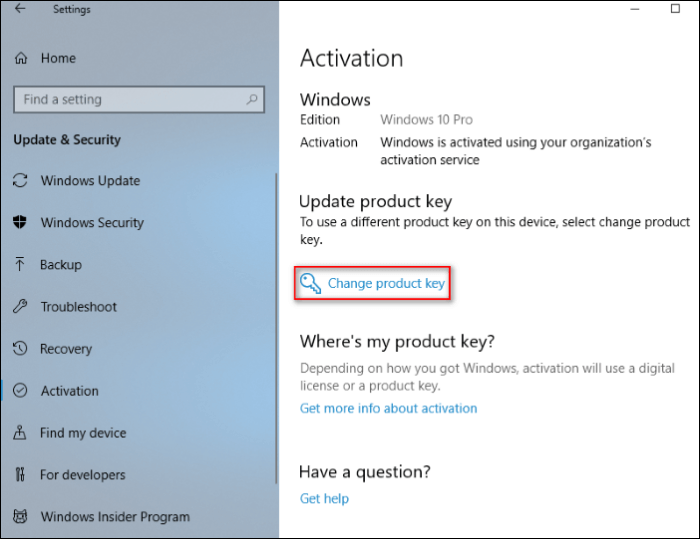
Step 4. To activate Windows 10 on your PC, enter the product key, which can be obtained online. Some special keys, such as VK7JG-NPHTM-C97JM-9MPGT-3V66T, are available online for this purpose.
Step 5. After the activation process is complete, click on the prompts on-screen, and click the Next button at the end to finish the process.
Step 6. After completing the activation process, you should see a confirmation message that says "Windows is activated." This indicates that Windows 10 is now ready to use.
Here's a list of Windows 10 license keys for various volumes. Select the one based on your needs and activate Windows 10 for free on your PC.
- Windows 10 Home: TX9XD-98N7V-6WMQ6-BX7FG-H8Q99
- Windows 10 Home N: 3KHY7-WNT83-DGQKR-F7HPR-844BM
- Windows 10 Home Single Language: 7HNRX-D7KGG-3K4RQ-4WPJ4-YTDFH
- Windows 10 Home Country Specific: PVMJN-6DFY6-9CCP6-7BKTT-D3WVR
- Windows 10 Professional: 8N67H-M3CY9-QT7C4-2TR7M-TXYCV
- Windows 10 Professional N: MH37W-N47XK-V7XM9-C7227-GCQG9
- Windows 10 Education: YNMGQ-8RYV3-4PGQ3-C8XTP-7CFBY
- Windows 10 Education N: 84NGF-MHBT6-FXBX8-QWJK7-DRR8H
- Windows 10 Enterprise: XGVPP-NMH47-7TTHJ-W3FW7-8HV2C
- Windows 10 Enterprise N: DPH2V-TTNVB-4X9Q3-TJR4H-KHJW4
Activate Window 10 with KMSpico
KMSpico is a reliable option to install and activate Windows 10 PC without a code, and can also activate Microsoft 365 packages like Word and Excel.
🔎Go through the guide below.
Step 1. To download KMSpico, go to the official website and download the program on your device.
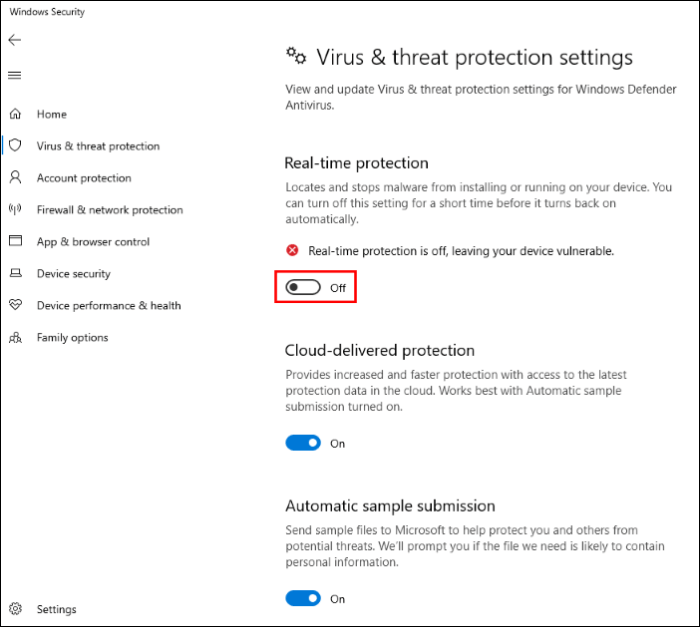
Step 2. Turn off Windows Defender on your PC before installing the software, as it may flag it as malware.
- To access the Windows Defender Security Center, go to Settings, then click on Update & Security, and from there, navigate to the Windows Defender section to open the Windows Defender Security Center.
- To access Windows Defender's settings, click on the "Virus & Threat Protection" option.
- Turn off Real-To disable Windows Defender, you can use the following methods: Time Protection, Cloud-Delivered Protection, and Automatic Sample Submission.
Step 3. Install KMSpico on your Windows 10 PC now.
Step 4. This software installs with a display of blue windows for a few minutes, and once the installation is complete, you will have activated Windows 10 and some Microsoft packages in no time.
Activate Windows 10 for Free using CMD
You can activate Windows 10 using the Command Prompt without any third-party software by following these steps: Open Command Prompt as an administrator, type "slmgr /ipk" followed by your Windows 10 product key, press Enter, and then type "slmgr /xpr" to verify the activation status. This method is a legitimate way to activate Windows 10 without using any third-party software.
- Notice:
- It's recommended to purchase and use an original Windows 10 or Windows 10 Pro license from Microsoft to activate the OS permanently. If you opt for free activation keys online, ensure you're getting them from trusted sources to avoid violating copyright policies.
🔎The steps to do it are given below:
Step 1. Click on the Start Search, Enter Command Prompt, and open it in "Administrator" mode.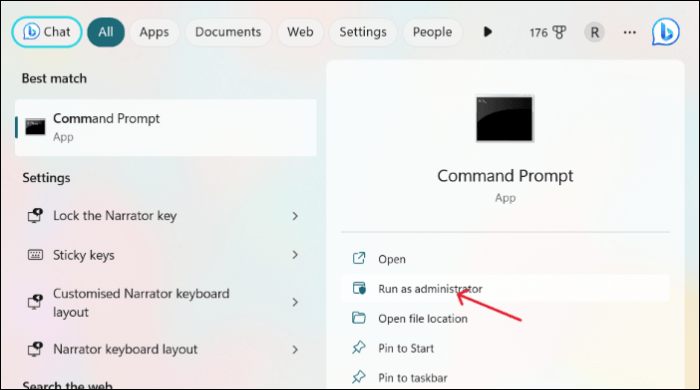
Step 2. To execute the command, open the Command Prompt, copy and paste the command line below, and hit Enter.
slmgr.vbs /upk
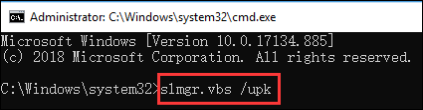
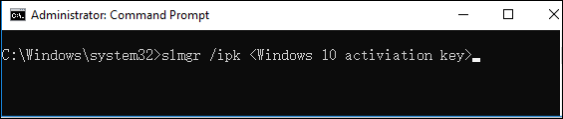
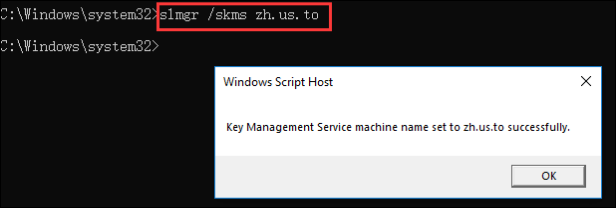
Step 3. Copy and paste the command lines below and hit Enter to install the Windows 10 Product Key.
slmgr /ipk
slmgr /skms zh.us.to
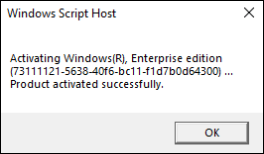
slmgr /ato
Step 4. You can replace the existing license key with a new one from Microsoft or one you find online, and follow the same steps to activate Windows 10 Pro with the Pro license key.
- Tip
- To verify if Windows 10 is activated on your PC after performing the mentioned methods, follow this. Press the Windows key + R to open the Run box, then type slmgr.vbs -xpr and hit Enter to check the activation status.
Conclusion
To get rid of the annoying Activate Windows watermark and enjoy the full features of Windows 10, you can activate it for free using one of three methods. Whether you have a product key or not, these steps can help you get the active version of Windows 10 on your PC quickly. Follow them to activate Windows 10 for free and enjoy the perks of the OS without the watermark.
To activate Windows 10 for free permanently, backup essential data with Qiling Disk Master to safeguard your data in all emergencies, as the activation process can be a data loss threat if not done correctly.
Here are some of the most frequent FAQs on permanently activating Windows 10 for free. If you have similar queries, I hope this will help you.
1. Is activation of Windows 10 for free legal?
Downloading and installing Windows 10 from Microsoft's ISO website, activating Windows 10 for free using the Command Prompt or a batch file, and using product keys from third-party software to activate Windows 10 are all legal. However, using product keys that you did not purchase is illegal.
2. How do I check if my Windows is activated?
You can check if Windows is activated or not in several ways. One way is to click on the Start button, then select Settings, followed by Update & Security, and finally Activation. If Windows is activated, you will see a message saying "Windows is activated with a digital license".
- Step 1. Press Windows + R, enter slmgr.vbs /xpr and hit Enter.
- Step 2. Open CMD, type slmgr/xpr and press Enter./li>
3. How to remove the Windows 10 activation watermark?
To remove the Windows 10 activation watermark, you need to activate the operating system, which can be done for free through various methods, and more information on these methods can be found in the article.
4. Can I get Windows 10 for free without a product key?
You can download and install Windows 10 for free from Microsoft, but the free trial is only for 30 days. After that, a few cosmetic restrictions will be applied, and you'll need to activate Windows 10 using a product key to remove them.
Related Articles
- What Is Microsoft Safety Scanner? How to Download and Use It? [Updated in 2023]
- [Fix] A required device isn't connected or can't be accessed with error
- Fix 99% or 100% High CPU Usage Issue in Windows 10 Fall Creators
- Dash Cam Card Full Error: How to Fix 'Dash Cam Says SD Card Full'
- [Detailed Answer] Is Cloning A Hard Dive Safe & How to Clone
Cloning a hard drive can be a safe process if done correctly, but it can also pose risks if not done properly. To clone a hard drive safely, you can use software like Qiling Disk Master, which can create an exact copy of your hard drive, including all files, programs, and settings. - Is It Safe to Buy a Used SSD or Not [Full Guide 2023]
Do you want a used SSD for your PC/laptop/PS4/PS5/Steam Deck/Xbox? However, is it safe to buy a used SSD, or is it a bad idea to buy a used SSD? You will find a correct answer in this article which teaches you to buy a nice used SSD.
Products
Articles & Tutorials
- Data Recovery
- Data Backup
- File Recovery
- File Backup
- System Backup and Restore
- Disk and Partition Clone
- Technical articles
- Mobile articles
- Disk Master Help
- Windows Data Recovery Tutorials
- Windows Secure Delete Tutorials
- Windows Partition Management Tutorials
- Windows File Backup and Restore Tutorials
- Windows System Backup and Restore Tutorials
- Windows Disk Backup and Restore Tutorials
- Windows Clone Tutorials