Is It Safe to Buy a Used SSD? What to Check
Buying a used SSD can be a gamble, as it may have unknown wear and tear, potentially leading to reduced performance or even failure. This risk is not worth taking, making it generally not a good idea to buy a used SSD. Qiling In this article, we'll explain why buying a used or second-hand SSD can be a gamble and provide you with tips on how to judge whether the one you purchased is qualified and safe.
Is It Safe to Buy a Used SSD
Many people may be looking to upgrade their PC from an HDD to an SSD, or from a smaller SSD to a larger one, or to get an external SSD as a supplement. However, budget concerns may lead them to consider purchasing a used or refurbished SSD. But is it safe to buy a used SSD, considering the potential risks and reliability issues that come with it? SSD We generally do not recommend buying a used SSD. There are two main reasons for this:
- ✏️SSDs Have Limited Write Cycles:
As we all know, solid-State drives use flash memory chips to store data, but each time data is written or modified, the voltage state of the electrons changes, erasing the original data and shortening the lifespan of the drive. This results in limited write cycles, and manufacturers often offer warranties in TBW (terabytes written), indicating how much data the drive can write over its useful life.
- ⚙️Reduced Performance:
A used SSD may degrade in performance due to unknown previous use, such as cryptocurrency mining, which can lead to increased bad blocks, data loss risk, and slower garbage collection times, ultimately affecting its performance and your use.
The two links can help you improve the performance of the used SSD. Check them if you need help.
- 🧩After-sales Service And Other Factors:
Used SSDs or refurbished SSDs may not have a good aftermarket and may be out of warranty, which can limit their resale value and reliability.
When on a tight budget, buying a used SSD can be a cost-effective option, but it's essential to choose a reliable one. To make an informed decision, consider factors such as the SSD's age, capacity, and condition, as well as the reputation of the seller and the warranty or return policy offered. By doing your research and being mindful of these factors, you can find a used SSD that meets your needs without breaking the bank.
How to Buy a Reliable Used SSD
If your budget is limited, buying a second-hand SSD can be a viable option. However, to ensure a safe purchase, be aware of the following key points: check the seller's reputation, verify the SSD's warranty and return policy, inspect the drive for any signs of physical damage or wear, and use reputable websites or stores to avoid scams. Additionally, consider purchasing from a reputable refurbisher or a trusted online marketplace to minimize the risk of buying a counterfeit or faulty SSD. By taking these precautions, you can safely buy a refurbished SSD that meets your needs and budget.
💡1. Reliable Source
You can find used SSDs on online marketplaces like eBay, Amazon, OLX, and Newegg, but be sure to choose a reliable seller. While manufacturers typically don't sell used or refurbished SSDs through their official channels, some may offer certified refurbished options. To make a safe purchase, check the store's ratings and read user reviews to ensure you're buying a certified and reliable used SSD.
💡2. Low Price
If the price of a second-It's not recommended to buy a second-hand SSD if the price difference is only a few dollars, as the lifespan of a new SSD is generally longer and more reliable.
💡3. Warranty
When purchasing a used SSD, check if it's still under warranty. If it is, ask the seller for details so you can send it in for repair within the warranty period. If it's not under warranty, it's best to avoid buying it.
💡4. Check SMART Status (Most related to the performance of the used SSD)
Checking the SSD's SMART status is the most important thing to do when buying one, as it indicates the drive's health and can prevent a wasted investment.
To check the health condition of a used SSD, we recommend using Qiling Disk Master. This tool allows you to check the health condition of the chosen SSD and also test its read/write speed to verify if it performs as expected.
This tool can check all the following SMART attributes for your used SSD:
- Health: The SSD's health condition can be checked by looking at its score, with higher scores indicating better health. This score is often closely related to the SSD's remaining life, and Qiling Disk Master will issue a warning if the score is not up to standard. If you see this alert, it's not recommended to buy the used SSD.
- Power On/Cycle Count and Power On Hours: If the count and hours are high, it may be close to its write cycle limit, making it less recommended to buy.
- Total Host Writes: This metric represents the total amount of data that has been written to the SSD, which can indicate the drive's overall health and lifespan. If the written data is excessively high, it may be a sign that the drive is nearing its end and may not be the best choice for purchase.
- Other SSD SMART Attributes: Qiling Disk Master can also test the health status of SSD in multiple dimensions.
To test the used SSD SMART status, first check the SSD for any visible signs of damage or wear. Next, download and install a SMART monitoring tool, such as CrystalDiskInfo or HD Tune, and run the tool to check the SSD's SMART status.
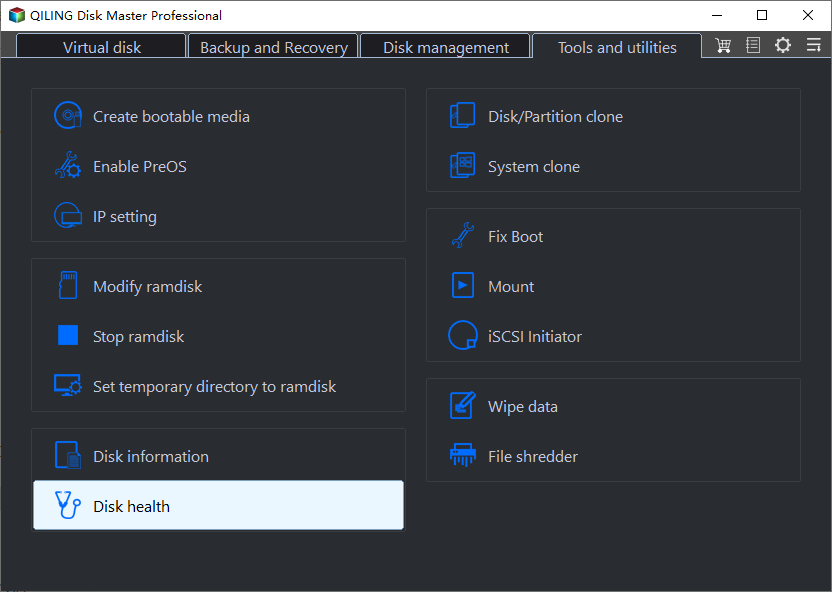
Step 1. Launch Qiling Disk Master and click the blue arrow to activate the "Disk Health" feature, which can be found under the "Discovery" section.
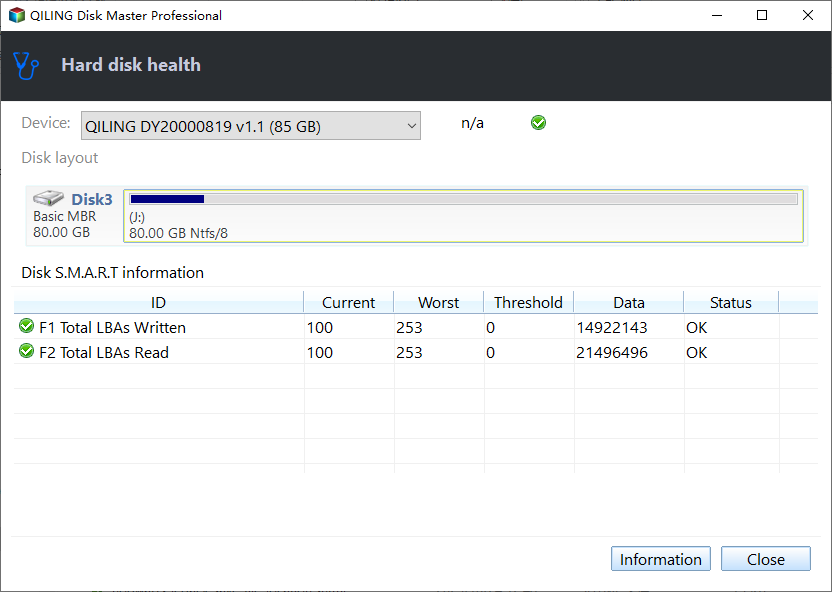
Step 2. To check the health condition of your disk, select the target disk and click the "Refresh" button. This will display the health condition of your disk.
Qiling Disk Master can help manage your SSD by performing various tasks, including the tasks below.
- Merge partitions on SSD
- Wipe a used SSD to get more usable disk space
- Format a new SSD or a used one
- Test SSD read/write speed
To check the SMART status of your used SSD, download a tool that can read the score. If the score you get isn't satisfactory, consider choosing a better one.
Bonus Tip: How to Optimize the Used SSD's Performance
Used SSDs may not be as good as new SSDs in performance and speed, but Qiling Disk Master can help improve it by using its "4K Alignment" feature, making it easier with a user-friendly interface.
Step 1. Go to "Disk management" and choose "4K Alignment".
Step 2. Select the disk you want to align. Click the "Proceed" button.
You may also like:
Conclusion
When considering buying a used or refurbished SSD, it's generally not recommended due to potential longevity and performance issues. However, if you still want to purchase a reliable second-hand SSD, factors like the purchase channel, budget, SMART Status, and warranty period should be taken into account. It's also essential to perform an SSD health test on the used SSD to ensure it's still usable. Qiling Disk Master can assist in checking the SSD's condition, helping you make a more informed investment decision. You can download and try it now.
FAQs About Is it Safe to Buy a Used SSD
When selecting a used SSD, consider the purchase channel, warranty, and SSD health condition. You may also want to ask about the seller's reputation, the SSD's age and usage history, and any potential issues or defects. Additionally, check if the SSD is still under warranty and what kind of support the seller offers.
1. Are refurbished SSD good?
Frankly, they are not that good, and I don't recommend buying them. The reasons are as follows:
- Possible bad sectors
- Limited write cycles
- Reduced Performance
- Unreliable after-sales service
2. How do I know if the SSD is legit?
If you notice an SSD priced significantly lower than similar models, it's likely a counterfeit product. To verify, check the SSD's performance by testing its read/write speed. If the results don't match the advertised specifications, it may be a fake.
3. Is it okay to buy a used M 2 SSD?
If you're on a tight budget, buying a used SSD or NVMe M.2 drive from a trusted source might be a viable option, but it's generally recommended to prioritize purchasing a brand new one.
Related Articles
- How to Solve Bitlocker Keeps Asking For Recovery Key? [Full Guide]
- 9 Best Solutions to Fix Windows Stop Code 0xC000021A
- QuickBooks Online Keeps Crashing [Troubleshoot with Comprehensive Guide]
- Clean C Drive without Formatting in Windows 10/8/7 [Tested & Worked]
- What Is Offsite Backup? [All You Need to Know]
Do you want to make your business data backup full-proof? Then follow our guide on Offsite backup. It ensures your data survives cyberattacks and natural disasters with the flexibility of scaling. - Ontrack EasyRecovery Review, Pros, Cons, Performance
Ontrack EasyRecovery review: explore its features, pricing, pros, and cons. Learn how this data recovery tool performs for recovering deleted files, formatted drives, and more.
Products
Articles & Tutorials
- Data Recovery
- Data Backup
- File Recovery
- File Backup
- System Backup and Restore
- Disk and Partition Clone
- Technical articles
- Mobile articles
- Disk Master Help
- Windows Data Recovery Tutorials
- Windows Secure Delete Tutorials
- Windows Partition Management Tutorials
- Windows File Backup and Restore Tutorials
- Windows System Backup and Restore Tutorials
- Windows Disk Backup and Restore Tutorials
- Windows Clone Tutorials