Is Primary and Active Partition the Same [Beginner's Guide]
A primary partition is a section of a hard drive that can be used to install an operating system or store data, and can also serve as the active partition where the computer boots from. In some cases, the primary partition may also be active, but this is not always the case. The primary partition and active partition can be the same, but they can also be different. The primary partition is a section of the hard drive where the operating system and data are stored, and the active partition is the partition where the computer boots from.
The blog discusses the differences between primary and active partitions, and when a primary partition may or may not be active, to help manage storage and organization of a computer's hard drive. The blog explains that a primary partition is a partition on a hard drive that is marked as active, allowing the operating system to boot from it, and an active partition is a partition that is marked as active and contains the operating system, but a primary partition may not necessarily be active. The blog aims to provide a clear understanding of the distinction between these two types of partitions to aid in managing storage and organization of a computer's hard drive.
Is Primary and Active Partition the Same
No, the primary and active partitions are not the same.
The primary and active partitions are often used interchangeably, but they have distinct meanings in computer storage. The primary partition is the partition where the operating system is installed, while the active partition is the partition that is currently being used by the operating system. In other words, the primary partition is the default partition for the operating system, whereas the active partition is the partition that is currently active and being used.
What Is a Primary Partition:
First, let's learn its definition before we can answer this question.
Definition: The primary partition is where the operating system is installed, and it's used when the computer loads the operating system.
Usage: Stores data files, programs, or an operating system.
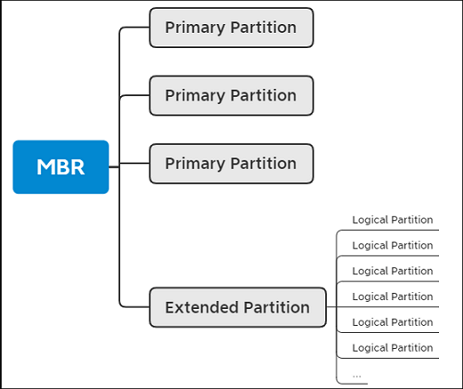
What Is an Active Partition:
An active partition is a partition on a hard drive that contains the operating system and is designated as the primary boot device. It is the partition from which the operating system is loaded and executed, and it is usually marked as the active partition in the BIOS settings.
Definition: The active partition is a designated partition on a computer that serves as the primary location for booting the operating system, allowing the computer to start up and run its various programs and applications.
Usage: An active partition is required to have a bootable operating system installed on it in order for the computer to start.
A primary partition is a partition on a disk that can be booted from, meaning an operating system can be installed on it. On the other hand, an active partition is the primary partition that is marked as active, allowing the computer to boot from it. In other words, an active partition is a primary partition that has been designated as the bootable partition.
What's the Difference Between Primary Partition and Active Partition
A partition in a computer is a section of a hard drive that acts as a separate unit. There are primary and active partitions, which have distinct characteristics and uses.
To differentiate between primary partitions and active partitions, consider the following factors. Primary partitions are created on a hard drive and are the first partitions created on a drive.
| Comparison | Primary Partition | Active Partition |
|---|---|---|
| Usage | Stores data files, programs, or an operating system | A bootable version of the operating system is required to start the computer, which is the first step in the boot process. This involves the computer's BIOS or UEFI firmware reading the contents of the storage device, such as a hard drive or solid-state drive, and executing the boot code from the operating system. |
| Can Be Set as Active | Yes | Yes |
| Purpose | To store data or install an operating system | To boot the computer and start the operating system |
| Definition | A section of a hard drive used to store data or install an operating system is called a partition. | The partition that the computer boots from and is used to start the operating system is called the **boot partition**. |
Primary partitions are used to store the operating system and boot files, and a hard drive can have up to four primary partitions in an MBR setup or 128 in a GPT setup, allowing for organization and storage of OS and data.
The active partition is the partition used to start up the computer, typically storing the OS and boot files, and can only have one designated at a time, which is crucial for the computer's startup process.
Primary partitions are necessary for storing the operating system and organizing data on a hard drive, with the active partition being the one used to start up and containing the operating system and boot files.
How to Set a Primary Partition Active
If you need to set a primary partition active on your computer, you can use Qiling Disk Master Professional, a comprehensive partition manager software that can help you quickly set a primary partition active on your hard drive.
Qiling Disk Master allows you to quickly set a primary partition active, but only if it is the system partition, which contains the operating system and necessary files to start the computer.
Step 1. To set a partition as active, run the Qiling partition manager software and navigate to the disk map. Right-click on the target partition and select "Set Active" from the drop-down menu. This will designate the chosen partition as the active one.
Step 2. Then, it does it immediately.
Qiling Disk Master offers additional tools beyond the "Set Active" feature, including partition management capabilities like resizing, creating, deleting, formatting, and hiding partitions, making it a valuable choice for managing hard drive partitions.
Some of the main features of Qiling Disk Master include:
- Set Active: Make a partition active to boot the computer
- Format: Format or reformat a hard drive/USB/SD card
- Create: Create partitions on USB drive/hard drive/SD card
- Resize: Resize a common partition or resize encrypted partition
- To hide system reserved partition or other partitions from the view, you can use the built-in Windows feature called "Disk Management" or third-party partition managers like Qiling Partition Master. In Disk Management, right-click on the partition you want to hide and select "Change Drive Letter and Paths".
- The command to delete a FAT32 partition or NTFS partition or partitions of other formats is not a single command. The process involves using a combination of commands to identify and remove the partition.
Qiling Disk Master is a comprehensive and easy-to-use partition manager that offers a range of useful tools for managing partitions on your hard drive, making it an excellent choice for tasks such as setting a primary partition active.
Conclusion
Primary and active partitions are not the same, though a primary partition can be active. A primary partition is simply a designated partition on a hard drive, whereas an active partition is a bootable partition containing the OS startup files. The two are related but distinct concepts.
On a single hard drive, it's possible to have multiple primary partitions, but only one can be the active partition at any given time. This distinction is crucial for proper hard drive and operating system configuration and maintenance.
You may also like:
Is Primary and Active Partition the Same FAQs
Primary and active partitions are the same thing. A primary partition is a partition on a hard drive that is designated as the active partition, meaning it's the first partition that the computer's BIOS looks for when booting up.
1. Does the active partition have to be primary?
The active partition is not necessarily a primary partition, but rather a bootable partition containing the OS startup files, which can be either primary or logical, as long as it's set as active in the BIOS/UEFI settings.
2. What are the two types of partitioning?
There are two main types of partitioning: primary partitioning, where a hard drive is divided into separate sections treated as separate drives, and logical partitioning, where additional partitions are created within an extended partition that can contain multiple logical partitions.
3. What does active partition mean?
An active partition is a bootable partition that contains the files necessary to start the operating system, designated as the active partition in the computer's BIOS or UEFI settings, and is the partition the computer boots from. It can be primary or logical, depending on the hard drive partitioning.
Related Articles
- How to Format Internal Hard Drive Mac? [QuickStart]
- How to Fix Checking File System on C Error on Windows 7/8/10/11 Startup
- How to Open .DAT Files in Windows 10/11
- How to Downgrade macOS Ventura to Monterey [with 3 Detailed Method]
- PCIe 3.0 VS 2.0: What are the differences and similarities?
PCIe 3.0 and 2.0 are two of the most vital aspects of the computers. But, what exactly are they and how are they different or similar? In this article, we'll answer those questions and explore the key traits of both these types. - [Fixed] Pen Drive Not Showing/Detected in My Computer in Windows
Here step-by-step tutorials explain how to fix pen drive not showing in my computer in Windows 10/8/7 is created. Try it fix your USB pen drive, flash drive, external hard drive or other external USB devices when it detected but not show in my computer.
Products
Articles & Tutorials
- Data Recovery
- Data Backup
- File Recovery
- File Backup
- System Backup and Restore
- Disk and Partition Clone
- Technical articles
- Mobile articles
- Disk Master Help
- Windows Data Recovery Tutorials
- Windows Secure Delete Tutorials
- Windows Partition Management Tutorials
- Windows File Backup and Restore Tutorials
- Windows System Backup and Restore Tutorials
- Windows Disk Backup and Restore Tutorials
- Windows Clone Tutorials