Recover Saved Game Data on Xbox Series X [ 5 Proven Ways]
What Is Xbox Series X [Overview]
Microsoft's Xbox is a gaming brand that offers consoles, games, streaming services, and apps, with the Xbox Series X being the latest console featuring high performance, fast load times, and 8K resolution visuals.
Gamers may encounter data loss problems on Xbox due to various reasons, such as console damage, system update, game installation issue, or accidental deletion. To recover saved game data on Xbox Series X, check the methods on this page.
Method 1. Recover Game Data from Xbox External Hard Drive
If game data has been lost on an external hard drive for an Xbox, you can use software like Deep Data Recovery to restore it. This tool can recover data files from various game storage devices, including Xbox, Steam, and PS4/PS5.
This software can restore deleted game saves and recover other data files such as videos, music files, documents, and other formats from various storage devices, including hard drives, SSD, USB flash drives, and pen drives.
Method 2. Recover Lost Saved Game Data from Xbox Cloud Gaming
Xbox's cloud integration allows all games developed for the platform to be played from any supported device, and also ensures that game saves are recovered back to the console if it needs to be reset.
If you've lost saved game data on Xbox Cloud gaming, you can recover it by going to the "Cloud Saves" tab in the Xbox app, selecting the game and date range you're looking for, and then clicking "Restore" to download the saved data to your console or PC. If the data is not available, you can also try contacting Xbox support for further assistance.
Step 1. Sign in to your Xbox Console with the same account you used earlier for the game. The account you used to play the game is the same account you need to sign in to your Xbox Console.
Step 2. Download, install, and launch the game, which will use the same Xbox profile to sign in.
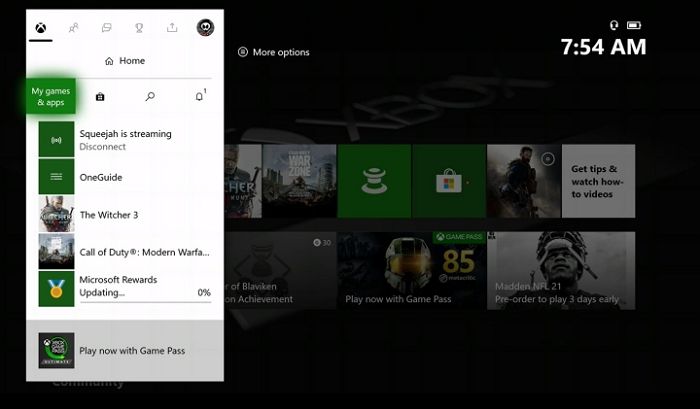
Step 3. Once you've completed the steps, the game will start syncing from the cloud. This syncing process involves downloading the game. Once the sync is complete, you can launch the game, and if you've used the same profile, it will resume from where you left off.
Method 3. Restore Lost Saved Game Data from the Backup
If you've manually created a backup of your Xbox Game data, you can restore it, but only for transferring games from your old console to your new one. To do this, follow these steps:
Step 1. Go to the home screen, navigate to the "Settings" icon, select "Account" and then "Sign in". Enter your Xbox account credentials, including your email address and password.
Step 2. Select "Settings" > "System" > "Backup & Transfer."
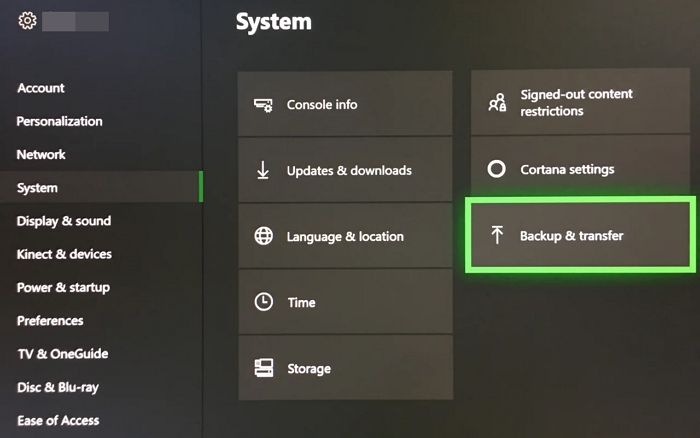
Step 3. Select the external hard drive or USB drive as the backup destination for backing up games and apps.
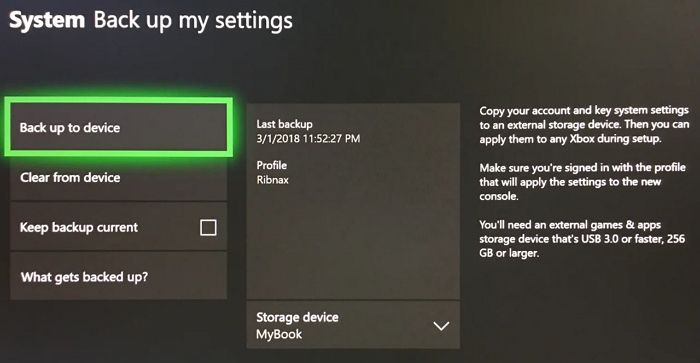
Step 4. Once the backup is complete, you can restore your saved game data from the backup by choosing "Restore a backup" and selecting the backup file.
If one of the methods is helpful to recover saved game data on Xbox series X, share it on Facebook, Twitter, Instagram, and other social media platforms!
Recover Deleted Game Data on Xbox with Qiling Recovery Software
If your Xbox external hard drive is severely corrupted or physically damaged, you can use the Qiling data recovery service to recover lost game data. This service provides professional and effective data recovery for Xbox gamers.
Deep Data Recovery is a professional software that supports all game data types, including Xbox, Steam, and PS4/PS5. Since these consoles allow external hard drives, users can easily connect them to their PC and use the recovery software.
The software is user-friendly and easy to install, allowing anyone with basic computer knowledge to quickly recover lost game data.
The company offers tutorials and guides if you get stuck, and you can follow the steps to continue.
Step 1. Run Deep Data Recovery, choose the drive where you lost files, and start scanning to recover lost data from devices like HDD, SSD, USB drive, SD card, pen drive, and camera.

Step 2. Qiling data recovery software supports 1000+ file types, including photos, videos, documents, emails, audio files, and many more, allowing users to browse and recover specific file types by filtering the results.

Step 3. To recover data, select the files you want to preview, then click "Recover" and choose a storage location to save the recovered data.

Conclusion
On Xbox Series X, you can recover saved game data using external hard drives, cloud gaming, or backups. If you've lost data, software like Deep Data Recovery can help recover it from various game data storage devices, and Qiling data recovery service can assist with severe data loss issues.
FAQs About How to Recover Saved Game Data on Xbox Series X
If you're experiencing issues with recovering saved data on your Xbox Series X, it's recommended to use professional software and an external drive to ensure a safe and successful recovery process. This will help you to recover your saved data without any further complications.
1. How to recover deleted/lost Xbox One saved game files?
The Deep Data Recovery tool is an excellent option for recovering lost or deleted data from an Xbox One, including deleted or lost saved game files. If you want to recover these files, follow this guide.
2. Where is the saved game data on the Xbox Series X?
The Xbox Series X stores data on its internal hard drive, external hard drives, or in the cloud, allowing users to save and access their game information.
To access your saved game data on the Xbox Series X, navigate to the My Games & Apps section on the console dashboard, select the game you want to play, and then choose Manage Games & Add-ons to view and manage saved game data.
3. How to restore lost game data from the Steam backup?
If you've lost your Steam game data due to a system crash or other issues, you can use a data recovery tool to retrieve it. Save the recovered data on a different drive to prevent further loss.
4. Why is my game save progress lost?
Your game save progress may be lost due to various reasons, including system crashes or power outages, corrupt game updates or patches, accidental deletion of game files, corrupt game data, or a malfunctioning hard drive or storage device.
To prevent the loss of your game save progress, back up your game data to an external hard drive or cloud storage service regularly.
Related Articles
- 2023 Tips| Could Not Complete Your Request Because of a Program Error Photoshop
- My PC Randomly Restarts! How to Solve It? [Fixed in 8 Ways]
- MacBook Won't Turn on After macOS Ventura [SOLVED]
- How to Load Old Cyberpunk 2077 Saves on Xbox
- Dish Hopper External Hard Drive Format: What Is the Best & How to Set [Ultimate Guide]
If your DVR isn't recognizing your hard drive, it might be due to the hard drive not being properly formatted for use with the DVR. This guide will help you choose the best format for your Dish Hopper external hard drive, ensuring it works seamlessly with your device. - How to Fix "Disk 1 Removable No Media" Error [2023 Detailed Guide]
Fix Disk 1 removable no media errors on USB drives or SD cards and learn how to make the device show up correctly again.
Products
Articles & Tutorials
- Data Recovery
- Data Backup
- File Recovery
- File Backup
- System Backup and Restore
- Disk and Partition Clone
- Technical articles
- Mobile articles
- Disk Master Help
- Windows Data Recovery Tutorials
- Windows Secure Delete Tutorials
- Windows Partition Management Tutorials
- Windows File Backup and Restore Tutorials
- Windows System Backup and Restore Tutorials
- Windows Disk Backup and Restore Tutorials
- Windows Clone Tutorials