Backup Fails 0x80042302: No VSS Writers Are Listed
Quick Navigation:
- What 0x80042302 Reports
- Read the Event Log First
- Restart the Services in Order
- Back Up Without VSS
- Frequently Asked Questions
The backup stops within a minute with 0x80042302 and a writer list that shows nothing at all. That pairing means the Volume Shadow Copy service never produced a snapshot, so the job had no consistent view of the volume it was told to copy. The last good backup is untouched, but every new attempt will fail the same way until the service, its dependencies, and its registered writers are healthy again.
What 0x80042302 Reports
The code comes back from the shadow copy requester, not from the disk. It says the service that builds snapshots could not be reached or refused the request, so the backup engine had no point-in-time copy to read. A disk with failing sectors reports a different family of errors, which is why this one appears before any data is touched.
The writer list is the second half of the clue. Writers are small components registered by Windows and by installed applications, and each one briefly freezes its own data so the snapshot stays consistent. An empty list means the service is not running, is running without its registrations, or cannot enumerate them for the caller.
That is why the error and the blank list appear together. A file-level backup needs at least the system writer to freeze the file system, and a tool that cannot get one stops instead of copying files that change underneath it.
Do not read the code as data loss. Nothing was written to the destination in most cases, and a destination that already holds a complete set still holds it. The job simply never started.
Read the Event Log First
Open Event Viewer, expand Windows Logs, and read the System log around the minute of the failure. Entries from VSS and from the Service Control Manager record the start attempt, the dependency that failed, and the status the service returned, which is more specific than the code shown in the backup window.
A dependency failure is the most common finding. The service depends on Remote Procedure Call and on the COM Server Process Launcher, and when either is slow to start the shadow service gives up and passes the failure back to the requester instead of waiting.
Also look for a snapshot that was never released. A trial of another backup product that was uninstalled, or an imaging job that crashed, can leave the service in a state where it starts, finds the old snapshot, and stops again within seconds.
The writer check itself is normally run as vssadmin list writers from an elevated prompt. vssadmin is a Windows built-in tool and is not part of Qiling Disk Master; it only reports what the service currently sees, which makes it useful before and after a restart.
Restart the Services in Order
Close the backup software first, then open Services and set Volume Shadow Copy to Manual if it shows as disabled. A disabled service cannot be started on demand, and that single setting produces exactly this error with no other symptom.
Start Volume Shadow Copy, then confirm that COM+ System Application and Remote Procedure Call are running. If the shadow service stops again immediately, the System log will name the dependency, and the repair belongs to that component rather than to the backup task.
Run the writer check once more. A list where every writer reports Stable means the snapshot path works again; a list that stays empty after a clean restart points at damaged registrations, and a reboot is the cheapest next test before any reinstall.
Retry only after the list is healthy. Retrying while the service is down adds a second copy of the same error and makes the real timestamp harder to find when the problem returns next month.
Back Up Without VSS
When the service refuses to cooperate, a disk-level job is the practical way out. A full image reads the disk as raw blocks, so it does not need a writer to freeze the file system, and Qiling Disk Master can take that image while Windows keeps running. That protects the data while you repair the service at your own pace.
Treat the workaround as a bridge, not as a fix. System restore points, updates, and many installers also depend on the shadow service, so leaving it broken costs more than one backup job.
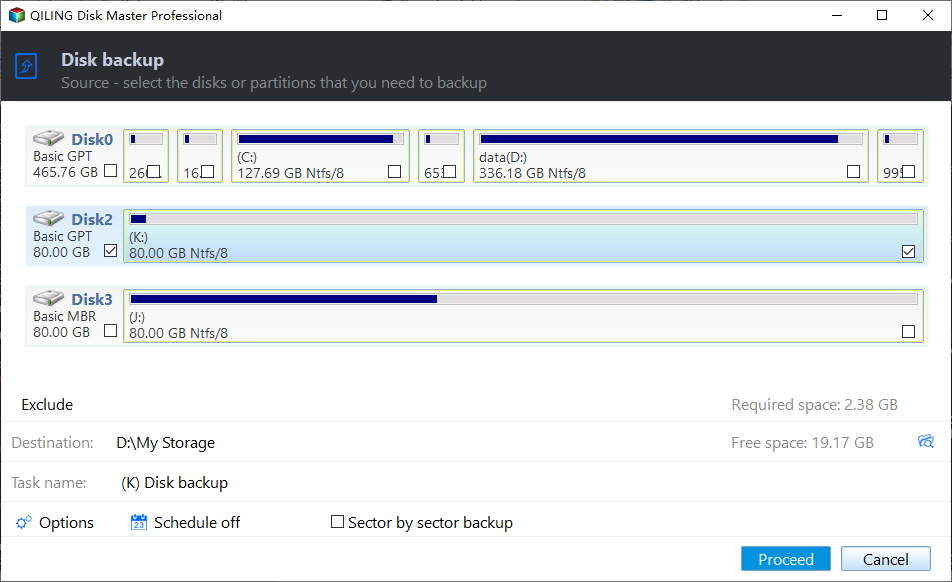
Step 1. Open Disk Backup and Tick the Disk
On the Backup and Recovery tab, click Disk Backup. Tick the disk in the source list, exactly as the window presents it, and compare its capacity with the figure Disk Management shows for the same disk number.
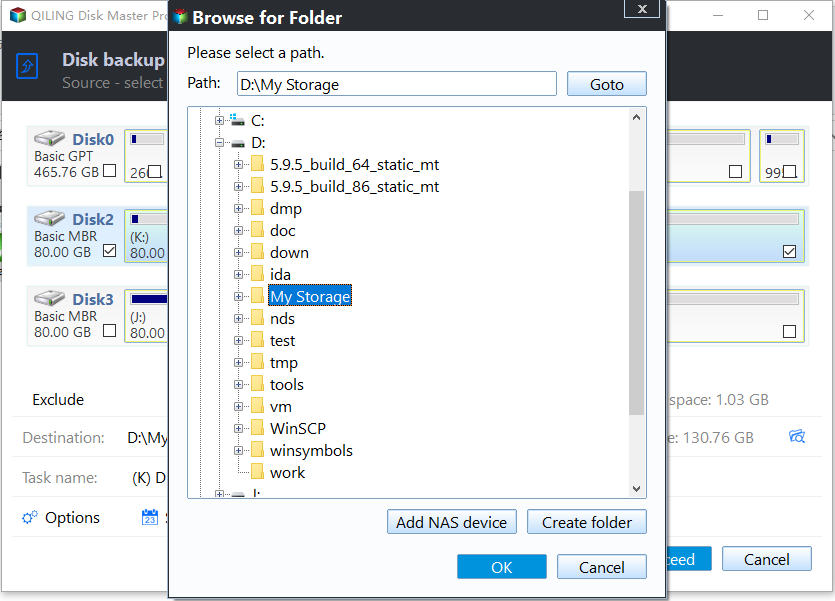
Step 2. Set the Destination
Point the destination at a folder on a different physical disk. Keeping the image on the volume being imaged wastes space and defeats the purpose when that volume is the one that fails.
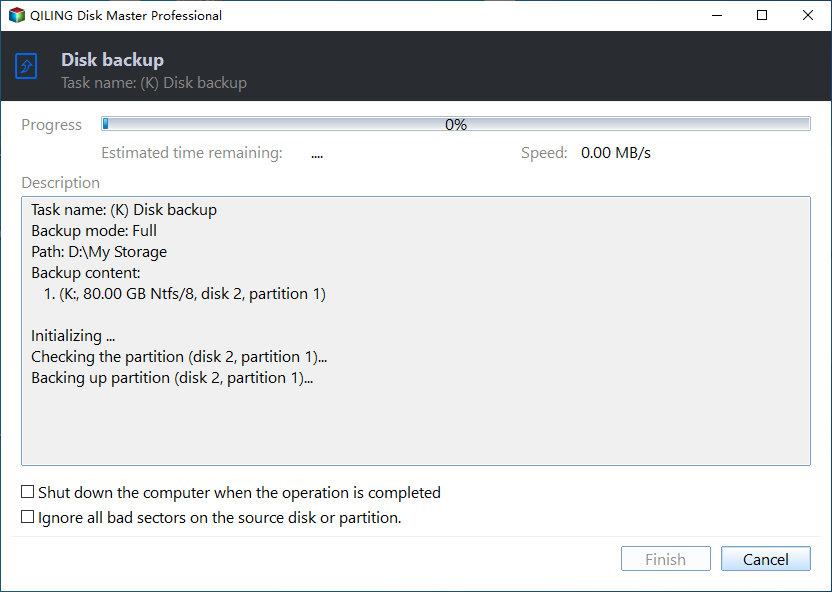
Step 3. Preview and Click Proceed
Preview the pending operation and click Proceed, then watch the first run to the end. A task that reports completion is proof the disk path is sound, which separates a service fault from a hardware one.
Frequently Asked Questions
Why is the writer list still empty after a restart?
Either the service is disabled again by policy, or a dependency failed before registration. Read the System log at the moment of the restart, not at the moment of the backup.
Can I ignore the error and keep using file backup?
No. A file-level job needs a consistent snapshot, so it will fail at the same point every time. Only a block-level image avoids the requirement.
Does reinstalling the backup software help?
Rarely. The failure is reported by the Windows service, not by the tool. Repair the service first, and reinstall only if the writers stay missing afterwards.
If the service runs but one application writer remains in a failed state, a VSS writer error 0x800423F4 covers the per-writer repair in more detail.
Related Articles
- Backup Fails With VSS Error 0x800423F4
- Windows Backup Error 0x81000019: Shadow Copy Failed
- Backup Error 0x8007045D: An I/O Device Error
- Backup Stops When the PC Goes to Sleep
- Backup Error 0x80070017: Data Error (CRC)
Products
Articles & Tutorials
- Data Recovery
- Data Backup
- File Recovery
- File Backup
- System Backup and Restore
- Disk and Partition Clone
- Technical articles
- Mobile articles
- Disk Master Help
- Windows Data Recovery Tutorials
- Windows Secure Delete Tutorials
- Windows Partition Management Tutorials
- Windows File Backup and Restore Tutorials
- Windows System Backup and Restore Tutorials
- Windows Disk Backup and Restore Tutorials
- Windows Clone Tutorials