Fix System Restore Error 0x81000205: No Restore Points
Quick Navigation:
- What the Code Means
- Why Restore Points Disappear
- Confirm a Point Still Exists
- Back Up Before You Restore
- Frequently Asked Questions
The restore stops at once and the window shows 0x81000205 without explaining which point failed. The code means System Restore picked an entry whose snapshot is no longer on the volume, so there is nothing to roll the system back to. The entry was real when the list was built, and it disappeared before the restore began.
What the Code Means
System Restore does not copy files into a folder. It asks Volume Shadow Copy to keep a point-in-time view of the system volume, and each restore point is a reference to that view. The error appears when the reference cannot be resolved, which is why it arrives immediately instead of halfway through the rollback.
Two records have to agree: the date in the restore point list and the shadow copy that actually holds the data. A cleanup pass, a quota change, or a volume resize can remove the second while the first is still displayed, because the list is refreshed only when the page is reopened.
This is not a failed rollback. The system files were never touched, so the machine keeps its current state, and the real task is to find a usable point or fall back to an image backup. A wizard that hangs instead of returning a code has a different cause, and the fixes for a system restore that stays stuck apply there.
Why Restore Points Disappear
System Protection reserves a percentage of each protected volume, and the oldest points are removed as new ones arrive. On a small system drive, a feature update or a large application install can consume that budget in a single afternoon.
Turning System Protection off and on again deletes every point on that volume. So does shrinking the partition, changing the disk layout, or resetting the PC, and users often do one of these while troubleshooting an unrelated problem.
Low free space is the other common trigger. When the volume drops below the configured limit, Windows deletes shadow copies to protect the volume itself, and the restore list keeps showing dates until the dialog is reopened.
Backup tools also use shadow copies and compete for the same space. A failed snapshot job can leave orphaned copies that count against the quota, so a shadow copy failure in another backup tool is worth reading before you retry System Restore.
Confirm a Point Still Exists
Open the System Protection tab for the system drive and read the list again instead of trusting the entry you selected earlier. A point that survives a reopen is usually intact; one that vanishes was only a stale label.
Check the disk usage line in the same dialog. If protection is on but the bar shows almost no space in use, the volume holds no usable snapshots even though the list may still display a few dates.
The Event Viewer, a Windows built-in tool that is not part of the software below, records shadow copy creation and deletion in the System log. A creation event followed by a deletion event explains the missing point better than any error text.
Create a fresh point before you change anything else, because the next attempt needs a known-good target. The steps are the same on Windows 10 and 11 and are covered in the guide to create a system restore point.
Back Up Before You Restore
A restore point is a convenience, not a backup. It lives on the disk it protects, Windows can delete it at any time, and it covers system files rather than personal data. An image written to a second disk survives all three problems.
Qiling Disk Master writes a system image as a file on a destination you choose, keeps a schedule, and restores from that file without depending on shadow copies that Windows may have removed.
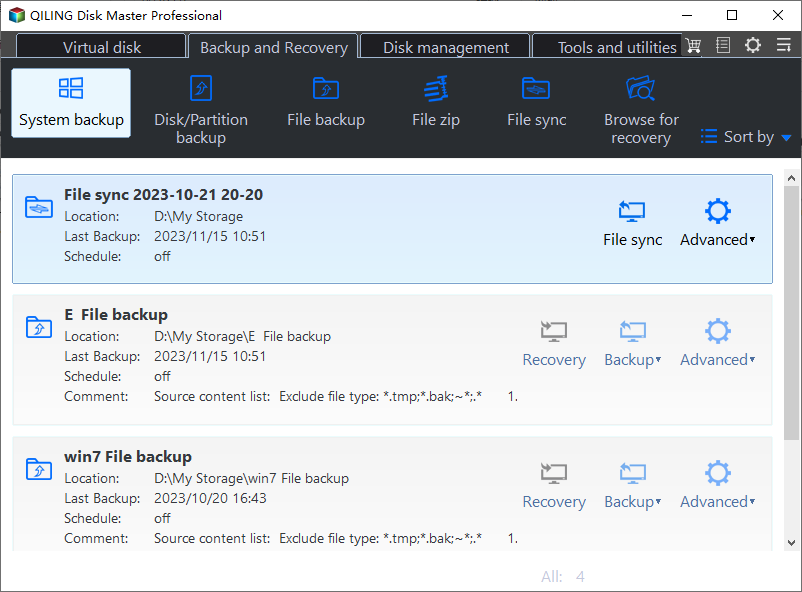
Step 1. Open System Backup
On the Backup and Recovery tab, click System Backup. The home screen lists existing tasks with their last result, so you can confirm that the destination disk is connected before a new job starts.
Step 2. Choose the Source and Destination
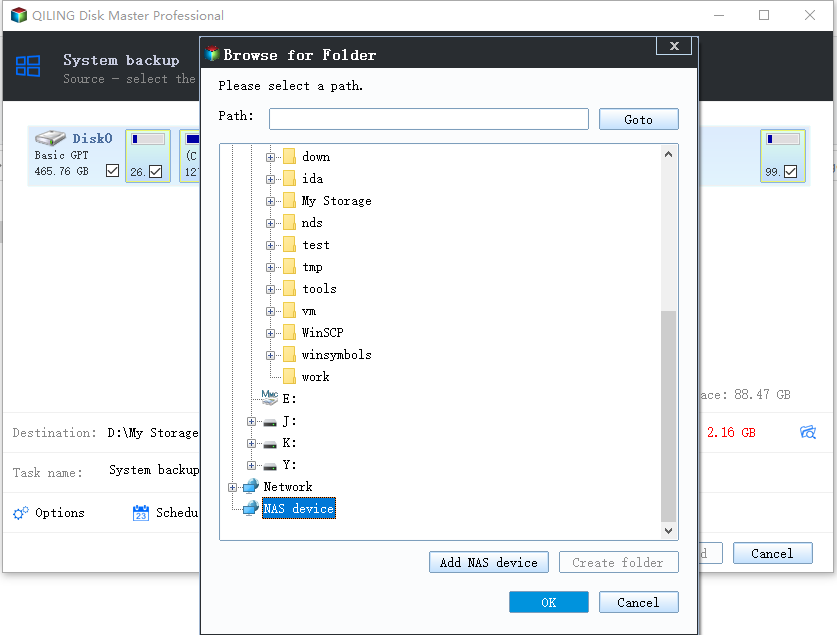
Keep the system and boot partitions selected, then pick a folder on a second disk or a network share. Store the image away from the volume being imaged so one disk failure cannot take both copies.
Step 3. Start the Backup
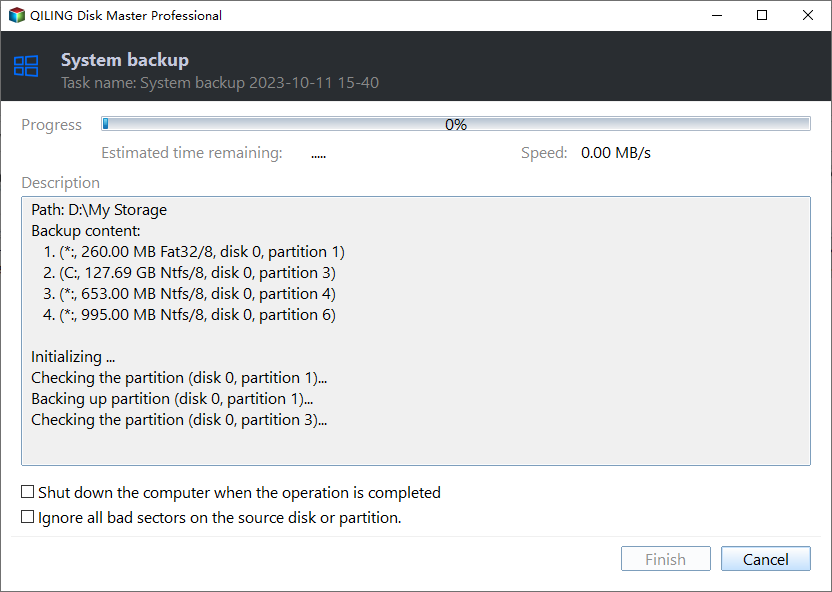
Set a schedule in Options and click Proceed. Watch the first run to the end, then open the image from the task card once to prove that the file is complete before you depend on it.
Frequently Asked Questions
Can I restore a point that 0x81000205 rejected?
No. The error means the snapshot behind that entry is gone. Create a new point and use it, or restore a system image instead.
Will freeing disk space bring the old points back?
No. Free space only allows new points to be kept. A deleted shadow copy cannot be rebuilt from a list entry that still shows its date.
Does a Windows update remove restore points?
A feature update can, and so can the cleanup that follows it. Check the list after a major update instead of assuming the older points are still available.
Related Articles
- No System Restore Points in Windows 7? 4 Ways to Recover
- Fixes to Windows 10 System Restore Stuck
- Windows 10 System Restore from Boot
- Create System Restore Point Windows 10/11
- Windows Backup Error 0x81000019: Shadow Copy Failed
Products
Articles & Tutorials
- Data Recovery
- Data Backup
- File Recovery
- File Backup
- System Backup and Restore
- Disk and Partition Clone
- Technical articles
- Mobile articles
- Disk Master Help
- Windows Data Recovery Tutorials
- Windows Secure Delete Tutorials
- Windows Partition Management Tutorials
- Windows File Backup and Restore Tutorials
- Windows System Backup and Restore Tutorials
- Windows Disk Backup and Restore Tutorials
- Windows Clone Tutorials