2 Easy Ways to Transfer Dropbox to Google Drive
On Reddit, users are seeking a solution to transfer their Dropbox files to Google Drive, suggesting a shared need for this functionality.
Don't worry. Cloud transfer is not a big challenge since you get this guide.
Table of Content
Why do You want to Transfer Dropbox to Google Drive?
Dropbox VS Google Drive: Which Is Better?
How to Transfer Dropbox to Google Drive (2 Methods)
Why do You want to Transfer Dropbox to Google Drive?
If you're considering switching from Dropbox to Google Drive, there are several reasons why you might want to make the switch. Perhaps you're looking to try out a new service or need more storage space. Whatever your reason, transferring your files from Dropbox to Google Drive is a relatively straightforward process.
Dropbox VS Google Drive: Which Is Better?
Dropbox and Google Drive are two of the most popular cloud storage services, each offering a range of features and pricing options to cater to different users' needs. The better choice ultimately depends on individual requirements, but both services provide a reliable and accessible way to store and share files online.
Dropbox offers more features than Google Drive, including support for a broader range of file types and the ability to set expiration dates for shared files. Additionally, Dropbox has stronger security features, such as two-factor authentication and end-to-end encryption, making it a more secure option.
Google Drive is a more affordable option with more storage space for free users, and integrates well with other Google products, but is less expensive than Dropbox and has less integration with other services.
Google Drive is a good option, but its features and security are not as strong as Dropbox's. The best choice depends on individual needs and preferences.
How to Transfer Dropbox to Google Drive
Here are two solutions for you - a third-party cloud transfer tool (Free for 5GB, with more available for purchase) and a manual tip.
Solution 1. Migrate Dropbox to Google Drive by Cloud Transfer Tool
Here is a helpful cloud transfer software, MultCloud. You can try it instantly.
The cloud file transfer tool is free for 5GB traffic and allows you to transfer and manage cloud files between clouds. It can be found as a Chrome extension or on the official website.
Step 1. Create an account and sign up on the official website.
Step 2. To add cloud services, select the "Add Cloud" option, allowing you to add Google Drive and OneDrive individually.
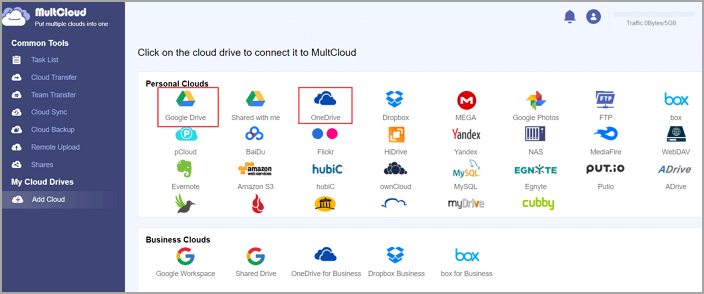
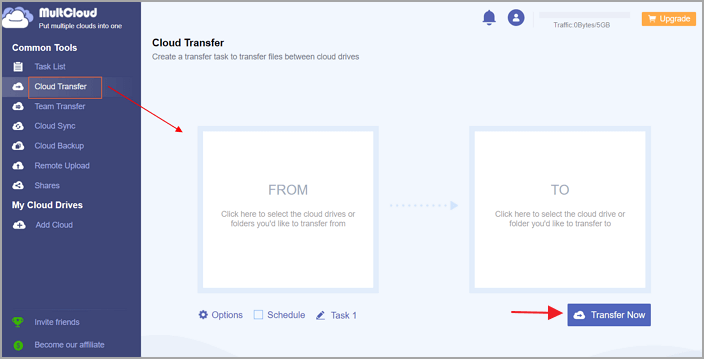
Step 3. To transfer files between clouds, click on the "Cloud Transfer" option, and you will be presented with two boxes to select the source cloud and the target cloud where you want to transfer the files.
Step 4. Select the files in Dropbox and choose the saved directory on Google Drive.
Step 5. Click "Transfer Now."
Gift - Get Free Data Transfer Software Between Computers
If you want to change devices, Qiling Disk Master can help you transfer all files from one computer to another, including cloud apps and data, and it's free for you. If you're trying to move large files to another disk, you can also download them.
Solution 2. Use Download and Upload to Move Files from Dropbox to Google Drive
Downloading and uploading files is a simple way to transfer files from Dropbox to Google Drive. You can download a file from Dropbox onto your computer, and then upload it to Google Drive, regardless of the file type - including documents, photos, and videos. Just ensure you have enough space in both Dropbox and Google Drive to accommodate the file transfer.
Step 1. Sign in to the Dropbox account.
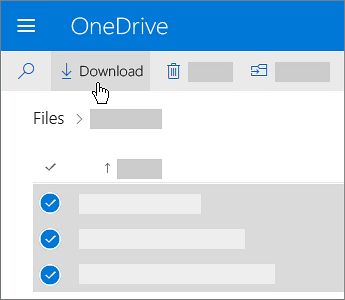
- On the home page, click "My Files" from the left pane.
- You can select files you want to transfer to Google Drive.
- Click on the "Download" button and save the file to your local device.
Step 2. Sign in to the Google Drive account.
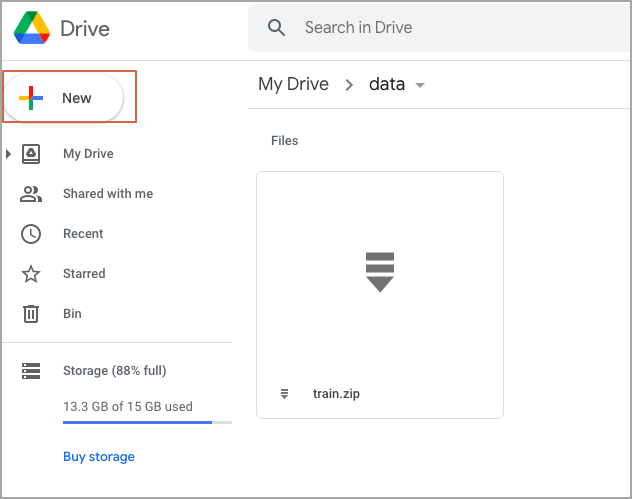
- Click the "New" button from the left pane.
- Drop the files or folders you download from Dropbox.
Manual steps can help transfer files from Dropbox to Google Drive, but it's cumbersome for large files, requiring more time for downloading and uploading.
Final Thoughts
You can transfer Dropbox to Google Drive on Windows using either a third-party cloud transfer tool or a manual solution. The third-party tool is free to move 5GB, while the manual solution has no restrictions on downloading and uploading.
Related Articles
- How to Free Up C Drive Space in the Windows Server?
- [Easy and Fast] How to Put a Program on a Flash Drive
- Internet Explorer End of Life 2022, Here Is What to Do
- How to Transfer Avast with License to A New Computer
- How to Back Up An External Hard Drive to Another External Hard Drive in Windows 10
Learn how to back up an external hard drive to another external hard drive in Windows 10. Follow three clear methods to copy, transfer, or protect your files safely. - 5 Best Backup and Restore Software for Windows 10 [Updated 2024]
Are you looking for the best backup and restore software for Windows 10? This article aims to tell you 5 best backup and restore software for Windows 10, tell you an overview of backup and restore in Windows.
Products
Articles & Tutorials
- Data Recovery
- Data Backup
- File Recovery
- File Backup
- System Backup and Restore
- Disk and Partition Clone
- Technical articles
- Mobile articles
- Disk Master Help
- Windows Data Recovery Tutorials
- Windows Secure Delete Tutorials
- Windows Partition Management Tutorials
- Windows File Backup and Restore Tutorials
- Windows System Backup and Restore Tutorials
- Windows Disk Backup and Restore Tutorials
- Windows Clone Tutorials