VSS 0x800423F3 Retryable Writer Error Blocks Backup
Quick Navigation:
- What 0x800423F3 Means
- Find the Writer That Failed
- Secure the Last Good Backup
- Back Up Without the Writer
- Frequently Asked Questions
A system or file backup stops with 0x800423F3 and the message that the writer experienced a retryable error, so the snapshot is discarded and the job ends before a single file is copied. The code comes from the Volume Shadow Copy Service: one of the writers that must flush its data before the snapshot reported a temporary failure. Retryable sounds harmless, but a scheduled job has no one to press Retry, and the same writer often fails again at the next run. This page explains what the writer was doing, how to find the one that refused, and how to finish a backup that does not depend on it.
What 0x800423F3 Means
The code is VSS_E_WRITERERROR_RETRYABLE. Before a snapshot is taken, the Volume Shadow Copy Service freezes every writer that owns data on the volume, and each writer must flush its buffers and confirm a stable state. A writer that cannot finish inside the window replies with this code, the service abandons the snapshot, and the backup job ends with 0x800423F3.
The word retryable describes the writer's answer, not the state of your files. The writer is saying that the request arrived while it was busy and that a later attempt could succeed. Nothing was copied, so the destination still holds the previous backup set and the source disk has not been written to by the backup.
Do not confuse it with its neighbours. 0x800423F0 means a snapshot was produced but its data did not match across writers, and 0x8004230F means the service waited too long for a writer to respond. 0x800423F3 is the milder case: the writer declined the freeze instead of producing a bad snapshot.
Writers belong to applications rather than to Windows itself. SQL Server, Exchange, SharePoint, Hyper-V, and several backup agents register their own, and a filter driver from a security product can delay the flush long enough to trigger the same reply.
Find the Writer That Failed
Start with the name of the writer. The Application log in Event Viewer records the failing writer and its result code in the entry that matches the backup time, and the writer name usually carries the product name, such as SqlServerWriter or Exchange Writer.
Event Viewer and the Services console are built into Windows and belong to Microsoft. They are not part of Qiling Disk Master, and they are described here only so you can read the failure and restart a stalled service.
Compare several failed runs. A writer that appears every time points at one application and its maintenance schedule. A writer name that changes from run to run points at resource pressure: a full volume, a security scan, or a snapshot that starts while the machine is still busy after logon.
Check the clock as well. A backup scheduled at logon can meet a database that is still recovering, and one scheduled at midnight can meet a consistency check that holds the writer for minutes. Moving the schedule by half an hour is often enough to let the writer answer.
Secure the Last Good Backup
Because the snapshot was thrown away, the run produced nothing. The last complete backup is now the only restore point, so open it and confirm that it is recent and readable before you change services or exclude anything from the next job.
If the last good backup is older than the data you care about, copy the important folders to a second disk by hand first. A file copy does not need a writer, so it succeeds while the snapshot path is still broken. Keep that copy until a full backup completes.
Avoid the shortcut of disabling the writer's service for good. A database captured with its writer stopped is crash-consistent at best, and a restore from such an image can take hours of recovery work. Stop the service only for the length of one run, then start it again.
Back Up Without the Writer
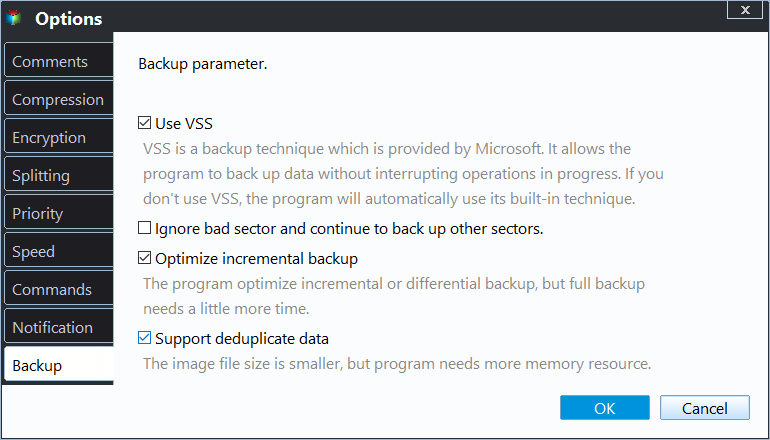
Qiling Disk Master can run a system backup without VSS: open Options, clear Use VSS on the Backup tab, and the program falls back to its built-in technique instead of waiting for a writer to freeze. The home screen also keeps the destination and the last result of each task, so a failed run is visible before the next schedule fires.
Step 1. Open System Backup
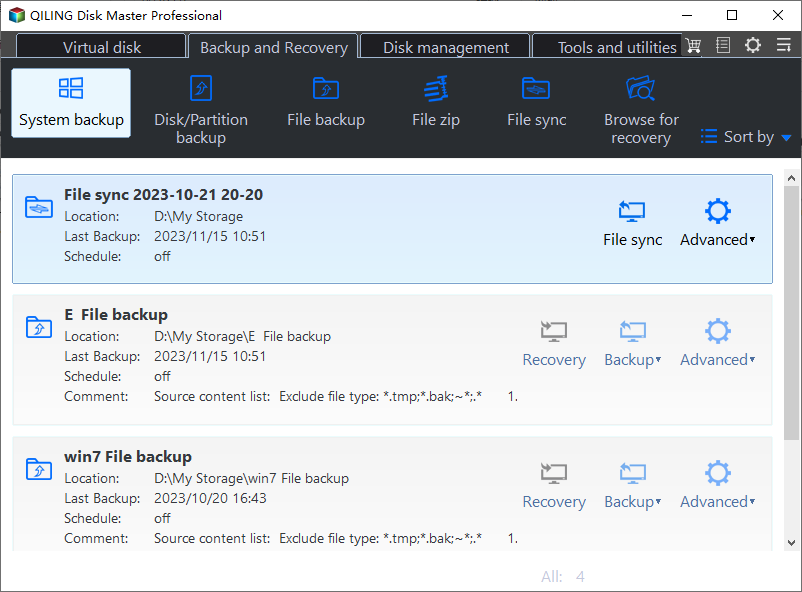
On the Backup and Recovery tab, click System Backup. The list under the buttons shows existing tasks with their destination and last result, so you can see whether the failed run left a partial file behind.
Step 2. Select the System Disk
Tick the disk that holds Windows and the system partitions beside it; the bar above the list shows how much space the selection needs. Leave the page open while you check the destination, because a drive that disappears here will fail during the snapshot.

Step 3. Decide How the Snapshot Is Taken
Click Options and open the Backup tab. Leave Use VSS selected while the writers are healthy, and clear it when the same writer keeps returning 0x800423F3 and you need a complete image today. With the box cleared, the built-in technique reads the disk without asking that writer to freeze.
Step 4. Preview and Run the Job
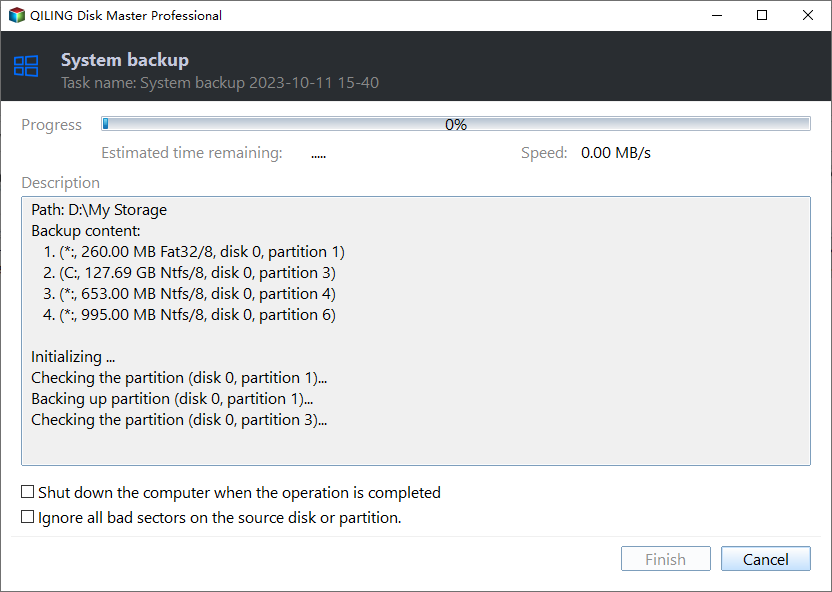
The summary above the buttons repeats the source, the destination, and the backup mode. Preview the pending operation and click Proceed, then watch the progress window: it names each partition as it is read, so a stall is visible at the disk that stops reporting.
Frequently Asked Questions
Can I simply run the backup again?
A second run often succeeds when the writer was busy with a short transaction. If the same writer fails twice, stop retrying and find out which application owns it, because repeated freezes push that application further behind.
Does 0x800423F3 damage the files on the source disk?
No. The backup never wrote to the source, and the snapshot was deleted before any data was read. The only loss is the backup that did not happen.
Is it safe to leave Use VSS cleared?
It is safe for a full image, which is read block by block. Keep VSS selected for databases and mail servers while their own writers are healthy, because those applications need the freeze to produce a consistent snapshot.
Related Articles
- VSS Writer Error 0x800423F0: Inconsistent Snapshot
- VSS Writer Timed Out: Fix Error 0x8004230F
- VSS Error 0x8004231F: Shadow Storage Is Full
- VSS Error 0x80042306: Shadow Copy Provider Veto
- Windows Backup Error 0x81000019: Shadow Copy Failed
Products
Articles & Tutorials
- Data Recovery
- Data Backup
- File Recovery
- File Backup
- System Backup and Restore
- Disk and Partition Clone
- Technical articles
- Mobile articles
- Disk Master Help
- Windows Data Recovery Tutorials
- Windows Secure Delete Tutorials
- Windows Partition Management Tutorials
- Windows File Backup and Restore Tutorials
- Windows System Backup and Restore Tutorials
- Windows Disk Backup and Restore Tutorials
- Windows Clone Tutorials