VSS Writer Error 0x800423f0 During Backup
Quick Navigation:
- What the Error Reports
- Check Writers and Shadow Storage
- Free Space and Retry
- Prevent the Next Failure
- Frequently Asked Questions
0x800423f0 is reported either as a writer timeout or as a failure to create the shadow copy, depending on which tool shows the message. In both cases the snapshot never completed, so the backup stopped before it copied any data and the previous image is still the newest good one.
What the Error Reports
A backup that uses a snapshot asks every VSS writer to flush and freeze its data, takes the copy, and then releases the writers. The error means one participant did not finish inside the allowed time, or the shadow copy could not be created because its storage area was full.
The writers involved are usually the ones behind a database, a mail store, or a virtualization service, because those hold state that takes time to write out. A writer that is stuck in a failed state keeps failing every later job until it is reset.
The same code appears when the shadow storage limit is reached. The copy needs room on the volume that holds the original data, and a volume that is nearly full cannot host it.
Check Writers and Shadow Storage
List the writers and their states before changing anything. A writer in a waiting or failed state explains the error on its own, while a stable writer list points to the storage side of the problem.
Compare the shadow storage limit with the space that is actually free on each volume. When the limit is small, or the free space is below the size of the data being copied, the snapshot cannot be created at all.
Check the event log for the time of the failure. A service that restarts at that moment, or a disk that reports a timeout, changes the direction of the fix.
Free Space and Retry
Free at least fifteen to twenty percent of every volume that takes part in the snapshot, and delete old shadow copies so the new one has room to grow.
Restart the writer service that reported the failure, then run a small test job on a single folder. A test that succeeds shows the writer is healthy and that the original job was simply too large for the time window.
Move the next run outside peak load. A snapshot that times out at busy hours often completes with no other change once the disk is quiet.
Prevent the Next Failure
A scheduled system image on a separate disk gives the snapshot a target that is not under the same load, and Qiling Disk Master writes the image after the snapshot completes instead of during application work.
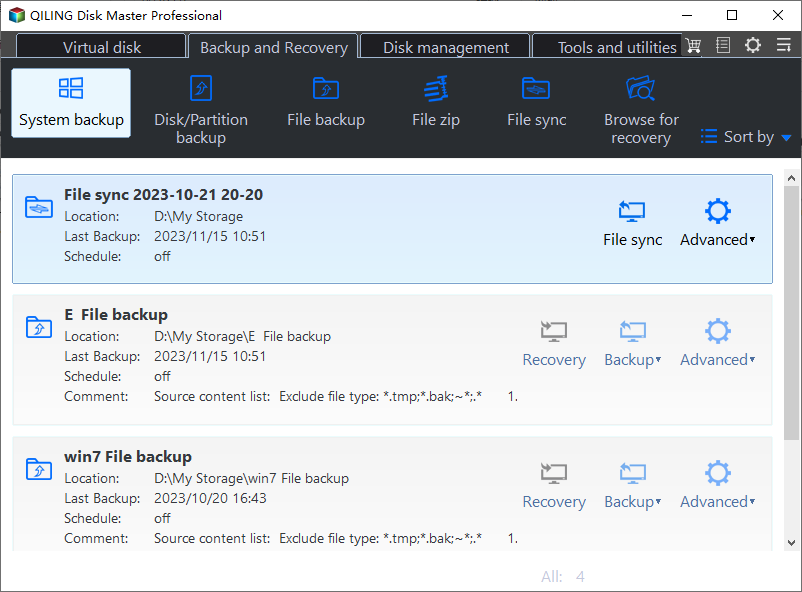
Step 1. Open System Backup
Choose System Backup on the home screen. The default selection covers the system partition and the boot files, which is exactly what a recovery needs.
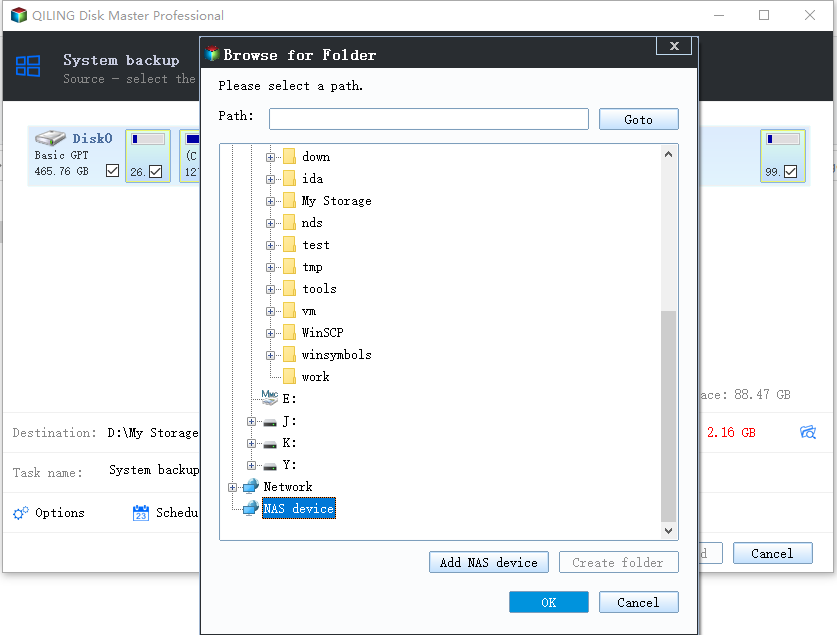
Step 2. Select the Backup Destination
Pick a folder on a second physical disk with more free space than the used space of the system drive, so that the snapshot and the image never compete for the same volume.
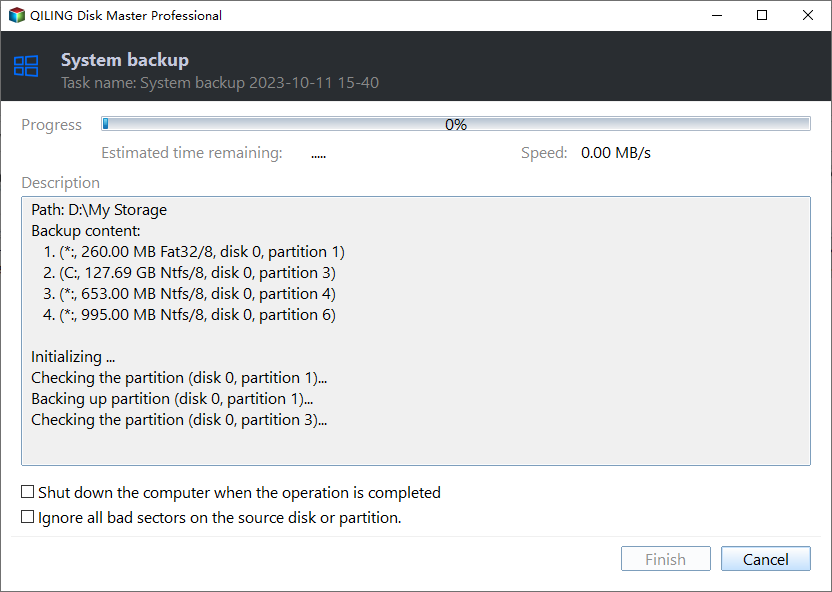
Step 3. Start the Backup
Set a daily schedule outside working hours, click Proceed, and let the first full image finish. Later runs are incremental and complete well inside the snapshot window.
Frequently Asked Questions
Is 0x800423f0 always a timeout?
No. The code covers a writer timeout and a failure to create the shadow copy, so both the writer state and the free shadow storage need a check.
Will deleting old shadow copies break System Restore?
It removes the restore points that depend on them. Keep the newest point you still need and delete the older ones.
Do I have to restart the server?
A writer restart is usually enough. Restart the server only when the writer stays in a failed state after the service has been restarted.
Related Articles
- Backup Fails With VSS Error 0x800423f4
- Windows Backup Error 0x8078005D
- Back Up Before Windows 11 26H2
- System Restore Fails After the Windows 11 26H2 Update
- Clone an SSD with Bad Sectors
Products
Articles & Tutorials
- Data Recovery
- Data Backup
- File Recovery
- File Backup
- System Backup and Restore
- Disk and Partition Clone
- Technical articles
- Mobile articles
- Disk Master Help
- Windows Data Recovery Tutorials
- Windows Secure Delete Tutorials
- Windows Partition Management Tutorials
- Windows File Backup and Restore Tutorials
- Windows System Backup and Restore Tutorials
- Windows Disk Backup and Restore Tutorials
- Windows Clone Tutorials