VSS Writer Error: SQL Server Blocks the Backup
Quick Navigation:
- Why SQL Server Owns the Snapshot
- Read the Writer List and the Log
- Free the Writer Before the Next Run
- Image the Disk Without Application Writers
- Frequently Asked Questions
A backup stops with a writer error and the name in the log is SQL Server. The database engine registers its own VSS writer so a backup can capture a consistent database, and when that writer is unhealthy the whole snapshot fails, even on volumes that have nothing to do with the database. The job may report a timeout, a failed writer, or a generic snapshot error. This page explains why SQL Server blocks the backup and how to free the writer or take a copy that does not depend on it.
Why SQL Server Owns the Snapshot
SQL Server does not lock the whole volume. Its writer freezes the database files just long enough for VSS to record a consistent state, then releases them. That handshake depends on a service, a writer in a stable state, and enough room in the log for the freeze to complete. When any of the three is missing, the writer reports a failure and VSS cancels the snapshot for every volume in the job.
The error is therefore wider than the database. A backup of the system volume alone can fail because a writer on the data volume never answered. Administrators often inspect the disk being imaged, find nothing wrong, and miss the real cause: a database service that has been running for months without a restart, a log backup, or a maintenance window.
Read the Writer List and the Log
The writer list is the first place to look. It shows SQL Server VSS Writer with a state and an error code, and anything other than Stable means the snapshot will not finish. A writer that reports a non-zero code, or that appears twice with one stale entry, has usually lost its connection to the database instance after a crash or an unexpected service restart.
The writer list, Event Viewer, and the Services console are all built into Windows and belong to Microsoft. They are not part of Qiling Disk Master, and this article uses them only to read state and logs. Run the checks in part three with those native tools first, then return to the Qiling steps in part four when you need a copy of the disk.
The database log is the second place. A full log, or a log that has grown until the disk holding it is nearly full, stops the freeze. A long transaction that has been open for hours has the same effect, because the writer cannot produce a consistent point while the transaction is still writing. Check the log size and the oldest open transaction before you restart anything on a production server.
Free the Writer Before the Next Run
The cheapest fix is to free space and end the transaction. Back up the database log with the native maintenance routine, or switch the recovery model briefly if policy allows, then confirm that the log file has room to grow. A long-running report or an uncommitted batch is easy to find and usually easy to stop once the owner agrees to release it.
Restarting the SQL Server VSS Writer service is the next step. It is a Windows service that belongs to Microsoft and ships with the SQL Server installation, not a Qiling component. Restarting it re-registers the writer with VSS and clears the stale entry that blocks the snapshot. Do not restart the database engine during business hours, because that drops every client connection.
If the writer returns to Stable, run the system state backup again and watch the first snapshot. If it fails at the same point, the writer was never the whole problem, and the image route below is the practical way to keep a copy while the database team investigates. Record the error code and the writer name in the ticket so the next person does not repeat the same checks.
Image the Disk Without Application Writers
A block-level image does not ask SQL Server for permission. Qiling Disk Master reads the sectors of the disk and writes them to an image file, so the job completes even while an application writer is unhealthy. The image is crash-consistent rather than application-consistent, which is fine for disaster recovery of the operating system and acceptable for a database when its log files are captured in the same image. Take one before any repair that could change the disk.
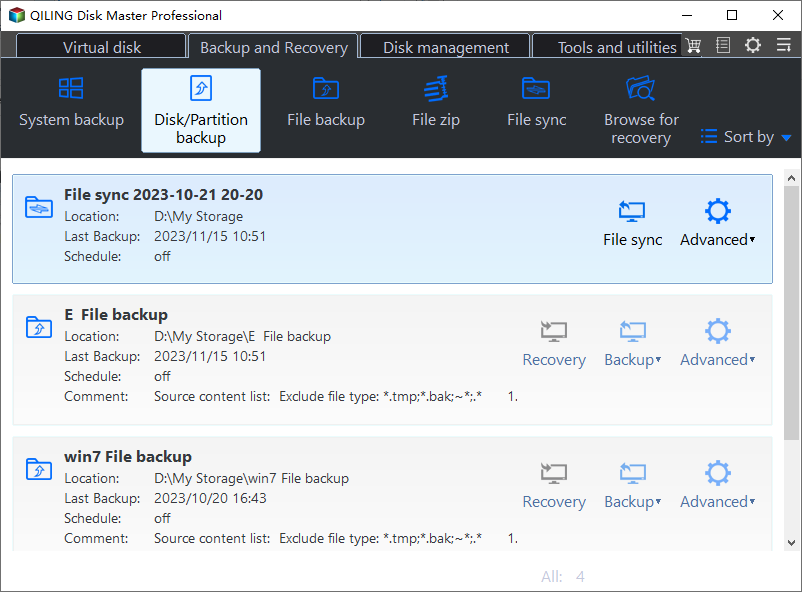
Step 1. Open Disk Backup
Click Disk Backup on the Backup and Recovery tab and choose the disk mode. The list reports the capacity, partition layout, and health of every attached disk, so you can identify the drive that holds the database files and the system files before the job writes anything to the target. Each row is a whole disk, so partitions of the same drive stay together.
Step 2. Select the Disk That Holds the Database
Tick that disk in the source list, and tick the system disk as well if the database and the operating system share the same physical drive. Leave the destination disk unticked so the image is never written back onto the disk it is reading from during the job. If the database files sit on two disks, tick both of them in this list.
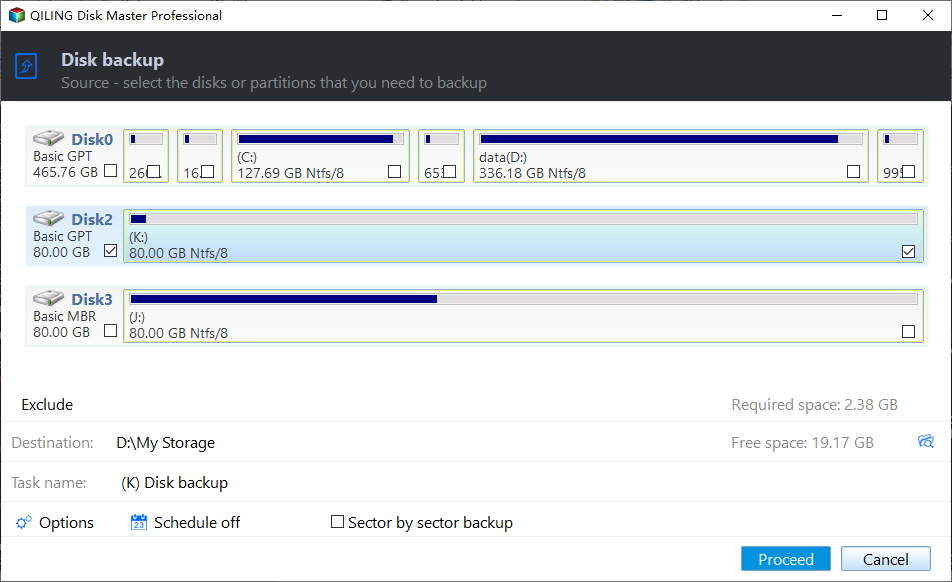
Step 3. Set the Destination, Preview, and Click Proceed
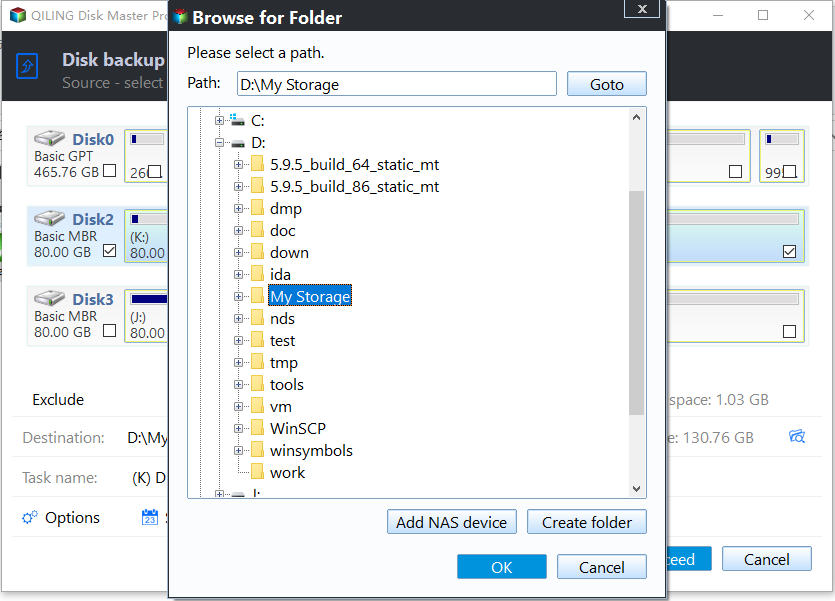
Set a destination folder on a different disk with free space larger than the used data, then open Preview to read the pending operation, the estimated size, and the target path. Click Proceed and wait until the progress window confirms completion. Store the image offline until the writer problem is resolved and a restore has been tested. Check the path twice before you confirm it, because a wrong folder wastes the whole run.
Frequently Asked Questions
Will an image of a running SQL Server be usable?
It is crash-consistent, like a copy taken after a power cut. The database recovers from its log when it starts, so the image is usable for disaster recovery. For point-in-time needs, keep the native database backups as well and treat the image as the last line of defense. Recovery replays the log during startup, so include the log files in the same image.
Do I need to stop SQL Server before the image?
No. That is the point of a block-level job. Stopping the service only removes the writer conflict; it does not improve an image that is already crash-consistent. Stopping the service also costs availability, and on a production server that cost is real. Stop it only if an internal policy demands an application-consistent copy, and schedule that in a maintenance window.
Why does the writer fail only on the system state backup?
The system state job collects writers from every volume, not just the one it images. A writer that is unhealthy anywhere on the server fails the collection, which is why a database problem can appear to break a backup of the system disk and send you looking in the wrong place. Check the writer list before you blame the disk being imaged.
Related Articles
- VSS Writer Timed Out: Error 0x8004230F
- Backup Fails with VSS 0x80042302: No Writers
- VSS 0x80042324: Shadow Copy Not Supported
- Windows Backup Error 0x81000019: Shadow Copy Failed
- Backup Fails on a Deduplicated Volume
Products
Articles & Tutorials
- Data Recovery
- Data Backup
- File Recovery
- File Backup
- System Backup and Restore
- Disk and Partition Clone
- Technical articles
- Mobile articles
- Disk Master Help
- Windows Data Recovery Tutorials
- Windows Secure Delete Tutorials
- Windows Partition Management Tutorials
- Windows File Backup and Restore Tutorials
- Windows System Backup and Restore Tutorials
- Windows Disk Backup and Restore Tutorials
- Windows Clone Tutorials