Windows Server Backup 0x8078001F: VSS or SPP Failure
Quick Navigation:
- What 0x8078001F Reports
- Check the VSS Writers
- Clear Shadow Storage and Target Space
- Image the Server Disk
- Frequently Asked Questions
A server backup that ends with 0x8078001F rarely means the disks are damaged. The code comes from the layer that Windows Server Backup uses to take a point-in-time copy: the Volume Shadow Copy Service, known as VSS, and the System Protection Provider, known as SPP, that drives it. When a snapshot is not ready within the time limit, when an application writer refuses to release its files, when the shadow storage area has no room, or when the target volume cannot accept the image, the job stops with this code. This page explains each part and how to get a usable backup again.
What 0x8078001F Reports
The backup engine never reads a live volume directly. It asks VSS to freeze the volume for a few seconds and to collect the writers that own open files, and SPP then coordinates the copy of the resulting snapshot. Error 0x8078001F is returned when that negotiation fails, not when a single file is unreadable. The same code therefore covers several different faults, and the message beside it is often vague because the engine only knows that the snapshot step did not complete.
Four conditions produce it most often. A writer stays in a waiting state until the snapshot times out. The shadow storage area on the source volume is too small for the change log. The destination volume is full, offline, or formatted in a way the job cannot use. Or the VSS and SPP services are stopped, disabled, or stuck after an earlier failed run. Each one leaves a different trace, so the checks below run from the cheapest to the most disruptive.
Check the VSS Writers
Windows ships a writer list that shows every component currently registered with VSS and the state of each one. A healthy entry reads Stable with no error. A writer that reports Waiting for completion, Failed, or a non-zero error code is the one holding the snapshot. Server roles such as SQL Server, Exchange, Active Directory, and file services each register their own writer, so the failing name usually points at the role that needs attention before the next backup attempt.
Event Viewer and the Services console are built into Windows and belong to Microsoft. They are not part of Qiling Disk Master, and nothing in this article asks you to run them as part of a Qiling backup task. Use them only to read the failure record and the service state, then close them before you start the steps in part four.
A stuck writer is often cleared by restarting the service that owns it rather than the whole server. Restart the VSS service first, then the SPP service, and read the writer list again. If an entry stays in a failed state after both restarts, a reboot is the dependable reset, because a writer that has lost its snapshot context cannot rebuild it in place. Plan that reboot in a maintenance window and warn the users who depend on the server.
Clear Shadow Storage and Target Space
Old shadow copies consume the space that the next snapshot needs. The usual symptom is a job that worked for months and then fails every night while free space on the source volume slowly drops. Remove the oldest snapshots from the source volume, keep the most recent one if you still need a rollback point, and leave enough room for the change log a full backup will generate. A volume with less than fifteen percent free is a poor candidate for snapshots.
The destination deserves the same check. A target that is nearly full, connected over a link that drops, or formatted with a small cluster size can fail the write after the snapshot has already been taken, and the engine reports the failure at the snapshot layer because that is where the job unwinds. Confirm free space, cable and share health, and write permission before the next run. A dedicated disk beats a share that other jobs also use.
Changing the destination is the fastest test. Point one job at a local disk with plenty of room. If it completes, the fault was on the old target; if it fails with the same code, the problem is on the source side and the writer checks in part two matter more. Keep the log of the failed job until the test finishes so you can compare the two runs side by side.
Image the Server Disk
While the snapshot layer is being repaired, the server still needs a copy that does not depend on application writers. Qiling Disk Master reads the disk at block level and images whole disks or single partitions, so a stuck writer cannot block the job. The image captures the boot files, the system partition, and the data volumes in one set that can be mounted or restored later. Take it before the reboot and again after the repair, so both states are covered.
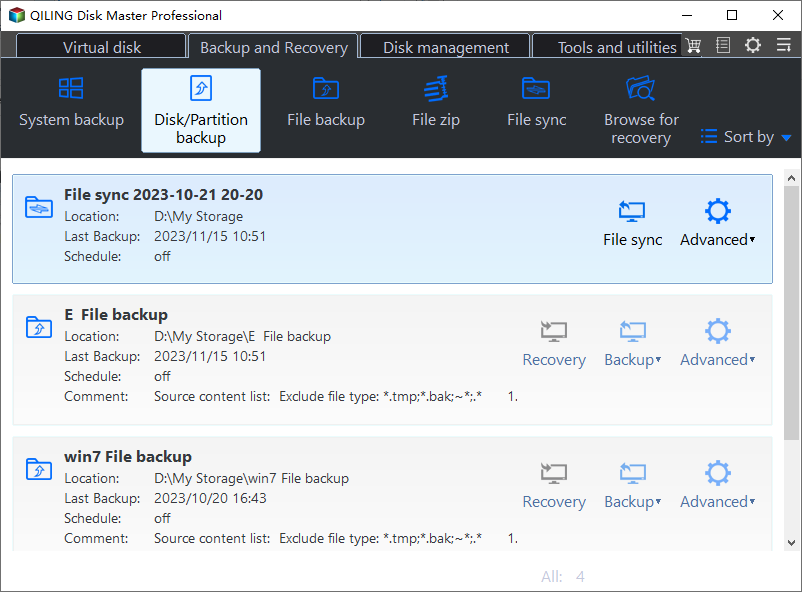
Step 1. Open Disk Backup
Open Qiling Disk Master and click Disk Backup on the Backup and Recovery tab, then pick the disk or partition mode and read the list carefully. The source list shows every disk with its capacity, partition layout, and health state, so you can confirm which one holds the boot volume and which one holds the data before anything is written to the destination.
Step 2. Select the Disk and the Destination
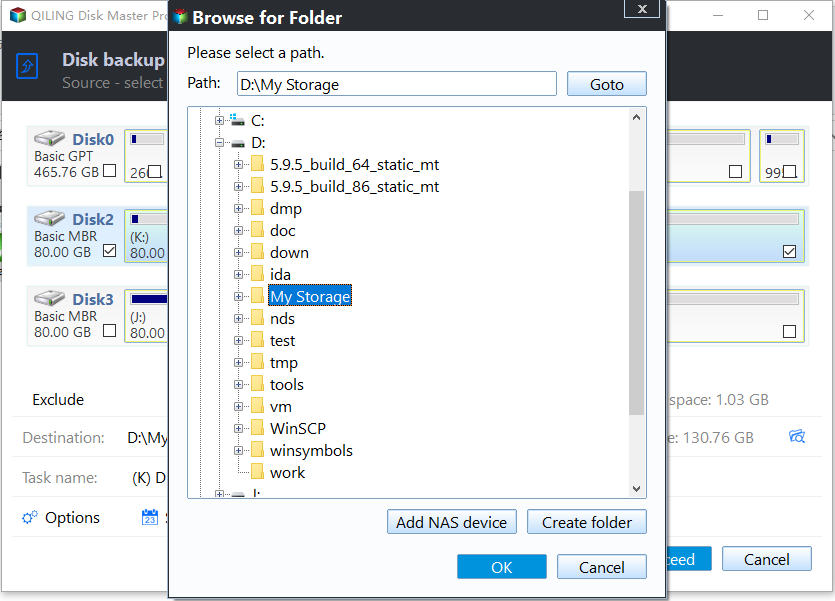
Tick the disk that carries the system and data volumes. If the server keeps its data on a separate disk, tick that one as well or run a second task for it later. Leave the destination disk unticked, then use the folder icon beside Destination to browse to a location outside the source, with free space larger than the used data on the disk you are imaging.
Step 3. Preview the Task and Click Proceed
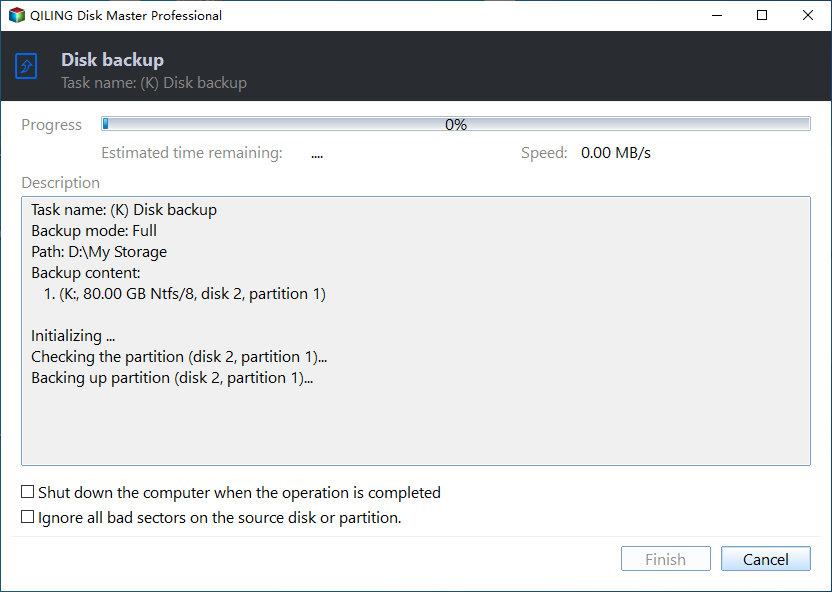
The Preview window lists the pending operation, the estimated image size, and the target path. Read it once, click Proceed, and wait until the progress window reports that the task has finished before you close the program or reboot the server. Keep the image until a restore has been tested, because an untested image is only a promise, not a recovery plan.
Frequently Asked Questions
Does 0x8078001F mean my server disks are failing?
No. The code comes from the snapshot layer, not from the storage driver. A failing disk usually reports a read error, a bad block, or a timeout at the device level instead. Check disk health separately with the vendor tool, but treat this code as a writer, service, or space problem first, and only then as a possible hardware fault.
Can I run the backup again without rebooting?
Sometimes. Restarting the VSS and SPP services clears a stuck writer in many cases, and the next run succeeds without a restart of the server. If the writer list still shows a failed entry, a reboot is the dependable fix, because an application writer cannot rebuild its snapshot context while the server keeps running. Plan the restart for a quiet hour.
Is a disk image enough to recover a domain controller?
An image restores the whole system, including Active Directory, but a restored domain controller needs care with replication and time sync. For a single server, an image taken while the service was healthy is a practical recovery point. Test the restore on separate hardware or a virtual machine before you rely on it, and keep a second copy on separate media.
Related Articles
- Backup Fails with VSS 0x80042302: No Writers
- VSS Writer Timed Out: Error 0x8004230F
- VSS Error 0x8004231F: Shadow Storage Full
- Backup Fails with VSS Error 0x800423F4
- Windows Backup Error 0x81000019: Shadow Copy Failed
Products
Articles & Tutorials
- Data Recovery
- Data Backup
- File Recovery
- File Backup
- System Backup and Restore
- Disk and Partition Clone
- Technical articles
- Mobile articles
- Disk Master Help
- Windows Data Recovery Tutorials
- Windows Secure Delete Tutorials
- Windows Partition Management Tutorials
- Windows File Backup and Restore Tutorials
- Windows System Backup and Restore Tutorials
- Windows Disk Backup and Restore Tutorials
- Windows Clone Tutorials