3 Ways to Recover Deleted Instagram Photos on iPhone
Summary
If you've accidentally deleted Instagram photos on your iPhone, there are three common solutions to recover them. The first method involves checking the Recently Deleted folder, where deleted photos are stored for a limited time. Alternatively, you can use iPhone data recovery software to scan your device and recover deleted Instagram photos.
Recover Deleted Instagram Photos on iPhone Directly
Most cases, deleted Instagram photos are from Profile or Instagram Story. You can recover them from the Recently Deleted folder in the Instagram app on your iPhone directly.
Instagram has introduced a "Recently Deleted" feature, which keeps deleted photos and videos for 30 days in a folder, allowing users to recover them within that timeframe.
To recover deleted Instagram photos on iPhone:
Step 1. Open the Instagram app and go to your profile.
Step 2. Tap "More" > "Settings" > "Account" and choose "Recently Deleted."
Step 3. To recover your photos, select the category that contains the photos you want to recover.
Step 4. Select the photos you want to recover.
Step 5. Tap "More" and then click "Restore to Profile" or "Restore."
Recover Deleted Instagram Photos on iPhone via Photos
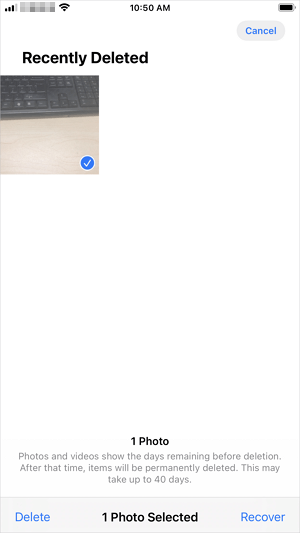
If you have deleted Instagram-To recover deleted Instagram photos, you can try to find them in the Recently Deleted folder in the Photos app, which keeps deleted items for 40 days. If the pictures you want to recover were deleted within this timeframe and haven't been emptied from the folder, you can restore them from there. This method is also applicable for recovering permanently deleted photos on iPhone.
To recover deleted pictures from Instagram:
Step 1. Go to the Photos app on your iPhone.
Step 2. Tap "Albums" and choose "Recently Deleted."
Step 3. Tap "Select" and select the items you want to recover.
Step 4. Tap "Recover" > "Recover Photos" to get them back.
Recover Deleted Pictures from Instagram via Software
If you've permanently deleted photos from Instagram, the methods mentioned earlier won't help. In this case, you can try using an iPhone data recovery tool like Qiling MobiSaver, which can scan your iPhone storage or an iTunes/iCloud backup for lost items, allowing you to choose specific items to restore. For Android users, there is similar software available.
To recover deleted Instagram photos:
Step 1. Connect iPhone to Your PC
Launch Qiling MobiSaver, choose “Recover from iOS Device” on the left, and click “Start”.
Step 2. Scan for Lost iPhone Photos
Qiling MobiSaver automatically scans your iPhone 13/12/11/X/XR/XS/8/7/6/5/4, finding both present and lost photos.
Step 3. Preview and Restore Photos
To recover photos, tick the "Photos" option on the left, select the desired photos, and choose either "Recover to PC" or "Recover to Device" to initiate the recovery process.
The Bottom Line
Among the three options to recover deleted Instagram photos, using the Recently Deleted folder is the easiest solution, but it won't work for permanently deleted pictures. In that case, an iPhone data recovery tool should be applied to try and recover them.
Related Articles
- How to Extract iPhone Contacts from iPhone Backup in Four Ways
- [Fixed] Snapchat locked, How to Unlock Snapchat Account on iPhone?
- How to Fix iPhone Messages Disappeared from Inbox
- How to Put iPad in Recovery Mode [2022 Update]
- How to Restore Lost AI Files After Adobe Illustrator CC Crashes
If you lost AI files in Windows 10 due to Adobe Illustrator CC 2019 suddenly stopping or crashing. - Apacer USB 3.0 Repair and Format Tool Free Download (Official)
This page provides a direct download link for the Apacer USB 3.0 repair tool and a step-by-step guide on how to use the Format and Restore function to repair a malfunctioning Apacer USB drive. Before attempting these steps, it's essential to back up any files on the drive to prevent data loss.
Products
Articles & Tutorials
- Data Recovery
- Data Backup
- File Recovery
- File Backup
- System Backup and Restore
- Disk and Partition Clone
- Technical articles
- Mobile articles
- Disk Master Help
- Windows Data Recovery Tutorials
- Windows Secure Delete Tutorials
- Windows Partition Management Tutorials
- Windows File Backup and Restore Tutorials
- Windows System Backup and Restore Tutorials
- Windows Disk Backup and Restore Tutorials
- Windows Clone Tutorials