How to Tell if You Are Blocked on Kik
Summary
Kik has proven to be a highly effective platform for global communication, allowing users to block unwanted contacts. If you're curious about your own block status on Kik, this guide provides a straightforward way to check it.
Kik, a popular communication platform, allows users to communicate freely while maintaining their privacy. However, users may wonder if someone has blocked them, and in this article, we'll explore how to determine if someone on Kik has blocked you.
What Is Kik Blocking
On Kik, when someone gets blocked, it means that the blocker has chosen to limit their interactions with the blockee. The blockee will no longer receive messages, calls, or any other form of communication from the blocker. The blocker's profile will also be hidden from the blockee, making it impossible for them to see the blocker's online status, profile information, or any other details.
On Kik, someone who gets blocked can still send messages, but they won't be visible to the blocker, and instead, show as "Blocked Message" in the chat.
How to Tell If You Are Blocked on Kik
If you suspect someone has blocked you on Kik, there are ways to confirm. You can check if you can send or receive messages from them directly, or see their messages in a group chat where both of you are members. If you're unable to do so, it's likely they have blocked you. This can be especially relevant if you've had a recent disagreement or fight with the person.
To determine if you're blocked on Kik, you can follow two direct methods. First, try sending a message to the person you suspect has blocked you. If your message is delivered and they respond, it means you're not blocked.
Method 1. Check If Kik Message Status Is Changed
If you suspect someone has blocked you on Kik, try sending them a message. If the message status changes, it's possible they've blocked you. However, to confirm, check if the message is marked as "delivered" or if the person's profile picture and name appear in the chat. If not, it's likely they've blocked you.
Step 1. To check if someone has read your message on Kik, simply send a message to them and look for the message status next to the sent message. This will show you whether the message has been read or not. You can do this on your mobile device by opening Kik, going to the chat of the person you want to check, typing in a message, and sending it to them. The message status will be displayed right next to the sent message.
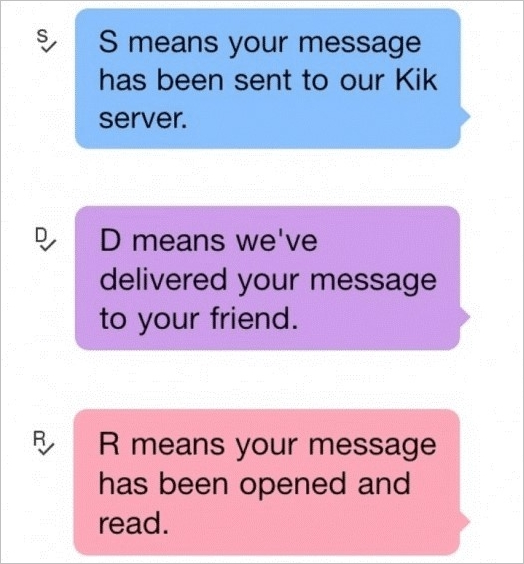
Step 2. If the message status on Kik remains "S" (sent) and doesn't change to "D" (delivered) or "R" (read), it's likely that the recipient has blocked you. This indicates that the message was sent to the Kik server but didn't reach the intended recipient.
Method 2. Check If You Can Start a Group With Them
To check if you're blocked on Kik, try starting a new group with the person you suspect has blocked you. Add some friends who you know haven't blocked you, followed by adding the person in question across the group. If they're not added to the group, it's likely that they've blocked you on Kik. This method can help you confirm their status in a quick and straightforward way.
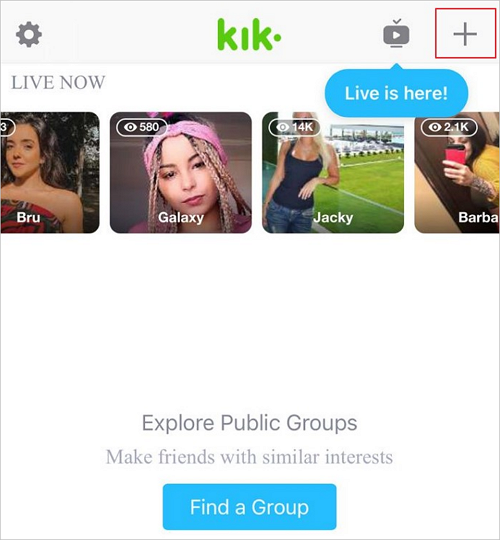
Step 1. Open the Kik application on your smartphone and click on the "+" icon at the top right of its home screen.
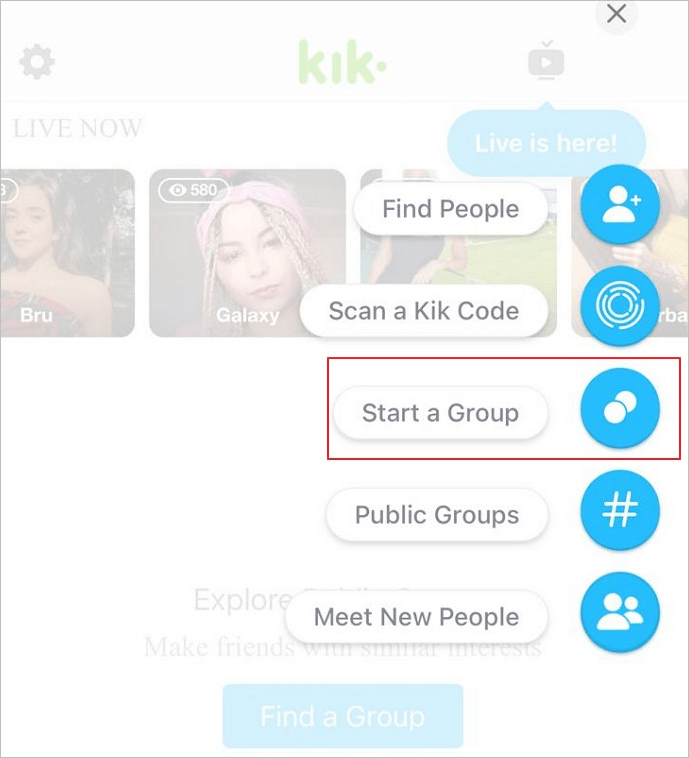
Step 2. To create a new group, select the "Start a Group" option from the available choices on the screen, then name the group and add a photo that you'd like to use as the group's profile picture.
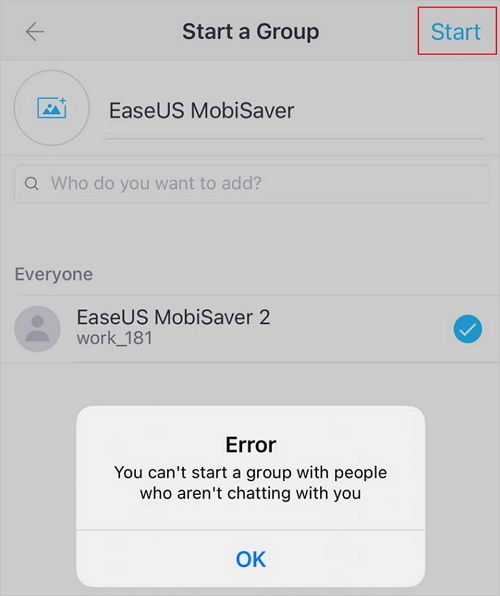
Step 3. To add a user to a group, select the users you want to add, including the person you suspect has blocked you, then click "Start" at the top of the screen. If the person hasn't blocked you, the group will be created. If they have blocked you, Kik will display an error message.
How to Block Someone on Kik
If you're unsure if you're blocked on Kik, you can check by trying to send a message to the person - if it doesn't go through, you're likely blocked. On the other hand, if you want to block or unblock someone on Kik, it's a relatively straightforward process. Blocking someone will disconnect your connection with them across the platform, and can be done by following the steps explained below.
Block People on Kik from iPhone
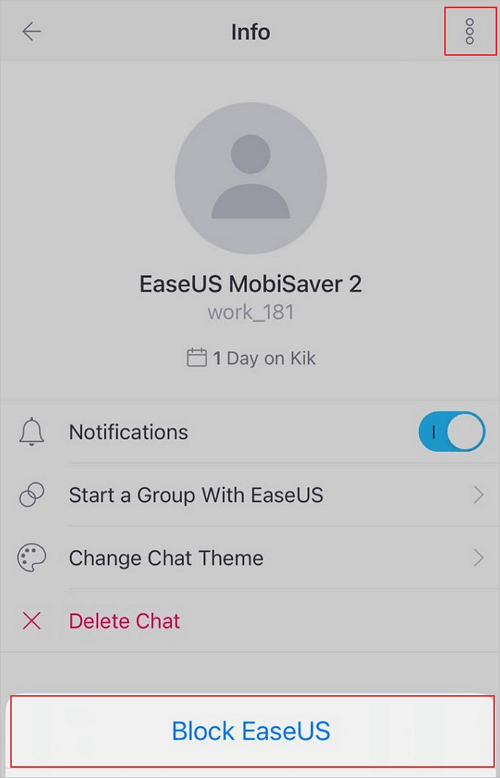
Step 1. To block someone on the Kik app on your iPhone, open the app and go to the profile of the person you want to block. Tap on their name to go to their profile, then tap on the three vertical dots on the top right corner of the screen.
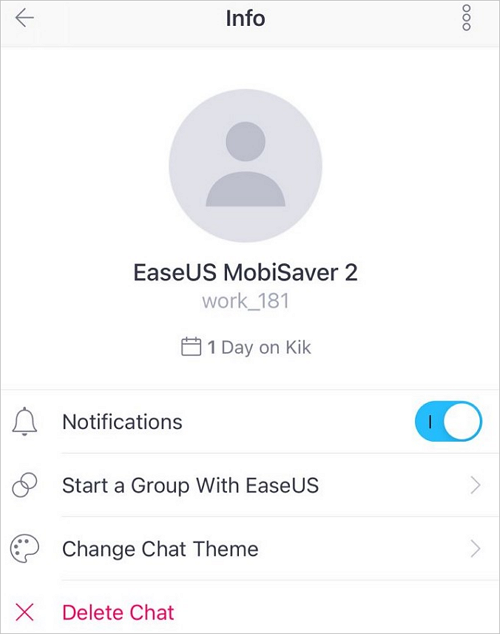
Step 2. To block a user, select the three-dotted icon on the top, then choose the "Block User_Name" option from the menu. Confirm by selecting the "Block" option in the prompt that appears.
Block People on Kik from Android
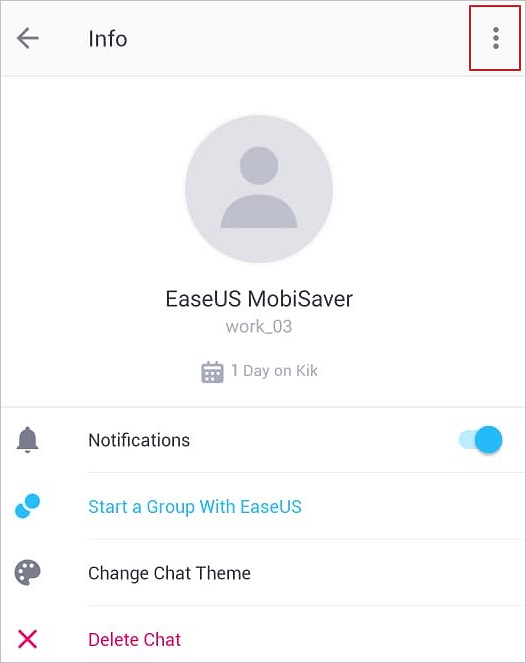
Step 1. To block a user on Kik, open the app on your Android device, navigate to the user you want to block, and click on the three-dotted icon at the top-right corner of the screen. From the dropdown list, select the "Block User_Name" option to block the user.
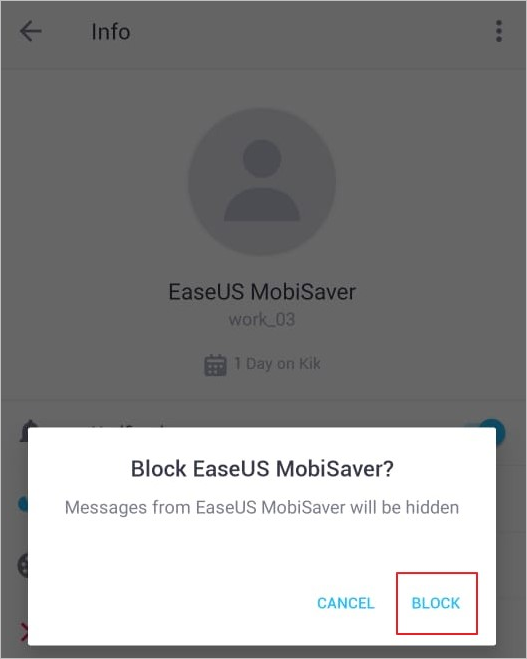
Step 2. To block a user on Kik on your Android, click on the "Block" option on the pop-up message that appears after receiving a prompt from the user you want to block. This action will restrict the user from sending you messages or contacting you on Kik.
Bonus Tip: Recover Kik Messages on iPhone
If you lose your Kik Messages due to unforeseen issues on your smartphone, Qiling MobiSaver can help. It's a data recovery software that can recover WhatsApp data and LINE chats from your iPhone, making it a great option if you've experienced data loss.
- Preview and Export Data:This platform allows users to preview data before exporting it in various formats, giving them control over the data recovered from the process.
- Diversity in Recovery:Qiling MobiSaver is a tool that helps users recover data from their iPhone's internal memory, as well as from iTunes and iCloud backups.
- Recover Unlimited Data:The tool allows users to quickly recover unlimited data from their devices without any file size restrictions.
- Easy and Convenient: The tool is extremely easy to use, making the recovery process simple for all users. It also supports data recovery from various devices, making it a convenient option.
How to Recover Messages of Kik using Qiling MobiSaver
If you're looking to recover your Kik messages using Qiling iPhone data recovery software, this guide provides a detailed walkthrough for both Android and iPhone users, explaining the simple process of using this data recovery tool.
Step 1. Select Device Storage
Connect your iPhone to your PC, launch Qiling MobiSaver, click the "Kik" button, and select "Device Storage" to recover Kik data from your iPhone.
Step 2. Make Sure Your Phone Has Kik
If the Kikis app is not installed on your device, your device will not be detected.
Step 3. Scan iPhone to Find Kik Data
Qiling MobiSaver will automatically scan your iPhone and find present and lost Kik data for you, which may take a few minutes to complete.
Step 4. Preview and Restore Kik Chats/Attachments
After clicking the "Kik" button, the missing chats and Kik files will be displayed. You can preview and select the data you want to recover, then click "Recover to PC" or "Recover to Device" to restore it.
Kik Blocked FAQs
We've covered how to check if someone has blocked you and a step-by-step guide on blocking someone. Now, let's move on to addressing some common questions users may have about Kik's blocked feature.
1. When you block someone on Kik, can they see your picture?
If you block someone on Kik, they can still view your profile and any images previously sent, but you can't send them new images. The old images will still be visible to them, but any new attempts to send images will fail and disappear from the chat.
2. How do you see your block list on Kik?
To check if someone has blocked you on Kik, try sending them a message and see if it gets delivered. If the message doesn't appear in their chat window, it's likely they've blocked you.
Step 1. To access the settings on Kik, open the app on your phone and tap the "Gear" icon. This will take you to the settings menu where you can customize various features and options to suit your preferences.
Step 2. Select "Privacy" from the options on the screen, then choose "Block list" to view the list of blocked contacts on Kik.
3. What happens if I unblock someone on Kik?
If you unblock someone on Kik, you can send and receive messages from them, see their messages across groups, and send images and contact them in all ways.
4. Can I send a message to someone who blocked me on Kik?
You can send a message to someone who has blocked you on Kik, but the message won't be delivered to them and the chat status won't change.
Conclusion
If someone gets blocked on Kik, this article provides a comprehensive guide on what happens next. Additionally, it highlights scenarios that can help determine if a user has been Kik blocked by another user. If a user loses Kik messages on their device, they can consider using Qiling MobiSaver for a convenient and easy solution.
Related Articles
- Where Do AirDrop Files (Including Photos) Go on iPhone/Mac [Solved]
- How to Quickly Recover iPhone Screenshots
- Full Guide to Recover Deleted Notes on iPhone with/Without Backup
- FIX 'Attempting data recovery' on iPhone X/8/7/6 After iOS 12 Update
- Fix Error Code 0x800F0954 on Windows 10
Users of Windows 10 have reported encountering error code 0x800F0954 while handling Windows updates or installing the .NET framework, but there are four easy fixes to help eliminate this error. - Should You Wait for a Response or Close When Excel Frozen but Not Crashed? 10 Tricks Here
If Excel freezes but doesn't crash in Windows 10, the correct reaction is to wait patiently for it to respond, rather than immediately restarting. This approach can help prevent data loss and allow you to recover unsaved work.
Products
Articles & Tutorials
- Data Recovery
- Data Backup
- File Recovery
- File Backup
- System Backup and Restore
- Disk and Partition Clone
- Technical articles
- Mobile articles
- Disk Master Help
- Windows Data Recovery Tutorials
- Windows Secure Delete Tutorials
- Windows Partition Management Tutorials
- Windows File Backup and Restore Tutorials
- Windows System Backup and Restore Tutorials
- Windows Disk Backup and Restore Tutorials
- Windows Clone Tutorials