Email Recovery for Gmail, Yahoo, Outlook, Hotmail
Are Deleted Emails Permanently Gone
When you delete an email, it may be archived, backed up, or still accessible, depending on how your email service is configured.
To ensure deleted emails are permanently gone, check with your email service to see how they handle deleted emails. Some services may allow you to configure settings to purge deleted emails from the system, while others may have a 30-day waiting period before permanently deleting them.

Some people need to recover deleted emails because they may have removed them by mistake or deleted them and then realized there was important information in them. If the emails are still in the Trash, they can be easily restored, but if they've been permanently deleted, recovering them requires a different approach. We'll show you how to recover permanently deleted messages after 30 days.
Recover Deleted Emails in Gmail
Losing access to your Gmail account can be a significant inconvenience, especially since most people rely heavily on it to communicate with friends, family, and colleagues. Fortunately, recovering permanently deleted emails from Gmail is possible, although the process can be complex.
When you delete an email from your Gmail inbox, it's moved to the Trash folder, where it stays for 30 days before being permanently deleted, giving you a 30-day window to recover it.
You can recover a permanently deleted email from Google's Mail using the Gmail Restore tool, which allows you to search for emails deleted more than 30 days ago by keyword or date range.
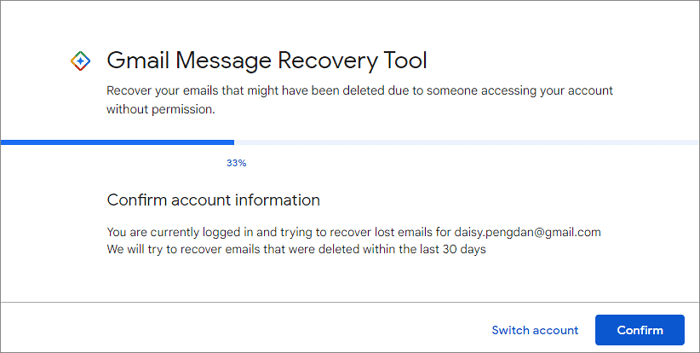
Step 1. To use the Mail Restore tool, log in to your Gmail account, click on the Tools menu at the top of the page.
Step 2. Follow the instructions on the screen to select "Mail Restore".
The Mail Restore tool may not always work and can only recover limited data, making it crucial to act quickly when trying to recover an important email.
For more tips about recovering permanently deleted emails from Gmail, or if you need help with the process, read the complete tutorial.
- Know more:
- If you've forgotten your Gmail password or Google account, you can recover it without a phone number, email, or phone by following these steps: Go to the Google account recovery page and select 'Forgot password' or 'Forgot account.' Enter the email address associated with your account and click 'Next.' Then, follow the prompts to answer your security questions or verify your account through other means. If you're unable to recover your account this way, you may need to contact Google support for further assistance.
Restore Deleted Emails in Outlook 2013/2016/2019/365
If you've deleted or permanently deleted emails in Outlook, don't worry - recovery is possible. Depending on the severity of the deletion, you can use Outlook's built-in recovery tools or take more drastic measures to retrieve your lost emails with minimal effort.
If you've deleted an email, you can likely recover it using Outlook's "Recover Deleted Items" feature. However, if you've permanently deleted an email, you'll need to take a more effective approach to recover your lost emails.
If you've deleted emails, you can try contacting your email provider to see if they can retrieve them from their backup system, but this is usually only possible if the emails were deleted recently, as older backups are typically deleted regularly.
You can try to recover deleted emails by using data recovery software, such as Deep Data Recovery, which can scan and find Outlook emails that have been permanently deleted from your hard drive.
To restore lost emails in Outlook, follow the outlined method in the topic article. This typically involves accessing the "Recover Deleted Items" feature, which can be found in the "Deleted Items" folder.
Learn more:
How to recover permanently deleted emails in Outlook 2016/2013.
Recover Deleted Yahoo Emails from Years Ago
If you deleted an email from your Yahoo account, you can try recovering it by going to the Yahoo Mail Trash folder, where deleted emails are temporarily stored. If you've permanently removed an email, you may be able to recover it by checking your Yahoo Mail Spam folder, as sometimes emails are mistakenly marked as spam. If you're unable to recover the email through these methods, you can contact Yahoo's customer support for further assistance.
If you're looking for a deleted email in Yahoo, first check your Deleted Items folder. If you haven't emptied it recently, the email may still be there. If not, click on the "Trash" icon in your mailbox to access your Trash folder.
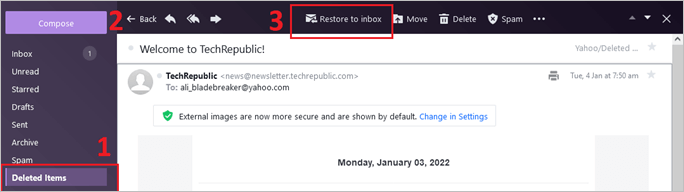
If the email isn't in your Trash folder, it may have been permanently deleted. To recover it, use Yahoo's Mail Recover tool, which can search for specific emails deleted within the last 7 days. Access the tool by going to the login page, clicking "Forgot your password," and completing the on-screen steps. This will move the email back into your inbox.
[Further reading] How to retrieve deleted Yahoo emails on desktop and iPhone.
Restore Permanently Deleted Emails from Hotmail
Hotmail keeps a copy of deleted emails for a certain period, allowing retrieval if action is taken promptly.
If your email was deleted within the last 14 days, you can find it in the Hotmail Trash folder. Log into your Hotmail account, go to the Trash folder, and restore the lost messages.
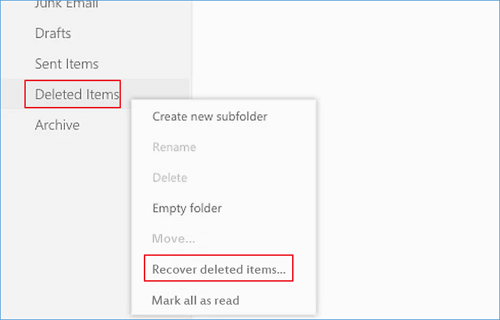
If an email was deleted more than 14 days ago, it's likely gone forever, but you can try recovering it by clicking the "Recover deleted items" link, which may show a list of all permanently deleted items.
Full guide:
How to recover permanently deleted emails from Hotmail.
Recover Permanently Deleted Emails from AOL
AOL email is a free web-A web-based email service allows users to access their email from any computer with an internet connection, featuring multiple tools such as spell check, an address book, and junk mail filtering.
If you accidentally delete an email from your inbox, you can usually find it in your Trash folder. However, if it's not there, it might be in your AOL Backup Folder, which stores deleted emails for up to 7 days.
If neither of those places has your deleted emails, your last chance is to recover from AOL's servers. To do this, go to view detailed steps for recovering deleted AOL emails.
The Bottom Line
To recover deleted emails from Yahoo, Outlook, or Hotmail, first check if they are in the Trash folder. If not, use professional email recovery software to restore permanently deleted emails. If all else fails, contact the email service provider to see if they can assist with restoring the emails.
Email Recovery FAQs
Read the following questions and answers to get more info about email recovery.
How to recover deleted emails on iPhone?
To recover deleted emails on your iPhone, first check the Trash folder if you've recently deleted the email. If it's been more than 30 days, you can try using an email recovery tool.
How do I recover permanently deleted emails from iCloud?
If you've permanently deleted an email from iCloud, it's gone for good. But if you've synced your iCloud account with another email account, you might be able to find a copy of the email in that other account.
How to recover deleted emails from Gmail after 2 years?
Deleted emails from Gmail can be recovered if they are within the Trash folder, but emails deleted more than 60 days ago are unlikely to be recoverable. You can try using an email recovery tool, but there is no guarantee of success.
How to retrieve deleted emails from Gmail on Android?
To recover deleted emails on Gmail, start by checking the Trash folder, which contains deleted emails. If the emails are not there, use Google's Email Recovery tool, which can help recover deleted messages if they were deleted within the last 24 hours. If the tool doesn't work, contact customer support for further assistance.
How can I recover my email without a password and phone number?
If you've lost access to your Gmail account and don't have your password or phone number associated with it, unfortunately, you can't recover your email. You'll need to create a new account. Consider setting a strong password and adding recovery info to your new account to avoid this issue in the future.
Related Articles
- Everything You Need to Know About Shortcut Virus
- Windows Repair Tools and Services [Windows 10/11]
- USB Fixes: Troubleshoot/Repair Corrupted USB Erros in 2022 [Full Guide]
- (July 2022) Ultimate Guide to Mac Time Machine Backup
- How to Format Flash Drive Using CMD
This article provides a two-part guide on how to format a flash drive using the Command Prompt and recover data from a formatted flash drive using the Command Prompt. - How to Format SD Card for Canon Camera
Formatting your Canon camera's SD card can seem daunting, but it's a straightforward process that can be done without losing any data. To format your Canon camera's SD card, follow these steps: follow the steps below.
Products
Articles & Tutorials
- Data Recovery
- Data Backup
- File Recovery
- File Backup
- System Backup and Restore
- Disk and Partition Clone
- Technical articles
- Mobile articles
- Disk Master Help
- Windows Data Recovery Tutorials
- Windows Secure Delete Tutorials
- Windows Partition Management Tutorials
- Windows File Backup and Restore Tutorials
- Windows System Backup and Restore Tutorials
- Windows Disk Backup and Restore Tutorials
- Windows Clone Tutorials