Clone Error 0x80070001: Incorrect Function
Quick Navigation:
- What 0x80070001 Means
- Where the Rejection Comes From
- Work Through the Causes in Order
- Clone with Qiling Disk Master
- Frequently Asked Questions
Error 0x80070001 stops a clone before any data is written, and the wording, incorrect function, is easy to misread. It does not say the disk is broken or the files are damaged. It says a command sent to a device was not implemented by that device or by the driver in front of it. The fix therefore targets the path between the software and the disk, not the contents of the disk.
What 0x80070001 Means
The code is the Windows representation of a low-level error named ERROR_INVALID_FUNCTION. A program asks the storage stack for an operation, the request travels through the driver, the controller, and the bridge chip, and one of those layers answers that the operation does not exist. The clone then stops rather than continue with incomplete information.
This is why the error appears on drives that read and write normally in the file manager. Ordinary file access uses a small set of commands that every device supports. A clone asks for more: the exact sector size, the partition table, the geometry, and sometimes a direct read of the raw device. A bridge that handles the first set can still reject the second.
Treat the message as a compatibility report. The software is telling you that it cannot obtain a reliable picture of the disk through the current connection, and continuing would risk writing a destination that does not match the source.
Where the Rejection Comes From
USB enclosures and docking stations are the most frequent source. Their bridge chips translate between USB and SATA or NVMe, and cheaper models do not pass every command through. A clone that works on an internal port can fail on the same disk once it is placed in an enclosure, which makes the enclosure, not the disk, the thing to change.
Sector size is the second common cause. A 4Kn drive reports 4096-byte logical sectors, while many bridges and older drivers assume 512 bytes. When the software asks for the geometry, the answer is rejected or translated incorrectly, and the job ends with the same code. The same conflict appears when a 512e drive is cloned through an adapter that reports a different sector size than the drive itself.
Write protection produces an identical result. A physical switch on an SD or USB adapter, a firmware lock on a refurbished drive, or a policy that mounts the disk as read-only will reject the first write request. An uninitialized destination behaves the same way, because it has no partition table and no disk signature for the tool to target. Finally, a missing or generic USB driver can block the commands the clone needs even though the drive letter appears.
Work Through the Causes in Order
Start by removing every adapter between the disk and the board. Connect the target to a direct SATA port or an M.2 slot and run the clone again. If the job completes, the bridge was the limit, and the enclosure should be reserved for file transfers rather than cloning. This one change resolves most cases and costs nothing.
Next, check write protection. Look for a switch on the adapter, confirm that the disk is not marked read-only in its firmware, and make sure the volume is not mounted in a read-only state by another program. For a destination that has never been used, open Disk Management and initialize it with the partition style that matches the source. Disk Management is a Microsoft tool that ships with Windows and is not part of Qiling Disk Master; initializing the disk there only prepares the partition table and does not touch the clone itself.
Then update the storage driver. A generic USB mass storage driver can lack the pass-through needed for raw access, while the chipset driver from the board vendor usually includes it. If the machine still rejects the request, clone from a bootable environment instead: the rescue system loads its own storage stack, bypasses the installed driver, and talks to the disk directly.
Clone with Qiling Disk Master
Qiling Disk Master reports the 0x80070001 code when it cannot obtain the disk information it needs, so the four steps below double as a test. If a step cannot list the disk, the connection is still the problem and no amount of retrying will help.
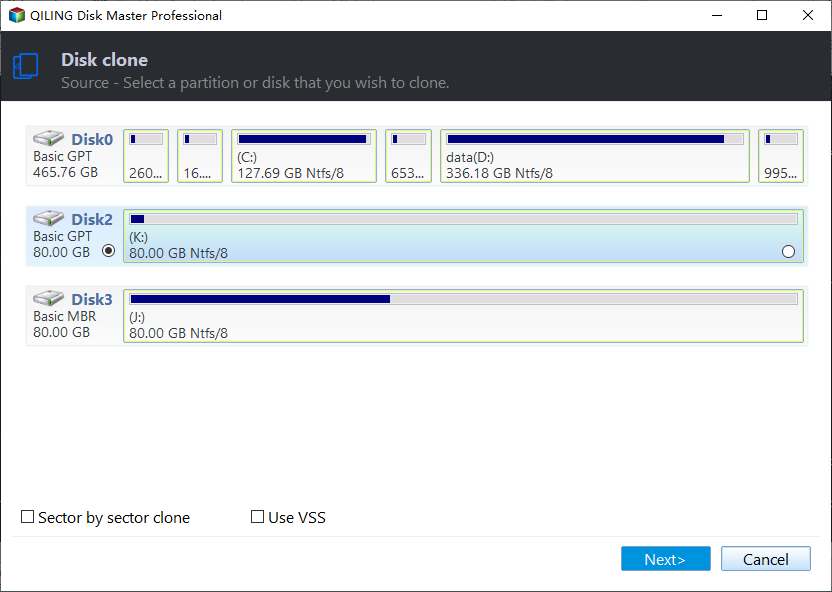
Step 1. Select the Source Disk
Open Disk/Partition clone, choose Disk Clone, and select the disk that holds the system. Read the sector size and capacity shown beside the name. A source that reports an unexpected sector size, or that appears with a capacity far below its label, is being seen through a bridge that is translating the geometry.
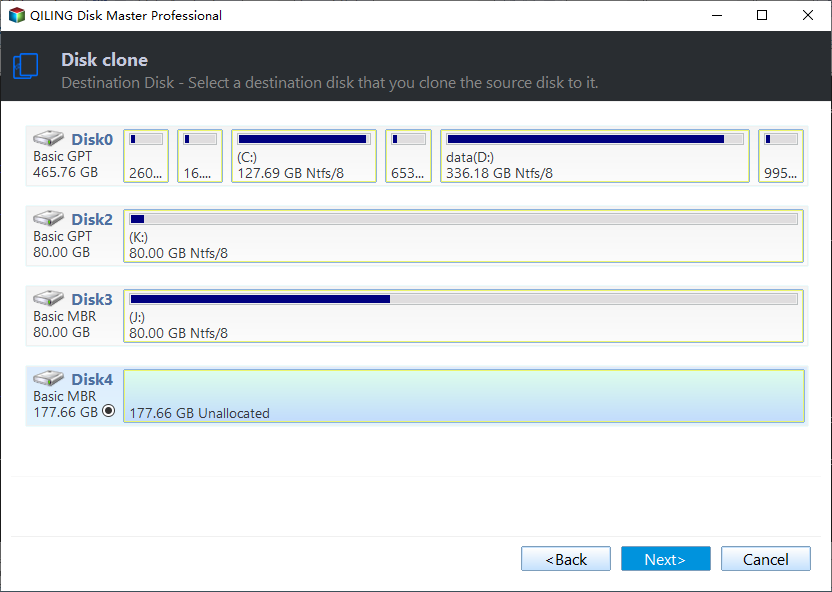
Step 2. Select the Destination Disk
Choose the target disk. If the list is empty, the destination is not initialized, is write protected, or is hidden behind a bridge that rejected the query. Fix the connection before continuing; a target that cannot be listed here cannot be written by any clone tool.
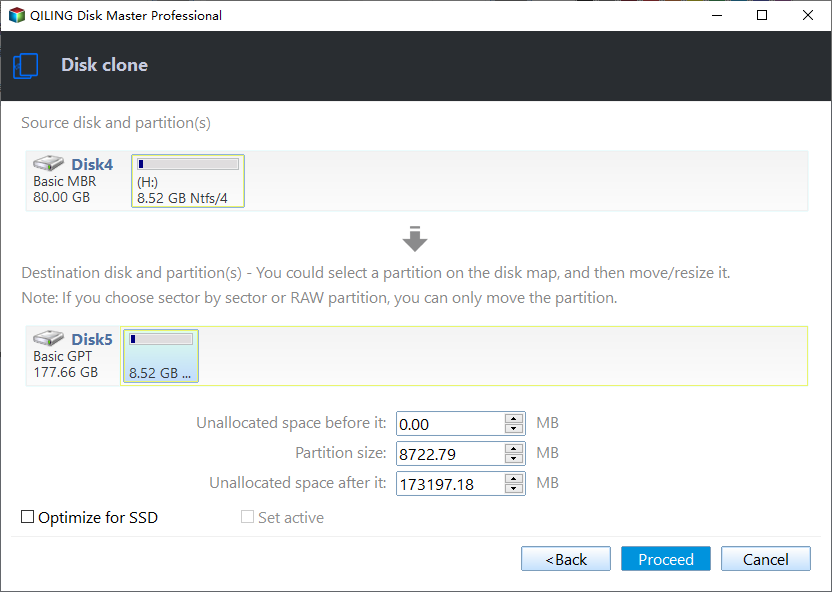
Step 3. Preview the Layout
The preview page confirms that the source partitions were read correctly and will be recreated on the destination. Tick Optimize for SSD when the target is solid state, and adjust a partition edge only if the destination is a different size. An empty or partial preview means the source was only partly readable, so stop here and reconnect the drive.
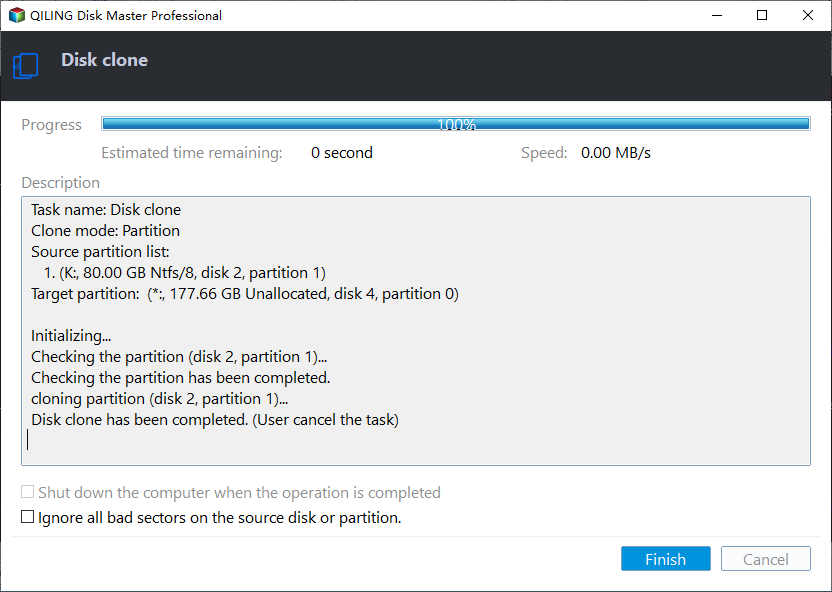
Step 4. Click Proceed and Watch the Progress
Click Proceed and confirm the overwrite warning. If the job fails at zero percent with the same code, the interface rejected the first write, which points back to the bridge, the write protection, or the driver. If it passes zero and continues, the earlier fix worked and only the wait remains.
Frequently Asked Questions
Does 0x80070001 damage the source disk?
No. The error is raised before or at the first write, and reads do not alter the source. The destination may keep a partial partition table, which is why it should be initialized again before the next attempt.
Why does the same enclosure work for file copies?
File copies use ordinary read and write commands, while a clone asks for raw device access and geometry. A bridge can support the first and reject the second, so the enclosure is fine for backups but not for cloning.
Can a 4Kn disk be cloned at all?
Yes, when it is connected directly and the target supports the same logical sector size. Through an incompatible bridge the geometry is rejected, and the error appears before any partition is written.
Related Articles
- Clone Through a USB Hub Fails
- Clone Destination Is Write Protected
- Clone a 4Kn Disk to a 512e Disk
- Clone a Disk with a Different Sector Size
- Clone a Drive with a Docking Station
Products
Articles & Tutorials
- Data Recovery
- Data Backup
- File Recovery
- File Backup
- System Backup and Restore
- Disk and Partition Clone
- Technical articles
- Mobile articles
- Disk Master Help
- Windows Data Recovery Tutorials
- Windows Secure Delete Tutorials
- Windows Partition Management Tutorials
- Windows File Backup and Restore Tutorials
- Windows System Backup and Restore Tutorials
- Windows Disk Backup and Restore Tutorials
- Windows Clone Tutorials