How to Clone a Hard Drive with Bad Sectors
A hard drive that shows bad sectors is not dead yet, but every hour of use makes a full copy less likely. The goal is to rescue the data while the drive still answers requests.
This guide explains how to judge the damage, when to image instead of clone, and how to copy the drive with Qiling Disk Master without stressing it further.
PAGE CONTENT
- Signs a Drive Has Bad Sectors
- Check Health Before Cloning
- Decide Between Clone and Image
- Clone the Drive with Qiling Disk Master
- Verify the Copy and Retire the Drive
- FAQs About Bad Sector Clones
- Back Up Windows Before You Clone
Signs a Drive Has Bad Sectors
- The drive clicks or chirps. Repeated mechanical noise points to a head or platter problem, not a software error.
- SMART shows reallocated sectors. A rising raw value means the drive is remapping failing blocks.
- Pending sectors appear. These blocks cannot be read and may fail on the next access.
- chkdsk reports errors. Bad clusters, lost file records, and index errors usually follow sector damage.
- Reads stall or time out. A copy that hangs at the same percentage is retrying a bad block.
Bad sectors spread. A drive that reports a handful today can report hundreds after another week of writes, so copy first and diagnose afterwards.
Check Health Before Cloning
- Read the SMART table. Reallocated, pending, and uncorrectable counts tell you how far the damage has gone.
- Skip the full surface scan. A long read test stresses a weak drive and can push it over the edge.
- Copy personal files first. Save documents and photos to another disk before any drive-level operation.
- Note the failing areas. If errors cluster in one folder, that data may need file recovery instead of a clone.
- Use a stable connection. A direct SATA port is more reliable than a loose USB adapter for a weak drive.
A drive that cannot finish a SMART read is not a clone candidate. Stop using it and plan data recovery from the original media.
Decide Between Clone and Image
- Choose an image for a dying drive. An image file captures the readable blocks once and can be restored many times.
- Choose a clone for a healthy drive. A working drive with a few old defects copies fastest straight to the new disk.
- Understand sector-by-sector mode. It copies every block, used or not, and is the closest match to the original layout.
- Understand used-data mode. It copies only allocated blocks, which is faster but can skip deleted content.
- Plan a second attempt. If the first copy stops, retry the unreadable range instead of restarting the whole drive.
For a drive that still boots, the image-first route is safer: you get one clean read pass and can experiment on the copy without touching the original.
Clone the Drive with Qiling Disk Master
Qiling Disk Master can clone or image a drive that Windows still detects. Install it on a working system and attach the failing drive through a SATA port or dock.
Step 1. Open Qiling Disk Master, choose Clone, and then select Disk Clone.
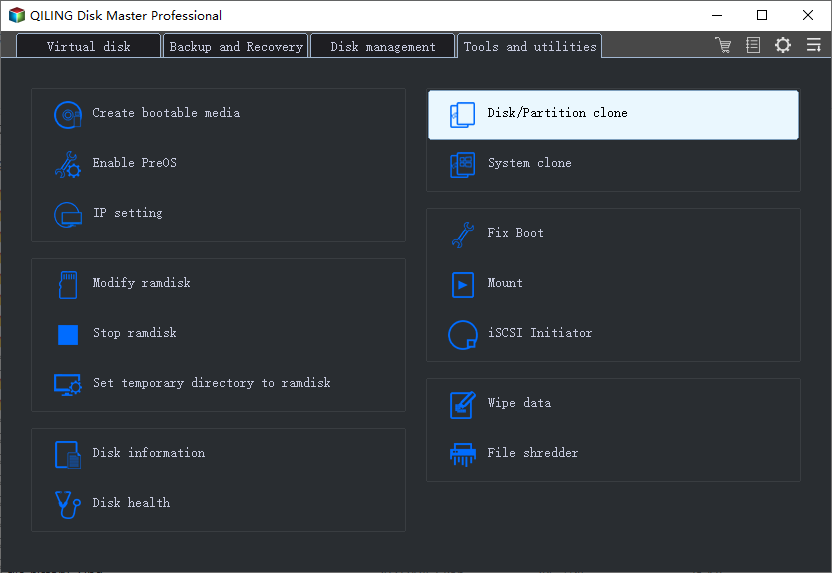
Step 2. Select the failing hard drive as the source and click Next.
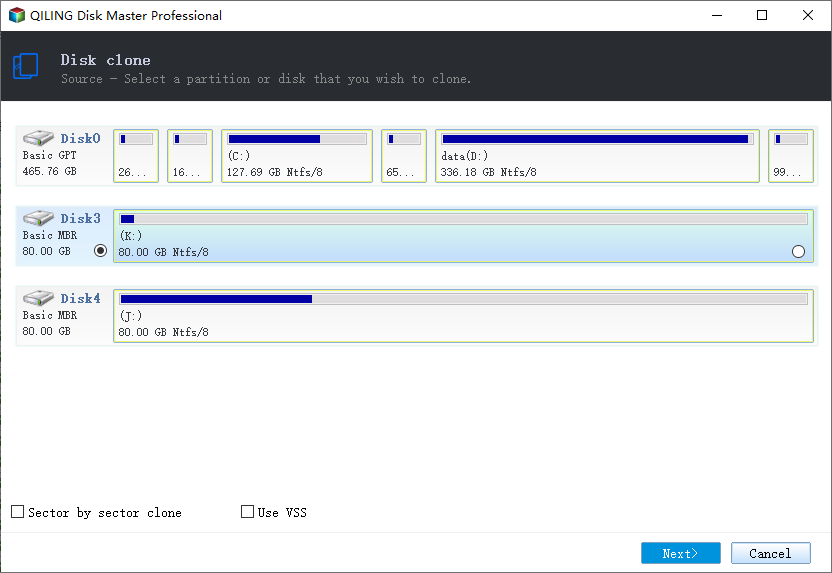
Step 3. Select the healthy replacement disk as the destination and confirm that its data will be replaced.
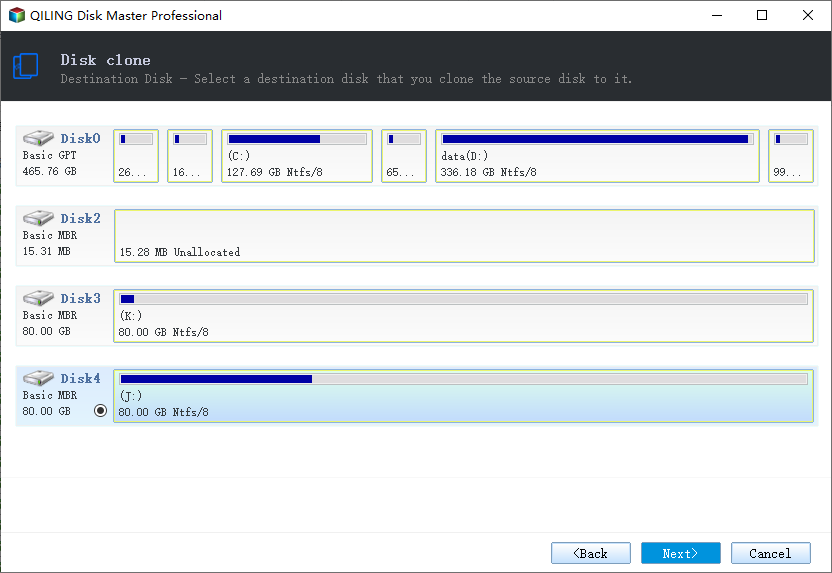
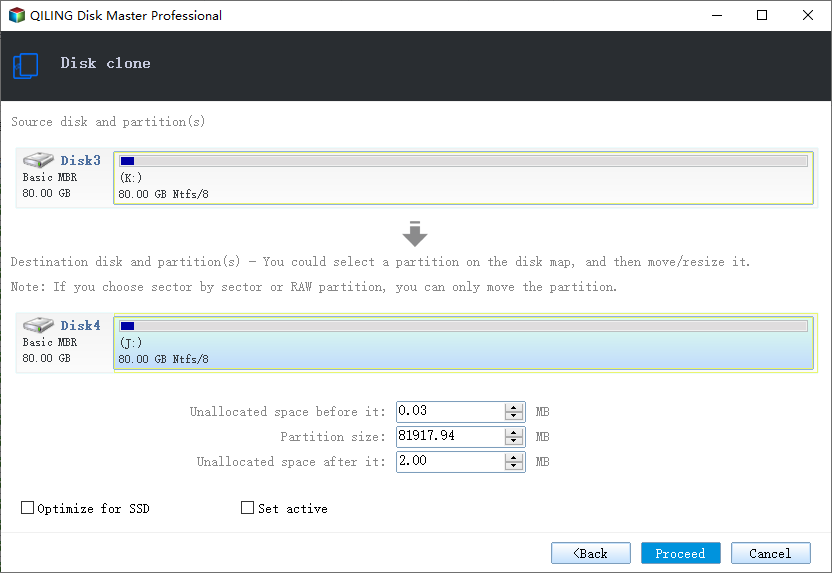
Step 4. Review the layout and enable sector-by-sector clone only when you need an exact copy of every block.
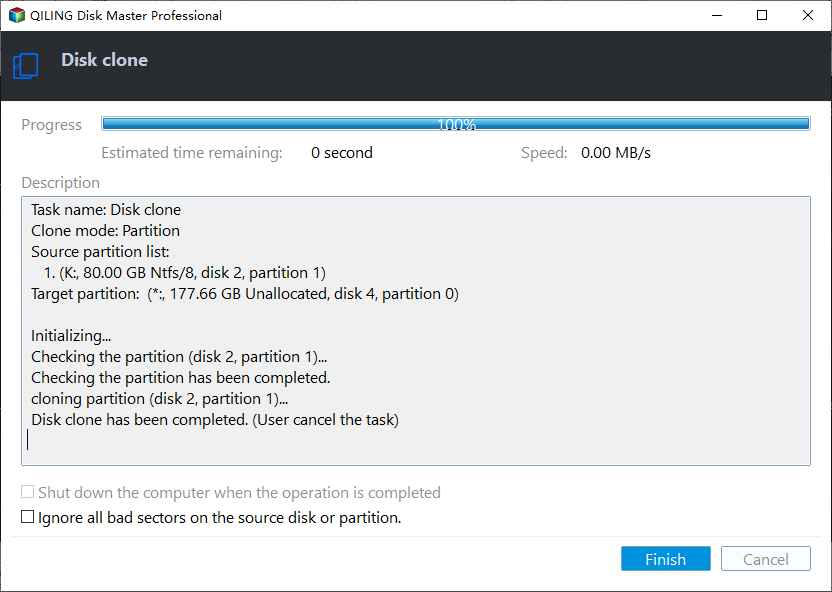
Step 5. Click Proceed and watch the progress bar. If it stalls for a long time, note the percentage before you stop the task.
Verify the Copy and Retire the Drive
- Run chkdsk on the new disk. A clean scan without bad clusters confirms the copy landed on healthy blocks.
- Read the new SMART data. The replacement should show no reallocated or pending sectors.
- Open key applications. Check the files used most often before you trust the copy with daily work.
- Test the boot path. Boot from the new disk with the old drive unplugged to prove it stands alone.
- Keep the old drive untouched. Store it until the copy has run for a week without errors.
If the copy refuses to boot, fix the boot entry rather than the data. The steps in Cloned Drive Wont Boot Fix cover the usual causes.
FAQs About Bad Sector Clones
Can cloning repair bad sectors?
No. A clone moves data to healthy blocks on a new disk but leaves the old drive damaged and unusable for storage.
Will a clone skip the unreadable data?
In used-data mode, deleted blocks are skipped. In sector-by-sector mode, a read error can stop the task at that block.
How many bad sectors are too many?
Any pending sector is a warning. When the count keeps rising between checks, replace the drive instead of repairing it.
Should I clone or reinstall Windows?
Clone when the installation and settings matter. Reinstall only when the drive is too weak to finish a copy.
Can I clone through a USB dock?
Yes for a stable drive. A weak drive is better served by a direct SATA connection to reduce retries.
Back Up Windows Before You Clone
Before changing drives or partitions, create a full system backup. Qiling Disk Master creates an image you can restore from.
Step 1. Open Qiling Disk Master and select System Backup to include Windows and the boot partitions.
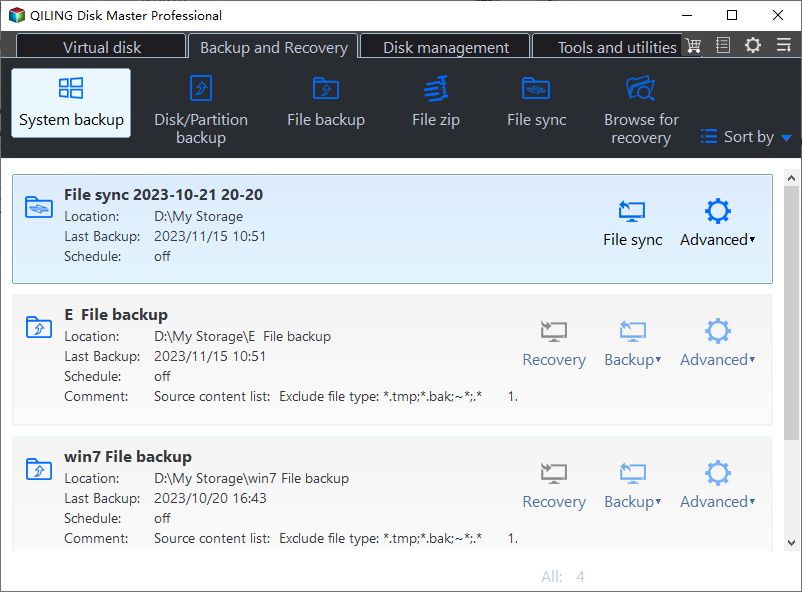
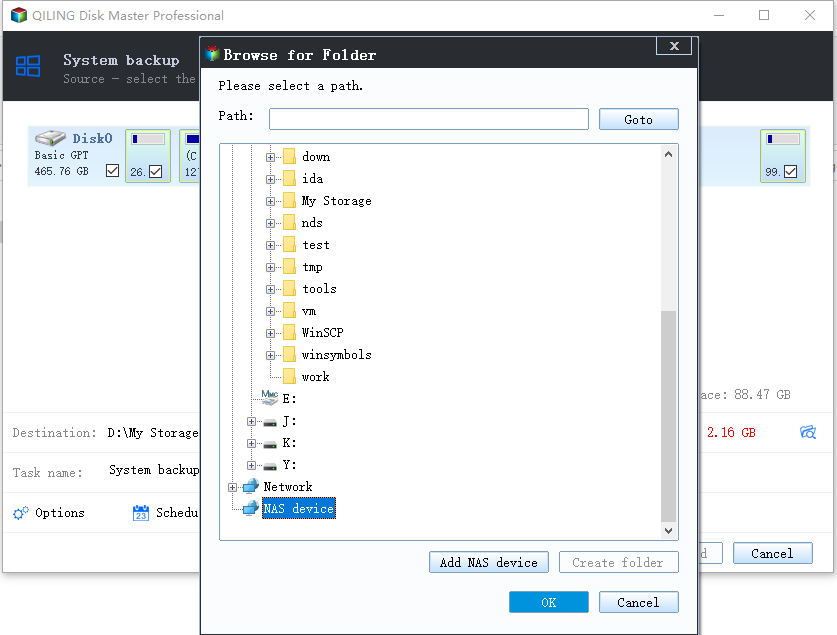
Step 2. Save the image to a drive other than the target disk and start the backup.
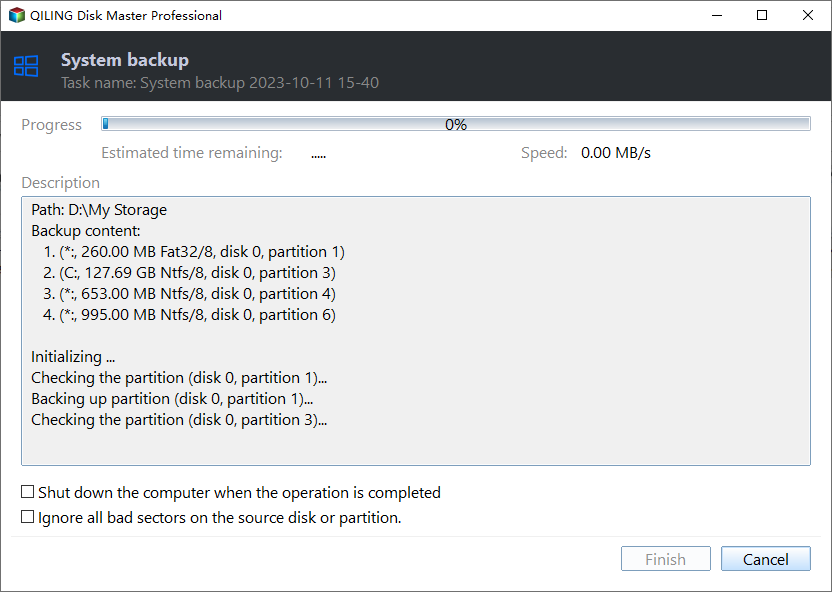
Step 3. Click Proceed to start the system backup and wait patiently until it finishes. You can also tick Shut down the computer when the operation is completed to power off automatically.
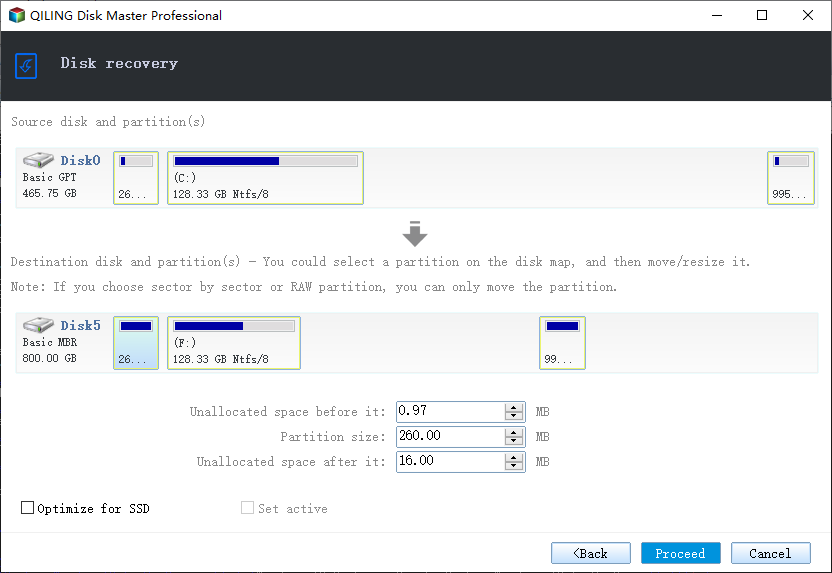
Step 4. If the copy will not start, restore the image to a spare drive and boot from it.
Conclusion
Copying a drive with bad sectors is a race against further damage. Read the SMART values, rescue personal files first, and avoid long surface scans that stress the platters. For a drive that still boots, an image gives you one clean read pass; for a healthy drive with old defects, a direct clone is faster. Use sector-by-sector mode only when you need every block, and verify the new disk with chkdsk before you retire the original.
For related reading, see Clonezilla Failed to Clone Bad Sectors, How to Clone a Failing SSD Before It Dies, Cloned Drive Wont Boot Fix, and How Long Does a Disk Clone Take.
Related Articles
- When Should I Replace My HDD
Warning signs that decide whether to repair or replace the drive. - How to Clone a Hard Drive to a Larger Hard Drive
Move everything to a bigger disk in one pass. - How to Clone a Hard Drive in Windows 7
Older systems clone the same way with a current tool. - How to Clone a Hard Drive Using Command Prompt
Built-in commands can copy an image but not a bootable disk. - How to Clone an SSD with Bad Sectors
Rescue readable data from a failing SSD by skipping unreadable blocks.
Products
Articles & Tutorials
- Data Recovery
- Data Backup
- File Recovery
- File Backup
- System Backup and Restore
- Disk and Partition Clone
- Technical articles
- Mobile articles
- Disk Master Help
- Windows Data Recovery Tutorials
- Windows Secure Delete Tutorials
- Windows Partition Management Tutorials
- Windows File Backup and Restore Tutorials
- Windows System Backup and Restore Tutorials
- Windows Disk Backup and Restore Tutorials
- Windows Clone Tutorials