S2D Tiered Virtual Disk Will Not Come Online After an Update
Quick Navigation:
- Why a Tiered Volume Stays Offline
- Read the Health and Operational Status
- Copy the Data Before Any Rebuild
- Image the Volume to a Healthy Disk
- Frequently Asked Questions
A tiered virtual disk on Storage Spaces Direct keeps a map of the slabs that live on the SSD tier and the slabs that live on the hard disk tier. A security update restarts the storage stack node by node, and the virtual disk is attached again against metadata that may now be validated differently. When that check does not complete, the disk stays offline instead of coming back, even though the data on the pool is usually still there.
Why a Tiered Volume Stays Offline
Tiered volumes are not a simple list of extents. The virtual disk metadata records tier membership, slab ownership, and the current allocation of every slab, and S2D keeps several copies of that metadata across the pool so a node failure cannot lose it. An update that changes how those blocks are written, or that fails to load the new driver cleanly, can leave the copies disagreeing.
During installation the cluster reboots in a rolling sequence. Disk ownership moves between nodes, the pool is re-enumerated several times, and a disk that answers slowly at the wrong moment can be left out of the attach. The virtual disk then reports itself as detached rather than degraded.
A single missing slab or one failed checksum on a metadata block is enough to block the attach, because the stack will not serve a namespace it cannot fully verify. That protection is the reason the volume looks dead while the physical disks are still healthy.
Read the Health and Operational Status
Read HealthStatus and OperationalStatus together, never one of them alone. HealthStatus reports Healthy, Warning, or Unhealthy for the virtual disk, while OperationalStatus reports OK, Degraded, Detached, Incomplete, or No Redundancy; a disk that is Detached with a Healthy status usually means the stack stopped the attach, not the media.
An Incomplete status means some slabs are missing from the current view. Compare the number of healthy disks in each tier with the number the pool expects, and look for a disk that is present on the node but not in the pool.
Windows built-in PowerShell cmdlets such as Get-VirtualDisk and Get-PhysicalDisk return these values, and they are Microsoft tools that are not part of Qiling Disk Master. Use them to read the state only, and change nothing until the data has been copied. When several disks drop together, see majority disks unhealthy in S2D for the order of checks.
Do not delete and recreate the virtual disk. Deleting it destroys the namespace and every volume that sits on it, and a new empty disk of the same size does not bring the data back; a rebuild only restores redundancy for the data that is still readable.
Copy the Data Before Any Rebuild
If the stack allows a read-only attach, bring the volume online that way and copy the files that matter most before anything else. A read-only volume cannot be written to, so a failed copy attempt will not make the metadata worse.
Copy to a disk that is not part of the pool. Writing the copy back onto the same pool consumes the free space a repair would need later, and it puts the only good copy on the hardware that is already suspect.
Keep the original disks and the original metadata untouched until two independent copies exist. Do not reset the pool, remove the tier disks, or start a metadata repair while the copy is running, because a repair that rewrites the slab map can cut the last path to files that were still readable. A pool that has already lost redundancy may warn about it, and the resiliency warning explains what that state means.
Image the Volume to a Healthy Disk
Qiling Disk Master captures the disk behind the volume as an image, so the copy does not depend on the file system mounting cleanly. Run it on a node or a workstation where the disks are visible, and write the image to a target outside the cluster.
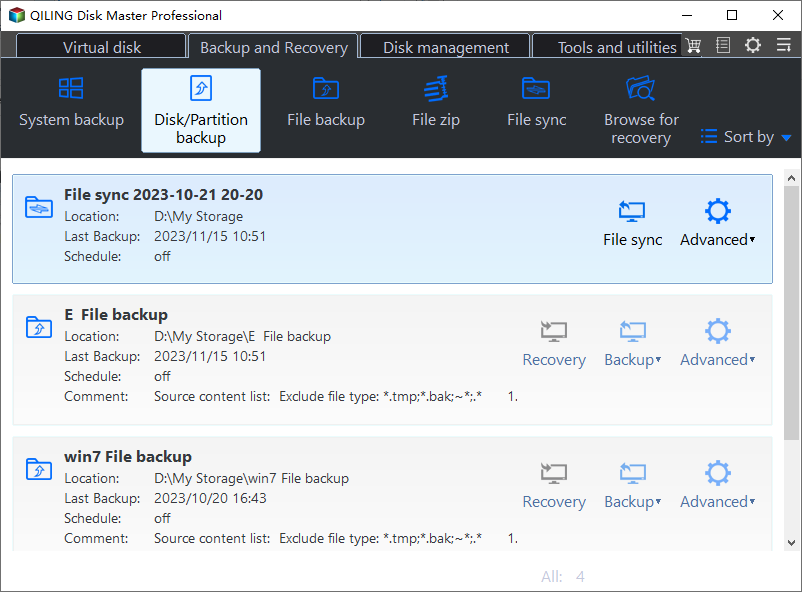
Step 1. Open Disk Backup
Go to the Backup and Recovery tab and choose Disk Backup. A disk image keeps the partition table and the file system structures together, which is what a detached tiered volume needs.
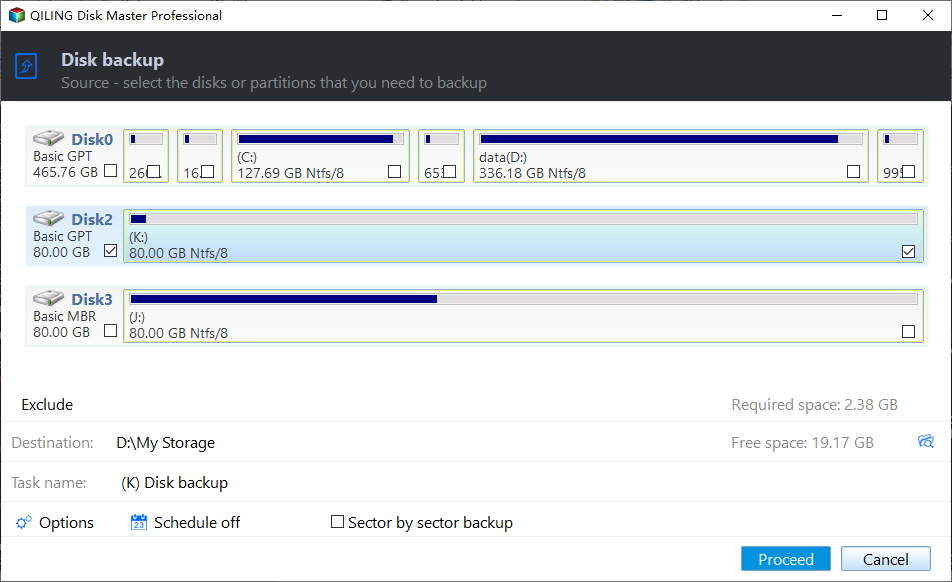
Step 2. Select the Disk Behind the Volume
Tick the disk that carries the affected volume directly in the source list. Compare its number and capacity with the output you read in the previous section, because the pool may expose several disks of the same model.
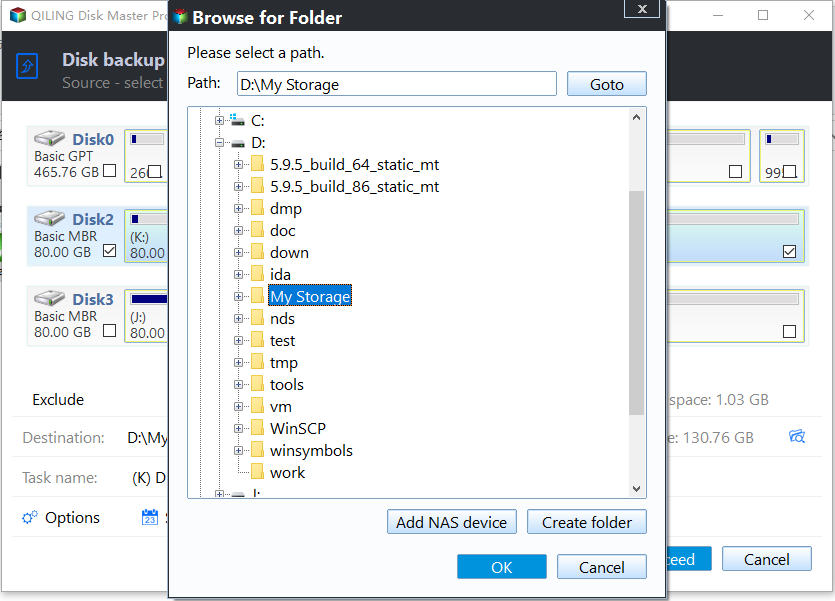
Step 3. Set a Destination Outside the Cluster
Choose a folder on a disk that is not a pool member, with enough free space for the used data. A local disk on another controller or a USB enclosure is safer than a volume on the same backplane that is already dropping links.
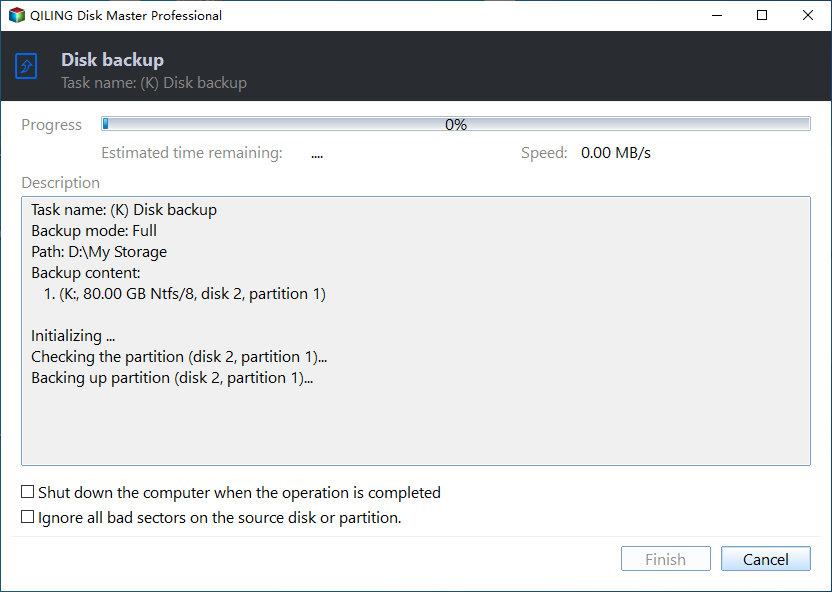
Step 4. Review the Task and Proceed
Check the summary, click Proceed, and watch the first few percent closely. A task that stops at once usually means the disk left the bus again, which points at hardware and should be fixed before any rebuild is attempted.
Frequently Asked Questions
Will rolling back the security update bring the disk online?
Not reliably. A rollback changes the storage stack again and can leave the metadata in a different state, so copy the data out first and treat the rollback as a separate, planned change.
Can the missing tier disk be added back to the pool?
Only while the pool still lists it as an eligible disk. A disk that was replaced, wiped, or claimed by another pool has to be prepared and added as a new disk, and any data that existed only on it is lost.
Does recreating the virtual disk restore the volume?
No. The new virtual disk starts empty. Only a copy made before the rebuild can bring the files back, which is why the image in the previous section comes first.
If the pool will not extend because a maintenance job never finishes, see a stuck storage job in Storage Spaces Direct.
Related Articles
- Virtual Disk Detached: Majority Disks Unhealthy in S2D
- Storage Spaces Reduce Resiliency Warning
- Storage Spaces Direct Pool Cannot Extend: Stuck Storage Job
- Two-Way to Three-Way Mirror Conversion Fails in S2D
- Windows Server 2025 Storage Pool Will Not Extend
Products
Articles & Tutorials
- Data Recovery
- Data Backup
- File Recovery
- File Backup
- System Backup and Restore
- Disk and Partition Clone
- Technical articles
- Mobile articles
- Disk Master Help
- Windows Data Recovery Tutorials
- Windows Secure Delete Tutorials
- Windows Partition Management Tutorials
- Windows File Backup and Restore Tutorials
- Windows System Backup and Restore Tutorials
- Windows Disk Backup and Restore Tutorials
- Windows Clone Tutorials