Storage Spaces Direct Pool Cannot Extend: Stuck Storage Job
Quick Navigation:
- Why the Storage Job Sticks
- Read the Job and Pool State
- Clear the Backlog
- Add Capacity Safely
- Frequently Asked Questions
In Storage Spaces Direct every pool change is a cluster job, and the cluster runs those jobs one at a time. When a job sits at Pending, the pool will not accept a new disk, and installing more hardware changes nothing until the queue moves again. The stalled job is not the fault itself; it is the symptom of a disk, a node, or a site that the cluster cannot bring to a healthy state.
1 Why the Storage Job Sticks
A job that has not completed holds the queue, and every later request waits behind it, including the one that would add your new capacity. This is by design: two metadata changes applied at once could describe the same disk twice.
The usual causes are a physical disk reporting Lost Communication or an unhealthy operational status, a disk that already belongs to another pool or still carries a stale S2D signature, a firmware or model mismatch inside the same pool, a node left in maintenance mode, or a site with no room left for the metadata update.
A job can also stall at a high percentage when the disk it targets has been physically removed. The cluster keeps retrying until that device is returned or formally retired from the pool, so the progress bar never reaches the end.
2 Read the Job and Pool State
Open Failover Cluster Manager, select the cluster, and open Storage, then Pools. The Storage Jobs view lists each job with its state, its progress, and any error text. Read the oldest unfinished job first, because the rest are only waiting on it.
In the same console, check the health of the pool and of every physical disk. Healthy, Warning, and Critical do not mean the same thing as online: a pool in Warning can still serve reads while it refuses new allocations.
Write down the serial numbers and the site of each unhealthy disk. That list, not the number of queued jobs, tells you what has to be resolved before the queue can drain on its own.
3 Clear the Backlog
Fix the target of the oldest job first. If a disk is missing, reconnect it to the same port on the same node; if it is failing, retire it through the pool interface instead of pulling it out of the chassis.
Do not delete the job and do not restart the cluster to clear the queue. An interrupted job leaves the pool metadata half-applied, and the pool may then report a reduced resiliency warning on top of the original problem.
Wait for the queue to empty and for the pool to return to Healthy, and confirm that no disk is degraded or retired, before you plan the capacity change.
4 Add Capacity Safely
Back up the workloads that live on the pool before the layout changes, and Qiling Disk Master can copy those data volumes to a separate disk while the cluster is still serving, so the addition stays reversible. Fit the new disk from the same model family and firmware as the existing members, install it in the same site, and leave it unformatted, because a disk with an old partition table or a foreign pool signature will be rejected and will start another stalled job.
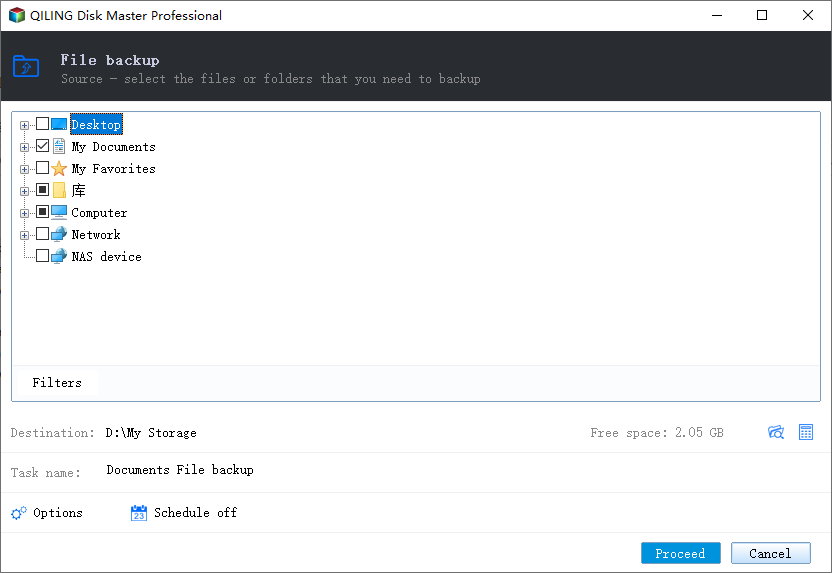
Step 1. Select the Files to Copy
Open the program, go to Backup and Recovery, and choose File Backup. Expand the volume that holds the cluster data in the source tree and tick the shared folders, so the copy reflects the files as they exist at that moment.
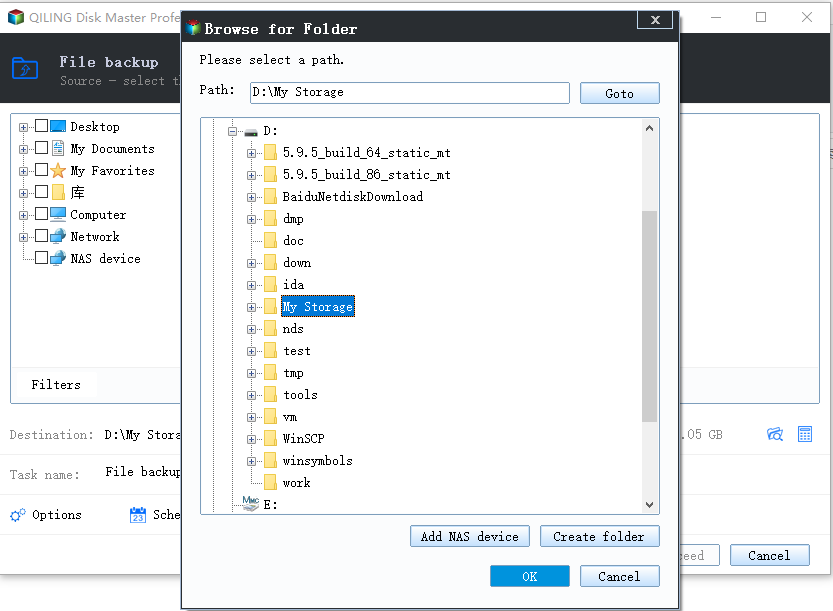
Step 2. Choose a Destination and Start
Point the destination at a disk outside the pool and confirm that it has more free space than the selection. Start the task, then open the destination and check several files before you add the new disk to the pool.
Only after the copy is verified should you add the disk and watch the new job run to completion; if that job fails, the backup is still the copy you fall back on.
5 Frequently Asked Questions
Can I add the disk while a job is pending?
No. The pool serialises changes, so the request queues behind the stalled job and may time out. Clear the backlog first.
Is restarting a node a safe way to clear a stuck job?
It is not. An interrupted job can leave the pool metadata half-written. Resolve the unhealthy disk the job is waiting on instead.
Why is the new disk rejected as already in use?
It still carries an old pool signature or a partition table. Wipe it completely and confirm that no other pool claims it before you retry.
Related Articles
- Storage Spaces Reduce Resiliency Warning
- Storage Spaces Disk Missing and Cannot Be Removed
- Back Up Windows Server 2025 Storage Spaces
- Recover Deleted Files From a Storage Spaces Volume
- Storage Spaces Drive Not Visible to Clone Software on Windows
Products
Articles & Tutorials
- Data Recovery
- Data Backup
- File Recovery
- File Backup
- System Backup and Restore
- Disk and Partition Clone
- Technical articles
- Mobile articles
- Disk Master Help
- Windows Data Recovery Tutorials
- Windows Secure Delete Tutorials
- Windows Partition Management Tutorials
- Windows File Backup and Restore Tutorials
- Windows System Backup and Restore Tutorials
- Windows Disk Backup and Restore Tutorials
- Windows Clone Tutorials