Storage Spaces Drive Shows Lost Communication: What to Do
Quick Navigation:
- What Lost Communication Actually Reports
- Bring the Node and Enclosure Back Online
- Replace the Disk Only After the Pool Is Stable
- Image the Pool Before Any Repair
- Frequently Asked Questions
Lost Communication is a health state, not an error returned by the drive itself. Storage Spaces and Storage Spaces Direct apply it when a physical disk stops answering the health checks the pool sends on a fixed interval. The disk may still be listed, still spin up, and still hold readable data. What has failed is the handshake between the pool and the device, and the order in which you respond decides whether that data stays reachable.
What Lost Communication Actually Reports
A pool does not address disks by bay number or drive letter. When a disk joins, the pool writes an identifier and a copy of the pool configuration onto it, and every later mount matches the disk by that identifier. Lost Communication means the pool could not complete that match within the time it allows, so it stops scheduling reads and writes on the disk and serves the volume from the remaining copies.
The label describes the path, not the media. A loose cable, a powered-down enclosure, a firmware reset, a backplane that drops a lane, and a drive with a failing controller all produce the same status. In a cluster the pattern is the giveaway: when every disk in one node changes state at the same moment, the node or its chassis is the common factor, and replacing drives one by one will not help.
The volume usually stays online while redundancy lasts. Once too few disks answer, the virtual disk detaches and access stops instead of slowing down, a sequence described in a virtual disk that detaches when most disks are unhealthy.
Bring the Node and Enclosure Back Online
Start above the disk. Check the cluster node state, the enclosure power, and the bay indicators before you touch a drive. If a whole chassis is affected, the fault is in the chassis, its power, or its uplink, and the disks are only reporting the result.
Reseat the suspect drive in its bay, then replace the cable and move it to another port on another controller if one is free. A disk that returns to Healthy after the move was never failing; retire the cable, bay, or backplane instead and record the change.
Give the pool time to rescan before you issue any repair. A rescan that is still running reports stale status, and forcing an action during it can move data onto disks that are already busy rebuilding.
Windows Event Viewer, Disk Management, and the cluster manager supply this evidence. They are Microsoft tools and are not part of Qiling Disk Master, so gather the facts there before you plan a copy.
Replace the Disk Only After the Pool Is Stable
Do not start a replacement while the pool is still recovering or a node is offline. A rebuild writes new copies across the surviving disks, and doing that while they are already under stress is how a single lost disk becomes a lost volume.
A disk that does not return after a reseat, a new cable, and a different port is the one to replace. Match the capacity at or above the old disk, keep the sector size the same, and prefer a model the enclosure vendor has validated. A disk that is slightly too small will not be claimed, the usual reason a pool refuses a replacement drive.
Leave the failed disk in the pool until the replacement is ready. Removing it rewrites the slab map and can push data onto disks that are stable but not idle, while waiting costs nothing as long as the volume is not writing.
After the rebuild finishes, confirm that every disk reports Healthy and that the volume has returned to its original resiliency. A pool that still shows a reduced state is not finished, even when the copy job has completed.
Image the Pool Before Any Repair
If files no longer open, capture the disks before you change anything. Qiling Disk Master reads a disk below the file system, so it can copy the pool members even when the volume will not mount in Explorer. Image every disk that still answers, then work on the copy.
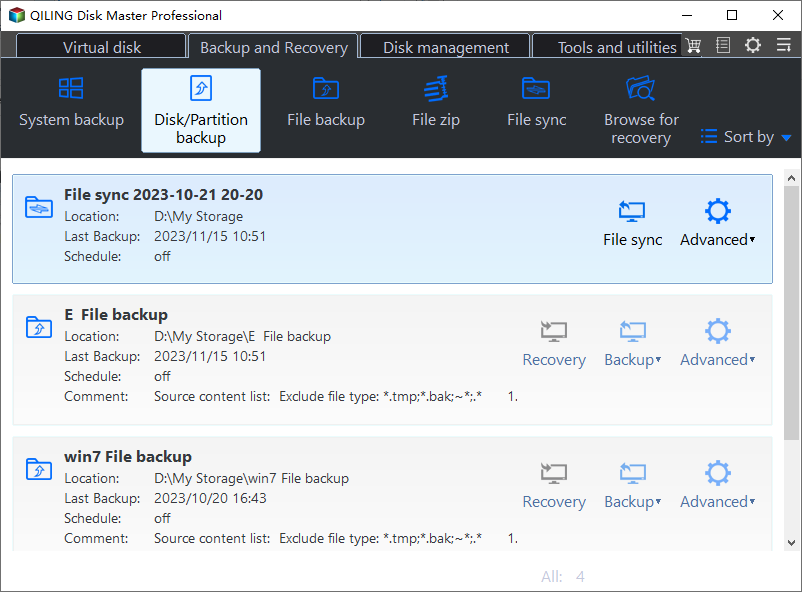
Step 1. Open Disk Backup
Go to the Backup and Recovery tab and choose Disk Backup. A full disk image keeps the pool metadata on each member, which is what a later rebuild needs.
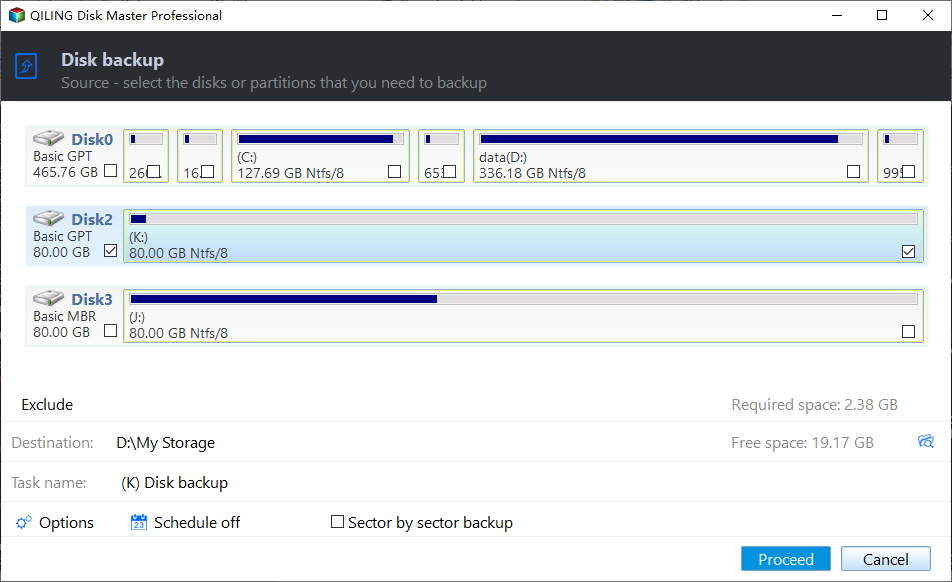
Step 2. Tick the Disks in the Source List
Tick each pool disk that still responds in the source list, and compare the capacities with the list in Disk Management so the failing member is included and no unrelated disk is captured.
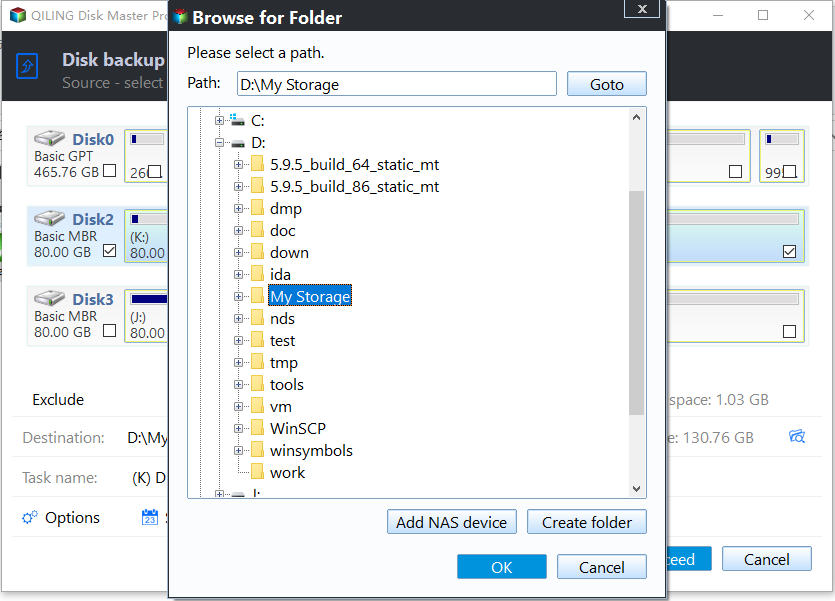
Step 3. Set the Destination and Proceed
Choose a folder on a disk outside the pool, review the task summary, then preview the pending operation and click Proceed. Watch the first few percent: a task that stops at once means a disk has left the bus again.
Frequently Asked Questions
Is Lost Communication the same as a dead disk?
No. The drive can be healthy and still lose the handshake through a cable, a port, or a firmware reset. Move it to another path before you decide to replace it.
Can the pool rebuild without a new disk?
Only if the original disk comes back and reports Healthy. A rebuild onto the same marginal disk repeats the failure, so wait for a stable member before you start one.
How long should I wait before replacing a disk?
Wait until the pool has finished rescanning and the node is online. Replacing during recovery adds load to the surviving disks and can take the volume down.
If a storage job hangs after the rebuild instead of finishing, see a Storage Spaces Direct storage job that stays stuck.
Related Articles
- Storage Spaces Physical Disk Shows Unknown or Lost Communication
- Virtual Disk Detached: Majority Disks Unhealthy in S2D
- Storage Spaces Disk Missing and Cannot Be Removed
- Storage Pool Will Not Claim a Replacement Drive
- Storage Spaces Direct Storage Job Stays Stuck
Products
Articles & Tutorials
- Data Recovery
- Data Backup
- File Recovery
- File Backup
- System Backup and Restore
- Disk and Partition Clone
- Technical articles
- Mobile articles
- Disk Master Help
- Windows Data Recovery Tutorials
- Windows Secure Delete Tutorials
- Windows Partition Management Tutorials
- Windows File Backup and Restore Tutorials
- Windows System Backup and Restore Tutorials
- Windows Disk Backup and Restore Tutorials
- Windows Clone Tutorials