Storage Spaces Physical Disk Shows Unknown or Lost Communication
Quick Navigation:
- What Unknown Means for a Pool Disk
- Tell a Bad Disk From a Bad Link
- Protect the Data While the Pool Is Degraded
- Copy the Data Off the Pool
- Frequently Asked Questions
Storage Spaces reports a physical disk as Unknown, or logs Lost Communication, when the pool can no longer read the identifier it wrote into that disk. The drive may still appear in Windows and may still spin up, but the pool has lost the handshake it needs in order to use it. The distinction matters, because the fix for a bad link and the fix for a bad disk are different.
What Unknown Means for a Pool Disk
The pool does not address disks by drive letter or by port. When a disk joins, Storage Spaces writes a copy of the pool metadata and a disk identifier to it, and every later mount matches the disk by that identifier rather than by the slot it occupies.
Unknown therefore means the identification read failed: the disk did not answer in time, answered through a different path, or returned metadata that no longer matches the pool. Lost Communication is the same condition reported by the health model, and the two often appear side by side.
A disk can be physically healthy and still show Unknown. A loose cable, a backplane that drops a lane, or firmware that resets the link produce exactly the same status as a drive that is about to fail.
Tell a Bad Disk From a Bad Link
Move the drive to another cable and another port, preferably on another controller, then rescan the pool. A disk that returns to Healthy after the move was never failing, and the old cable, bay, or backplane should be retired.
Read the drive's SMART data before trusting it again. Reallocated sectors, pending sectors, and uncorrectable errors point at the media; a clean media report with a rising link or CRC error count points at the path instead.
Compare the firmware and driver level of the HBA or backplane with the vendor's supported list, and check that each drive runs a firmware release the enclosure vendor has validated. A driver that resets the link under load will keep marking disks Unknown until it is updated.
Windows built-in tools such as Disk Management, Device Manager, and Event Viewer supply this evidence, and they are Microsoft tools that are not part of Qiling Disk Master.
Protect the Data While the Pool Is Degraded
A pool with an Unknown disk has lost at least one copy of the data on the affected slabs, and every access now reads the surviving copies. Copy the data off while the remaining disks are still answering, because a second failure in that window can take the volume down.
Do not remove the Unknown disk from the pool yet. Removal rewrites the slab map and may move data onto disks that are already under stress, while a copy leaves the pool layout untouched.
Replace the failed disk with one of equal or larger capacity, and keep the sector size and model family as close as the pool allows. A disk that is too small will not be claimed, and a pool that refuses a replacement drive usually has a capacity or eligibility problem rather than a hardware one.
Watch the pool's free space during the rebuild. A pool that reports not enough capacity cannot restore redundancy until space is freed or a larger disk is added.
Copy the Data Off the Pool
Before any disk is removed, read the suspect drive end to end. Qiling Disk Master runs that read as a surface test and can then image the surviving disks to a target outside the pool. The steps below cover both.
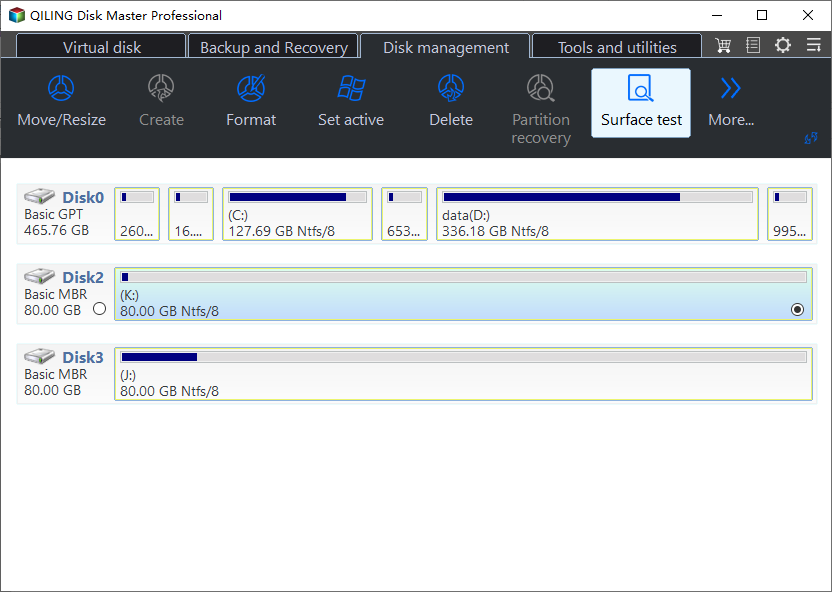
Step 1. Run a Surface Test on the Suspect Drive
Open the Tools and utilities tab, choose Disk Surface Test, and let it read the whole disk. The test reports unreadable or slow sectors without writing, so it separates media damage from a link that only fails under load.
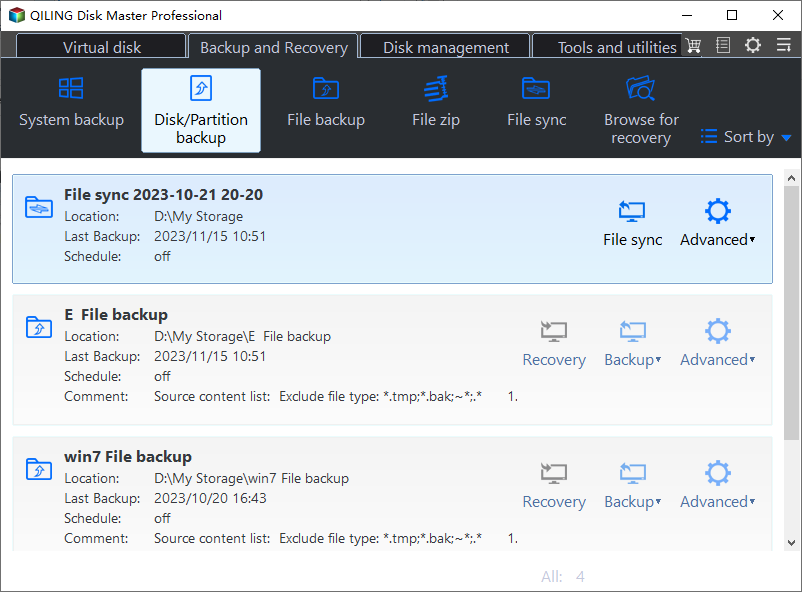
Step 2. Open Disk Backup
Switch to the Backup and Recovery tab and choose Disk Backup. An image of each surviving disk preserves the pool data even when the volume itself cannot be mounted.
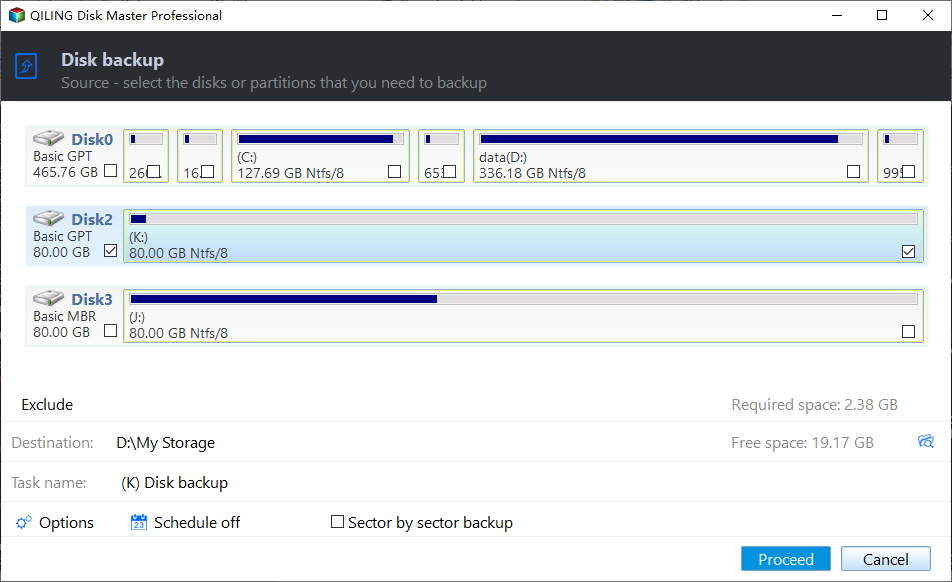
Step 3. Select the Disks and Choose a Target
Tick each pool disk that still responds directly in the source list, then set a destination on a disk outside the pool with room for the used data. Keep the image away from the enclosure that is dropping links.
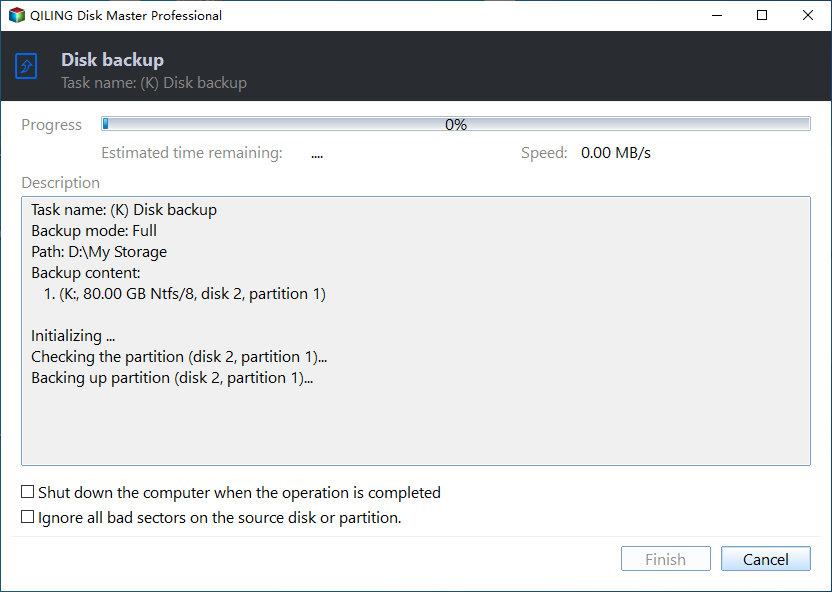
Step 4. Start the Task and Watch for Read Errors
Click Proceed and follow the first few percent of the task. A stop at once means a disk has left the bus again; note which disk it was, because that is the one to replace first.
Frequently Asked Questions
Can an Unknown disk be forced back into the pool?
Not safely. Forcing it back can overwrite the pool metadata on that disk, and if the read failed because of media damage, the write may finish the job.
Does a disk from another brand work as a replacement?
Yes, when the capacity is equal or larger and the sector size matches. The pool reformats the new disk, so it must not hold data you still need.
Is Lost Communication always a hardware fault?
No. Stale pool metadata after an unclean shutdown can produce the same status, and a rescan after a clean restart sometimes restores the disk without any part being replaced.
If the disk stays listed as missing and the pool will not release it, see a Storage Spaces disk that is missing and cannot be removed.
Related Articles
- Storage Pool Will Not Claim a Replacement Drive
- Storage Spaces Disk Missing and Cannot Be Removed
- Storage Space Says Not Enough Capacity
- External Hard Drive Disconnects During Large File Copies
- Disk Offline After a Windows Update
Products
Articles & Tutorials
- Data Recovery
- Data Backup
- File Recovery
- File Backup
- System Backup and Restore
- Disk and Partition Clone
- Technical articles
- Mobile articles
- Disk Master Help
- Windows Data Recovery Tutorials
- Windows Secure Delete Tutorials
- Windows Partition Management Tutorials
- Windows File Backup and Restore Tutorials
- Windows System Backup and Restore Tutorials
- Windows Disk Backup and Restore Tutorials
- Windows Clone Tutorials