Differencing VHDX Will Not Mount When the Parent Is Missing
Quick Navigation:
- How the Chain Records Its Parent
- Reconnect the Parent Read-Only
- Export the Data Before Touching the Chain
- Back Up the Virtual Machine Folder
- Frequently Asked Questions
A differencing VHDX does not contain the whole virtual disk. It records only the blocks that changed since its parent, and it stores a reference to that parent so the two files can be combined when the disk is opened. Move, rename, or delete the parent and the chain breaks: the child file is intact, but it cannot be read on its own.
How the Chain Records Its Parent
Each VHDX keeps a parent locator, which is the path where the parent sat when the child was created, plus an identifier that ties the child to that exact file. Windows checks both when the chain is opened, and either check alone is enough to stop the mount.
A copy of the parent is not the same file. Even a byte-identical copy at the right path fails the identifier check if the file was recreated, and a genuine parent moved to another folder fails the path check, which is why renaming a folder is as damaging as deleting the file.
The usual symptoms are a message that the parent disk cannot be found, or a mount that reports the child as corrupt even though both files are present. A child that grew far beyond its expected size has a different problem, covered in a VHDX that does not shrink after deleting data.
Reconnect the Parent Read-Only
Put the parent back at the recorded path and under the recorded name first, because that restores the chain without editing the child at all. If the original path is unknown, read the parent locator from the child's metadata with a VHD tool rather than guessing.
Attach the child through Disk Management with the Read-only option ticked, so nothing writes to the chain while it is being tested. Disk Management, Hyper-V Manager, and PowerShell are Microsoft tools and are not part of Qiling Disk Master.
If the parent has to stay in a new location, keep the relationship relative by placing the parent and the child in one folder and attaching them together. Editing the chain with Set-VHD is possible, but it rewrites metadata that cannot be restored from a backup you have not made.
Export the Data Before Touching the Chain
Copy the whole folder, including the parent, the child, and any checkpoints, to another disk before any repair. Merging a child into its parent is one-way, and a merge that fails halfway can leave neither file usable.
Attach the chain read-only and copy the files out of the guest volume through Explorer or a file-level backup. When the virtual machine will not start, mount the child on the host read-only and copy the data from the mounted volume instead of booting the guest.
Only after the data exists somewhere else should the chain be merged or rebuilt. A snapshot chain that is already broken should be rebuilt from a full copy, and the difference between the disk types is explained in a dynamic VHDX that stops growing.
Back Up the Virtual Machine Folder
Qiling Disk Master backs up folders and files to another disk, which is enough to preserve a parent and child pair before any merge. The steps below create that copy from the host.
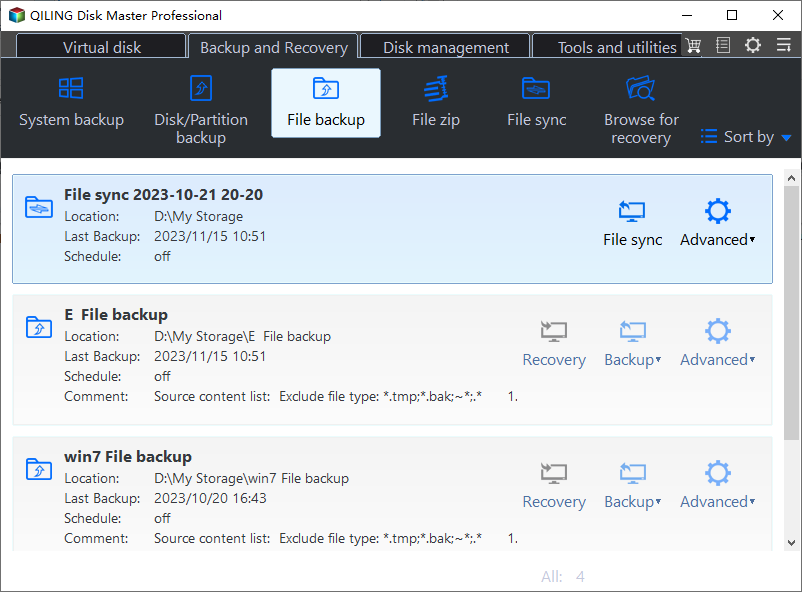
Step 1. Open File Backup
Go to the Backup and Recovery tab and choose File Backup. A file-level job keeps the folder structure, so the parent and child stay in the same relative position inside the backup.
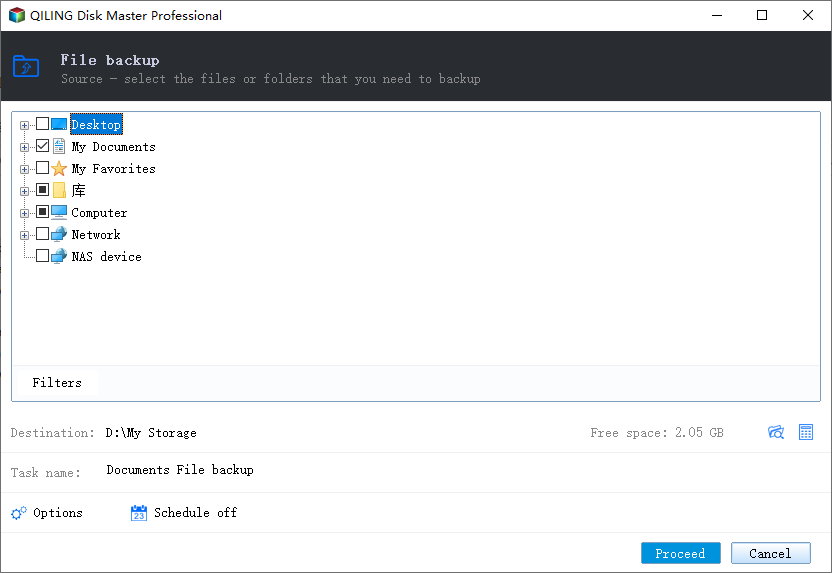
Step 2. Select the Virtual Machine Folder
Add the folder that holds the parent VHDX, the child VHDX, and the configuration files. Select the folder rather than the child alone, because the child is useless without its parent.
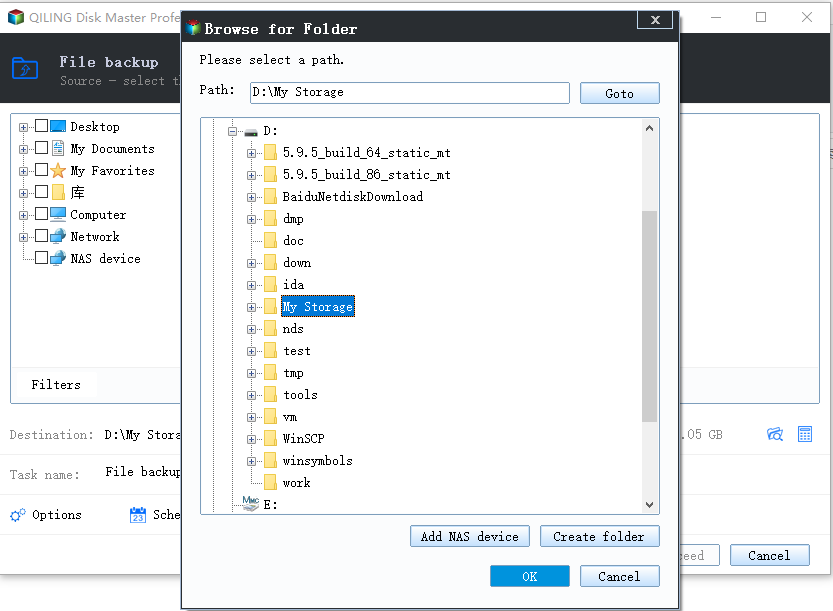
Step 3. Choose a Destination on Another Disk
Pick a folder on a different physical disk with room for the full size of the chain. The parent is usually the large file, so check the used space of the folder rather than the size of the child.
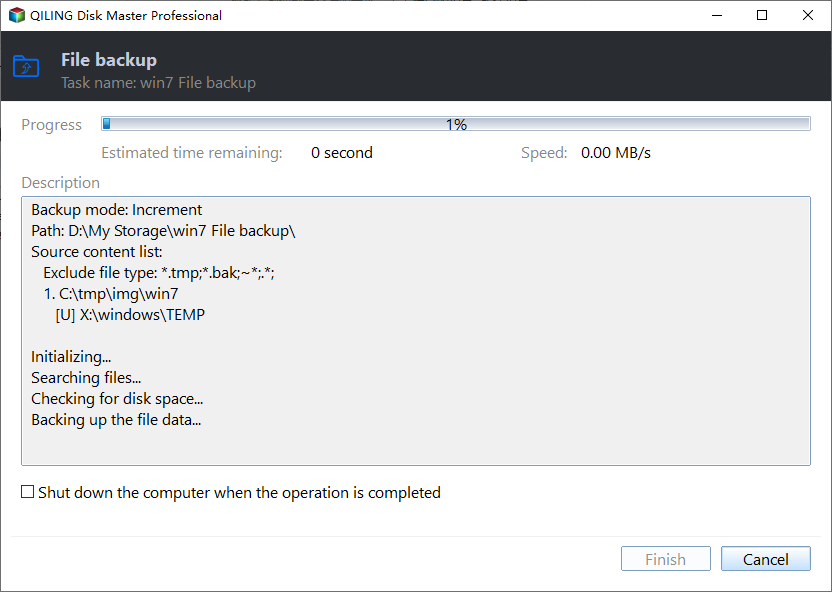
Step 4. Start the Task and Check the Result
Click Proceed and let the job finish, then open the destination folder and confirm that both VHDX files and the configuration files are present and the same size as the source.
Frequently Asked Questions
Can the child VHDX be used without the parent?
No. The child holds only the changed blocks, so every unchanged block still has to be read from the parent. Without it the virtual disk cannot be assembled.
Does renaming the parent folder break the chain?
Yes. The recorded path no longer resolves, so the mount fails before the identifier check even runs. Rename it back and the chain works again.
Can a merged disk be split back into parent and child?
No. Merging writes the child's blocks into the parent and is one-way, which is why the folder copy has to exist before the merge begins.
If the restored virtual disk later reports that it is out of space, see a thin-provisioned volume that runs out of space.
Related Articles
- Dynamic VHDX Stops Growing at Its Maximum Size
- VHDX File Does Not Shrink After Deleting Data
- Thin-Provisioned Volume Runs Out of Space
- Disk Management Keeps Refreshing and Shows No Disks
- Windows 10 Drive Converted to RAW Format
Products
Articles & Tutorials
- Data Recovery
- Data Backup
- File Recovery
- File Backup
- System Backup and Restore
- Disk and Partition Clone
- Technical articles
- Mobile articles
- Disk Master Help
- Windows Data Recovery Tutorials
- Windows Secure Delete Tutorials
- Windows Partition Management Tutorials
- Windows File Backup and Restore Tutorials
- Windows System Backup and Restore Tutorials
- Windows Disk Backup and Restore Tutorials
- Windows Clone Tutorials