What Is HFS+ | HFS+ vs. APFS, HFS+ vs. exFAT
What IS HFS+
HFS Plus, also known as Mac OS Extended, is a file system developed by Apple. It has been the default file system for Mac computers since 1998, primarily used on mechanical and hybrid drives.
HFS+ is the file system used on all Macs since 1998, primarily on mechanical and hybrid drives. Older versions of macOS use HFS+ by default for all drives, but it was replaced by APFS in newer versions.
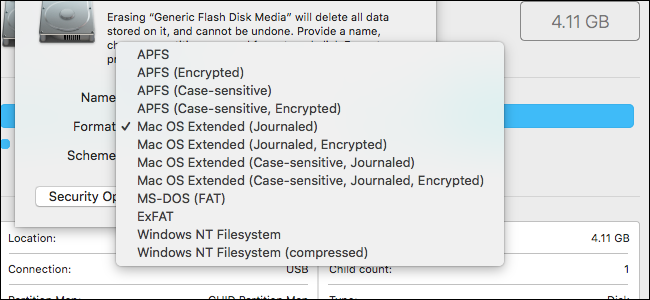
HFS+ was introduced as an upgrade to the original Hierarchical File System (HFS) when Apple released macOS 8.1. It is still used on older Macs and is also known as Mac OS Extended (Journaled).
HFS+ vs. HFS
HFS+ supports much larger files and is more compatible compared to its predecessor HFS.
| Feature | HFS | HFS+ |
| User-visible name | Mac OS Standard | Mac OS Extended |
| Number of allocation blocks | 16 bits worth | 32 bits worth |
| Long file names | 31 characters | 255 characters |
| File name encoding | MacRoman | Unicode |
| File attributes | Support for fixed-size attributes | Allows for future meta-data extensions |
| OS startup support | System Folder ID | Also supports a dedicated startup file |
| catalog node size | 512 bytes | 4 kb |
| Maximum file size | 2^31 bytes | 2^63 bytes |
HFS+ Structures
An HFS+ volume consists of nine main structures:
- The Volume Header stores essential information about a volume, including its creation date, file number, and other relevant details. This section provides a concise summary of the volume's metadata, allowing users to quickly identify and manage their data.
- Allocation File: A data structure used to track the availability of memory blocks, indicating whether each block is used or free.
- Catalog File: describes the file structure on a volume.
- Attributes File: B-tree with additional fork information.
- Extents Overflow File: A B-tree that stores additional extents for files when the catalog file's record is full. This separate mechanism keeps track of the remaining extents for each file.
- Startup File: to start up non-Mac computers.
- The Alternate Volume Header is the equivalent of the HFS Alternate Master Directory Block. It contains information about the alternate volume, such as its name, size, and location on the disk.
- Boot Blocks: identical to the boot blocks found in HFS.
- Apple's Last sector is reserved for use during the computer manufacturing process. It's not used for storing data.
HFS+ Features
To summarize, the main features of the HFS+ format are:
Efficient use of disk space: Having more allocation blocks means a smaller block size, especially on larger volumes, which reduces average wasted space and allows for more files as the available space can be more finely distributed among multiple files.
International-friendly file names: HFS+ uses Unicode to store file names, allowing up to 255 characters, which makes setting descriptive words as file names easier, and long computer-generated names more advantageous.
Future support for named forks: HFS+, which is a file system, has an attribute file to store additional information for files. This data remains with the file even when it's moved or renamed, and is only deleted when the file itself is deleted.
Ease booting on non-macOS operating systems: HFS+ has a particular startup file as an unstructured fork, which can be found easily during system startup. This makes it handy on macOS or other OS that don't have HFS/HFS+ support in ROM. It generalizes the HFS boot blocks in many respects, providing a more extensive, variable-sized storage.
HFS+ for Windows, HFS+ for Mac, HFS+ for Linux
HFS+ format files can be read and written on all Mac OS computers since macOS 8.1, but Windows requires third-party software to recognize them, and Linux can only read them. The main advantages of HFS+ include:
- Using Unicode characters for naming items instead of Mac OS Roman or other character sets allows for a more comprehensive and consistent representation of names, especially those containing non-English characters. This approach helps to avoid character set limitations, ensures that names are displayed correctly, and promotes inclusivity by accommodating a broader range of languages and cultural backgrounds.
- Using B-trees to store most volume metadata.
- Supporting hard links to directories.
- Permitting file names up to 255 characters in length.
- Using a full 32-bit allocation mapping table rather than HFS's 16 bits.
- Improving the use of space on large disks.
Apple introduced APFS in 2016 and made it the default file system with macOS High Sierra in 2017, replacing HFS+. The Apple File System is a disk format optimized for solid-state drives (SSDs), but HFS+ remains a widely used disk format on Macs.
Since using the APFS disk as a Time Machine backup drive is not supported, formatting the disk to the HFS+ file system is a viable and practical option.
If you find this article helpful, share it with others who may also benefit from learning about HFS+.
HFS+ vs. APFS
Apple File System (APFS) is the default file system in macOS High Sierra, offering improved performance and features over HFS/HFS+, including enhanced security, snapshots, and more efficient use of solid-state drives and flash memory.
- APFS is faster in copying and pasting a folder because it points to the same data twice, making the process instantaneous.
- APFS improvements to metadata allow for quick determination of how much space a folder occupies on the drive.
- APFS has undergone many reliability improvements, resulting in fewer instances of corrupted files and other issues.
macOS Sierra was the first operating system to support APFS, but it's not compatible with older Macs or Windows PCs. This means APFS-formatted drives can't be written to by Macs with older operating systems, and Windows PCs can't read or write to either APFS or Mac OS Extended drives.
APFS isn't compatible with Time Machine, so backup drives need to be formatted as HFS+, making it difficult to recover files from an APFS drive with Time Machine.
HFS+ vs. exFAT
Microsoft created the exFAT format in 2006 to provide cross-platform compatibility with the older FAT32 format, allowing drives to work with both Windows and macOS computers without file and partition size limitations.
exFAT isn't optimized and is more prone to file fragmentation than APFS or HFS+, but it's readable and writable by both Windows and macOS computers.
The difference between HFS+ and exFAT are as follows:
| exFAT | HFS+ | |
| Primary use | File system | Mac OS file system |
| Initial release | 2006 | 1998 |
| Open format | √ | ✕ |
| Supported Operating Systems | Windows, Linux, Mac OS, Android, iOS | Linux( read-only), Mac OS, iOS |
HFS+ files cannot be read or written on a Windows PC, but third-party software like Apple HFS+ Drivers can be installed to enable HFS+ format use on Windows.
HFS/HFS+ Data Recovery
On Macs, HFS or HFS+ is the most widely used disk format for storing important data and files. However, users may risk losing data in certain situations, such as accidentally deleting HFS/HFS+ files or experiencing corruption of the HFS/HFS+ partition.
If you're unable to recover data from your Mac's Trash or Time Machine, a data recovery software like Deep Data Recovery for Mac can be used to recover data from HFS/HFS+ partitions.
Deep Data Recovery
- To recover an HFS/HFS+ partition, you can use a data recovery software that supports HFS/HFS+ file systems. This software can scan the partition for recoverable files, and you can select the files you want to recover.
- Data recovery support is available for various situations, including sudden deletion, formatting, hard drive corruption, and system crashes.
- Support is provided for recovering data from NTFS partitions on Mac, as well as recovery of other file system types, including HFS and HFS+.
After downloading and opening Qiling data recovery software on your Mac, you can easily recover lost data from the HFS/HFS+ partition where it was stored. The process is straightforward and can be completed in just a few steps, making it accessible even to those without extensive computer experience. Simply follow the prompts to locate and recover your lost data.
Step 1. To recover data from an HFS/HFS+ partition, identify the partition you want to recover and select the "Scan" option to initiate a scan for lost data. This will allow you to locate and potentially recover your lost files.
Step 2. To recover lost data, view the result of scanning and select the lost data you want to recover.
Step 3. Click "Recover" to save the lost data from the HFS/HFS+ partition to a secure location on your Mac's hard drive.
Conclusion
HFS+ is a file system developed for Mac, first released in 1998, and is also known as Mac OS Extended. It has been compatible with all Mac computers since macOS 8.1. However, HFS+ is not compatible with Windows, which cannot read or write this file system, and Linux can only read it.
On a Windows PC, using the HFS+ format requires installing third-party software, while on a Mac, HFS+ remains the popular disk format, having been replaced by Apple File System (APFS) in 2017.
HFS+ FAQs
If you have an HFS+ partition on your Mac, you might be wondering what HFS+ is and whether you can use an HFS+ formatted USB drive on a Windows PC.
HFS+ is a file system used by Macs. While it is not natively supported by Windows, you can still use an HFS+ formatted USB drive on a Windows PC with the help of third-party software, or by formatting the drive to a Windows-compatible file system like NTFS.
1. Is HFS+ the same as Mac OS Extended?
Mac OS Extended, also known as HFS+, was the default file system for Mac drives from 1998 until macOS High Sierra, when it was replaced by APFS on mechanical and hybrid drives.
2. What is the use of HFS+?
HFS+ is a file system developed by Apple Inc. to manage and organize files on Mac OS.
3. Can Windows read HFS+?
Windows can't natively read or write HFS+ format, but installing third-party software can allow it to read HFS+ format.
4. Which is better, NTFS or HFS+?
NTFS is commonly used on Windows systems, internal and external hard drives, while HFS+ is used on Mac OS for USB drives and Fusion drives.
Related Articles
- Rollback from Windows 11 to Windows 10 - 2 Methods
- What Is USB to HDMI Adapter? What Is It Used For?
- [2023 HOT] Plist File on Windows: What Is It and How To Open It?
- What Is System 32 in Windows and Why You Shouldn't Delete It? [Detailed Information]
- Frustration and Loss: The Sandisk Extreme Pro Portable SSD Not Working
Fix SanDisk Extreme Pro Portable SSD not working, not detected, or not showing up. Learn troubleshooting steps and how to recover important data. - How to Fix SanDisk SSD Slow Error [2023 Ultimate Guide]
Fix a slow SanDisk SSD in Windows. Check firmware, disk health, storage space, malware, and system settings to improve speed.
Products
Articles & Tutorials
- Data Recovery
- Data Backup
- File Recovery
- File Backup
- System Backup and Restore
- Disk and Partition Clone
- Technical articles
- Mobile articles
- Disk Master Help
- Windows Data Recovery Tutorials
- Windows Secure Delete Tutorials
- Windows Partition Management Tutorials
- Windows File Backup and Restore Tutorials
- Windows System Backup and Restore Tutorials
- Windows Disk Backup and Restore Tutorials
- Windows Clone Tutorials