PDF Files Full Information | How to Open PDF Files
What Is a PDF File
PDF stands for Portable Document Format. A PDF file is an electronic image of a printed document that can be navigated, printed, or shared with others.
The PDF file format was developed by Dr. John Warnock, a co-founder of Adobe Inc., allowing users to download documents from any application, transfer electronic copies of those documents anywhere, and view and print them on any computer.
The PDF file format has gained immense popularity, and PDF files are essentially digital images of documents. They contain one or more page images that can be zoomed in or out, and users can scroll through the pages forward and backward.
We're about to discuss the purpose of PDF documents in the next part. If you'd like to reference this information later, feel free to bookmark this guide or share it on social media.
What Are the PDF Documents Used for
PDF files have many advantages that make them a popular choice among users, who use them for various purposes. They are used for sharing and storing documents, such as reports, contracts, and academic papers, due to their ability to retain formatting and layout.
Additionally, PDFs are used for digital rights management, as they can be encrypted and password-protected to prevent unauthorized access. They are also used for printing and archiving documents, as they can be easily printed and saved in a digital format.
Resume. To avoid the issue of a saved Word document showing up differently on other computers, you can save it as a PDF instead. This will ensure that the formatting remains the same across different devices.
Contract. When sending a contract to clients, users often save it as a PDF to prevent clients from making changes.
Print. To send your papers to someone else to print, it's best to share the PDF files so the format remains intact.
When you want to keep a document's format unchanged and prevent others from editing it, saving it in PDF format is the way to go. This preserves the layout and structure, making it ideal for sharing or archiving.
How to Open the PDF Files on Windows
Most computers have a default PDF viewer program, which allows you to easily open and view PDF files on Windows without any difficulties.
Step 1. Locate your PDF files on your computer.
Step 2. You can either double-click the PDF file to open it with the default program, or right-click and select "Open with", then choose Microsoft Edge.
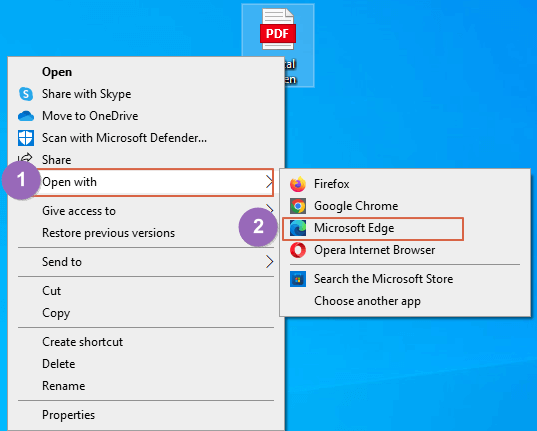
Step 3. If Adobe Acrobat is not available, you can also install Adobe Acrobat on your computer and use it to open PDF files when they won't open normally. This program allows you to create, open, and edit PDF files with ease.
How to Open the PDF Files on Mac
Mac previewer can open PDF files, and users can also open them with Safari. To access PDFs on your Mac, you can either open them directly with Previewer or use Safari to view them.
Open PDF Files on Mac with macOS Previewer:
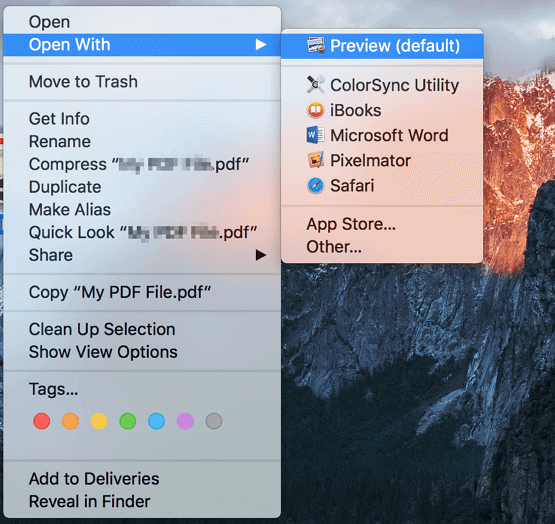
Step 1. Find the folder which contains your PDF files.
Step 2. When you right-click on a PDF file and select "Open With", click on "Preview (default)" to open it with the default Preview app, or simply double-click the PDF file to open it with Preview.
Open PDF Files on Mac with Safari:
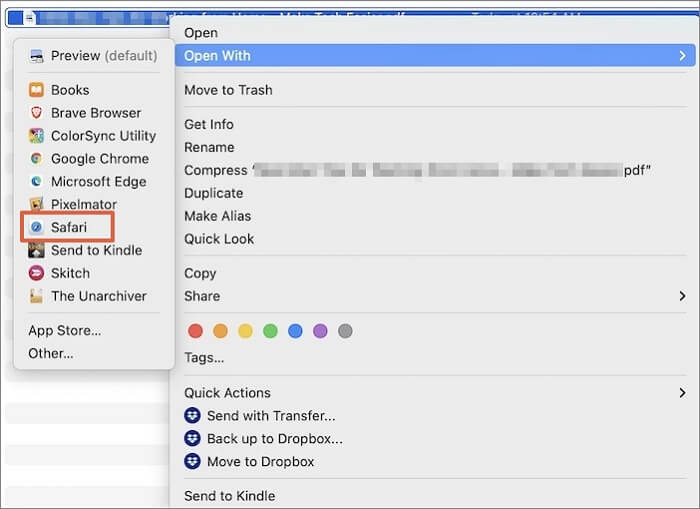
Step 1. Find the folder which contains your PDF files.
Step 2. Right-click the PDF file and open it with "Safari", which will open the file in a new Safari window.
Free PDF Editor - Top 6 Best Free PDF Editors 2023 Update
You can also try to open, edit, and convert PDF files with PDF editors.
How to Deal with PDF Documents' Problems
You may encounter issues while using PDF files or other documents, such as accidental deletion or file corruption, which can be frustrating and time-consuming to resolve.
PDF files can be lost or damaged due to various reasons, such as accidental deletion, computer viruses, system crashes, or malware attacks, which can cause them to become corrupted or disappear entirely.
If you've accidentally deleted a PDF file or need to repair a damaged one, don't worry - we have a solution for you. Our tool can help recover deleted PDF files, giving you a second chance to retrieve your important documents.
Additionally, it can also repair PDF files that are corrupted or damaged, restoring them to their original state.
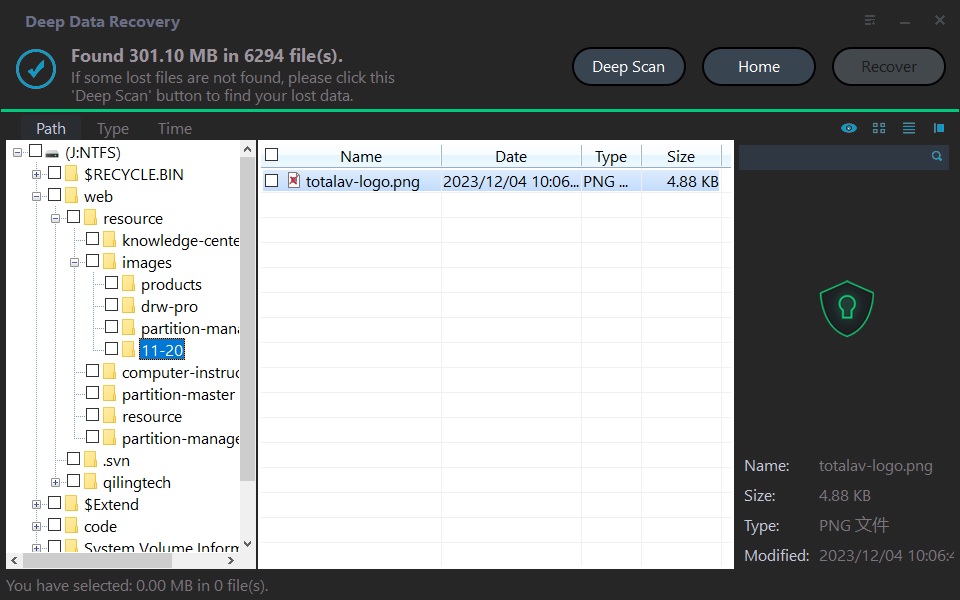
Deep Data Recovery is a third-party tool that helps recover and repair lost or corrupted PDF files from various storage devices, including computers, SD cards, and external hard drives.
What Are the Differences Between PDF and JPG
PDF (Portable Document Format) and JPG (Joint Photographic Experts Group) are two distinct file formats. While PDF is a document format used to present and share content, such as text, images, and graphics, in a fixed layout, JPG is an image file format specifically designed for storing and displaying photographs and other types of images.
Although both formats can contain images, they serve different purposes and have different characteristics.
- JPG files are relatively small due to compression, but this compression comes at the cost of potentially losing image data when saving. In contrast, PDF files compress both image and text data without sacrificing any information, making them a more reliable choice for preserving the integrity of digital content.
- While PDFs can be challenging to edit, it's still possible to make changes to them. In contrast, JPEGs are compressed into a single layer, making it difficult to break them down into individual parts and edit them.
- Choosing JPGs over PDFs can be beneficial due to their smaller size, taking up less space on your hard drive, portable disk, or cloud. However, PDFs may be a more dependable option for storing papers and photos, considering their ability to maintain their original format and quality.
Conclusion
To open or edit PDF files, you can use the built-in PDF viewer on Windows (Windows PDF Viewer) or download a third-party PDF editor like Adobe Acrobat Reader on your computer. On Mac, you can use the Preview app to view and edit PDF files.
If you encounter issues like losing PDF files or file corruption, you can download Deep Data Recovery to troubleshoot and recover your lost PDF files.
Related Articles
- All Inforamtion About Recovery Media Creator [Update 2023]
- What Is Verbose Mode Mac and How to Boot into It? [2023 Guide]
- All Information About System Restore Explorer [Updated 2023]
- What Is Pagefile.sys? Is It OK to Delete It?
- Solve Silicon External Hard Drive Not Showing Up [Windows & Mac]
Is your silicon external hard drive not showing up on your Mac or Windows? Discover some excellent solutions in this article to help your system recognize your hard drive and offer fixes for all of the issues. - Sims 4 Saves Location: Where and How to Find It
Finding the Sims 4 file location is crucial, allowing you to access previous saves or back up file data to prevent loss. This article will guide you to the Sims 4 saves file location and introduce a backup software to provide a strong shield for your game saves.
Products
Articles & Tutorials
- Data Recovery
- Data Backup
- File Recovery
- File Backup
- System Backup and Restore
- Disk and Partition Clone
- Technical articles
- Mobile articles
- Disk Master Help
- Windows Data Recovery Tutorials
- Windows Secure Delete Tutorials
- Windows Partition Management Tutorials
- Windows File Backup and Restore Tutorials
- Windows System Backup and Restore Tutorials
- Windows Disk Backup and Restore Tutorials
- Windows Clone Tutorials