Formatting Stuck in Disk Management? Try Qiling Partition Format!
Formatting Stuck in Disk Management?
Some users have been experiencing a problem where formatting is stuck in Disk Management. Fortunately, a third-party software has been found to help resolve this issue.
Page Content
Why Does A Full Format Take So Long?
How Do I Stop Formatting in Disk Management?
Alternative to Disk Management, Try Qiling Disk Master Format
Formatting Stuck FAQs
Why Does A Full Format Take So Long?
The 1TB drive is stuck during formatting and choosing a full format will take several hours.
Formatting a drive involves erasing everything on it and creating a new file system. A full format not only erases the file system but also scans the drive for bad sectors and marks them as unusable, making it more reliable and faster in the long run. In contrast, a quick format is much faster but doesn't do any of this, leaving the rest of the data intact. This means quick formats don't provide the same level of protection against data loss and can make drives more prone to problems, making a full format the better choice for long-term use.
Can I Stop Formatting in Disk Management?
To stop formatting in Disk Management, follow these steps:
Step 1. Open Disk Management and right-click the targeted disk.
Step 2. Select "Cancel Format" from the list.
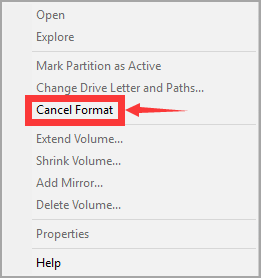
Now, your entire drive will show as "unformatted". A professional and safe disk formatting tool is necessary to start formatting your drive again.
Alternative to Disk Management, Try Qiling Disk Master Format
Qiling Disk Master Free is a reliable and user-friendly tool that can quickly format your drive, making it a great option for those looking to get the job done. Compatible with nearly any Windows version, this software is easy to use, even for novice users, thanks to its intuitive interface. And the best part? It's completely free, so you can format your drive without worrying about the cost. Overall, Qiling Disk Master Free is a great choice for anyone looking to format their drive quickly and easily.
Get Qiling Disk Master to easily maintain your drives and keep them in top condition.
Step 1. Right-click the hard drive partition and choose the "Format" option.
Step 2. In the new window, set the Partition label, File system, and Cluster size for the partition.
Step 3. To start formatting the hard drive partition, click the "Proceed" button. This will initiate the formatting process, which will erase all data on the selected partition.
Step 4. You can see a warning window, click "Yes" to continue.
To format your hard drive, start the format process, wait for it to complete, which may take several hours depending on the size of your hard drive, and avoid using programs that access the hard drive during this time to prevent data corruption.
If you are using Command Prompt, see related errors:
Formatting Stuck FAQs
1. How long does it take to format a drive in disk management?
It typically takes around 10-15 minutes is a good estimate for formatting a drive in Disk Management, assuming it's a standard-sized drive. Larger drives might take a bit longer.
2. How long should it take to format a 2TB hard drive?
- Quick Format - 20 ~ 30mins
- Full Format - 3h ~ longer
Formatting a hard drive is a quick process that erases all data and sets up a new file system, taking a few minutes to complete, but can take longer for larger drives.
3. How do I remove disk formatting error?
If you're experiencing issues with a computer, try using a different machine to see if the problem persists. If it does, it could be a problem with the disk itself. You can try formatting the disk, but make sure to back up any important data first, as this will erase all information on the disk. If the formatting process fails or the issue continues, you may need to seek professional help.
4. How to cancel format in CMD?
You can stop the process via Disk Management.
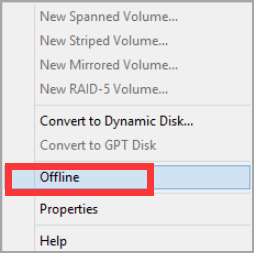
Step 1. To check the formatting progress of a disk or partition, you can open the Disk Management utility and right-click on the disk or partition in question. This will allow you to see the current status of the formatting process.
Step 2. Select "Offline" from the list.
Related Articles
- Best System Clone Service for Windows and Windows Server Users [Your Best Practice]
- How to Permanently Delete Files from Computer Without Recovery Windows 11/10/8/7
- Full Guide to Check and Fix Disk Error in Windows 11
- What Is Dell Default Admin Password & How to Reset It
- How to Fix USB Drive Incorrect Size Problem
To fix a USB drive with an incorrect size issue, you can try reformatting it using a third-party USB formatting tool or the Diskpart command. This process can help restore the drive to its full capacity and correct the size problem. - Guide to Fix Microsoft Compatibility Telemetry High Disk Usage Windows 11/10
This tutorial explains Microsoft Compatibility Telemetry and how to disable Windows compatibility telemetry to resolve the Microsoft Compatibility Telemetry high disk usage issue.
Products
Articles & Tutorials
- Data Recovery
- Data Backup
- File Recovery
- File Backup
- System Backup and Restore
- Disk and Partition Clone
- Technical articles
- Mobile articles
- Disk Master Help
- Windows Data Recovery Tutorials
- Windows Secure Delete Tutorials
- Windows Partition Management Tutorials
- Windows File Backup and Restore Tutorials
- Windows System Backup and Restore Tutorials
- Windows Disk Backup and Restore Tutorials
- Windows Clone Tutorials