Top 5 Best SD Card Benchmark Software Recommend 2024
Key Takeaways:
- SD card benchmark software helps you test your SD card to verify the peak speeds and overall performance.
- SD card benchmarking plays a crucial role in achieving optimal performance and data transfer capabilities. By testing the card's read and write speeds, users can ensure that it is functioning at its best, allowing for seamless and efficient data transfer. This is particularly important for applications that require high-speed data transfer, such as video recording and photography, where a slow-performing SD card can result in lost shots, corrupted files, or even equipment damage.
- The top 5 SD card benchmark software of 2024 include Qiling Disk Master, a user-friendly option suitable for all users, among other notable software.
The performance of your SD card can significantly impact your experience, so it's a good idea to test it with an SD card benchmark - a software tool that allows you to unlock and analyze the full potential of your SD card.
The test emulates various factors, including read and write speeds, random access times, and input/output processes, providing valuable information about the card's data transfer capabilities and overall effectiveness.
If you're looking for an SD card benchmark tool, this article is a must-read, as it was created after a month of thoroughly testing over 20 SD card benchmark software options. You can see the tests we ran below.
| ⏳How long we tested: | 1 month |
| 🔢How many SD card benchmark software we tested: | 20+ |
| 🧩What benchmark parameters we've tested: | The four types of data are Sequential Read Data, Sequential Write Data, Random Read Data, and Random Write Data. Additionally, there are Speed Data, I/O Data, and Delay Data. |
| 💵How much it all cost: | $600 |
Follow the criteria to choose the best software for your needs and improve SD card performance and data storage.
Top 5 Best SD Card Benchmark Software Recommend in 2024 [Full Review]
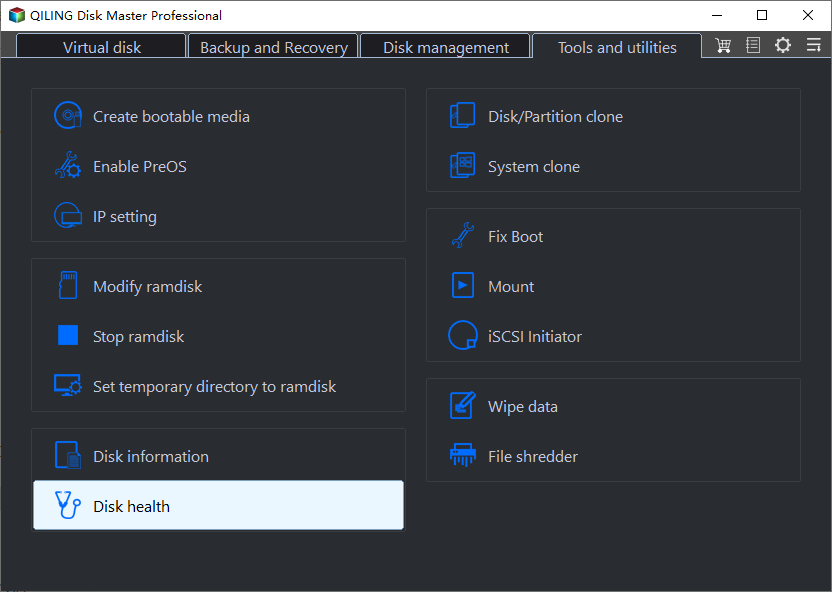
To quickly check your SD card's performance, find one of the top SD card benchmark programs in 2024 using the list of suggestions below, and thoroughly test factors such as speed, I/O data, delays, sequential read and write data, random read and write data, and others.
| SD Card Benchmark Software | Complexity Level | Who Should Use It |
| Easiest | Windows beginners, advanced users, and professionals | |
| 2. CrystalDiskMark | Easy | Windows beginners seeking accurate read/write performance across various file sizes can consider the following. |
| 3. H2testw | Moderate | Windows users can use the built-in Windows Device Manager to diagnose issues with USB drives and gather relevant data. To do this, they can follow these steps: open the Device Manager, expand the "Disk drives" section, and find the USB drive in question. |
| 4. ChipGenius | Moderate | Windows professionals looking to extract information from USB devices |
| 5. CamDo SpeedOut | Complex | Windows users with many action cameras like GoPro |
Qiling Disk Master is a reliable and powerful tool that stands out as a top choice for SD card benchmarking and efficient disk management. It can be downloaded from the official Qiling website and installed within minutes.
The website allows users to test their SD card's performance online by uploading a file and measuring the time it takes to read and write data to the card. This can help users identify any potential issues with their SD card, such as slow performance or errors, and troubleshoot any problems they may be experiencing.
1. Qiling Disk Master
- Developed by: Qiling Software (2006)
- License: Shareware
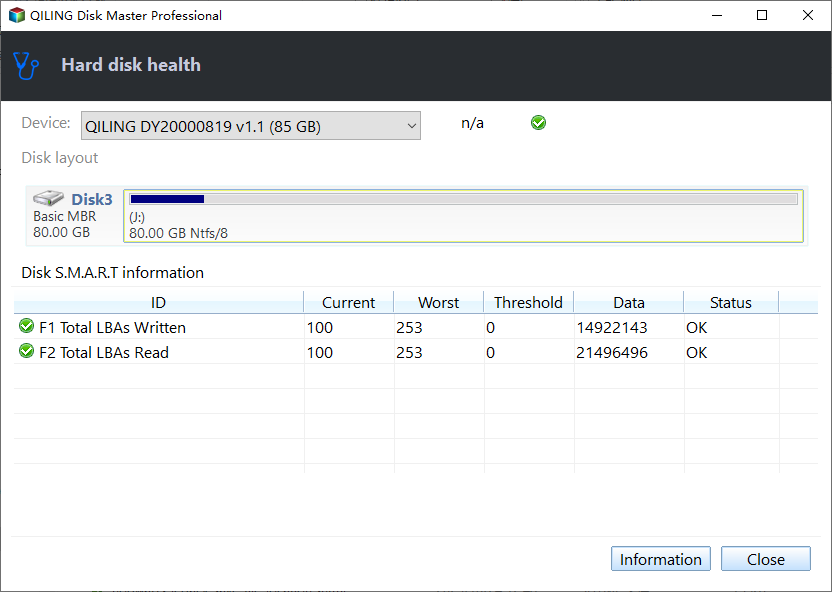
Qiling Disk Master is a reliable partition management program that also provides benchmark information for SD cards, allowing users to measure the speed of various devices, including SD cards, USB drives, SSD/HDDs, and other storage devices, using its advanced Disc Mark function.
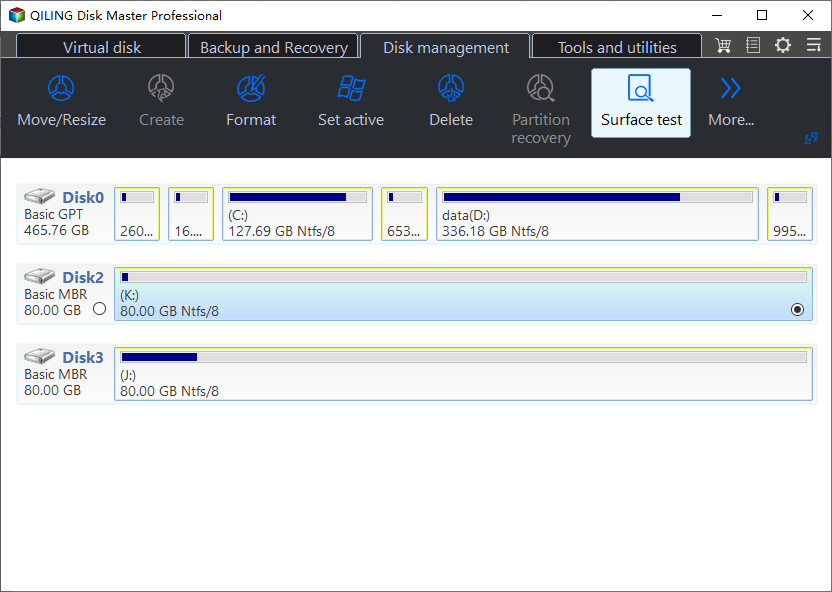
With Qiling Disk Master as your reliable SD card benchmarking companion, you can bid farewell to performance limitations and hello to a world of enhanced efficiency and data transmission.
Features of Qiling Disk Master:
- Run speed tests on your storage devices, including microSD/SD cards, USB flash drives, and hard drives, to evaluate their performance and identify any potential issues.
- Manage/Clone drive partitions
- Fix SSD problem with slow SSD write/read speed.
- Check file system errors
- Convert NTFS to FAT32
Pros and Cons, with Editors' Review:
Expert's Rating:
👍🏻
Pros
- User-friendly UI
- A thorough examination of read and write speeds
- Effective partition management software
- Backup and disc copying features
- Appropriate for many Windows OS versions
👎🏻Cons
- Limited Linux and macOS support
- Expensive pro version
Editors' Review
Qiling Disk Master Free Edition is a user-friendly tool, making it a good option to consider when looking for free disk partitioning software.
Personal Views
I highly recommend Qiling Disk Master for anyone looking to maximize their SD card's performance. This user-friendly benchmarking software is perfect for optimizing your SD card's performance.
Download Link:
#SD Card Benchmark#SD Card Benchmark Freeware#SD Card Speed Test Tool#Free
If you prefer a step-by-step guide, follow the link here:
SD Card Benchmark 2024 Tutorial with Full-Step Guide
Do you need to check if your SD card is working properly? This post introduces SD card benchmark tools that can help you spot performance issues early. See this SD card benchmark guide for more details.
2. CrystalDiskMark
- Developed by: Noriyuki Miyazaki (2007)
- License: MIT license
CrystalDiskMark is an open-source disc drive benchmarking program for Microsoft Windows users, accurately measuring solid-state storage performance using Microsoft's MIT-licensed Diskspd application.
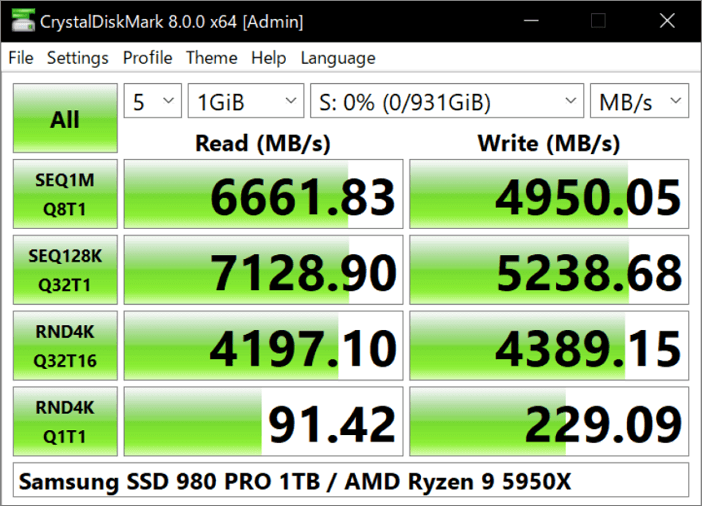
Features of CrystalDiskMark:
- Measure Sequential and Random Performance (Read/Write/Mix).
- Various measure modes (Peak/Real World/Demo).
- Multilingual support.
- Customizable themes.
Pros and Cons, with Editors' Review:
Expert's Rating:
👍🏻Pros
- Easy to use with an intuitive interface.
- Comprehensive measurement of read and write performance.
- Effective for testing small, medium, and large files.
- Offers real-world performance simulation.
👎🏻
Cons
- Limited operating systems support.
- Some advanced features may not be available in the free version, limiting its functionality compared to the paid version.
Editors' Review
CrystalDiskMark is a popular benchmarking tool that has been around for over a decade, used by the PC community to test the speed of various storage devices, including hard drives, solid-state drives, and flash drives. It's a user-friendly tool that can be run with a single click, providing a quick and easy way to determine the performance of your storage.
Personal Views:
CrystalDiskMark is a reliable and precise benchmarking tool that accurately measures read and write speeds for various file sizes, making it a great choice for those looking to optimize their storage devices.
Download Link: https://crystalmark.info/en/download/
#Open Source#Free#SD Card Benchmark#Windows
3. H2testw
- Developed by: Harald Bögeholz
- License: Freeware
H2testw is a potent and cost-The software tests and evaluates the health of hard drives and USB flash drives, and also detects counterfeit SD cards and flash drives, providing a comprehensive assessment of their condition.
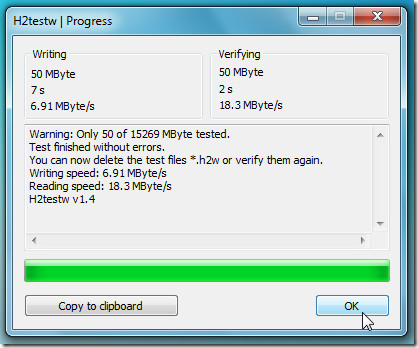
The SD card reader is still a reliable solution for modern storage devices, despite being created in 2008 when SD cards were more widely used.
Features of H2Testw:
- Configurable options
- Reliable speed tests
- Windows XP, Server 2003, and Vista are no longer supported, but Windows 2000, Server 2008, 7, and 8 are still supported.
Pros and Cons, with Editors' Review:
Expert's Rating:
👍🏻Pros
- Reliable for deep scanning
- Dependable when determining capacity
- Especially beneficial for small-capacity SD cards
👎🏻
Cons
- Lengthy scanning procedure
- Dated design and interface
- The target drive must be formatted to complete the inspection.
Editors' Reviews
H2testw is a free, installation-free tool with a simple interface that can be used by anyone to compare their product's performance or detect errors on their device.
Personal Views:
H2testw is a useful and cost-A free utility for checking the health of storage devices, such as USB flash drives and SD cards, to spot potential problems and obtain device data.
Download Link: https://h2testw.org/
#SD Card Benchmark#Free#Test SD Card Only
4. ChipGenius
- Developed by: hit00
- License: Freeware
ChipGenius is a compact and portable program that quickly retrieves data from linked USB devices on a computer, even when they are hidden from Windows' device explorer, allowing for easy identification of potential problems with USB flash drives.
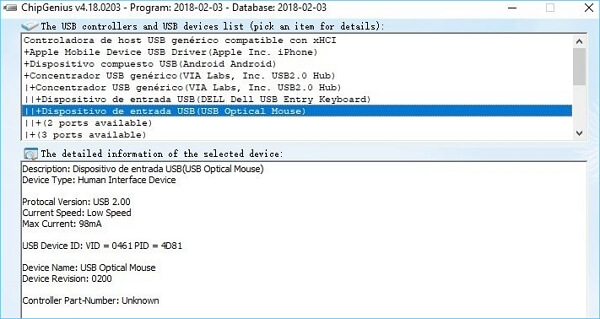
Features of ChipGenius:
- Easy-to-use interface with a simple design.
- Diagnoses problems with faulty equipment.
- Flexible USB device support.
- Information about the gadget is retrieved.
Pros and Cons, with Editors' Reviews:
Expert's Rating:
👍🏻Pros
- No download is needed.
- Any USB device may be identified.
- Reliable and fast-speed tests.
👎🏻Cons
- No possibility to export logs.
- Incompatible with out-of-date technologies.
Editors' Reviews
ChipGenius is a user-friendly application designed to help users extract information about their USB devices, providing details necessary for repairing broken flash drives, as per Softpedia.
Personal Views:
ChipGenius is a time-saving diagnostic tool with a straightforward interface that extracts data quickly from USB devices, making it useful for USB device detection and troubleshooting.
Download Link: https://chipgenius.en.lo4d.com/windows
#SD Card Benchmark#Test SD Speed#Freeware
5. CamDo SpeedOut
- Developed by: CamDO Solutions
- License: Freeware
To test the speed of micro-SD cards, particularly those used with GoPro cameras, can be efficiently managed with CamDO SpeedOut. This program ensures that consumers find suitable and reliable SD cards to maintain smooth and dependable camera operation.
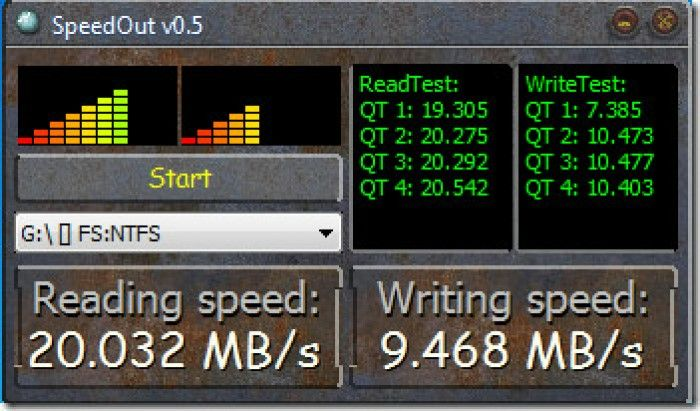
Features of CamDo SpeedOut:
- Simple setup and no installation necessary
- Check the micro-SD card speed for compatibility with GoPro.
- Delivers precise results (minimum read/write speed of 30 MB/s)
- Works on both Mac and PC platforms
Pros and Cons, with Editors' Review:
Expert's Rating:
👍🏻
Pros
- Free software; no expense to users
- Ensures compatibility with GoPro cameras
- Very helpful for selecting fast micro SD cards
👎🏻Cons
- There is no report generating or detailed export
- Complex to use
Editors' Reviews
SpeedOut is a simple program that can be used to find the exact data transfer rate and also check which USB or external hard drive provides better performance.
Personal Views:
CamDO SpeedOut is a handy tool that simplifies checking micro-SD card speeds for GoPro compatibility, making it a must-have for GoPro enthusiasts. Its user-friendly interface and precise results ensure stable and reliable camera performance.
Download Link: https://cam-do.com/pages/sd-card-speed-tester
#SD Card Benchmark#Free Tool
SD Card Benchmark Software Overview with Checklist 2024
This section delves into SD card benchmark software, covering its purpose, usefulness, and how to select the best tool for your needs.
What Is SD Card Benchmark Software?
SD card benchmark software measures and evaluates the performance of an SD card by assessing its read and write speeds, random access times, and data transfer rates, providing valuable insights to help choose the most suitable SD card for specific activities.
Using SD card benchmark software has the following advantages:
- Here are some common issues that can hinder your SD card's performance:
- Enhancing the performance and speed of your SD card.
- When purchasing new SD cards, it's crucial to make an informed decision to avoid settling for subpar choices. By considering factors such as storage capacity, speed, and compatibility with your device, you can ensure that your SD card meets your needs and provides reliable performance.
How to Find the Best SD Card Benchmark Software?
To begin SD card benchmarking, it's essential to choose the best software for your needs. Start by considering factors such as the type of tests you want to run, the level of detail you need, and any specific features you're looking for. Compare the features and capabilities of different software options, such as CrystalDiskMark, HD Tune, and ATTO Disk Benchmark, to determine which one best suits your requirements.
1. Robust Features. The program should provide a comprehensive set of functions to evaluate SD cards, including measures of read and write speeds, random access performance, and other key metrics related to data transfer.
2. Budget-Friendly. Consider whether the program fits within your budget before making a decision.
3. User-Friendly. Choosing software that is user-friendly and simple to use for SD card benchmark procedures is a good idea.
4. OS Compatibility. Regardless of whether you're using Windows, macOS, or Linux, ensure that the tool you select works seamlessly on your chosen operating system.
If you're a fan of the SD Card benchmark utilities mentioned, consider sharing this information with your friends to help them find a reliable SD card speed test tool online. This way, more people can benefit from your discovery and get accurate results when testing their SD cards.
Conclusion
Through benchmarking, you can evaluate read and write rates, identify potential issues, and select the best SD card for your requirements.
- For the easiest and most professional SD card benchmark software - Qiling Disk Master
- For an open-source benchmark tool to test SD card performance - CrystalDiskMark
Qiling Disk Master is my favorite software because of its easy-to-use interface, which allows both novices and pros to test SD card performance. Furthermore, it provides extensive capabilities like as thorough analysis and effective partition management, making it an excellent choice for optimizing storage devices.
Do you still have any questions? If so, continue to the next section of this article.
FAQs About SD Card Benchmark Software
Here are some frequently asked questions for your reference.
1. How do I check my SD card performance?
To check SD card performance, connect the SD card to your computer, open File Explorer, copy a large file to the card, and observe the transfer speed during the copying process.
2. Is there a free SD card speed test tool for Windows 11?
Free Windows 11 tools like CrystalDiskMark and H2testw can test the read and write speeds of an SD card, providing a quick and easy evaluation of its performance.
3. Can I test my SD card speed in Windows 11 without the software?
To test the speed of an SD card in Windows 11, copy a large file to the card and monitor the transfer speed. Alternatively, use benchmarking software like Qiling Disk Master for more accurate results.
Related Articles
- How Can I Merge Disk 0 and Disk 1 in Windows 11/10
- How to Optimize Windows 11 for Gaming [6 Effective Ways🧰]
- How Do I Convert Bootable Disk or Bootable USB to Normal in Windows 11
- How To Check Storage on PC [Step-by-Step Guide]
Storage is an important value for monitoring the status of the computer. This article aims to teach users how to check storage on PC. - How to Run SFC and DISM in Windows 11 [2023 Guide]
If you're experiencing issues with your Windows 11, you can try running the DISM and SFC tools to resolve them. To do this, open Command Prompt as administrator and run the command “DISM /Online /Cleanup-Image /RestoreHealth” followed by “sfc /scannow”. - Windows 11 Download Without TPM 2.0 & Run Windows 11 Without TPM
It is still possible to get Windows 11 even when your computer does not have TPM 2.0 enabled. Follow this guide to learn how to bypass TPM 2.0 and download Windows 11 without TPM 2.0.
Products
Articles & Tutorials
- Data Recovery
- Data Backup
- File Recovery
- File Backup
- System Backup and Restore
- Disk and Partition Clone
- Technical articles
- Mobile articles
- Disk Master Help
- Windows Data Recovery Tutorials
- Windows Secure Delete Tutorials
- Windows Partition Management Tutorials
- Windows File Backup and Restore Tutorials
- Windows System Backup and Restore Tutorials
- Windows Disk Backup and Restore Tutorials
- Windows Clone Tutorials