6 Ways to Samsung 970 EVO Plus Slow Write Speed
Samsung is a well-Samsung, a well-known hardware manufacturer, offers the Samsung 970 EVO Plus, a high-performance SSD with sequential read and write speeds of up to 3,500/3,300 MB/s. However, some users have reported that their Samsung 970 EVO Plus has slowed reading and writing speeds, and this article will address the issue and provide solutions.
To analyze the cause of the Samsung 970 EVO Plus slow write speed, we first need to confirm the Samsung SSD speed using a professional SSD benchmarking tool to get an accurate reading of the SSD's read and write speed.
How to Test Samsung 970 EVO Plus Read and Write Speed
To accurately assess why the Samsung 970 EVO Plus is slowing down, I recommend using a professional benchmarking tool like Qiling Disk Master, which offers a free DiskMark feature to check read and write speeds, I/O, and delay data, and allows you to export results for further analysis.
If you're new to computers, don't worry - using this tool is easy! It has a clear and simple interface. To check the read/write speed of your Samsung 970 EVO Plus, simply download the tool and follow the steps.
Step 1. Launch Qiling Disk Master, click the download button to activate the "Surface test" feature under the "Disk management" tab page.
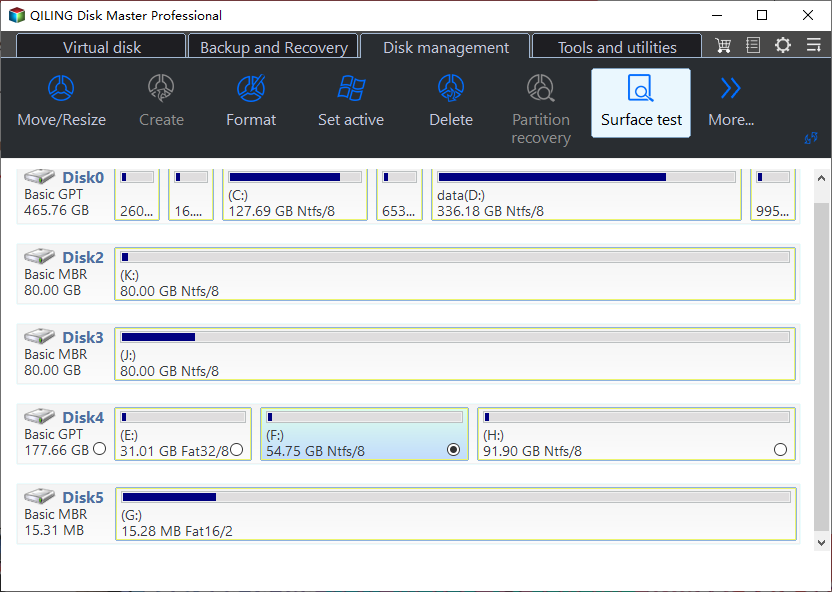
Step 2. Select the target drive, test data, and block size from the drop-down menus to configure the test.
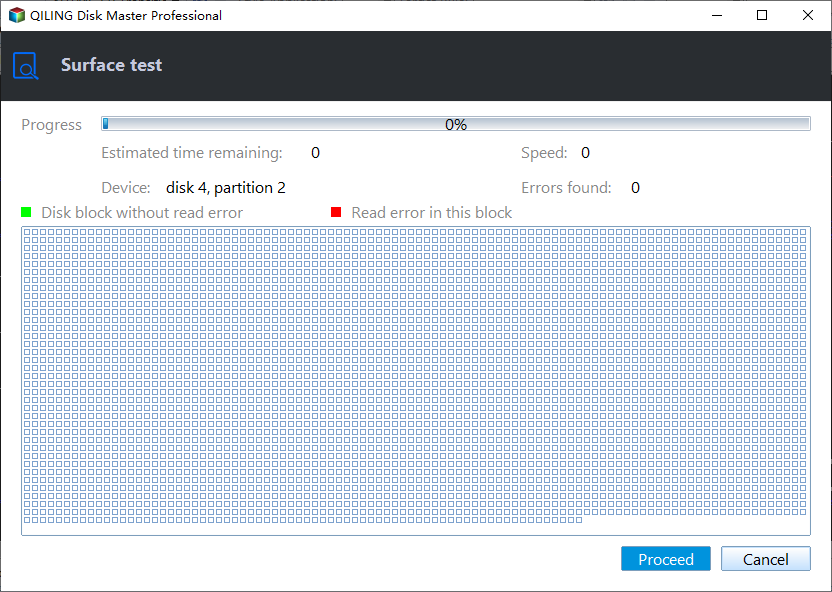
Step 3. Once everything is configured, click "Proceed" to begin the disk test, which will then display sequential read speed, I/O, and Delay data.
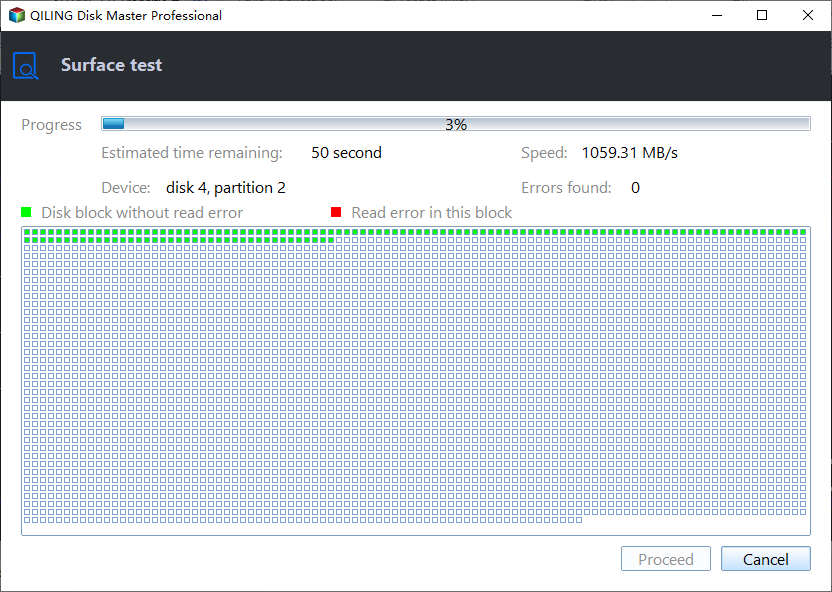
The tool not only helps you test Samsung SSD health but also keeps the performance of your SSD in top shape. If you find this tool helpful, you can share it with your friends by clicking the social buttons below. This way, more people can benefit from it!
If your 970 EVO Plus shows a slow write speed problem after testing with Qiling Disk Master, let's analyze and fix it together.
Why Samsung 970 EVO Plus Slow Write Speed Happens
Slow write speed is a frustrating issue, and after analyzing various cases in the forum, several possible reasons for the slow write speed of the Samsung 970 EVO Plus have been identified. These include potential causes such as outdated firmware, incorrect drive settings, or even physical damage to the drive.
- High temperature: If the Samsung 970 exceeds the SSD temperature range, it may affect its write and read speed.
- Slot: A PCIE 3.0 x4 NVME drive requires a PCIE adapter that supports PCIE 3.0 mode to reach its full speed.
- Insufficient space: If a drive can't fit more data in the available space, it can also slow down write speeds.
- SSD wear: Frequent writes to an SSD can lead to wear and tear, ultimately impacting its performance.
- Firmware: The firmware on the Samsung 970 EVO Plus is outdated.
- Bad sectors: SSDs that have been compromised by malware or contain bad sectors can experience a significant slowdown in read and write speeds, affecting overall system performance.
The Samsung 970 EVO Plus's slow write speed can be attributed to several factors. First, the drive's MLC (multi-level cell) memory technology, which stores more data per cell, can lead to slower write speeds. Additionally, the drive's TLC (triple-level cell) cache, which helps improve performance, can become saturated and reduce write speeds.
How to Fix Samsung 970 EVO Plus Slow Write Speed
Several solutions can be implemented to address the slow write speed issue with the Samsung 970 EVO Plus. One solution is to enable the Write Boost feature, which can improve sequential write performance.
- Fix 1. 4K Aligned SSD
- Fix 2. Update SSD Firmware
- Fix 3. Check and Control SSD Temperature
- Fix 4. Free Up Samsung 970 EVO Space
- Fix 5. Use Samsung Magic Software
- Fix 6. Check the Slot
If you know what's causing your SSD to slow down, you can try the corresponding solution. Otherwise, try these solutions one by one: Check for disk errors, run a disk cleanup, update your operating system, run a disk defragmentation, check for malware, and consider upgrading to a faster SSD. If none of these work, you may want to consider seeking further assistance from a professional.
Fix 1. 4K Aligned SSD
Qiling Disk Master optimizes SSDs with its 4K alignment technology, which removes junk from the system and deletes large files to improve performance. This process enhances computer efficiency by streamlining system resources.
Step 1. Go to "Toolkit" and choose "4K Alignment".
Step 2. Select the disk you want to align and click the "Start" button.
Fix 2. Update SSD Firmware
Hey there! If you're having issues with your SSD, such as slow speeds or errors, updating the firmware might be just what you need to get things running smoothly again. To give it a try, you can follow these simple steps:
Step 1. Visit the Samsung SSD manufacturer's website and select your SSD model.
Step 2. Download the latest firmware and install it.
Step 3. Reboot your computer after the firmware update is complete,
Fix 3. Check and Control SSD Temperature
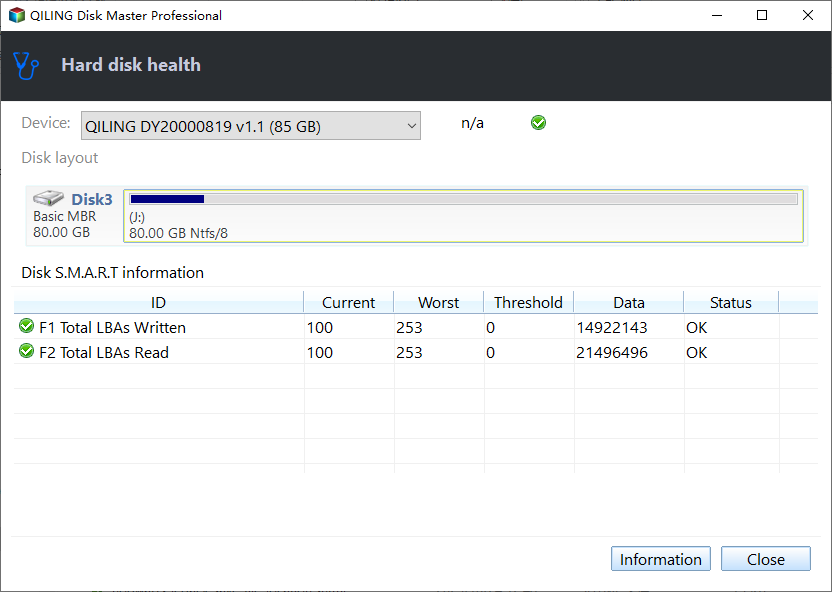
High temperatures can affect the performance of your SSD, but Qiling Disk Master's Disk Health feature detects real-time temperature conditions and alerts you when the temperature is too high, helping to prevent potential issues.
Step 1. Launch Qiling Disk Master and click the blue arrow to activate the "Disk Health" feature under the "Tools and utilities" tab page.
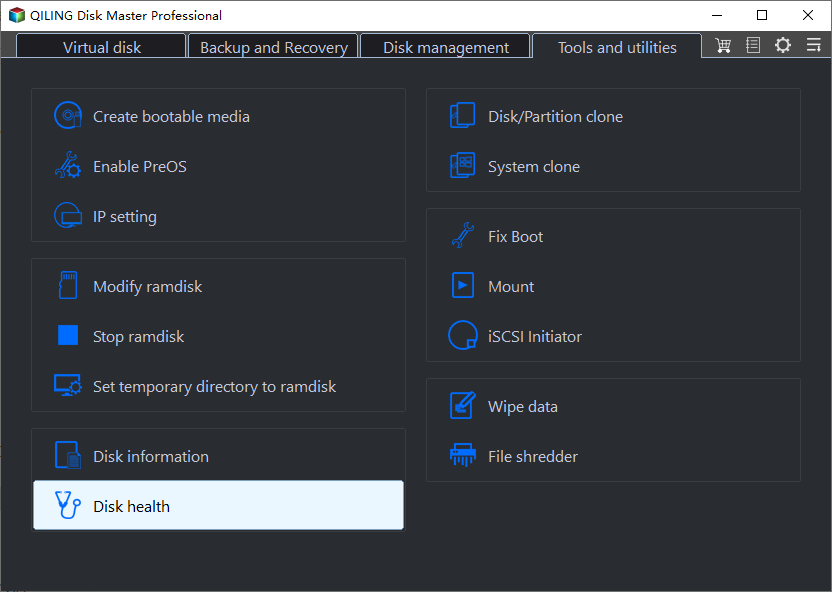
Step 2. To check the health condition of your disk, select the target disk and click the "Refresh" button. This will display the current status of your disk.
Video Tutorial with Detailed Guide on Testing SSD Temperature
Here in this video, we show you how to monitor if your SSD is overheating, providing detailed steps to check and ensure its optimal performance.
If you notice your SSD is running hot, stop using it right away. Avoid overloading the SSD and ensure good airflow around it to prevent overheating.
Fix 4. Free Up Samsung 970 EVO Space
Having too many unnecessary programs on your hard drive can consume space that could be used for more efficient tasks, and also slow down write speeds, which can be improved by removing invalid software.
Step 1. Open the Control Panel and select Programs.
Step 2. To uninstall a program, go to Control Panel, then select Programs, and click on Uninstall a program. From there, you can right-click on the program you want to remove and select Uninstall.
To free up hard drive space, consider deleting unnecessary files, uninstalling unused applications, and clearing out temporary files. You can also use tools like Disk Cleanup or CCleaner to remove unwanted items, and consider compressing or deleting large files and folders.
Fix 5. Use Samsung Magic Software
Samsung provides Samsung Magician to manage and monitor the performance of SSDs, offering features like "Performance Optimization" and "Reserved Space" to improve overall performance. Trying this tool may help fix the slow write speed issue with the Samsung 970 EVO.
Step 1. Download Samsung Magician:https://semiconductor.samsung.com/consumer-storage/magician/. The software will automatically detect your SSD.
Step 2. On the left side, select the tab that corresponds to your needs.
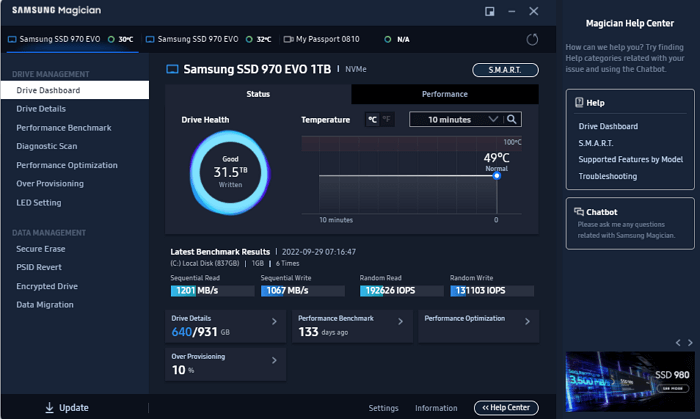
Note: This method only works with Samsung SSDs, so if you have a different brand, you'll need to use Qiling Disk Master instead.
Fix 6. Check the Slot
If the above problem doesn't cause your SSD to slow down, it might be due to a slot issue. Some users have found that slower drives are installed in PCIe x1 slots, while faster drives are installed in PCIe x4 slots. Swapping the drives to the correct slots might give you a speed boost.
Conclusion
The Samsung 970 EVO Plus saw a significant speed boost over its predecessor, but some users may still experience slow write speeds due to various reasons and SSD errors. Fortunately, there are effective fixes available, and Qiling Disk Master is a one-stop solution that can help with detecting and fixing speed issues, making it a great tool to try.
FAQs About Samsung 970 EVO Plus Slow Write Speed
This section will provide questions about the speed of the Samsung 970 EVO Plus. If you also have these questions, please read on.
1. What is the Samsung EVO 970 Plus's write speed?
The Samsung 970 EVO features a new Phoenix controller and intelligent TurboWrite technology, allowing for sequential read and write speeds of 3,500/2,500 MB/s, with a 32% increase in write speed compared to the previous generation.
2. What about the 970 EVO Plus in 2026?
The Samsung 970 EVO Plus is a good SSD in 2026, ideal for data storage and backups, especially with its discounted price of almost 75% off downloads, making it a strong appeal.
3. What is the 980 SSD's read/write speed?
The 980 PRO is Samsung's top-This is a high-performance consumer PCIe 4.0 SSD with read speeds of up to 7GB/s and write speeds of up to 5GB/s.
Related Articles
- Convert FAT32 to NTFS Without Losing Data [2023 Guide]
- Best Free Hard Drive Erase Software
- Delete Partition with Windows Partition Delete Tool & Free Partition Manager
- How to Merge Partitions by Disk Management and Free Partition Software
- 3 Ways to Resize Partition Windows 10 without Losing Data
How to resize partition Windows 10 without data loss? In this article, 3 ways are listed to help you extend or shrink partition on Windows 10 for free. - Solved: Second Hard Drive Not Detected in Windows 11/10/8/7
If you find your second hard drive not detected in Windows 10, read this post, please. It teaches you what to do respectively when second hard drive is not detected in FIle Explorer, Disk Management, BIOS or after Windows 10 update.
Products
Articles & Tutorials
- Data Recovery
- Data Backup
- File Recovery
- File Backup
- System Backup and Restore
- Disk and Partition Clone
- Technical articles
- Mobile articles
- Disk Master Help
- Windows Data Recovery Tutorials
- Windows Secure Delete Tutorials
- Windows Partition Management Tutorials
- Windows File Backup and Restore Tutorials
- Windows System Backup and Restore Tutorials
- Windows Disk Backup and Restore Tutorials
- Windows Clone Tutorials