844 MB Unallocated Space After a Windows 11 25H2 Update
Quick Navigation:
- Where the 844 MB Comes From
- Check the Recovery Partition State
- Reclaim the Space Safely
- Verify WinRE After the Change
- Frequently Asked Questions
After the Windows 11 25H2 update, Disk Management sometimes shows a block of about 844 MB of unallocated space sitting between the Windows volume and the recovery partition. Nothing is broken, but the space is unusable in that position, and the recovery partition may also be smaller than the update now expects.
Where the 844 MB Comes From
Feature updates rebuild the recovery partition when WinRE needs more room for the new servicing payload. The safe route is to create a new partition of the required size at the end of the free block, copy the recovery image into it, and then remove or shrink the old one.
That sequence works with whole megabytes rounded to the partition alignment. The leftover between the new partition and the old boundary is what you see as unallocated space, and on many 25H2 systems the leftover lands at roughly 844 MB.
Two further causes add to the number. A disk that was imaged or cloned keeps the original recovery partition at its old size, and the update then allocates a larger one beside it. A machine with a small unallocated gap already present from an earlier shrink contributes that gap as well.
Check the Recovery Partition State
Open Disk Management in the volume view and note three things: the size of the recovery partition, whether it has a letter, and whether the unallocated block touches it directly. A gap that does not touch the recovery partition belongs to a different problem.
Confirm which partition WinRE actually uses. Settings shows the recovery environment status under System and Recovery, and it names the partition that holds the image. If that partition is the one next to the gap, reclaiming the space is a layout task rather than a recovery task.
Take a full image of the system disk before you move boundaries. Recovery partitions are small, but a move that fails halfway leaves WinRE pointing at an offset that no longer holds the image.
Reclaim the Space Safely
There are two sensible outcomes. Move the recovery partition to the left, so the gap joins the unallocated space at the end of the disk, or extend the recovery partition into the gap so it gains the extra room it needed in the first place.
Extending the recovery partition is the safer choice because it moves no data. Moving the partition changes its offset, and WinRE records that offset, so a move always requires re-registering the image afterwards.
Never extend the Windows volume into the gap while the recovery partition sits behind it. The result is a Windows volume that no longer ends where the boot files expect, and the recovery partition becomes orphaned at the end of the disk.
Verify WinRE After the Change
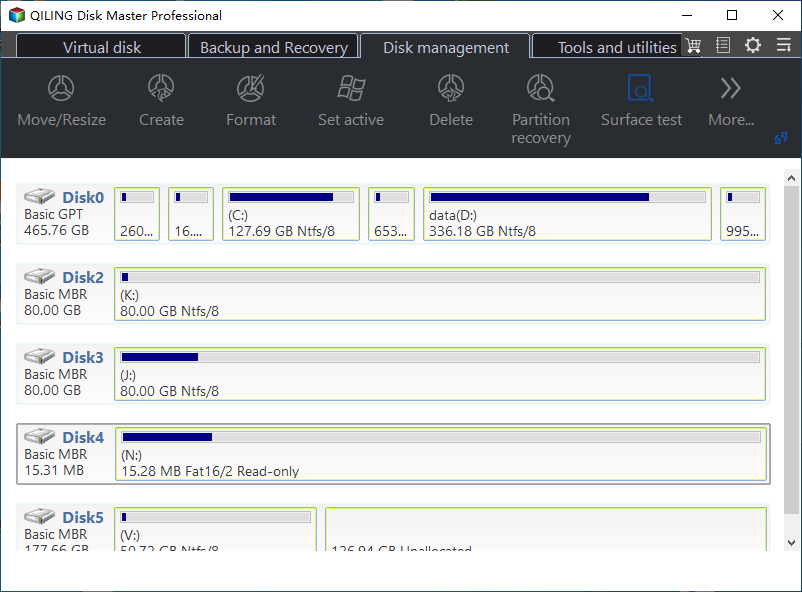
Once the layout is final, the recovery image has to be present, registered, and reachable. Qiling Disk Master shows the new boundary and the free space of the recovery partition on its disk map, so you can confirm the result before you test the recovery environment.
Step 1. Confirm the Layout After the Change
Open the program and check that the unallocated block is gone or has moved to the end of the disk. Compare the recovery partition size with the value Disk Management reports, and make sure the Windows volume still ends on the boundary you intended.
Step 2. Extend the Recovery Partition if It Is Still Short
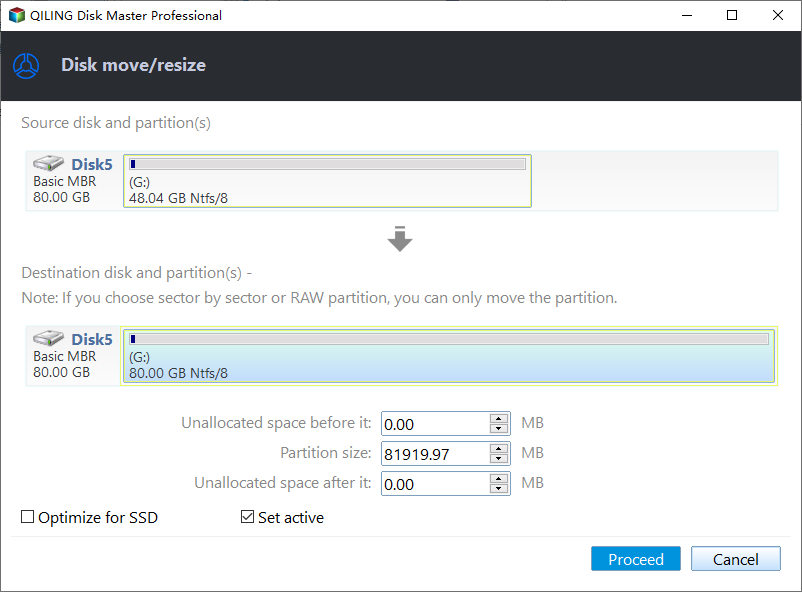
Right-click the recovery partition and choose Move/Resize. In the window, raise the partition size or set the unallocated space after it to 0 so the free block is absorbed into that partition, then click Proceed. The change starts at once and there is no separate apply page to confirm. Do not assign a drive letter to the partition.
After the restart, open the recovery status page and start WinRE once to confirm it loads. If it reports that the image cannot be found, the image must be re-registered from the Windows volume before the next update.
Frequently Asked Questions
Can I just extend C: into the 844 MB?
Not while the recovery partition sits between them. Extend C: only after the recovery partition has been moved to the end of the disk.
Is 844 MB worth reclaiming?
As free space it is minor, but the layout matters. A recovery partition that is too small is what blocks the next WinRE update.
Will moving the recovery partition break the update history?
No. Only the location of the recovery image changes, and it is re-registered once. The update history and the installed build stay as they are.
If the partition cannot be moved because the disk is full, see recovery partition full blocks the WinRE update.
Related Articles
- Move the Recovery Partition Safely
- Remove a Recovery Partition
- Recovery Partition Full Blocks WinRE Update
- All Options Grayed Out in Disk Management
- Back Up Before a Feature Update
Products
Articles & Tutorials
- Data Recovery
- Data Backup
- File Recovery
- File Backup
- System Backup and Restore
- Disk and Partition Clone
- Technical articles
- Mobile articles
- Disk Master Help
- Windows Data Recovery Tutorials
- Windows Secure Delete Tutorials
- Windows Partition Management Tutorials
- Windows File Backup and Restore Tutorials
- Windows System Backup and Restore Tutorials
- Windows Disk Backup and Restore Tutorials
- Windows Clone Tutorials