The Best WhatsApp Recovery Software for iPhone & Android
Summary
If you've deleted or lost important WhatsApp conversations, you can recover them using a reliable WhatsApp recovery tool. This tool allows you to restore chat history, including pictures, videos, and audio files, on both Android phones and iPhones.
To avoid data loss, it's essential to regularly back up your iPhone and Android devices. However, if your backup becomes corrupt or inaccessible, you'll need to find alternative solutions to recover your data.
Having reliable data recovery software or app installed on your computer is one of the safest options to extract wiped, deleted, or lost data from devices without hassle. When choosing an ideal data recovery tool, consider factors such as ease of use, compatibility with your device, and the ability to recover a wide range of file types. This ensures a smooth and effective data recovery process.
- Make sure the software is 100% safe and clean
- Make sure it indeed works as it claims (use its free version to test)
- To check if the app is compatible with your phone, you can check the app's tech information, such as its minimum and maximum supported operating system versions, device types, and screen resolutions. This information can usually be found on the app's page on the app store or on the developer's website.
- Make sure there are no ads come with it
Given the various factors to consider, we've chosen some of the best data recovery tools for both iPhone and Android devices.
- Part 1. Top 3 Best WhatsApp Recovery Tool for iOS Device
- Part 2. Best WhatsApp Recovery Tool for Android
- Part 3. How to Backup WhatsApp Messages
Part 1. Best 3 WhatsApp Recovery Tools for iOS Device
The process of retrieving data from iPhones is relatively easier than from Android devices due to the uniform operating system shared by most iPhone models, making it simpler to use recovery software. With this in mind, there are many recovery tools available online that can help retrieve WhatsApp data without hassle, and the top 3 iPhone data recovery tools of 2022 are listed below.
Top 1. Qiling MobiSaver
Qiling MobiSaver is a highly-regarded iOS data recovery tool that allows users to recover various types of data, including contacts, messages, videos, and WhatsApp messages, with just a few clicks. The program supports three recovery modes: recovering from iTunes, recovering from iCloud, and recovering directly from the device, making it a versatile solution for recovering lost data.
Learn more functions and features of Qiling Mobisaver, see below.
Key Functions:
- The app provides three recovery modes: recovering from iCloud backups, iTunes backups, or iOS backups.
- Selectively restore what you want from your iPhone
- Allows you to preview deleted data before restoring.
- Data recovery software can recover data in various scenarios such as a broken screen, jailbreak, water damage, system crash, and more.
Key Features:
- Easy to use
- High recovery rate
- Good compatibility (compatible with almost all iOS devices)
- Available for Windows and Mac
To recover WhatsApp messages on iPhone, follow these steps:
Step 1. Connect iPhone to PC
Launch Qiling MobiSaver, choose the "WhatsApp" button, and select "Device Storage".
Step 2. Make Sure Your Device Is Connected
If WhatsApp is not installed on your iPhone, Qiling MobiSaver will not be able to find your data.
Step 3. Scan iPhone and Find Important Data
Qiling Mobisaver automatically scans your iPhone 13/12/11/X/XR/XS/8/7/6/5/4 to find lost WhatsApp chats, history, photos, videos, and other files, a process that may take a few minutes to complete.
Step 4. Preview and Restore WhatsApp Data
To recover missing WhatsApp data, tap the "WhatsApp" button on the left, preview and select the desired data, and then click "Recover to PC" or "Recover to Device" to get the data back.
Apart from WhatsApp messages, Qiling MobiSaver also does an excellent job in recovering iPhone photos, messages, videos, notes, etc.
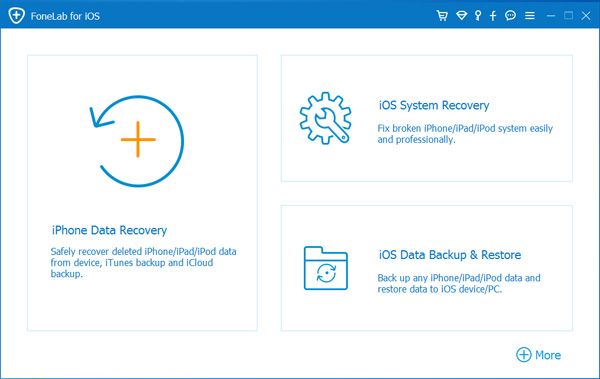
Top 2. FoneLab
FoneLab is an iOS data recovery tool that can help recover deleted or lost data from an iPhone. It offers three recovery modes and has a 15-day trial version, but the file recovery feature is not available in the free version.
Top 3. Stellar Data Recovery for iPhone
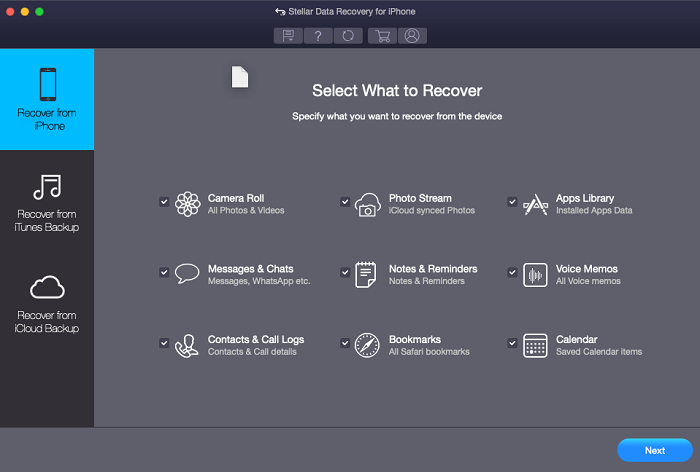
Stellar Data Recovery for iPhone is a software that can recover lost WhatsApp data from all iOS devices, iCloud, and iTunes backup files. It works similarly to other recovery tools, but can also access data stored in encrypted iTunes backup files, making it more powerful. However, its price is a bit high, which might be a drawback for many users.
 Bonus Tips: To restore your chat history from iCloud backup, go to Settings > [Your Name] > iCloud > iCloud Backup and select the backup that contains your chat history. Then, tap "Restore" and enter your Apple ID password to confirm.
- Open your WhatsApp app and go to the "Settings" option.
- To ensure that there is an available backup, go to the "Chats" section and tap "Chat Backup".
- Delete and reinstall WhatsApp on your device.
- Verify your phone number and iCloud ID, then follow its on-screen prompts to restore chat history.
Part 2. Best WhatsApp Recovery Tools for Android
Retrieving data from Android devices can be challenging due to the numerous makes and models available, limiting options for data recovery. However, Qiling MobiSaver for Android is one of the few available solutions for this purpose.
As one of the best WhatsApp recovery tools, this software can recover deleted files for various reasons like accidental deletion, virus attack, device failure, and improper handling, among others. It also has other key features, including the ability to recover deleted files.
- Powerful and easy to use
- High recovery speed
- 100% safe and clean
- Lifetime free upgrade
You can easily retrieve lost WhatsApp chats on Android by downloading a WhatsApp recovery tool and following its simple steps.
Step 1. Connect your Android phone to the computer
To recover data from your Android phone, install and run Qiling Deep data recovery for Android on your computer. Connect your phone to the computer using a USB cable, then click the "Scan" button to allow the software to recognize and connect your device.

Step 2. Scan Android phone to find the lost data
After connecting your Android phone to the software, it quickly scans the device to find existing and lost data, allowing you to easily locate the desired files by selecting the correct file types.

Step 3. Preview and recover data from Android phone
After previewing all the recoverable files, select the items you want to recover quickly and click the "Recover" button to get them back.
Tips: If you've ever made a WhatsApp backup to Google Drive, then you can directly restore deleted WhatsApp messages without using any third-party recovery tools. Here are the steps to do it.
- Delete and reinstall WhatsApp on your Android phone.
- Open the new WhatsApp app you downloaded and verify your phone number.
- A message will appear, asking you to restore your chats from Google Drive. Tap the "Restore" option to proceed.
Part 3. How to Backup WhatsApp Messages
To avoid losing important WhatsApp messages, it's a good idea to back up your messages regularly on both Android and iPhone devices. This will save you time and energy in the future if you need to retrieve them.
The Bottom Line
With Qiling MobiSaver for iOS or MobiSaver for Android installed on your computer, you can easily restore WhatsApp messages without worrying about data loss. Download either of them to try.
Related Articles
- How to Restore iPhone from iCloud Without Resetting
- Fix iPhone 7/ 7 Plus Stuck in Recovery Mode without Losing Data
- Solved: iPhone Deletes Photos by Itself (6 Ways)
- [SOLVED] Why Won't My iOS 15 Install? Fix the Error
- Recycle Bin Windows 10 - Full Guide [with Pictures]
Fix a missing Windows 10 Recycle Bin by restoring the desktop icon, checking settings, and finding deleted files when the icon disappears. - 7 Ways to Fix Slow Google Chrome Slow on Windows 11
Upgrading to Windows 11 can sometimes result in Google Chrome becoming slow and lagging, making it difficult to open. However, there are several ways to fix this issue, and this tutorial will provide the top 7 solutions to get Chrome running smoothly again in Windows 11.
Products
Articles & Tutorials
- Data Recovery
- Data Backup
- File Recovery
- File Backup
- System Backup and Restore
- Disk and Partition Clone
- Technical articles
- Mobile articles
- Disk Master Help
- Windows Data Recovery Tutorials
- Windows Secure Delete Tutorials
- Windows Partition Management Tutorials
- Windows File Backup and Restore Tutorials
- Windows System Backup and Restore Tutorials
- Windows Disk Backup and Restore Tutorials
- Windows Clone Tutorials