How to Fix 'Python Setup.py egg_info' Failed with Error Code 1
| Workable Solutions | Step-by-step Troubleshooting |
|---|---|
| Fix "Python Setup.py egg_info" | Method 1. Check if Pip and Setuptools Are...Full steps Method 2. Upgrade Pip...Full steps Method 3. Upgrade Setuptools...Full steps Method 4. Try to Install the ez_setup...Full steps |
| Restore Data After Fixing the Error | Step 1. Run Deep Data Recovery. Choose the drive where you lost files and start scanning...Full steps |
"Python Setup.py egg_info" Failed with Error Code 1

As a Python programmer, you often need to integrate various other programming packages into your code to add functionality and enhance its capabilities. This involves using pre-written codes from other developers to expand the features of your program.
Integrating others' code into a project can be a daunting task, but Python's package managers make it more manageable. However, Python programmers often encounter issues when installing packages, specifically a "python setup.py egg_info" error with code 1.
The error "python setup.py egg_info" failed with error code 1 is a common issue that can occur due to various reasons. Before diving into the solutions, it's essential to understand why this error happens in the first place.
- The good news is that you don't have to manually add other programmers' code (packages) into your code, thanks to python package managers like PIP and SetupTools. However, if they're not installed correctly, you may encounter a "python setup.py egg_info" failure with error code 1.
- To update PIP to the latest version, run the command "python -m pip install --upgrade pip" in your terminal or command prompt. This will ensure that your package manager is up-to-date and can handle the installation of new packages without any errors.
- If you're experiencing issues with Setuptools due to a version mismatch, installing the latest version of Setuptools using PIP is crucial. Running an outdated version of Setuptools can cause problems, including the "python setup.py egg_info" error with code 1. To resolve this, simply update Setuptools to its latest version using PIP. This will ensure that you're using the most recent version, which should resolve any compatibility issues and allow your setup process to complete successfully.
- The ez_setup module is another essential component for Python programming that must be installed on your system. If it's not, you may encounter the error "python setup.py egg_info" with a code 1.
The "python setup.py egg_info" command failing with error code 1 can be caused by several factors, including a missing or corrupted Python executable, a corrupted or incomplete installation of pip, or issues with the Python version or architecture. Other potential causes include a missing or corrupted wheel package, a problem with the setup.py script, or a conflict with another Python package.
4 Ways to "Python Setup.py egg_info" Failed with Error Code 1
The command "python setup.py egg_info" failed with error code 1 can be fixed with a simple workaround. Our article provides four easy methods to resolve this issue, each with a step-by-step guide to follow carefully. By implementing these methods, you can successfully fix the error and continue with your task.
Method 1. Check if Pip and Setuptools Are Installed Correctly
PIP and Setuptools are Python package managers that help add external libraries, packages, and pre-written code to your program. However, if they are missing or installed incorrectly, it can cause the command "python setup.py egg_info" to fail with error code 1.
Therefore, you need to check if both PIP and Setuptools are installed correctly in your system. Follow the below steps to check if PIP and Setuptools are installed correctly on your computer.
Step 1. Open Command Line Interface (CMD) on your computer.
To open the Command Prompt, press the Windows + R keys to open the Run window, type "CMD" and press Enter.
Step 2. In CMD, enter the command pip list.
Running pip list will enlist if you have pip and setuptools installed and their version numbers.
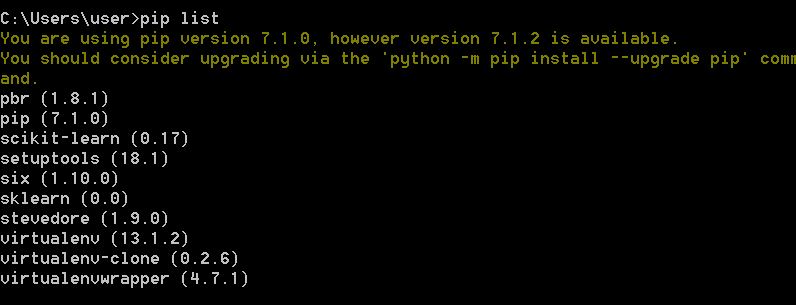
If you run pip list, you should see both pip and setuptools installed. Next, compare the version numbers to ensure they're up-to-date. If either is outdated, you can upgrade them using the methods that follow.
Method 2. Upgrade Pip to Fix "Python Setup.py egg_info"
If PIP is installed, but with an older version, the command "python setup.py egg_info" may fail with error code 1, making it difficult to install packages. This issue can be resolved by updating PIP to the latest version using the command "python -m pip install --upgrade pip". This ensures that PIP is up-to-date, allowing for successful package installations.
Upgrading the PIP on your computer can resolve the issue of the command "python setup.py egg_info" failing with error code 1. You can easily upgrade PIP by following a few simple steps.
Step 1. Open Command Line Interface (CMD) on your computer.
Press the Windows + R keys to open the Run window, type CMD and press Enter.
Step 2. In CMD, type python -m pip install -U pip.

Running the command will upgrade the PIP package installed on your computer, resolving the "python setup.py egg_info" failed with error code 1 issue, allowing you to install python packages without any problems after the upgrade.
Method 3. Upgrade Setuptools to Fix "Python Setup.py egg_info"
Setuptools, like pip, requires updates to ensure compatibility and functionality. If you're running an outdated version, updating it is necessary to resolve issues like the "python setup.py egg_info" command failing with error code 1.
Follow the below steps to upgrade Setuptools on your computer.
Step 1. Open Command Line Interface (CMD) on your computer.
Press the Windows + R keys to open the Run window. Type CMD and press Enter to open the Command Prompt.
Step 2. In CMD, type pip install -upgrade setuptools.
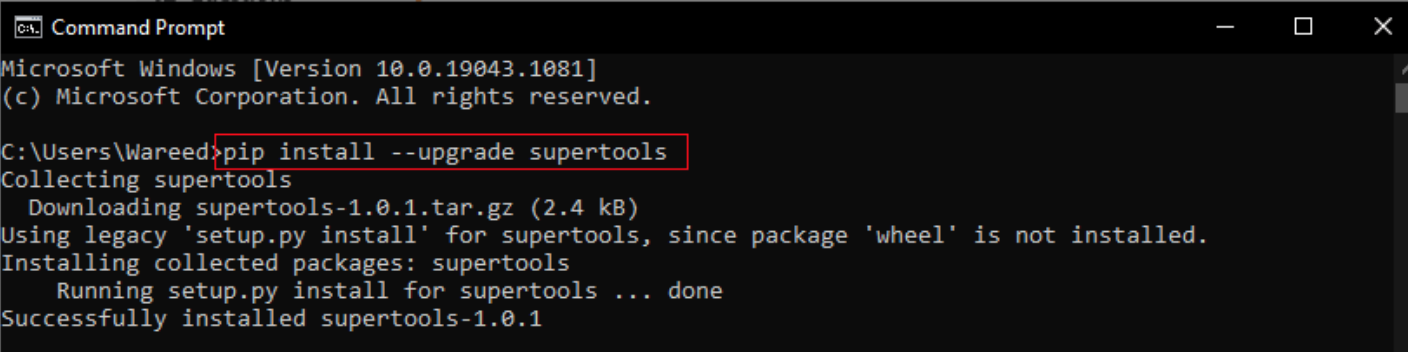
To resolve the issue of "python setup.py egg_info" failing with error code 1, run the command `python -m pip install --upgrade pip` followed by `python -m pip install --upgrade setuptools` in your terminal to upgrade both pip and setuptools. This will ensure that your system has the latest versions of these packages, allowing you to install other packages without encountering the error.
Method 4. Try to Install the ez_setup
The command "python setup.py egg_info" fails with error code 1 due to a missing ez_setup module. However, you can easily install the ez_setup using the pip package manager.
Follow the below steps to install the ez_setup on your computer using the pip package manager of python.
Step 1. Open Command Line Interface (CMD) on your computer.
To open the Command Prompt, press the Windows + R key to open the Run window, type "CMD" and press Enter.
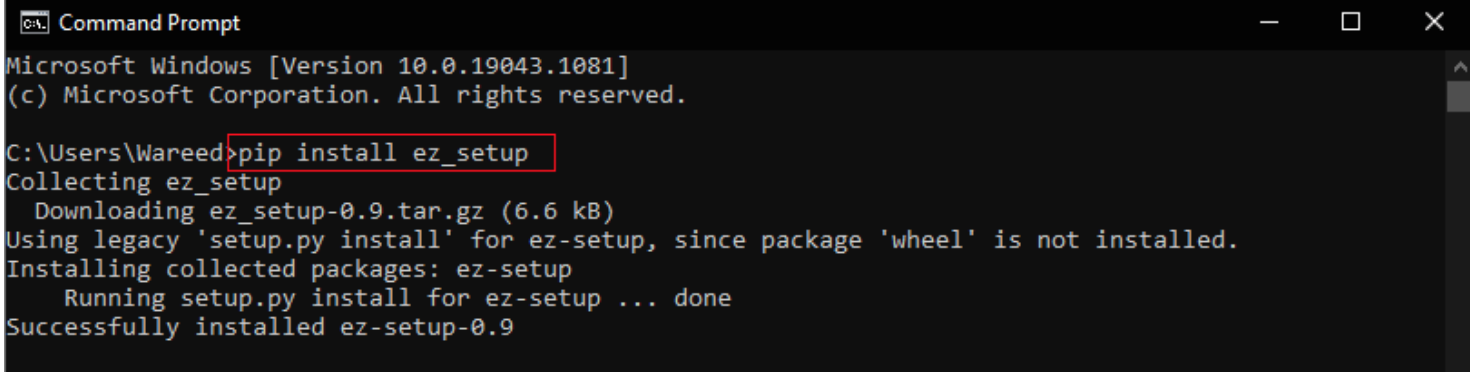
Step 2. In CMD, type the command pip install ez_setup
After installing the ez_setup module, you should be able to successfully install new Python packages. If you previously encountered the issue where "python setup.py egg_info" failed with error code 1, you should no longer face this problem.
How to Restore Data After Fixing Python Error Code 1
Users of the Python community have reported that the command "python setup.py egg_info" failed with error code 1, resulting in data loss. If you've experienced data loss due to this issue, you can recover your files using Qiling free data recovery software, which is suitable for Windows 11/10/8/7.
Deep Data Recovery stands out with its impressive set of features, making it a highly recommendable tool. Some of its key features include.
- Deep Data Recovery is a tool that helps you recover accidentally deleted data from your computer.
- During a Windows upgrade, data can be recovered with a few simple steps.
- Data from network-attached storage can be recovered (NAS).
- External storage devices like external hard drives can be used to retrieve data.
Step 1. Launch Deep Data Recovery on your PC. Select file types and click "Fast Scan" to start the recovery process.

Note: You can choose different search modes based on where and why the data was lost.
Step 2. This software allows you to recover lost data from all devices, including HDD, SSD, USB drive, SD card, pen drive, camera, etc., by scanning the drive where you lost files.

Step 3. You can browse the full scan results and choose the file type you need by clicking on the file type filter, with Qiling data recovery software supporting over 1000 file types including photos, videos, documents, emails, audio files, and more.

Step 4. Select the files you want to preview. Click "Recover" and set a storage location to save the recovered data.
Conclusion
When installing new packages, Python programmers may encounter the issue of "python setup.py egg_info" failing with error code 1. However, this can be resolved by ensuring that pip and setup tools are installed on your computer and their latest versions are running.
To resolve the issue, you need to upgrade both pip and setup tools if you're running an outdated version. This will also ensure that you have the ez_setup module, which is essential for resolving the command "python setup.py egg_info" failed with error code 1 issue.
One more important thing is that you can restore data lost using Deep Data Recovery, a free software that can recover data from any scenario, making it highly recommended.
Related Articles
- How to Recover Deleted Files from Scan and Fix (3 Steps)
- How to Recover Data Files Deleted by Antivirus
- Undelete Windows Server 2016: Recover Deleted Files Windows Server 2016
- Windows.old Restore: Restore Files from Windows.old Folder
- RAW USB Recovery | How to Recover Data from RAW USB Drive
A USB drive can become “raw” and lose its file system, but data can still be recovered. You can recover data from a raw USB drive with Deep Data Recovery. This solution can also be applied to recover data from other raw storage devices, such as memory cards, SD cards, etc., without losing any data. - Recover Data from a Dead USB Flash Drive
A dead USB drive can refer to different states, such as not showing up in Windows, being missing in Disk Management, or being truly unresponsive.
Products
Articles & Tutorials
- Data Recovery
- Data Backup
- File Recovery
- File Backup
- System Backup and Restore
- Disk and Partition Clone
- Technical articles
- Mobile articles
- Disk Master Help
- Windows Data Recovery Tutorials
- Windows Secure Delete Tutorials
- Windows Partition Management Tutorials
- Windows File Backup and Restore Tutorials
- Windows System Backup and Restore Tutorials
- Windows Disk Backup and Restore Tutorials
- Windows Clone Tutorials