How to Find/Redeem Game Key on Epic Games (Complete Guide)
To find a game key on Epic Games, you can either retrieve it from the Epic Games launcher or online store, or use one of the two alternative methods. To redeem a game key on Epic Games, you can either enter the key on the Epic Games launcher or online store, or use one of the two alternative methods. This article provides guidance on both methods of retrieving and redeeming game keys.
What Is an Epic Games Key
To prevent unauthorized use, game publishers may provide product keys that users must activate, and sharing these keys with others is not allowed.
- For users who already have the key, they can navigate to the "redeem" section to unlock the content.
- For individuals who have not recovered the game key, read on to the "find the key" part.
Check Solutions Quickly:
- How to Find CD Key via Qiling Key Finder
- How to Redeem Game Key on Epic Games
- Bonus Tips: How to Transfer/Move Epic Games to Another PC/Drive
How to Find CD Key via Qiling Key Finder
When installing games, a product key is often required. The serial number can usually be found in two ways: either in an order email or online service if the game was purchased from an online store, or on the CD package if the game was installed from a physical disc. Unfortunately, if the CD box with activation information is lost, a game enthusiast may need to recover the game key.
Qiling Key Finder is a product key finder that has a user-praised function to find and extract your software key in one click. The software's clear interface helps you locate the "Product Key" section easily, and clicking the Scan button lists all your software keys on the next window. From there, you can click the copy button and paste the key to a safe location.
Free download game product key extractor:
Tutorial - How to Find Lost Game Keys:
Step 1. Click "Application" tab under "Registry Key".
Step 2. Qiling Key Finder shows all registry keys of installed software, allowing you to copy, print, or save the targeted serial numbers.
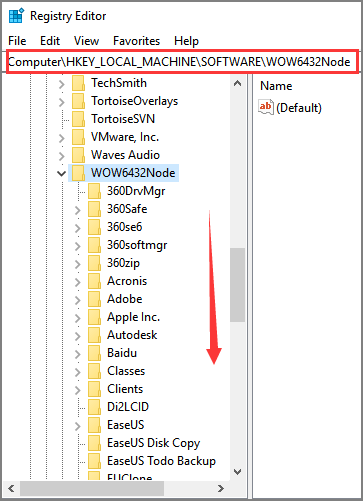
If you can't find what you need from Qiling Key Finder, you can also try using the Registry Editor as an alternative method.
Step 1. To open the Registry Editor, press the Windows key + R to open the Run dialog box, then type "Regedit" and click "OK".
Step 2. Follow the path to locate key information:
HKEY_LOCAL_MACHINE\Software\Wow6432Node
Then seek the name of the game publisher, expanding the game, and find the serial key.
How to Redeem Game Key on Epic Games
To find or redeem your game key on Epic, sign in to your account, download the Epic Games Launcher, and follow the activation process.
Check 2 ways to redeem Epic games keys:
1 - Redeem Product Keys on Epic Game Launcher
Step 1. To sign in to an Epic account and access Fortnite, go to the Epic Games page and select the desired sign-in method. Once signed in, download the Epic Games launcher, which will allow access to Fortnite and other Epic Games titles.
Step 2. To access your Epic Games account, open the Epic Games launcher and sign in to your account.

Step 3. You can check your username on the bottom left side. Locate and click it.
Step 4. And then click Redeem Code.

Step 5.Enter your code part and type the code you kept. And then choose Redeem.
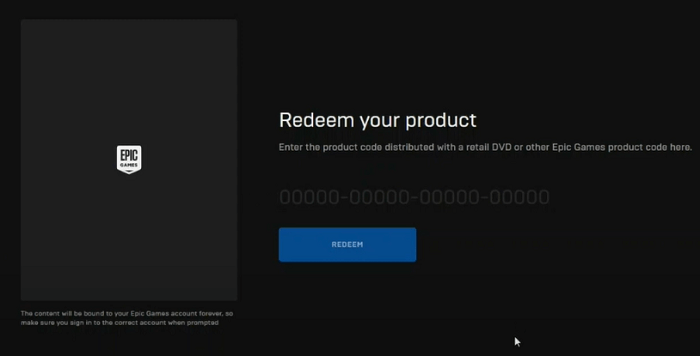
After receiving a message that the code has been redeemed, you can check your game from the game library.
2 - Redeem Game Code via Epic Games Store
Step 1. Search link on the browser (https://www.epicgames.com/store).
Step 2. Log into your Epic Games account.
Step 3. To redeem a code, locate your username in the top right corner, click on it, and then select Redeem Code. This will allow you to enter your code and receive any applicable rewards.
Step 4. Enter your code and click Redeem.
More info: How to Activate Ubisoft Games from Epic Game Store
If Epic Games asks you for a key for downloading the Ubisoft game, follow the instructions to run your Ubisoft game.
Step 1. To remove the Epic Games Launcher and Ubisoft Connect icons from the system tray, you can follow these steps: 1. Right-click on the taskbar and select Task Manager.
Step 2. You can try to run the Ubisoft game after rewriting the registry and launching the Epic Game Launcher again.
Bonus Tips: How to Transfer/Move Epic Games to Another PC/Drive
Reinstalling software to another computer or drive can lead to transfer issues. To free up space on your C drive for games, you may need to change the game location. If you're purchasing a new machine, you'll likely need PC transfer software to transfer all programs from one PC to another.
See what does Qiling Disk Master can do for you:
- Transferring programs, files, and settings from one computer to another can be done in a "PC to PC" mode, allowing you to easily move your data and settings from one machine to another.
- Move all your installed programs to another drive - "App Migration" mode.
To Sum Up
To find a game key on Epic Games, we recommend using third-party software, which offers useful features to retrieve your serial number. The free download is fast and efficient, thanks to its small size.
To redeem a code and quickly play games, you can check two online options, verifying the code each time. If it shows as incorrect, double-check the code number. This process can help you enter games without delay, which can be frustrating if you have to wait.
Related Articles
- [Easy to Follow] How to Find CorelDRAW Serial Number?
- What to Do When You Forgot Thunderbird Password
- 2 Easy Ways to Recover Ubisoft Account and Password
- How to Read and Find Lost WiFi Password (PC/Mac/iOS/Android)
- What Is Windows Hyper V? [Detailed Description]
Don't know what is Windows Hyper-V? Windows launched a virtualization software in 2008 called Hyper-V. With Windows Hyper-V, you can create multiple virtual machines with different operating systems. Continue reading to learn more about Hyper-V! - How to Fix 7 Days to Die Corrupted Save on PC (2024 New Guide)
Fix a corrupted 7 Days to Die save on PC. Learn how to locate save files, restore backups, and reduce the risk of losing progress.
Products
Articles & Tutorials
- Data Recovery
- Data Backup
- File Recovery
- File Backup
- System Backup and Restore
- Disk and Partition Clone
- Technical articles
- Mobile articles
- Disk Master Help
- Windows Data Recovery Tutorials
- Windows Secure Delete Tutorials
- Windows Partition Management Tutorials
- Windows File Backup and Restore Tutorials
- Windows System Backup and Restore Tutorials
- Windows Disk Backup and Restore Tutorials
- Windows Clone Tutorials