What Is a Windows 10 Installation Disc?
If you're planning to install the new version of Windows 10 on your computer, here's a step-by-step guide to make the process smooth and convenient.
Windows 10 is one of the most stable versions of Windows, offering a seamless user experience with minimal failures. This guide provides comprehensive information about the Windows 10 installation disc, its purpose, features, and other related details.
What is Windows 10 Installation Disc?
The Windows 10 installation disc is a data disc that stores the complete files of the Windows 10 system, used to install Windows 10, and originally one of the Windows operating system installation media released by Microsoft.
The Function of Windows 10 Installation Disc
The Windows 10 installation disc includes a software copy of Windows 10 that can be installed on a blank hard drive or new PC, as well as an Advanced Recovery tool to fix Windows issues.
The presence of a Windows 10 installation disc makes it unnecessary to have any additional tools, and its availability on a USB or DVD makes it easy for anyone to install or repair.
The Features of Windows 10 Installation Disc
- Anyone can create it on a USB or DVD Drive.
- Built-in Advanced Recovery Tool
- The easiest way to install Windows
- Includes disk partition tools to help with Windows installation
- Recover lost Boot Record
- Download Updates during installation
- Checks PC requirements
Install System with Windows 10 Installation Media
Microsoft offers a Media Creation Tool to help users create Windows installation media, such as ISO files, to install Windows systems, making the process of downloading Windows 10 ISO files faster and more efficient.
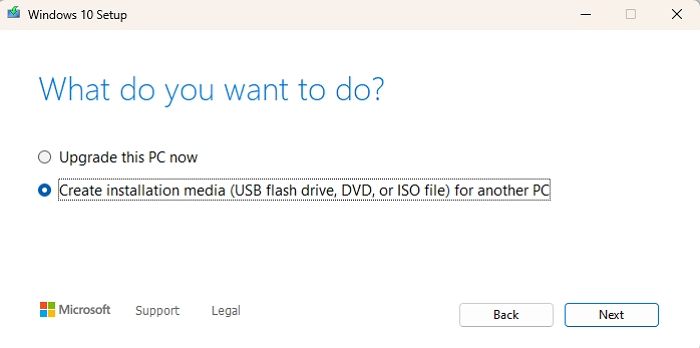
The ISO file is a virtual image file that contains all the information on the disc. After downloading the Windows 10 ISO file, users can burn it to a DVD and complete the final installation task.
Conclusion
The Windows 10 installation disc is a convenient solution for installing or upgrading to Windows 10, allowing you to get a complete copy of the operating system on your device with just a few clicks.
Related Articles
- What Is SSD TBW and How to Check TBW on SSD
- Hard Drive Data Recovery Glossary
- What Is 4K Ultra HD [All You Need to Know]
- Apple M1 Chip| An Apple Chip You Need to Know
- Efficient Tutorial: Create Multiple Partitions on USB Drive Using Diskpart
This article will guide you through the process of creating multiple partitions on a USB drive using Diskpart, offering a quick and easier method for creating partitions on your USB device. - Fix CS:GO "VAC Was Unable to Verify Your Game Session"
Struggling with the error: VAC was Unable to Verify Your Game Session? This guide has 5 best solutions to fix the issue within a few minutes.
Products
Articles & Tutorials
- Data Recovery
- Data Backup
- File Recovery
- File Backup
- System Backup and Restore
- Disk and Partition Clone
- Technical articles
- Mobile articles
- Disk Master Help
- Windows Data Recovery Tutorials
- Windows Secure Delete Tutorials
- Windows Partition Management Tutorials
- Windows File Backup and Restore Tutorials
- Windows System Backup and Restore Tutorials
- Windows Disk Backup and Restore Tutorials
- Windows Clone Tutorials