Is TotalAV a Good Antivirus? (2024 Ultimate Review)🔥
Key Takeaways
- Using secure antivirus software is crucial to protect devices from increasingly sophisticated digital threats and cyberattacks.
- TotalAV offers effective malware scanning and real-time protection, making it a top choice for antivirus software.
- TotalAV provides comprehensive protection for your devices with its multi-layered security and real-time antivirus capabilities, safeguarding them from various threats.
- Antivirus software protects your computer from viruses and other threats, but it's also essential to have a reliable backup plan in place to safeguard your data.
TotalAV is a reputable antivirus software that offers robust protection against malware and other online threats. It provides real-time scanning, automatic updates, and a user-friendly interface, making it a good choice for those seeking reliable digital security. However, the effectiveness of any antivirus software ultimately depends on various factors, including the type of malware, device specifications, and user behavior. Therefore, while TotalAV is a good antivirus, it's essential to consider other factors and possibly combine it with other security measures for comprehensive protection.
TotalAV is a suitable antivirus choice due to its strong malware scanning and real-time protection features. This article provides an in-depth evaluation of TotalAV, exploring its security features, advantages, disadvantages, pricing plans, and real-world performance to help you decide if it's the right antivirus for your needs.
| 🏅 Overall Rank | #3 out of 74 antiviruses |
| 🔥 Firewall | ❌ |
| 🌐 VPN | ✅ (with unlimited data) |
| 🎁 Free Plan | ✅ |
| 💵 Pricing | Starting at $19.00/year |
| 🎨Rating | 4.6/5.0 |
| 💰 Money-Back Guarantee | 30 days |
| 💻 Operating Systems | Windows, Android, Mac, iOS |
TotalAV Antivirus Comprehensive Review
TotalAV is a reliable antivirus software that can help protect your devices from complex digital threats and cyberattacks. A comprehensive review of TotalAV highlights its security features, advantages, disadvantages, price plans, and main features, making it a top choice for those looking to safeguard their data.
1️⃣ Security: Is TotalAV Safe?
When choosing an antivirus software, security is the top priority. A reliable and secure antivirus like TotalAV can give you peace of mind, protecting your device against viruses, malware, and phishing attacks.
TotalAV offers layered security and real-time antivirus protection to secure devices, but its effectiveness relies on timely updates and a comprehensive virus database. It also includes a VPN, which encrypts internet connections, providing online privacy and security, and allowing access to geo-restricted content anonymously.
TotalAV provides protection, but its effectiveness may change over time due to evolving cyber threats. To stay safe, it's essential to keep the antivirus software updated regularly.
2️⃣ Advantages & Disadvantages
Pros
- Intuitive dashboard with easy access to essential functions.
- Multiple Platform Support, including Windows, Mac, Android, and iOS
- Provides real-time protection against digital threats and malware.
- System optimization tools to improve device performance.
- Additional features, including VPN and device optimization.
- Free version is available with basic features.
Cons
- Limited Independent Testing.
- Pop-Up Ads in Free Version.
- The VPN included in TotalAV's feature has limitations.
- Frequent promotions and upsell attempts.
📖You may be interested: Windows 11 Virus Protection Keeps Turning Off | Norton vs McAfee: Ultimate Comparison
3️⃣ Price Plan
TotalAV offers various pricing plans to suit different needs and budgets, providing flexibility and affordability for users.
- Antivirus Pro: This plan provides comprehensive protection for up to 3 devices, featuring real-time antivirus software, system optimization tools, remote Firewall, and a web browser cleaner, all designed to safeguard against malware and other online threats.
- Internet Security: This plan offers expanded coverage for up to 5 devices, along with additional features including a VPN, ad blocker, safe password vault, and smartphone optimizer.
- Total Security: The most comprehensive plan offers coverage for up to 6 devices and includes all the features from the previous plans, plus priority support and an extra "enhanced" VPN.
Here are the features of each plan:
| TotalAV Total Security | TotalAV Internet Security | TotalAV Antivirus Pro | TotalAV Free Antivirus | |
| Platforms | PC, Mac, Android, iOS | PC, Mac, Android, iOS | PC, Mac, Android, iOS | PC, Mac, Android, iOS |
| Price | $49.00 / year | $39.00 / year | $19.00 / year | Free |
| Number of device licenses | 6 | 5 | 3 | 1 |
| Advanced ransomware protection | ✅ | ✅ | ✅ | ❌ |
| Real-time antivirus protection | ✅ | ✅ | ✅ | ❌ |
| Anti-malware scanner | ✅ | ✅ | ✅ | ✅ |
| Anti-phishing protection | ✅ | ✅ | ✅ | ✅ |
| System clean-up tools | ✅ | ✅ | ✅ | ❌ |
| Cloud-based malware scanning | ✅ | ✅ | ✅ | ❌ |
| Virtual private network (VPN) | ✅ | ✅ | ❌ | ❌ |
| Password manager | ✅ | ❌ | ❌ | ❌ |
| Ad Blocker | ✅ | ❌ | ❌ | ❌ |
| Phone and email customer support | ✅ | ✅ | ✅ | ✅ |
| Mobile app | ✅ | ✅ | ✅ | ✅ |
| 30-day money-back guarantee | ✅ | ✅ | ✅ | Free |
Download TotalAV to safeguard your PC from all aspects:

TOTALAV
TotalAV is an award-winning antivirus software that offers real-time protection against viruses, malware, and online threats.
Antivirus Protection Enabled
4️⃣ Main Features
TotalAV offers a range of features to provide comprehensive security and system optimization, including real-time virus scanning, malware removal, firewall protection, password management, and system optimization tools to improve computer performance and extend battery life. Additionally, it provides features like adware removal, online backup, and a built-in VPN for secure browsing. TotalAV also offers a password manager to securely store and generate strong passwords, and a system optimizer to clean up temporary files, registry entries, and other system clutter.
Virus Scan
TotalAV is a comprehensive antivirus and security solution that offers multiple features to protect your devices from malware, powered by Avira's reputable anti-malware engine.
There are four types of virus scans available:
- Quick Scan: Scans and secure temporary files where viruses are commonly found.
- System Scan: Scans the entire system for malware.
- Smart Scan: This tool combines malware detection with system optimization by identifying junk files, tracking cookies, and other issues, providing a comprehensive solution for maintaining a secure and efficient computer system.
- Custom Scan (Windows only): This software enables you to scan a single file, a folder, or even an entire disk for viruses, malware, and other potential threats, providing a comprehensive security check.
System Tune-Up:
TotalAV's System Tune-Up includes several tools to optimize your computer's performance:
- Startup Manager: Allows users to control which applications run automatically at boot.
- Application Uninstaller: Helps you remove unwanted or obsolete software.
- Browser Clean-up: Clears your browsing data, enhancing online privacy.
- Junk Cleaner: Removes unnecessary files that can slow down your computer.
- Duplicate File Finder: Identifies and deletes duplicate files to free up storage space.
Total Password
Total Password is a secure password manager that uses 256-bit AES encryption, has a zero-knowledge policy, and offers two-factor authentication with authenticator app options, along with features for password auditing, generation, and security reports to identify weak or compromised passwords.
Smart Firewall
TotalAV's smart firewall monitors and controls network traffic to prevent unauthorized access and protect personal information.
Safe Browsing (VPN):
TotalAV's Safe Browsing VPN is a virtual private network that protects online activity by rerouting internet traffic through secure servers, providing anonymity and security.
TotalAV's VPN offers compatibility with popular streaming services, supports P2P file sharing, and provides customization options like a kill switch, protocol selection, and auto-connection on public Wi-Fi networks.
Anti-Phishing Protection
TotalAV's WebShield tool uses a combination of well-known blacklists and its own AI-powered system to block phishing sites and online malware distributors, protecting users from harmful websites.
- This browser extension filters search results to block unsafe web addresses and potentially harmful websites, providing protection against phishing and malicious sites.
- Users have the flexibility to customize WebShield settings, including blocking low-trust websites and crypto-mining URLs.
Data Protection
TotalAV's data protection features include file encryption and secure browsing, as well as a password vault to securely store login credentials and create strong, unique passwords for different accounts.
Device Optimization
TotalAV offers system optimization tools that enhance device performance by cleaning up junk files, optimizing settings, and boosting overall speed and responsiveness.
Real-Time Protection
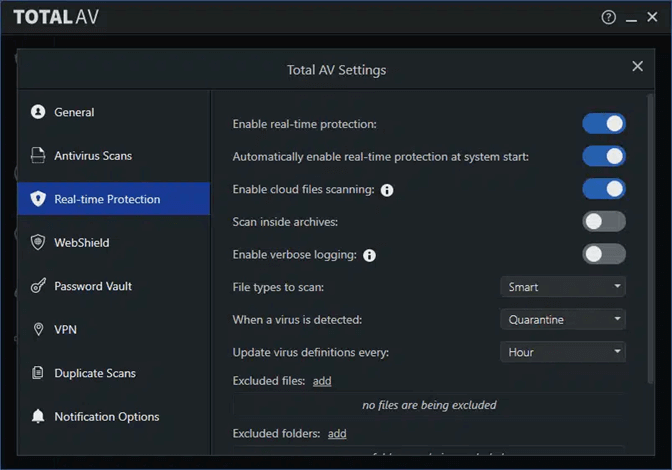
TotalAV's real-Time protection scans files, applications, and websites for potential threats, identifying and removing malware and other malicious software in real-time.
5️⃣ Installation and Setup
Installing TotalAV is a relatively straightforward process. To get started, simply download the software from the official website, then follow the prompts to install it on your computer. The setup process is typically easy to navigate, and the program will guide you through the necessary steps to complete the installation.
Step 1. Visit the Official TotalAV Website and download TotalAV.
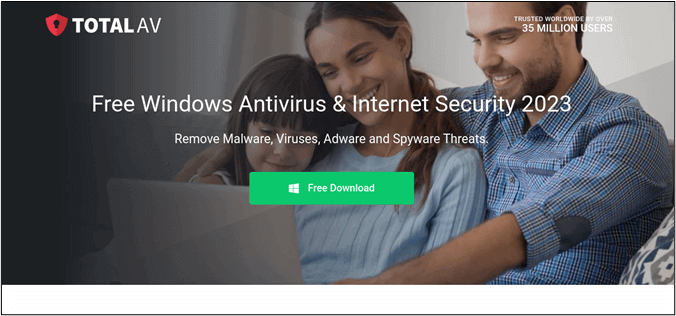
Step 2. To get started, install the software on your computer and carefully review the terms and conditions before proceeding.
Step 3. Open the TotalAV app and access the application menu.
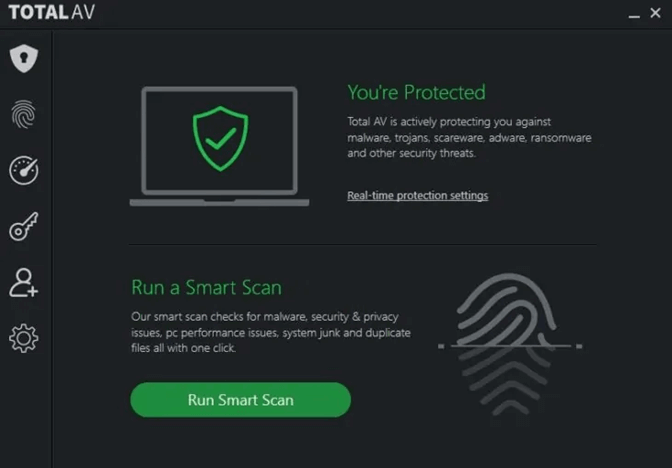
Step 4. TotalAV now provides real-time protection, monitoring the device for threats and offering immediate protection, keeping it secure from potential threats.
Bonus: Create a Backup to Add a Layer of Protection for Your PC
To safeguard your valuable information, it's crucial to create a backup of your PC, as your data is always at risk of digital threats. While antivirus software protects your system from malware and threats, a reliable backup solution is also necessary to ensure that you never lose critical files. Qiling Disk Master can help you secure your data and provide peace of mind.
Qiling Disk Master Free is a free backup and recovery software that securely protects your data and system integrity. It offers various backup options, including full system backups, disk and partition backups, and file-level backups, as well as the ability to create disk images and perform incremental and differential backups for efficient recovery. Additionally, its encryption features ensure the privacy of your backups, providing an extra layer of security.
- 🗂️Data Backup: The software allows users to create full system backups, disk/partition, and file backups, ensuring that data is stored and easily recoverable in case of data loss.
- 📀Disk Imaging: Qiling Disk Master allows you to create exact disk images, making it easy to restore your system to a specific point in time. This is particularly useful in situations where a system crashes or is severely infected with malware, as it enables you to recover to a known good state.
- 🧮Incremental and Differential Backups: Incremental and differential backups can be performed, minimizing the time and storage space needed for backups.
- 📲System Migration: If you're upgrading your hardware or moving to a new PC, Qiling Disk Master simplifies migrating your entire system and data by allowing you to clone your old disk to the new one, preserving your settings, files, and programs.
- ⏰Scheduled Backups: Set automated backup schedules to ensure your data is regularly and consistently protected without manual intervention.
This robust backup solution provides an extra layer of protection, safeguarding your data even in the event of a hard drive failure or physical computer damage. It's an essential addition.
Final Verdict
TotalAV is a solid antivirus option with robust malware scanning and real-time protection, but its pricing and support may not be ideal for some users.
While no antivirus is foolproof, it's crucial to complement your protection with a reliable backup solution like Qiling Disk Master to ensure comprehensive digital defense and safeguard your important data against evolving cyber threats.
FAQs on TotalAV Review
TotalAV is a reliable antivirus software that provides comprehensive protection against various types of malware, including viruses, spyware, and ransomware. It also offers additional features such as password management, a VPN, and a system cleaning tool to help improve your device's performance. Many users have reported positive experiences with TotalAV, citing its ease of use, effectiveness, and affordable pricing.
1. What is better, Norton or TotalAV?
Norton and TotalAV are both reputable antivirus solutions, with Norton excelling in robust security features and consistent performance, while TotalAV is known for its malware scanning and real-time protection.
2. Is TotalAV better than Malwarebytes?
The choice between TotalAV and Malwarebytes depends on your specific needs and budget. If you're looking for a comprehensive security suite, TotalAV might be the better option. However, if you're specifically looking to remove existing malware, Malwarebytes is a strong tool. Some users even use both products together for added protection.
3. Do I need an antivirus if I have Microsoft Defender Antivirus?
Microsoft Defender Antivirus is a built-in antivirus solution for Windows that provides basic protection against common threats, but third-party antivirus solutions often offer more advanced features, making them a better choice for protecting important data.
Related Articles
- Easy and Quick! | 3 Solutions to Refresh Windows 11
- How to Transfer Disk Image to New Hard Drive on Windows 11/10/8/7
- Samsung M.2 SSD Migration Software for Windows[2024 Choice & Guide]
- How to Install Games on SSD with Full and Detailed Guides
- pCloud vs Dropbox: Which Wins?🏆
- Best Way to Backup Data to Synology NAS (2024 Choice)
Are you looking for the best way to back up data to Synology NAS? Well, you are in the right place. This tutorial will walk through the best backup software Qiling Disk Master, as well as the steps to use it to back up Windows data to Synology NAS.
Products
Articles & Tutorials
- Data Recovery
- Data Backup
- File Recovery
- File Backup
- System Backup and Restore
- Disk and Partition Clone
- Technical articles
- Mobile articles
- Disk Master Help
- Windows Data Recovery Tutorials
- Windows Secure Delete Tutorials
- Windows Partition Management Tutorials
- Windows File Backup and Restore Tutorials
- Windows System Backup and Restore Tutorials
- Windows Disk Backup and Restore Tutorials
- Windows Clone Tutorials