Norton vs McAfee: Ultimate Comparison to Decide Which to Use
Key Takeaways
- ✅Norton 360 and McAfee Total Protection offer feature suites that include password managers, web surfing protection, encrypted storage, and VPNs, among other features.
- ✅Based on the tests, features, and scanning performance, Norton's antivirus software appears to have a slight edge over McAfee's, according to the available data.
- ✅TotalAV is considered one of the top antivirus programs, offering advanced security features both online and offline, with high malware detection rates.
- ✅To safeguard your data and system, consider backing up your data, which adds an extra layer of protection.
We use antivirus software to protect computers from external threats. While well-known options like McAfee and Norton 360 are available, choosing one can be a challenge. Both Norton 360 and McAfee Total Protection not only offer protection, but also come with feature suites that include password managers, web surfing protection, encrypted storage, VPNs, and more.
Since both Norton and McAfee excel in one or the other features, we compare them to determine which is best for you. We evaluate both software based on various features, such as protection, performance, and user interface, to provide a comprehensive comparison.
| Norton | McAfee | |
| 🔥Rating | 4.7 out of 5 | 4.2 out of 5 |
| 🏅Overall Rank | #2 out of top 25 | #7 out of top 25 |
| 💵 Price | starts from $19.99/year | Starts from $39.99 a year |
| 💻Platforms | macOS, Windows, iOS, Android | Windows, macOS, iOS, Android |
| 🛒Free Version | 7-day free trial | 30-day free trial |
Norton vs McAfee: An Ultimate Comparison
Norton and McAfee are popular antivirus programs with a large user base. The question on many minds is how they compare when it comes to protecting devices. To determine the winner, let's compare them across various categories.
#️⃣Main Features: Norton 360 vs McAfee Antivirus
Many reviewers rate Norton 360 and McAfee similarly, with their main features being quite comparable. To determine which is more effective, several reviewers conducted tests, with Germany's AV-Test Institute being a popular choice. Based on their results, we can evaluate the main features of each antivirus software.
| McAfee Total Protection | Norton 360 | |
| Independent Tests | Highest score | Highest score |
| Firewall Protection | Effective | Effective |
| Real-time Protection | 99.8% | 99.9% |
| Scanning | Effective, works 10 out of 10 times in detecting malware | Effective, works 10 out of 10 times in detecting malware |
Firewall Protection
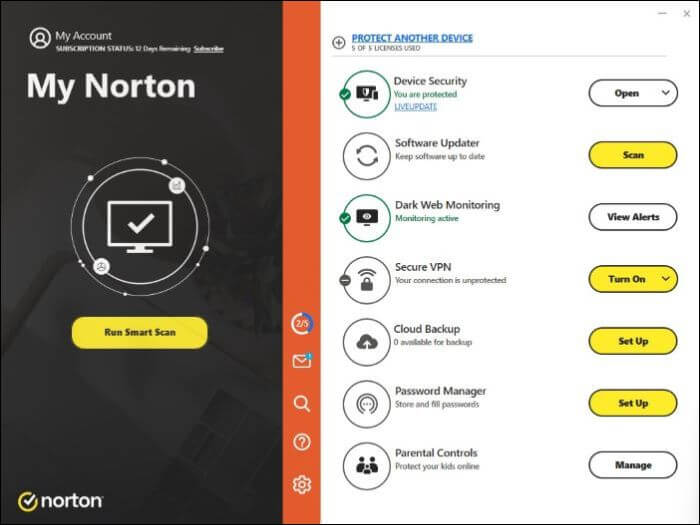
Norton's Smart Firewall features and the Intrusion Prevention System work together to act as firewalls, with the Smart Firewall checking for malicious pieces and the Intrusion system deciding which data to allow through. This is similar in performance to McAfee's Firewall protection, which operates on a slightly different model, but both provide effective security.
McAfee's firewall protection is rated higher than Norton's due to fewer false positives, but both ultimately provide effective protection.
Real-time Malware Protection
To deal with malware, it's essential to detect, protect, and remove it. Both Norton and McAfee offer great features for this, helping you safeguard your device and prevent any potential harm.
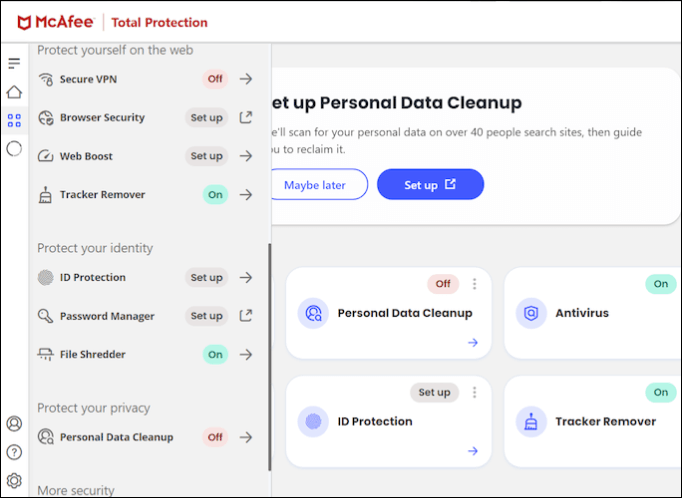
Norton malware protection includes real-time malware protection and a Safe Web feature, while McAfee has features like Tracker Remover, Secure Apps, and a file shredder to tackle online and offline threats.
Tracker Remover is used to delete cookies and temporary files, while the other two options, which are not specified, are used to keep files safe during updates or deletions on external platforms. Web Advisor, on the other hand, provides safe web browsing and protection from misclicks and typos that may lead to visiting dangerous sites.
Scanning
Norton offers various scanning types, including a quick scan for regular checkups, a full scan for detecting vulnerabilities, and other options like a smart scan and file scan.
McAfee offers three types of scans: quick, full, and custom. The quick and full scans are similar to Norton's offerings, but the custom scan allows users to scan specific files by right-clicking on them.
The post is helpful and provides valuable information. If you found it useful, please share it on your social platforms to help others discover it as well.
#️⃣Price plan
Norton and McAfee offer similar plans with comparable benefits, but Norton's basic plan starts at $19.99/year, making it a more affordable option for those who need basic features to keep their systems safe. If you're looking to save a buck with base features, Norton is the way to go, while a higher price for Norton will only get you an extra set of features, sometimes advanced versions of the existing ones, for an extra layer of security.
| Plan | McAfee | Norton |
| Plus vs. AntiVirus Plus | $ 49.99/year | $19.99/year |
| Premium vs Standard | $39.99/year | $ 49.99/year |
| Advanced vs. Deluxe | $49.99/year | $ 89.99/year |
| LifeLock Select | ----------- | $99.99/year |
To compare McAfee and Norton 360, try their free trials, which come with money-back guarantee plans, such as 30 days for McAfee and 60 days for Norton.
#️⃣Advantages & Disadvantages
👍Advantages of Norton 360:
- A complete security software suite: Norton 360 provides a suite of security features, including antivirus, firewall, ransomware protection, VPN, and real-time threat protection, offering comprehensive protection against various online threats.
- Effective Malware Detection: The software has the ability to identify and remove complex and tricky viruses, spyware, ransomware, and threats with high capability.
- Multiple device support: Norton allows users to have multiple devices protected with a single subscription, making it convenient for people who have multiple phones, PCs, and other devices.
- Cloud and Cross-platform support: The package offers cloud storage solutions, allowing users to easily back up and access their data across multiple devices.
👎Disadvantages of Norton 360:
- Resource-Intensive: Norton 360's scans consume more CPU resources and memory, resulting in slower system performance.
- Complex User Interface: The overwhelming UI of the program can be a major drawback, as it requires users to become accustomed to its numerous features, which can lead to confusion and make it difficult for them to navigate.
👍Advantages of McAfee Antivirus:
- Comprehensive protection suite: McAfee offers a wide range of security features, including antivirus protection, firewall, identity theft protection, secure VPN, and safe browsing tools, among others.
- Performance Optimization: McAfee offers performance optimization features like disk cleanup and defragmentation to improve system speed and efficiency.
- Real-Time Scanning and Protection: McAfee scans the system in real-time, identifying and addressing potential threats swiftly and efficiently.
- Global Threat Intelligence Network: McAfee benefits from an intelligence network that analyzes millions of users and endpoints worldwide, providing more effective and robust security protection.
👎Disadvantages of McAfee Antivirus:
- Resource-Intensive: Antivirus programs are resource-intensive and consume more resources when performing complex tasks, such as scanning files or running full system scans.
- Slower Scans: McAfee takes longer than Norton to complete quick scans, full scans, and other security tasks.
- Ads and false positives: McAfee may display ads to subscribed users, including frequent pop-up notifications and promotions, and has a history of flagging legitimate software as a potential threat.
#️⃣Ease of Use
McAfee is easier to use than Norton, with a simpler interface that's less overwhelming for non-tech users.
While both Norton and McAfee offer customization options, McAfee is slightly preferred. One of the key advantages of Norton, however, is its ease of use, particularly once you're up and running. The intuitive user interface from the landing page makes it a breeze to navigate and use, which is a significant plus for any software application.
#️⃣Impact on PC performance
Antivirus software, such as McAfee and Norton, plays a crucial role in protecting systems from malware and other cyber threats. While performing tasks or running in the background, their impact on PC performance should be minimized. Fortunately, modern antivirus programs have evolved to limit their effect on system performance, ensuring a seamless and efficient computing experience.
The impact of quick scans on concurrent functions is minimal for both Norton and McAfee, but noticeable differences emerge during full or more thorough scans. Notably, Norton tends to utilize more CPU and memory resources, whereas McAfee uses more disk resources compared to its competitor. This highlights the distinct system resource management strategies employed by each antivirus program.
| McAfee | Norton | |
| Quick Scan | 12 min 3 s | 1 min 22 s |
| Full Scan | 223 mins | 121 mins |
| CPU Load | 90-100% for a quick scan and 80-100% for a full scan | 80-100% for a quick scan and 70-95% for a full scan |
| Memory Load | McAfee uses approximately 350-450 MB of RAM during idle, and around 400-500 MB during a full scan. | Norton uses approximately 300-400 MB of RAM during idle, and around 350-450 MB during a full scan. |
McAfee consistently ranks high in various benchmark tests from AV-comparatives and AV-test, outperforming others in most functions.
The post is helpful and informative, providing valuable content to its readers. To further assist others, consider sharing it on your social media platforms to spread the knowledge and reach a wider audience. This can be a great way to contribute to the community and make a positive impact.
Norton 360 and McAfee: Which Is the Best?
Norton and McAfee are top antivirus software, but in my opinion, Norton is the winner. Norton outperforms McAfee in tests, features, and scanning performance, with the only drawback being its complex interface. Despite this, Norton offers more features and better value for money, making it a top choice.
Norton and McAfee both offer robust protection features, including webcam protection, ransomware protection, and VPN services, but Norton 360 has a slight edge in terms of pricing and overall protection scores. Both Norton and McAfee provide comprehensive protection against all types of threats, but Norton 360 has a slight advantage. McAfee also offers additional features and solid protection, but falls slightly behind Norton 360.
If you're still unsure about which antivirus to buy, you might consider an antivirus tool that combines the best features of Norton and McAfee, such as TotalAV, which is known for its advanced security features and high malware detection rates.
This software provides comprehensive protection against viruses, malware, and trojans, as well as WebShield protection for safe browsing. It also blocks ads, offers a VPN, secures multiple devices, performs efficient security scans, and monitors your computer's data. With a single subscription, you can use this software on multiple devices, and it is compatible with Windows, Mac, iOS, and Android.
📖Read Also: Is TotalAV a Good Antivirus? (Ultimate Review)
 TOTALAV
TotalAV is an award-winning antivirus and security software that provides real-time protection from viruses, malware, and online threats.
Antivirus Protection Enabled
Pro Tip: Backup System to Add Extra Layer of Protection for PC
Antivirus programs can't protect against physical damage or system failure, but backing up your data provides an extra layer of protection against malware, viruses, failing drives, system damage, and other threats. This way, you can keep a copy of your data safe.
Qiling Disk Master is a reliable software for backing up your device, offering advanced backup methods, clone options, cloud storage, and bootable media capabilities. It allows for efficient cloning, upgrading, or transferring of systems with a built-in security zone for added protection. With its comprehensive features, it's the best solution for all your backup needs, and you can download it now to start backing up your data immediately.
Final Summary
In the battle of antivirus software, Norton edges out McAfee by a narrow margin in some key areas, offering more affordable plans and features, making it the best value for money. However, to ensure complete data security, an antivirus program alone may not be enough, and actively backing up your data is also crucial.
Qiling Disk Master is the best way to keep your data safe with award-winning solutions. You can safely store your data on the cloud with a security zone to boost security and add an extra protection layer. Try it now.
FAQs on Norton vs McAfee
1. What are the disadvantages of Norton Antivirus?
- Norton is robust and fast but consumes many resources, resulting in a dent in system performance.
- The complete suite is really expensive to buy.
- Users may face compatibility issues.
2. Do I need both Norton and McAfee?
Having multiple antivirus programs on the same computer is unnecessary, and both Norton and McAfee offer great features as a complete protection suite. However, based on tests by trusted companies, Norton has a slight edge over McAfee.
3. Is Norton slowing down my computer?
Norton 360 may slow down your computer if you have another antivirus program installed, and it consumes many system resources. Try disabling other antivirus programs and run tasks when the system is idle.
Related Articles
- How to Backup QuickBooks Desktop to Flash Drive [QuickBooks Guides]
- ISO Is Corrupted| How to Fix a Corrupted ISO Files in Windows 11/10
- How Long Does It Take Google Drive to Process a Video
- OneDrive Files Not Showing on Another Computer - 7 Simple Solutions
- What Is HP Cloud Recovery And How To Use It?
- Virus vs. Ransomware vs. Malware: Figure out Differences in 1 Minute
- How to Create Sector by Sector Backup on Windows 11/10/8/7🔥
To create a sector-by-sector backup of your computer hard drive, follow the steps outlined in this article. The best backup software can help you back up all the sectors on your drive, ensuring a complete and reliable backup.
Products
Articles & Tutorials
- Data Recovery
- Data Backup
- File Recovery
- File Backup
- System Backup and Restore
- Disk and Partition Clone
- Technical articles
- Mobile articles
- Disk Master Help
- Windows Data Recovery Tutorials
- Windows Secure Delete Tutorials
- Windows Partition Management Tutorials
- Windows File Backup and Restore Tutorials
- Windows System Backup and Restore Tutorials
- Windows Disk Backup and Restore Tutorials
- Windows Clone Tutorials