Things to Backup Before Reinstalling Windows, Don't Forget!
Some users may welcome reloading Windows 10, but before doing so, they should consider backing up important files and data to avoid losing them. This guide provides a backup checklist and uses free backup software to help users create a backup of their system before reinstalling Windows.
💻You'll receive a detailed checklist and free backup software as part of this package.
⚙️Time You Consume 3-4 Mins.
💰Cost(?): Completely Free.
Page Content:
What to Backup Before Reinstalling Windows?
How Do I Backup My Computer Before Reinstalling Windows?
Restore from Backup After Reinstalling Windows
Before reinstalling Windows, it's essential to figure out why you want to do it, and then consider the potential drawbacks.
Before reinstalling Windows, it's essential to back up your files to prevent data loss. If you're not familiar with the software, the process can be time-consuming and frustrating. To avoid this, take the time to prepare and research the necessary steps. Reinstalling Windows can be a great way to resolve issues and give your PC a fresh start, but it's crucial to have a solid plan in place first.
Preparation: You Must Have!
1. Download a new performance-based software - Qiling Backup Free.
Qiling Backup Free is a free backup and restore solution for all data, offering a simple and convenient way to backup and restore all data with just a few clicks, supporting full, incremental, and differential backups, and compatible with Windows 10/11.
2. Run a virus scan on your drive to ensure that any infected files are not backed up, which could potentially harm your new operating system.
What to Backup Before Reinstalling Windows?
A question that's been around for a while but still causes concern for many people is what to do before resetting Windows 10.
1. Backup personal data - IDs, login passwords, settings, accounting data file (like Quickbook), Paper.
To avoid losing important data, back up personal info like IDs, passwords, settings, and financial files before reinstalling Windows, ensuring a smooth and hassle-free reinstallation process.
2. Back up all files (from Microsoft Office or other file processors), Email, video, and audio.
To avoid losing files, back up all data, including Microsoft Office and other software-created files, as well as emails, videos, and audio files, whenever reinstalling Windows. This ensures that all created files are preserved.
3. Backup bookmarks/favorites (Chrome, Firefox, Edge, etc.)
Holding the password of each account on the browser is not a one-time solution, as it requires frequent updates and management to ensure security and convenience.
Upgrading your system will not prevent you from accessing your favorite websites, even if something goes wrong during the process. You'll still be able to browse the internet as usual.
4. Back up applications and drivers.
Backing up the latest applications and drivers is crucial to prevent data loss in case of a system crash or unforeseen problem, allowing for a smooth roll-back to a previous version if needed.
5. Back up the database for the Server computer.
Backing up your database is crucial to ensure that you have a copy of all your data in case something goes wrong during reinstallation, providing a safety net and peace of mind.
Video Guide - The Definitive Checklist to Reinstalling Windows 10
- 00:00:39 - Backup your files
- 00:02:14 - Sync and save your settings
- 00:03:20 - Save a list of your applications and product keys
- 00:05:32 - Extract settings from your apps
- 00:06:30 - unlink apps / remove PC associations
- 00:07:21 - Keep drivers / installation files ready
- 00:08:58 - Write down drive letters and Windows product key
How Do I Backup My Computer Before Reinstalling Windows?
To back up all critical files to an external hard drive, start by identifying the essential files and folders you need to save. Then, connect the external hard drive to your computer and format it to match the drive type of your computer.
Step 1. To begin the backup process, click the File backup button.

Step 2. The tree view of the screen displays lists of both local and network files, allowing you to expand directories and select the files to back up.
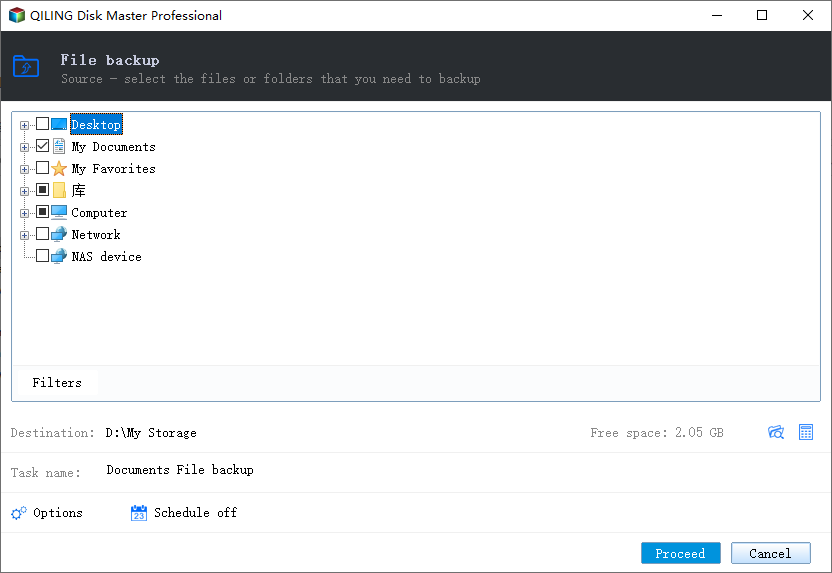
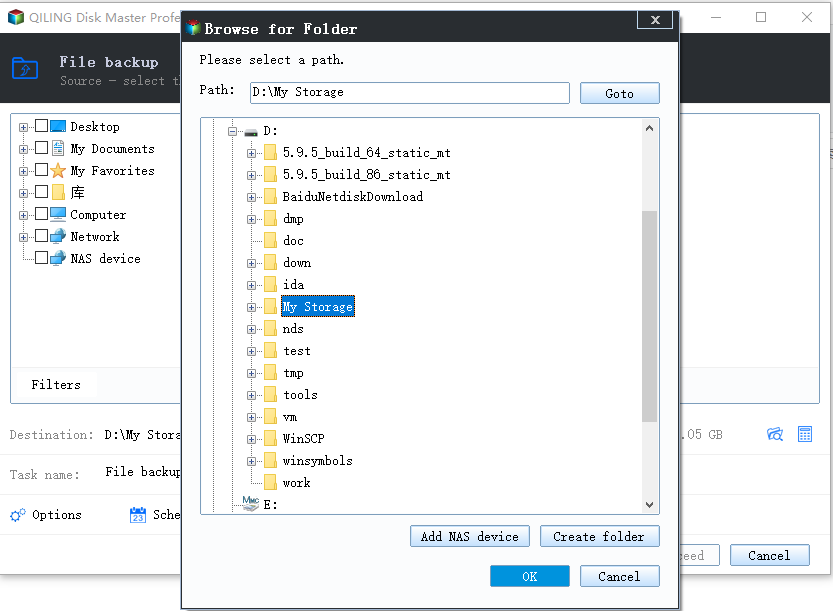
Step 3. Follow the on-screen instructions to select the location where you want to save the backup.
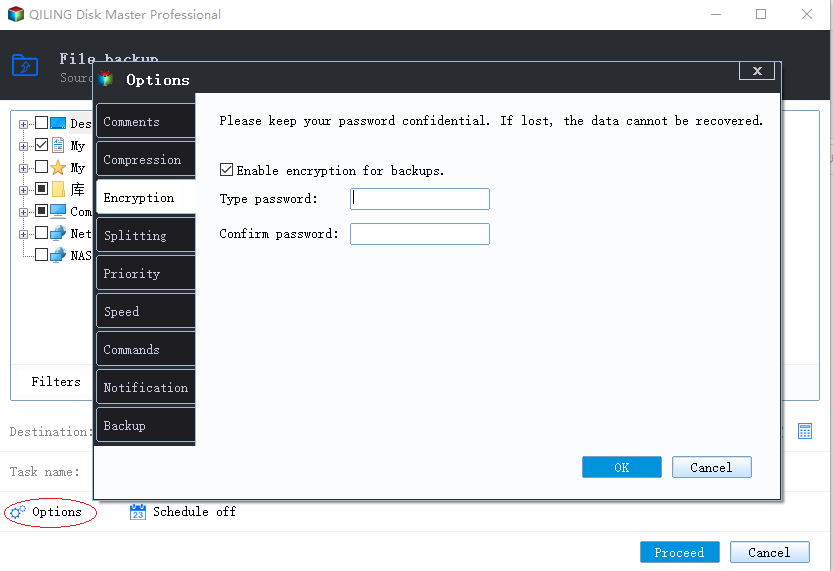
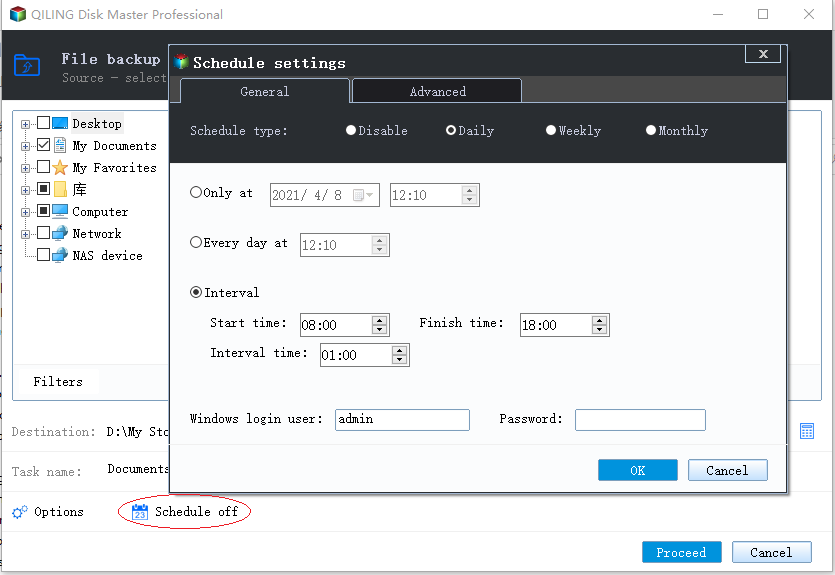
Step 4. To ensure your backup is secure, make sure it's encrypted, and set a schedule for it by clicking on 'Options' in 'Backup Options'.
You can also choose to start the backup at a certain time in Backup Scheme by clicking Options, and there are many other customizable options available.
Step 5. You can store the backup file either on your computer, in Qiling's cloud service, or on a network-attached storage device (NAS).
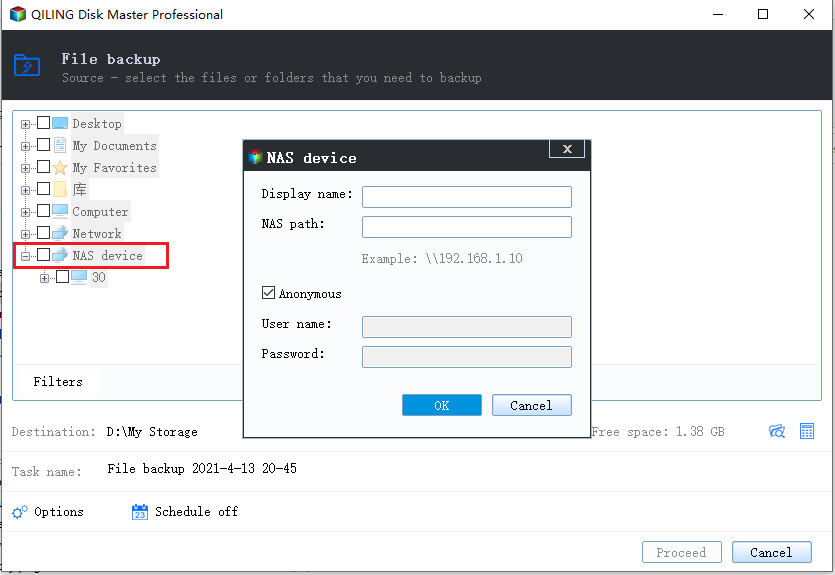
Step 6. Qiling Backup allows customers to store backup copies of their files on a third-party cloud drive or the company's own cloud storage.
To back up your data on a third-party cloud drive, select Local Drive and scroll down to add Cloud Device, then fill in your account information.
Step 7. Click on "Proceed" to start a backup, and once the backup process is completed, it will be displayed as a card on the left side of the screen, which can be clicked to view more details about the backup job.
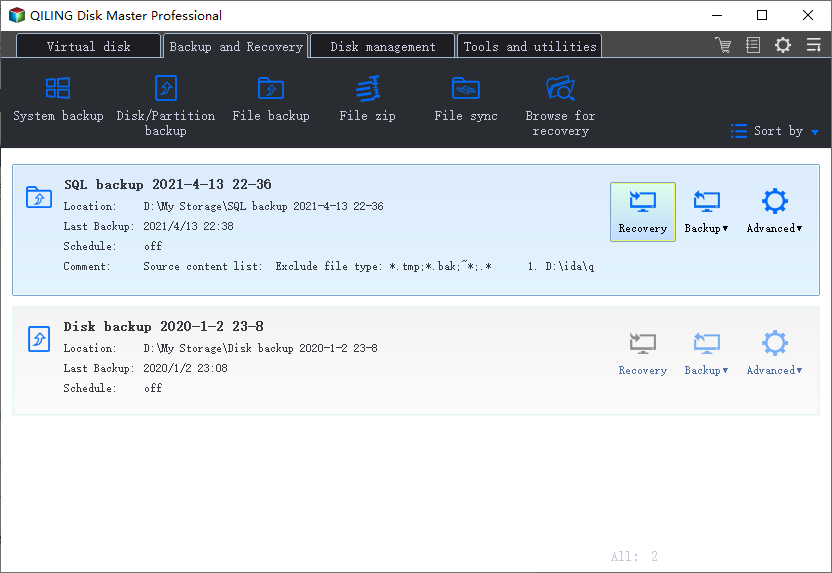
After using the best free backup software for Windows 10, you can continue to install Windows 10 without losing data. Then, go to the next part for restoring data files as described.
Restore from Backup After Reinstalling Windows
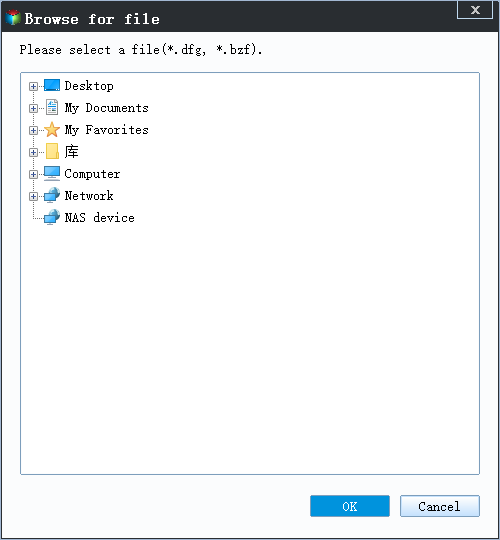
Step 1. Launch Qiling Backup, click "Browse to Recover".
Step 2. To recover your data, go to your backup destination and select the backup file you want to recover. The backup file created by Qiling Backup is a .fvd file.
Step 3. You can choose to recover data to a specific location or to its original location.
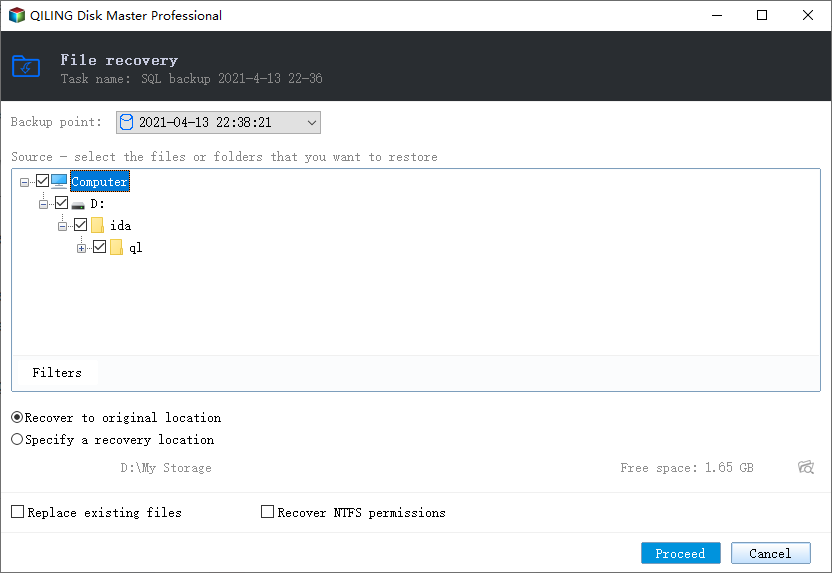
Step 4. Click "Proceed" and the recovery would start.
Backup Before Reinstalling Windows FAQs
1. Do I need to backup my files before reinstalling Windows 10?
To prevent reinstalling crashes during a clean install, you should backup your system before doing so. This will ensure that you have a copy of your important files, settings, and programs, and can restore them if something goes wrong during the installation process.
2. What folders to backup when reinstalling Windows? -Reddit
- "Documents" folder
The folder in question contains all your files, including photos, music, and documents, making it a critical repository of your digital life. Backing up this folder is essential to prevent data loss and ensure that your important files are safe and accessible.
- "AppData" folder
The registry contains a lot of information about your installed programs and settings.
- "Desktop" folder
It contains shortcuts to your most-used programs and files.
3. Do I really need to back up everything when installing Windows 10 - quora.com
If you opt for a clean install of Windows 10, it's essential to back up any personal files you want to keep beforehand. This is because a clean install will erase all files, and you won't be able to recover them without a backup. On the other hand, if you choose to upgrade to Windows 10, you won't need to back up files, as Windows will automatically save them.
4. How to reinstall Windows 10 without losing any games or app? - quora.com
To prepare for a reinstall of your operating system, create a backup of all your important files, including any game saves you don't want to lose. Next, uninstall any apps you want to keep using after the reinstall, and then proceed with reinstalling the OS and restoring the apps.
5. Would backing up my files and then performing a clean install prevent Windows 10 from breaking down? - quora.com
While preventing Windows 10 from breaking down in the short term, this solution is not a long-term fix. As more files are added and software is installed, the likelihood of Windows 10 crashing again increases over time.
The impact depends on the reinstall method; read what reinstalling Windows can delete before erasing partitions.
Related Articles
- How to Backup Files to Cloud (Google/Dropbox Are Included)
- Automatically Backup a Folder to A Network Drive
- Outlook Backup and Restore in 2 Ways [with Video]
- Download System Clone Software to Clone OS in 2 Procedures
- Top 9 Best Backup Software for Windows
Find the best backup software for Windows to protect files, disks, and systems. Compare backup features and choose a reliable tool. - Top 8 Best Enterprise Backup Software in 2022
There are numerous Enterprise Backup software programs available, but this article will focus on the top 8 options. After considering the selection criteria, you can choose the best enterprise backup software that suits your needs.
Products
Articles & Tutorials
- Data Recovery
- Data Backup
- File Recovery
- File Backup
- System Backup and Restore
- Disk and Partition Clone
- Technical articles
- Mobile articles
- Disk Master Help
- Windows Data Recovery Tutorials
- Windows Secure Delete Tutorials
- Windows Partition Management Tutorials
- Windows File Backup and Restore Tutorials
- Windows System Backup and Restore Tutorials
- Windows Disk Backup and Restore Tutorials
- Windows Clone Tutorials