How to Use Image Reserve Strategy in Qiling Backup Personal Edition
This article applies to:
Qiling Backup Free & Home Editions
Please bear in mind the following notes when creating a backup strategy.
1. Each backup produces a separate backup file.
2. Basic knowledge Full, Incremental, and Differential Backup Types is required for understanding this article.
3. Your backup storage will need to be at least twice the size of a full backup. Or even larger than that.
You could imagine that after Schedule Backup with Qiling Backup, no matter how large the target storage is, the backup files will eventually fill up all the available space. Qiling has a Backup File Retention feature that retains the latest 1 or 2 cycles of backup files and removes older ones to ensure there is always enough space for new backup files. Backup files are retained or deleted using the rules described below.
How to enable and configure the rules
You can enable Image Reserve Strategy by clicking Options. For new backups, please create a new Backup Task, select what you want to back up, then click Options in the lower-right corner.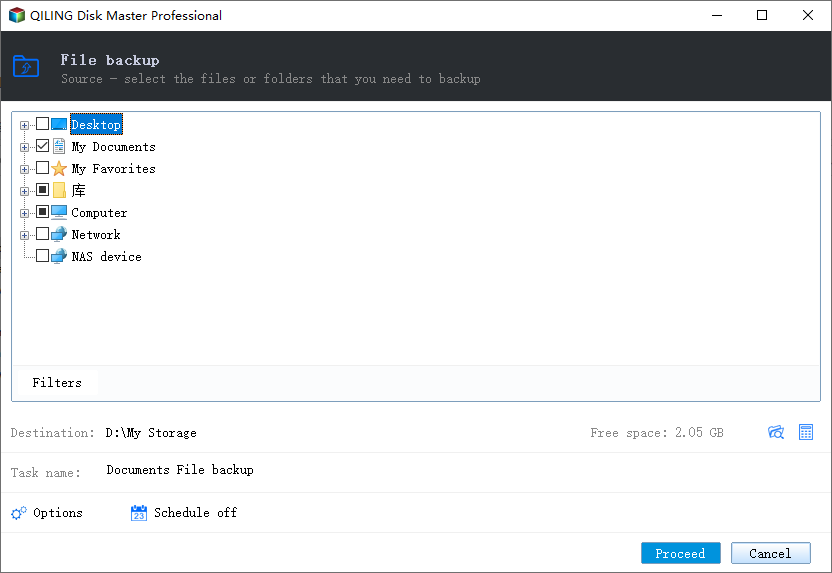
For existing backups, please highlight the task on the left side and click Options.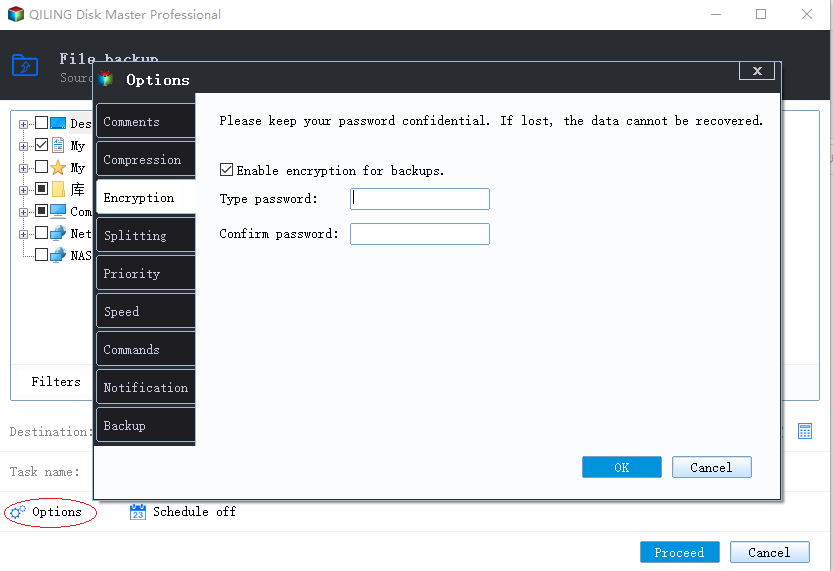
After clicking Options, please navigate to the Backup Scheme page, and tick Enable image reserve strategy.
List of numbered items in the screenshot:
1. Turn on/off Image Reserve Strategy for the current backup.
2. Delete old backup files based on a certain period or number of files. In the time option, you can retain files for days, weeks, or years.
3. With this option ticked, the first full backup image will not be deleted by the software automatically.
4. With this option ticked, old images will be Merge Backup Images to Release Disk Space.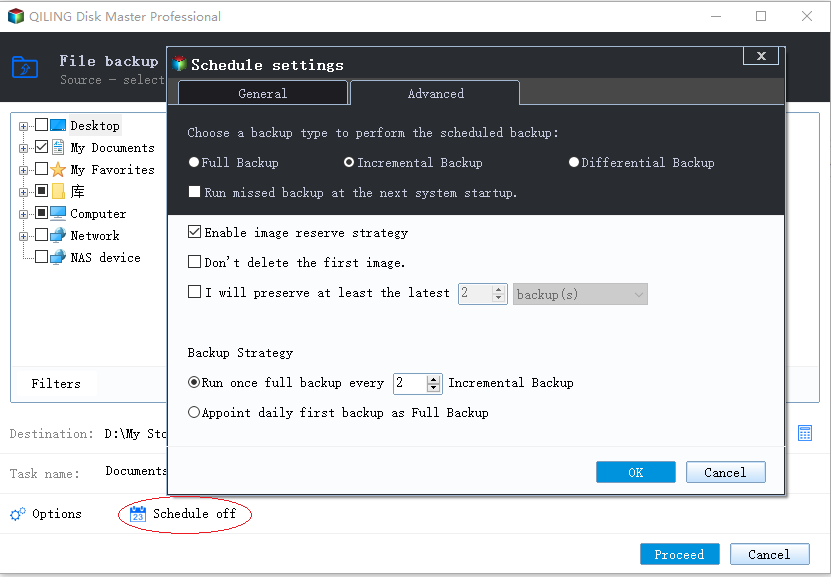
- For Ver3.5 and All Previous Versions
-
When creating a new backup/schedule, the rule configuration page will appear after clicking the hyper link Image-reserve strategy.
List of screenshot numbered items:
1. Turn on/off Image Reserve Strategy for current backup.
2. Delete old backup files based on a certain period or numbers of files. In the time option you can retain files for days, weeks or years.
3. With this option ticked, the first full backup image will not be deleted by the software automatically.
4. With this option ticked, old images will be How to Merge Images to Release Disk Space on Qiling Backup Personal Edition.
It is also allowed to add a rule for the created schedules. Details are given in the figure below:
How the rule works
There are two rules which control how backup files are retained and/or deleted.
1. A full backup file will only be deleted when its related incremental/differential files are all deleted.
2. To retain X versions/days' image file means there should be at least X versions/days' image files recoverable. So it is normal that the actually retained backup files are greater than the specified number X.
Example: The diagram below shows the sequence of backup file retention/deletion when selecting "no more than 3 days".
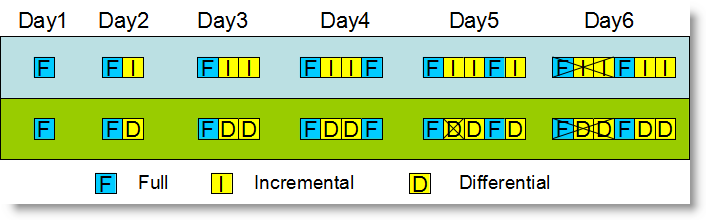
Explanation:
1. On day 4, Qiling Backup creates a new full image file to start a new cycle.
2. On day 5, the incremental schedule creates a new incremental file. However, Qiling Backup doesn't delete any backup files on that day because if the first cycle of full + incremental backup files were removed, there would be only 2 available image files left.
For a differential schedule, the first differential backup file is removed on day 5 due to the difference between the two types of schedules. An incremental backup file is based on all previous image files in the same cycle, while a differential backup only has a connection to the full image file.
3. On day 6, when the available backup files increase to three, the first set can be completely removed for both schedule types.
4. On day 7, the number of files will appear as they did on day 4.
Related Articles
- QILING Fast Cache Tutorials
QILING Fast Cache can improve overall system performance. - 5 Best Disk Imaging Software for Windows 10/7 in 2022 | Paid & Free
Disk imaging software creates an exact copy of a computer hard drive for backup and restore. It captures a drive snapshot at a specific time. - Do You Backup Everything
It's a good habit for people to back up your data often. But what files should we backup on a computer? Do you backup everything? This short post will discuss this question and give you some advice. - Does Installing Windows 11 Delete Everything?
Windows 11 is the latest operating system from Microsoft, with many new features. Therefore, many users want to install Windows 11. But does installing Windows 11 delete everything? This article will describe whether installing Windows 11 will delete everything. - Dell Backup and Recovery Windows 10 & Its Alternative
Dell Backup and Recovery helps protect your Windows 10 Dell computer by creating system and data backups. This article walks you through using Dell Backup and Recovery and introduces Qiling Backup as a more powerful alternative with automatic, scheduled, incremental, and differential backup options. - Five Ways to Backup Your Data on Windows [2022 Update]
Discover five effective ways to backup your data on Windows, including cloud drives, external hard drives, USB drives, NAS, and CD/SSD. Learn the pros and cons of each method and find the best backup solution to protect your files from system failure or data loss.
Products
Articles & Tutorials
- Data Recovery
- Data Backup
- File Recovery
- File Backup
- System Backup and Restore
- Disk and Partition Clone
- Technical articles
- Mobile articles
- Disk Master Help
- Windows Data Recovery Tutorials
- Windows Secure Delete Tutorials
- Windows Partition Management Tutorials
- Windows File Backup and Restore Tutorials
- Windows System Backup and Restore Tutorials
- Windows Disk Backup and Restore Tutorials
- Windows Clone Tutorials