5 Best Snapshot Backup Software Examples
What is Snapshot
A snapshot is an image of a computer system's state at a specific point in time, allowing for system restoration to that state in case of data corruption or hardware failure.
How Do Snapshots Work?
When a snapshot is created, the system creates a differential disk that mirrors the original virtual hard disk, ensuring that all future data is written to the differential disk, preserving the original disk's contents.
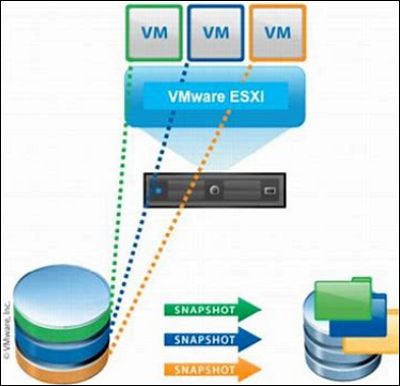
The file system creates multiple snapshots at different points in time, providing multiple branches for the system. This allows for the restoration of recently modified data or the system state to a specific point in time.
What is Snapshot Backup
A snapshot backup, also known as an image backup, captures the entire state of a system or disk at a specific point in time. Unlike traditional file backups that copy individual files, a snapshot backup preserves the complete system configuration, applications, settings, and data as a single recoverable image.
When Do People Need Snapshot Backup?
When using a computer, you may encounter situations that require snapshot backup, such as a system crash, virus infection, or accidental file deletion. Having snapshot backups ensures that your system or files can be restored to a previous state, making it a necessary precaution.
Best 5 Snapshot Backup Software
Typically, a snapshot is created using disk or system imaging, but most backup software can also take snapshot backups, making system image recovery or system restore more efficient and convenient.
Here are 5 of the best snapshot backup software in the market, and this post lists their respective details. Read on and find the software that suits you most!
- Qiling Backup Enterprise
- MSP360 Managed Backup
- Paragon Backup&Recovery Business
- Acronis Cyber Protect
- Backblaze
Qiling Backup Enterprise [Most Recommended]
Qiling Backup Enterprise is a recommended snapshot backup software that allows for easy creation of automatic backup schedules for entire systems, drives, partitions, or single files.

Qiling Backup Enterprise offers a simple, efficient, and powerful backup solution that can protect businesses of all sizes and servers with full, incremental, and differential backups. This user-friendly software allows for quick creation of snapshot backups with just a few clicks, making it a reliable option for businesses of all sizes.
Supported system:
Windows 11/10/8/7
Main features:
- Offers SQL/Exchange Server Backup
- Provides the one-click system clone and disk clone
- Allows users to run the software before Windows starts
- Local and offsite backups
Disadvantage:
Requires email login to use
Here are the simple steps for you to know how Qiling Backup Enterprise backup the system.
MSP360 Managed Backup
MSP360 Managed Backup is a snapshot backup software that can easily back up and restore data, allowing for immediate server restoration in case of a crash, but does not provide cloud storage, instead allowing users to store data in their chosen cloud solution.
Supported system:
Windows, Linux, macOS
Main features:
- offers 65 storage destinations(Amazon S3, OneDrive, and so on)
- Supports item-level restore from the image backup
- Covers almost all mixed storage scenarios
Disadvantage:
Lacks phone support
Paragon Backup & Recovery Business
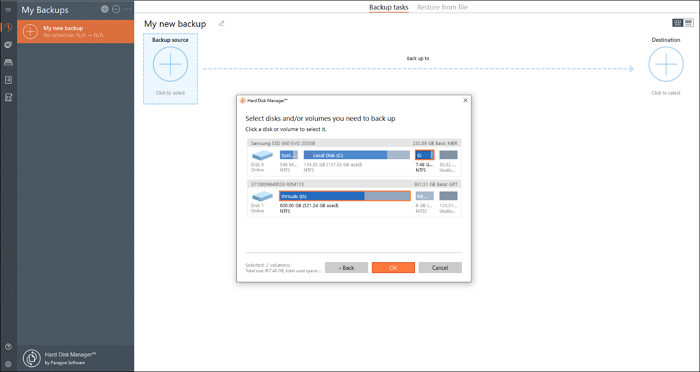
Paragon Backup&Recovery Business has a good reputation and long history in data backup and recovery, offering a simple snapshot backup solution suitable for small and midsize companies, with a user-friendly interface and schedule backup options.
Supported system:
Windows 11/10/8/7
Main features:
- Has the ability to rebuild entire disks and partitions
- Can automatically create a bootable environment
- Supports many advanced backup options
Disadvantage:
No continuous options for folders
Acronis Cyber Protect
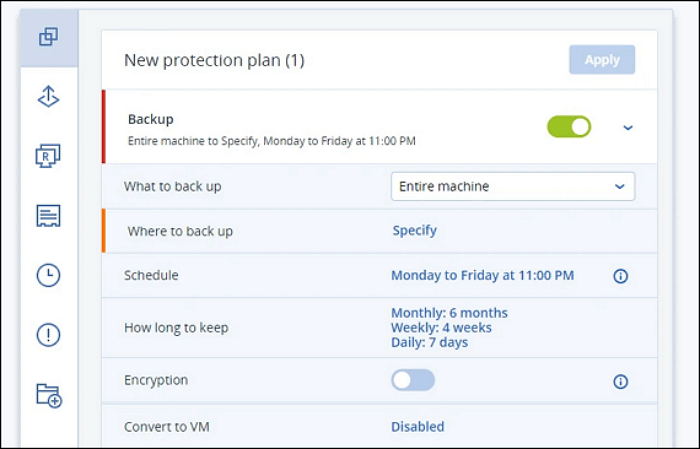
Acronis Cyber Protect is a renowned backup software that offers a comprehensive backup solution with robust security features, including encryption key protection, data monitoring for suspicious file modifications, and ransomware prevention capabilities.
Supported system:
Windows, macOS
Main features:
- Provides anti-ransomware software technology
- Supports Facebook and Instagram backup
- Has a unique data protection map
Disadvantage:
High price
Backblaze
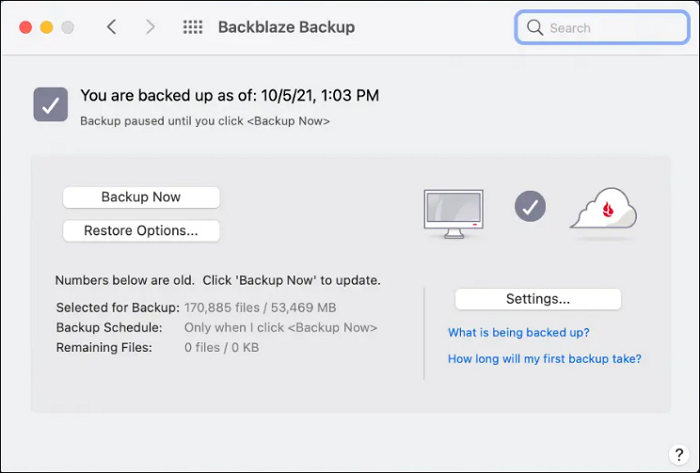
Backblaze is a top cloud backup brand, praised for its unlimited storage space and ease of use, making it suitable for novice users, but may lack advanced features for more experienced users.
Supported system:
Windows 11/10/8/7, macOS
Main features:
- Unlimited storage space
- Provides private encryption keys and two-factor authentication
- Suitable for beginners
Disadvantage:
Licenses are for just one PC
Conclusion
For computers, snapshot backup not only ensures data security but also allows users to restore system state. The five best snapshot backup software options include Qiling Backup Enterprise, which stands out for its ease of use and ability to complete all backup plans quickly and efficiently, even in the face of viruses or ransomware attacks.
FAQs
Is snapshot backup a full backup?
Snapshot backup only provides system state data at a certain point in time and is not a full backup. It is an important part of the system backup process, but not a complete backup.
What are the types of snapshots?
Snapshots have 4 types.
Copy-on-write: This method tracks metadata describing data blocks that have changed since the snapshot was created. When a data block is modified, the original version is copied to a separate snapshot storage area before the new data is written, preserving the state at the time of the snapshot.
Redirect-on-write: When creating a new block, write the snapshot once.
Continuous data protection: A snapshot of the original copy is created in real-time, with each change updating the snapshot.
Mirror/clone/replication: A clone or mirror is essentially a duplicate copy of a storage unit, whereas replication is a method that helps protect data by creating a redundant copy of it.
Related Articles
- 3 Best Scheduled Disk Cloning Software for Windows | 2022 New
- How to Create Qiling Bootable USB, CD/DVD, and ISO Image with Qiling Backup
- Top 10 Best Exchange Backup Software for Exchange Server 2003 - 2019
- How to Backup and Restore Active Directory in Windows 2022/2019/2016?
- How to Transfer Minecraft Worlds from PC to PC
Transferring Minecraft worlds from one PC to another can be easily done using the easiest method, which involves exporting the world as a .world file and importing it on the new device. - How to Transfer User Account and Profile from Windows 7 to Windows 10/11
Transferring user accounts from Windows 7 to Windows 10/11 can be a seamless process with the right tool.
Products
Articles & Tutorials
- Data Recovery
- Data Backup
- File Recovery
- File Backup
- System Backup and Restore
- Disk and Partition Clone
- Technical articles
- Mobile articles
- Disk Master Help
- Windows Data Recovery Tutorials
- Windows Secure Delete Tutorials
- Windows Partition Management Tutorials
- Windows File Backup and Restore Tutorials
- Windows System Backup and Restore Tutorials
- Windows Disk Backup and Restore Tutorials
- Windows Clone Tutorials