Is Clonezilla Safe? | Here Is the Answer & Its Alternative
Clonezilla is a free, open-source disk cloning tool based on command lines. It is one of the most frequently-used cloning software worldwide. But is Clonezilla safe? This article from Qiling will describe whether Clonezilla is safe to use and offer a better cloning solution for you to perform cloning tasks.
What Is Clonezilla
Clonezilla is a partition/disk imaging and cloning utility. It can help you do system deployment and bare metal backup and recovery. It is powerful disk cloning software with capabilities including cloning only used space, compatibility with several operating systems, compression cloning, PXE booting, and others. It runs well with Windows, macOS, and Linux computers.
Clonezilla is an excellent tool for users to upgrade a hard drive to a larger one and transfer Windows to a new hard drive. In addition, it can help clone single or multiple hard drives from one drive to another, and it supports various hard disks, including HDD, NVMe SSD, SATA SSD, etc.
Three versions of Clonezilla are available: Clonezilla Live for single computers and Clonezilla lite server or Clonezilla Server Edition (SE) for mass deployment.
🎯Main Features of Clonezilla
- Full support for encryption
- Clone a hard drive with bad sectors
- create an image backup of a hard drive
- Support various file systems (NTFS, ext2, ext3, etc.)
- Offer a command line interface for experienced users
- Support MBR and GPT partition formats of a hard drive
- Allows imaging of an individual partition and an entire disk drive
- Runs from a Live CD or Live USB (no need to install it within Windows)
| ✅Pros of Clonezilla | ⛔Cons of Clonezilla |
|---|---|
|
|
According to the above information, Clonezilla is a practical cloning tool for disk cloning. You can learn how to use this software in this guideline below:
Clonezilla is quite complicated for computer beginners. Therefore, this post aims to teach you how to use Clonzilla with pictures and a detailed tutorial.
But is Clonezilla safe to use? Keep reading!
Is Clonezilla Safe to Use
In the disk cloning field, Clonezilla takes place, and many of you might have heard of it. But have you ever been stuck on questions like "Is Clonezilla really free?" "Is Clonezilla legit?", "Is Clonezilla good?" "Is Clonezilla reliable for cloning a Windows drive?" or "Is Clonezilla safe?"
The answer is in the affirmative. Clonzilla is safe and good. It is not malware or computer viruses but a disk cloning program. You can feel free to use Clonezilla for cloning a hard drive. In addition, Clonezilla lets you encrypt your image files using passwords to help prevent unauthorized access.
However, even if you are an expert, using Clonezilla to clone a hard drive is not as simple as you could imagine because it involves numerous steps. What's worse, you might run into problems like Clonezilla failing to clone bad sectors or Clonezilla failing to clone HDD.
Under such circumstances, using Clonezilla to clone or upgrade a hard disk is not your first choice. Therefore, it would be best to use a Clonezilla alternative to help you clone a hard disk.
Share this article on social media to help more people.
Best Clonezilla Alternative Free Download
When it comes to cloning an HDD or SSD, Qiling Disk Copy is a cloning tool that has to mention. It can let you clone a hard drive easily and quickly. It can serve you well in cloning and is a good alternative to Clonezilla.
Qiling Disk Copy is professional disk cloning and migration software compatible with Windows 11/10/8/7. It can help you clone your system, disk, and partition, clone a hard drive to a USB flash drive, and migrate Windows from HDD to SSD or SSD to SSD. In addition, it can help you transfer Windows from HDD to SSD without losing data and create a local backup of your hard drives.
🎯Highlighted Features of Qiling Disk Copy
- Create WinPE bootable disk
- Clone a hard disk with bad sectors
- Install Windows 7 on an NVMe SSD
- Full support for migration to SSD disks
- Full disk and partition-level cloning options
- Clone Windows OS from HDD to smaller SSD
- Re-size and re-arrange partitions during cloning
- Many supported files Systems: FAT12/FAT16/FAT32/NTFS
| ✅Pros of Qiling Disk Copy | ⛔Cons of Qiling Disk Copy |
|---|---|
|
|
Qiling Disk Copy can serve you well in cloning and upgrading a hard drive. It has a user-friendly interface and a faster cloning speed, which can help you clone a disk easily and quickly.
If you have nowhere to go, just download and install Qiling Disk Copy, and follow the steps below to clone a hard drive.
Step 1. Download, install and run Qiling Disk Copy on your PC.
Click "Disk Clone" and select the hard drive that you want to copy or clone. Click "Next" to continue.
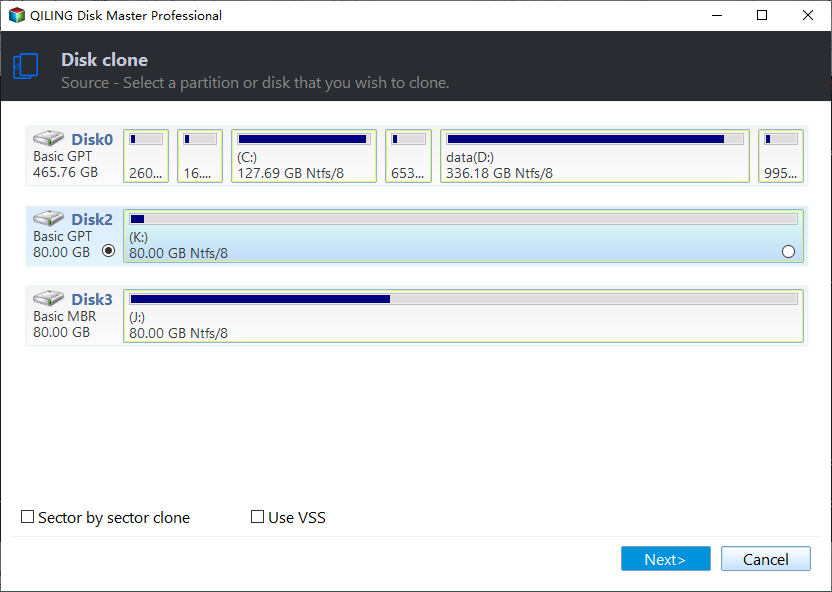
Step 2. Select the destination disk.
Note: The destination disk should be at least the same big or even larger than the source disk if you want to copy or clone the source hard disk.
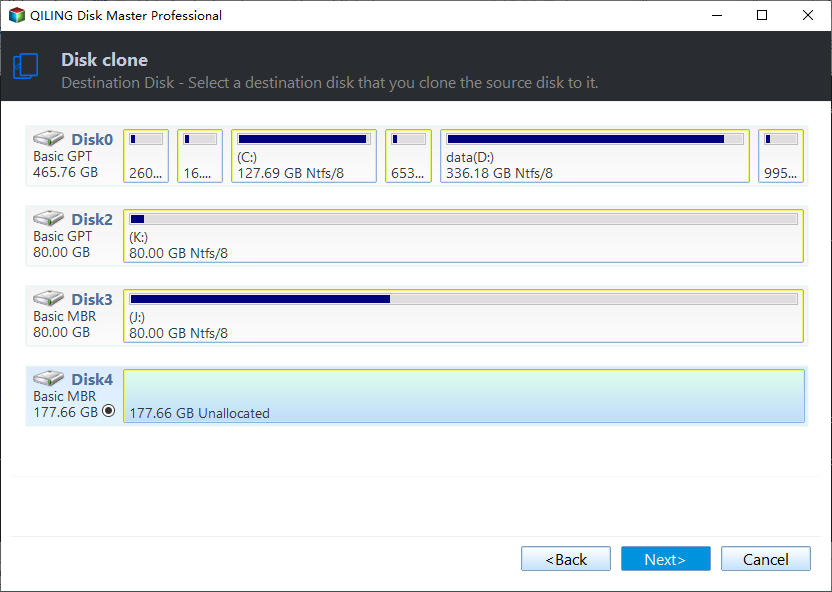
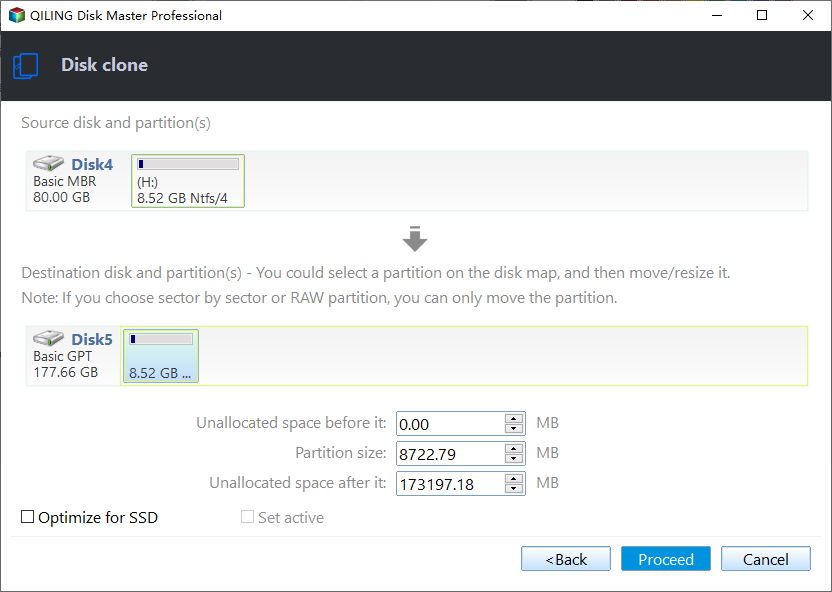
Step 3. Check and edit the disk layout.
If your destination disk is an SSD drive, do remember to Check the option if the target is SSD.
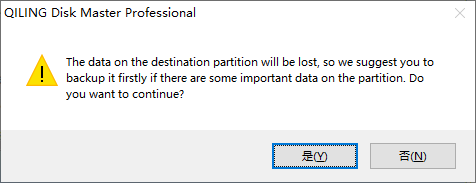
Step 4. Click "OK" to confirm if the program asks to erase data on the destination disk.
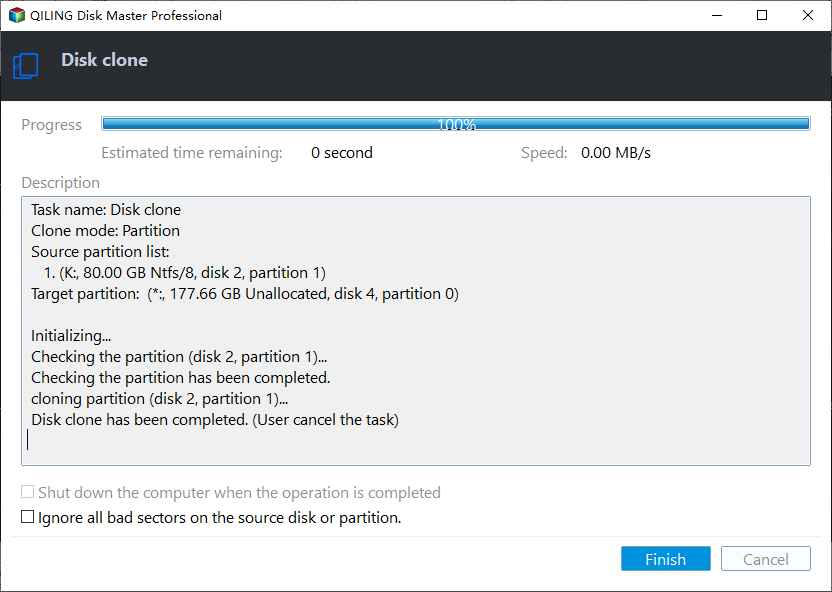
Step 5. Click "Proceed" to start the hard drive cloning process.
To Wrap Things Up
Is Clonezilla Safe? Do you get your answer now? Clonezilla is safe and good for cloning a hard drive. And it works fine with Windows, MacOS, and Linux. But you may encounter some issues when using it, and it has a complex interface, which is not suitable for novices. Therefore, using an alternative to Clonezilla would be better.
As for Clonezilla alternatives, Qiling Disk Copy is your best choice. It can help you transfer the C drive to a new SSD and solve the cloned hard drive showing wrong size. In addition, it lets you replace a laptop HDD with an SSD. Just download and try it to explore more practical features.
FAQs on Is Clonezilla Safe
1. Why is Clonezilla not booting my USB?
Check the following if your USB flash drive or USB hard drive won't boot: A minimum of one FAT or NTFS partition must exist on your USB flash device. Check if the partition in the partition table has the "bootable" designation. The partition must begin on a cylinder boundary.
2. Will Clonezilla work with Windows 10?
Does Clonezilla work with Windows 10? Yes, Clonezilla works fine with Windows 11 and 10. If you use Windows 10 computer, you can also use Clonezilla to move your current operating system installation along with all of your settings, programs, and files to a new drive that is equal in size or speed without reinstalling it.
The page was helpful.
Qiling Disk Copy
Qiling Disk Copy is a user-friendly tool that makes it easy to clone and migrate hard drive or solid state disk contents, ideal for quickly transferring an existing system to a new disk or SSD with minimal setup required.
Related Articles
- Top 6 SD Card Cloning Software Easy to Get
- How to Transfer Data from One Internal Hard Drive to Another with 3 Ways
- 5 Best Alternative Cloning Software to Samsung Data Migration (2024 Pick)
- Migrate Windows 10 from SSD to NVME and M.2 Without Reinstalling
- How to Replace Old SSD with New SSD on Windows Laptop/PC
- How to Make Cloned Drive Bootable in Windows 11/10 [5 Tips]
If you are confused by how to make cloned drive bootable in Windows 10, 8, 7, this article may help you to solve this problem with detailed guidance.
Products
Articles & Tutorials
- Data Recovery
- Data Backup
- File Recovery
- File Backup
- System Backup and Restore
- Disk and Partition Clone
- Technical articles
- Mobile articles
- Disk Master Help
- Windows Data Recovery Tutorials
- Windows Secure Delete Tutorials
- Windows Partition Management Tutorials
- Windows File Backup and Restore Tutorials
- Windows System Backup and Restore Tutorials
- Windows Disk Backup and Restore Tutorials
- Windows Clone Tutorials