Samsung 990 Pro vs WD Black SN850X: How to Choose?
Choosing the right solid-state drive (SSD) can be overwhelming, especially with market leaders like Samsung continuously upgrading their features and new companies offering cutting-edge technologies. When deciding between a new SSD from Samsung and Western Digital, it's essential to consider the various options available in the market. In this post, we will be comparing the latest SSDs from these two prominent brands.
The Samsung 990 Pro and WD Black SN850X are two high-performance SSDs that excel in different areas. The Samsung 990 Pro stands out for its exceptional speed, with sequential read and write speeds of up to 9,500 MB/s and 9,000 MB/s, respectively, making it ideal for demanding applications like video editing and gaming. On the other hand, the WD Black SN850X offers a more affordable price point without compromising on performance, with sequential read and write speeds of up to 7,300 MB/s and 6,800 MB/s, respectively.
Samsung 990 Pro vs WD Balck SN850X: Ultimate Comparison
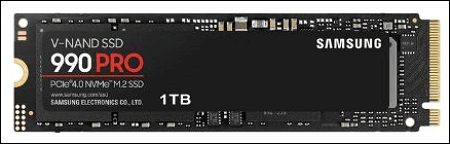
Samsung's 990 Pro SSD outperforms its predecessor, the 980 Pro, by a significant margin, and is even more efficient, but at a higher price point than its competitors for the 2TB model. It offers impressive read and write speeds of 7,450MB/s and 6,900MB/s respectively.
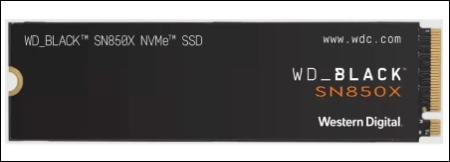
The WD Black SN850X NVMe is an upgraded version of Western Digital's high-performance gaming M.2 SSD, with a new 4TB version and upgraded flash memory to boost read and write speeds. The 2TB model achieves impressive speeds of 7,400 MB/s read and 6,700 MB/s write.
Refer to the table below to compare the major specifications of the drives. Figure out what fits you best.
| SSD Specifications | Samsung 990 Pro | WD Black SN850X |
| 📒Theoretical Read Speed | 7,450 MB/s | 7,350 MB/s |
| 📜Theoretical Write Speed | 6,900 MB/s | 6,600 MB/s |
| 🗂️Storage types | 1TB, 2TB, and 4 TB | 1TB, 2TB, and 4 TB |
| 🎟️Prices | 1TB for $190, 2TB for $350 | 1TB for $150, 2TB for $300 |
| 💰Warranty | 5 years warranty | 5 years warranty |
| 💾Hardware Interface | PCIe 4.0 | PCIe Gen4 16GT/s, up to 4 lanes |
| 🎀Best Suited for | Video Editing, and consistent tasks | Gaming |
🚩You may be interested:
How to Choose Between 2 SSDs
With most of the specs aligning, it's a hard task to choose one. Surprisingly, there are a lot of benchmark factors that can confuse you regarding SSDs. Here are our suggestions on which SSD is good for what.
The Samsung 990 Pro is the fastest SSD, offering significantly fast writing and reading speeds that are ideal for those seeking consistent high performance. It's perfect for editors, graphic designers, and gamers, allowing for faster rendering of graphics, loading of games, and editing of high-quality videos. For users who want their PC to deliver consistent performance, the 990 Pro is the best choice. Its exceptional hardware build, despite the high read and write speeds, is a notable feature, but it's recommended to purchase a model with a heat sink to prevent failure under intense workloads.
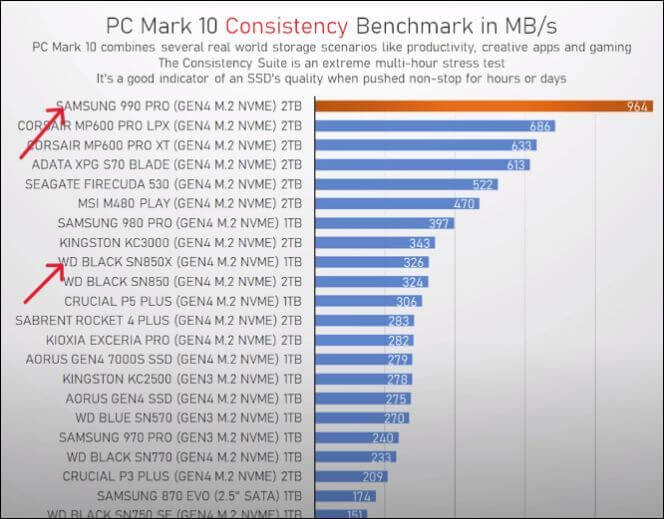
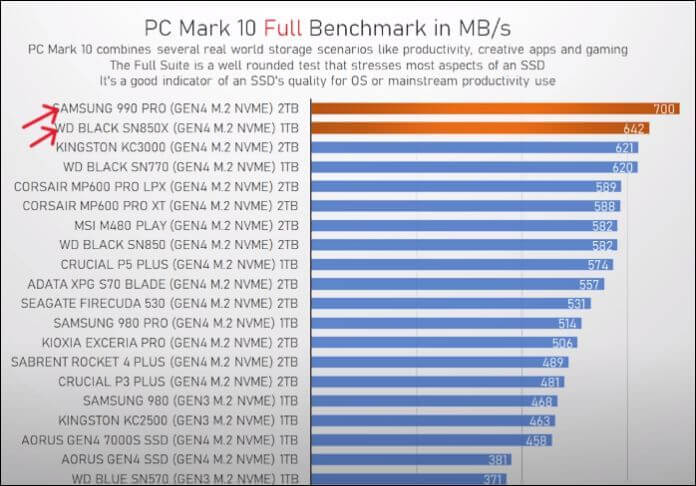
The WD Black SN850X, although slightly lagging in reading and writing speeds, excels in PC Mark tests, showcasing faster loading, processing, and rendering for gaming. Its PCIe 4.0 interface ensures high performance and low latency. For gamers in need of an extremely high-performance SSD, the SN850X is the top choice, delivering enough power to run everything smoothly, whether for editing, gaming, or normal usage, and is a budget-friendly option.
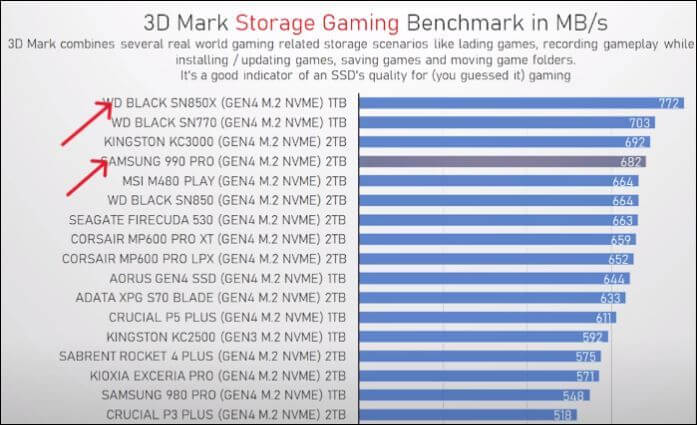
Ultimately, the choice between the Samsung 990 Pro and WD Black SN850X depends on your specific needs. If you're an editor, designer, or require consistent performance, the Samsung 990 Pro is unmatched. For gaming, the WD Black SN850X is the obvious choice. However, if budget is a concern, the SN850X can still deliver smooth performance, albeit slightly slower. If budget is no issue, I'd recommend the Samsung 990 Pro for its exceptional sequential read and write speeds, making even high-end gaming simple.
Pro Tip: Upgrade to a New SSD Easily without Losing Data
Now that you've chosen between the two options, you'll need to transfer your data from the old SSD to the new one, which can be easily done through cloning, a process that copies the entire contents of the old drive to the new one, eliminating the need for recovery. To accomplish this, you can use a reliable tool like Qiling Disk Copy, which simplifies the cloning process and ensures a smooth transfer of your data.
Qiling Disk Copy is a best SSD cloning software that helps you create a replica of the drive with just three steps, allowing you to upgrade or transfer data quickly without reinstalling.
Key Features of Qiling Disk Copy:
- Clone HDDs/SSDs to another in just three steps.
- Create bootable media for backup and recovery.
- Transfer data from one drive to another with advanced cloning options, ensuring seamless migration with minimal downtime.
- Boot your computer with SSDs without reinstalling OS.
Follow the guide to upgrade to the new SSD without losing data:
Prior Notice:
- The "Sector by sector copy" feature requires the destination disk to be at least as large as the source disk, so it can be unchecked when cloning a larger hard disk to a smaller one.
- All data on the destination disk will be completely erased, so be sure to back up any important files before proceeding.
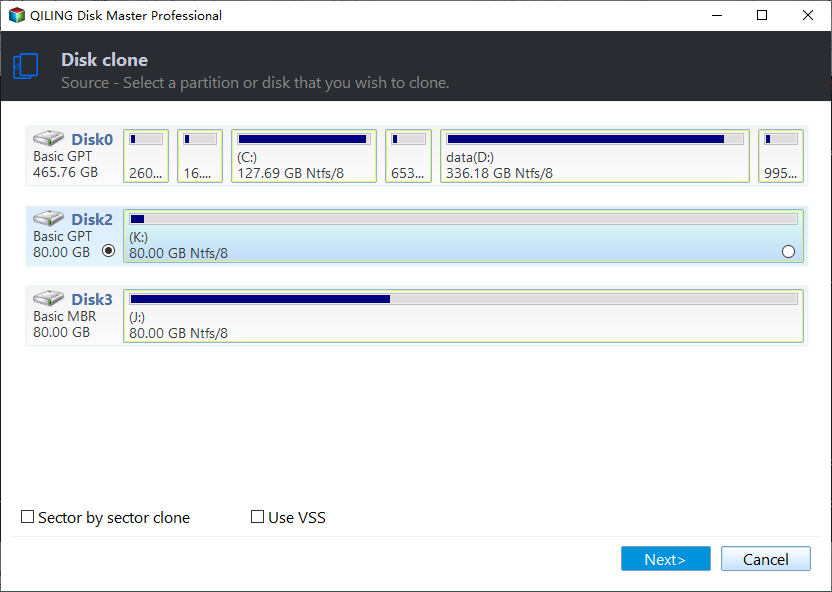
Step 1. To start copying/cloning an entire disk to another, select the source disk under "Disk Mode" and click "Next".
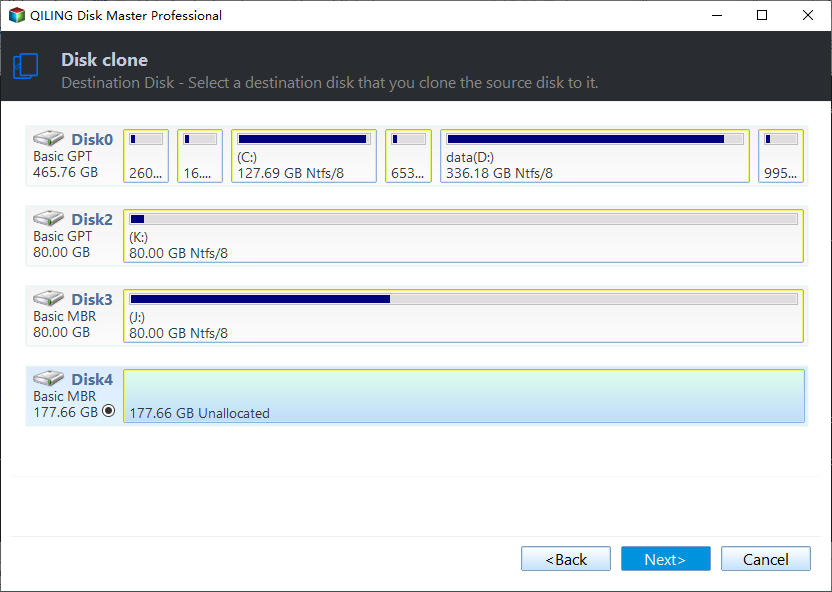
Step 2. Choose the other disk as the destination disk.
Step 3. Check the disk layout of the two disks, managing the layout of the destination disk by selecting "Autofit the disk", "Copy as the source" or "Edit disk layout".
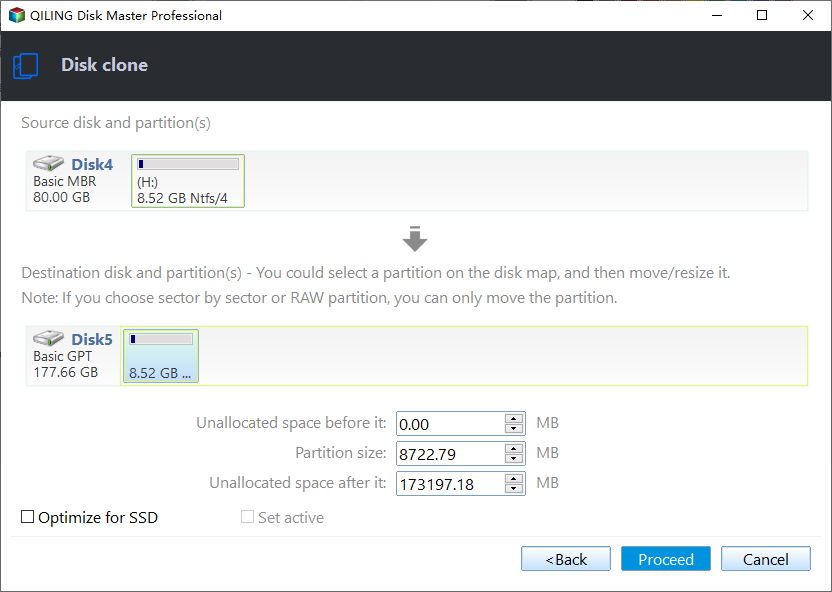
- "Autofit the disk" makes some changes by default on the destination disk layout to optimize its performance.
- The "Copy as the source" option doesn't modify the destination disk, and the resulting layout is identical to the original source disk. (self-contained)
- Edit disk layout allows you to manually resize or move the partition layout on the destination disk.
Enabling the "Check the option if the target is SSD" option allows your SSD to run at its optimal performance.
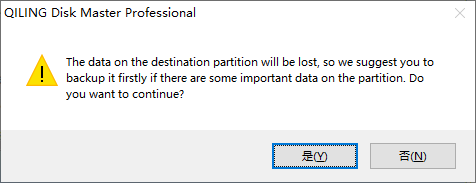
A message now appears, warning you that data will be lost. Please confirm this message by clicking "OK" and then click "Next".
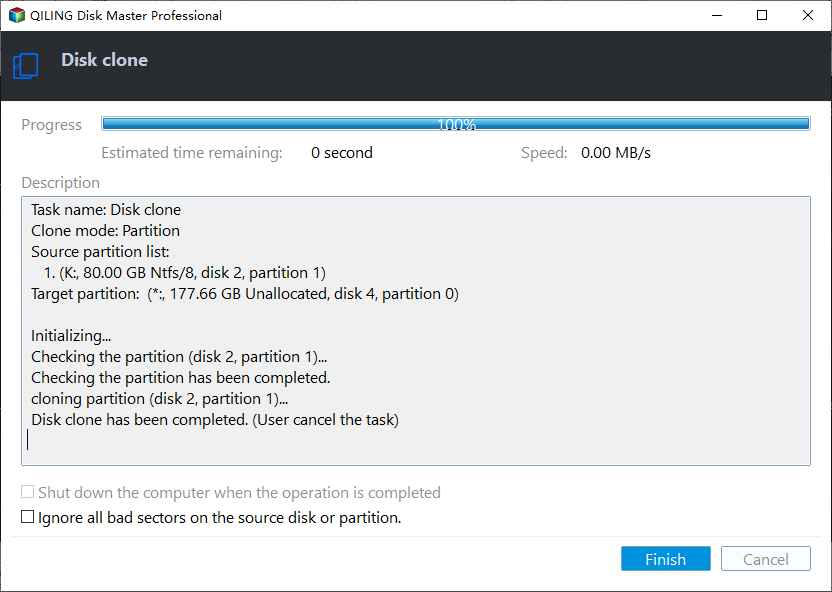
Step 4. Click "Proceed" to officially execute the task.
Wrapping Up
If you're in the market for a new SSD, you're likely considering Samsung 990 Pro and WD Black SN850X. Both offer excellent performance, making them a great choice for editing, gaming, or everyday use. To make a decision, it's worth comparing these two options. Meanwhile, if you're looking to upgrade your existing SSD, Qiling Disk Copy is a great tool to clone your old drive to the new one. Get it now and make the transition seamless.
FAQs on Samsung 990 Pro vs WD Black SN850X
The Samsung 990 Pro and WD Black SN850X are both high-performance NVMe SSDs, but they differ in their specifications and features. The Samsung 990 Pro has a higher sequential read and write speed, while the WD Black SN850X has a higher sequential write speed. The 990 Pro also has a higher QD (queue depth) and a more advanced controller, but the SN850X has a higher TBW (terabytes written) rating. Additionally, the SN850X has a more robust cooling system, while the 990 Pro has a more compact design.
1. Which is better SN850 or SN850X?
The SN850X is the successor of SN850 and boasts significantly improved reading and writing speeds, with a 5% increase in reading and a 28% increase in writing.
2. Does the SN850X get hot?
The SN850X SSD's temperature rises significantly from 45C to 78C when under load, necessitating the purchase of a heat sink to ensure stable operation at high loads.
3. Do I need a heatsink for the SN850X?
If you're working under intense loads, a heatsink is a good idea, but for normal usage, it's not necessary.
Related Articles
- How to Factory Reset PS4 [2024 Complete Guide]
- Outlook 2016 Not Working with Gmail | How to Fix
- How to Fix the Windows Key Not Working on Windows 10/11
- 9 Ways to Fix "The Remote Computer Requires Network Level Authentication"
- Fix Finder Not Responding After Updating to Sonoma with 5 Proven Ways
If you're experiencing issues with the Finder not finding files after updating to Sonoma, this article will help you troubleshoot the problem. we will explore the possible causes and provide step-by-step solutions to get your Finder working smoothly again. - Disk Utility First Aid Process Has Failed [with 5 Proven Ways to Fix It]
Fix First Aid process has failed in Mac Disk Utility. Learn causes, repair options, backup steps, and when data recovery is needed.
Products
Articles & Tutorials
- Data Recovery
- Data Backup
- File Recovery
- File Backup
- System Backup and Restore
- Disk and Partition Clone
- Technical articles
- Mobile articles
- Disk Master Help
- Windows Data Recovery Tutorials
- Windows Secure Delete Tutorials
- Windows Partition Management Tutorials
- Windows File Backup and Restore Tutorials
- Windows System Backup and Restore Tutorials
- Windows Disk Backup and Restore Tutorials
- Windows Clone Tutorials