Samsung 990 Pro vs 980 Pro: Which SSD to Choose?
Solid-Samsung's high-performance SSDs, the 990 Pro and 980 Pro, have gained popularity due to their exceptional speed and reliability, outshining traditional hard drives. These cutting-edge storage devices are designed to provide top-notch performance and advanced features.
When choosing between the Samsung 990 Pro and the 980 Pro, consider factors like speed, performance, capacity, and cost-effectiveness to determine which one suits your needs and budget.
📖Read also: How to Replace/Upgrade Laptop HDD with an SSD | SN850 vs SN850X: Which Is Better?
990 Pro vs 980 Pro: Specification, Price, Speed, Performance
The Samsung 990 Pro SSD has been making waves since its release in November 2022, impressing users with its exceptional speed and reliability. This top-notch storage solution is ideal for both professionals and enthusiasts, boasting cutting-edge technology and impressive specifications.
The Samsung 990 Pro boasts a 50% performance boost per watt over its predecessor, the 980 Pro, with impressive sequential speeds of 7,450MB/s read and 6,900MB/s write, as well as random IOPS of 1400K/1550K.
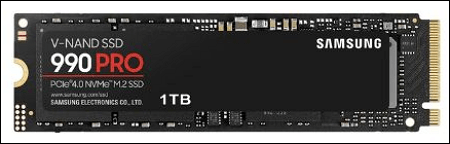
The Samsung 980 Pro, a prior model, has several advantages, including a lower price, similar read and write performance, and multiple storage type options, making it a strong competitor to the best m.2 SSDs on the market, with speeds of up to 7,000 MB/s and 5,000 MB/s for write and read operations respectively.
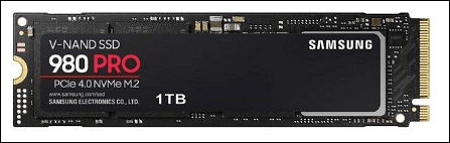
We compare and evaluate two SSDs based on their parameters, prices, write and read speeds, and overall performance to help you make an informed decision that suits your needs.
*️⃣Specification
| Specifications | Samsung 990 Pro SSD | Samsung 990 Pro SSD |
|---|---|---|
| Theoretical Read Speed | 7,450 MB/s | 7,000 MB/s |
| Theoretical Write Speed | 6,900 MB/s | 5,000 MB/s |
| Random read speed | Max to 1.40 M | 1,000K IOPS |
| Randon write speed | Max to 1.55 M | 1,000K IOPS |
| Storage types | 1TB, 2TB | 2TB, 1TB, 500GB, 250GB |
| Hardware interface | PCIe 4.0 | PCIe 4.0 |
| Warranty | 5 years | 5 years |
| Encryption | Available | Available |
The Samsung Pro 990 is equipped with more powerful components than the 980 Pro.
*️⃣Price
Here are the prices for different storage variants of Samsung 990 Pro and 980 Pro on various platforms: The prices for the Samsung 990 Pro and 980 Pro vary depending on the storage capacity and the platform. On Amazon, the 1TB Samsung 990 Pro costs around $749.99, while the 2TB model costs around $1,299.99.
Samsung 990 Pro SSD
- 1 TB - The price of the Samsung Galaxy S21 on Amazon is $134, on Samsung's official website it's $110, and on Newegg it's $200.
- 2 TB - This item is available for purchase on various platforms, with a price range of $160 to $245, depending on the seller. It can be found on Amazon for $245, on Samsung's official website for $160, and on Newegg for $250.
Samsung 980 Pro SSD
- 1 TB - The Samsung Galaxy Watch is available for $110 on Amazon, $70 on Samsung's official website, and $110 on Newegg.
- 2 TB - The Samsung QN90R 4K QLED TV is priced at $245 on Amazon, $120 on Samsung's official website, and $220 on Newegg.
*️⃣Speed & Performance
The Samsung 990 Pro and 980 Pro SSDs both offer high-performance capabilities, with the 990 Pro boasting a slight advantage over its predecessor due to its improved sequential read and write speeds, as well as its support for the PCIe 5.0 interface, making it a top choice for demanding users.
The Samsung 990 Pro achieves exceptional sequential read and write speeds of up to 7,450 MB/s and 6,900 MB/s, respectively, using the PCIe 4.0 interface, making it ideal for demanding applications like video editing, 3D rendering, and gaming.
The Samsung 980 Pro, like the WD Black SN850, uses the PCIe 4.0 interface and achieves sequential read rates of up to 7,000 MB/s and sequential write speeds of up to 5,000 MB/s.
The 990 Pro and 980 Pro both deliver extremely fast read and write speeds, making them suitable for demanding users. While most users may not notice a significant difference in real-world usage, the 990 Pro has a slight speed advantage, making it a good choice for those who want the fastest performance and future-proofing.
🚩You may be interested: Samsung 990 Pro vs WD Black SN850X: How to Choose?
Which SSD to Choose: Samsung 990 Pro or 980 Pro?
To make an informed decision between the Samsung 990 Pro and 980 Pro SSDs, consider your specific needs and priorities. The 990 Pro is ideal for those who want the latest technology and high-speed performance, while the 980 Pro is a more affordable option with still impressive speeds. Think about your budget, the type of tasks you'll be using the SSD for, and the level of durability and reliability you require.
- The Samsung 990 Pro is the preferred choice for professionals and enthusiasts seeking top-tier performance and durability, offering top-notch performance for resource-intensive tasks like video editing, 3D rendering, and gaming, thanks to its PCIe 4.0 interface and lightning-fast speeds, making it ideal for demanding professional settings.
- The Samsung 980 Pro is a great option for power users who want high-performance storage without the high cost, offering fast sequential read and write speeds and improved performance with the NVMe 1.4 standard.
- The 980 Pro may be a better value for money than the 970 EVO, offering exceptional speed and performance while being more budget-friendly.
For everyday tasks like browsing, document processing, and casual gaming, a lower-cost SSD with slightly inferior specs may be a more cost-effective option, as the Samsung 990 Pro and 980 Pro provide more performance than needed.
The choice between the Samsung 990 Pro and 980 Pro ultimately comes down to personal preferences, budget, and intended use. Weighing the trade-offs between performance and cost will help determine the best SSD for each situation, making the decision a matter of considering what matters most to you.
How to Upgrade to a New Samsung SSD Without Losing Data
After choosing the Samsung SSD to buy, the next step is to upgrade your old HDD/SSD with the new Samsung 990 Pro or 980 Pro to boost your device's performance. To transfer data from the old hard disk to the new one, cloning is the most effective option. This process creates an exact replica of the original hard disk, including settings, partition layout, configurations, programs, and more.
Qiling Disk Copy CloningMaster is a reliable software that allows you to clone an old disk to a new Samsung SSD without losing any data. It's a straightforward process where you select the source and target disks, confirm the disk layout, and click "Proceed" to start the cloning process. Simply download CloningMaster and easily transfer your data to the new Samsung SSD.
To activate Qiling Disk Copy, simply launch the software and follow the on-screen instructions to initiate the disk copying or cloning process. This will ensure a smooth and efficient transfer of data from one disk to another, minimizing the risk of errors or data loss.
1. Download, install and run Qiling Disk Copy on your PC.
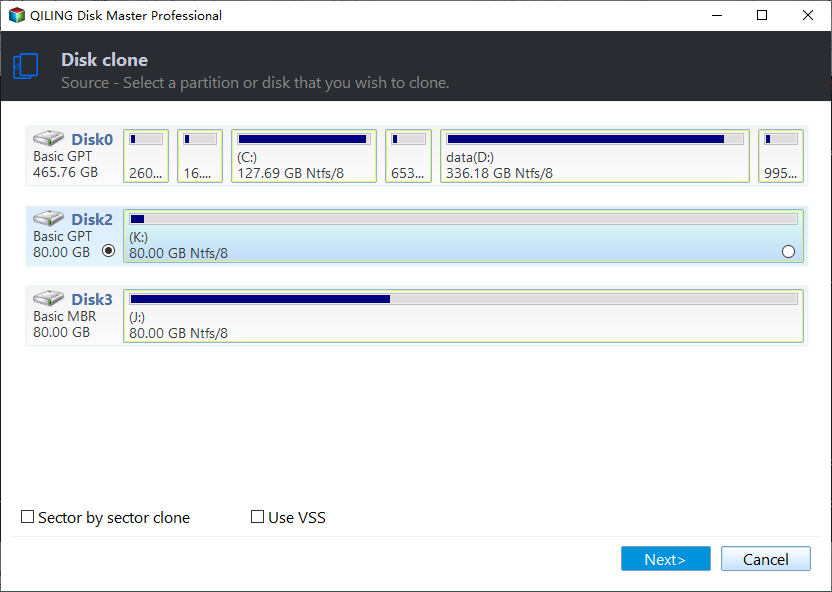
To begin the process, click Disk Mode and select the source disk that you want to copy or clone. Then, click Next to proceed.
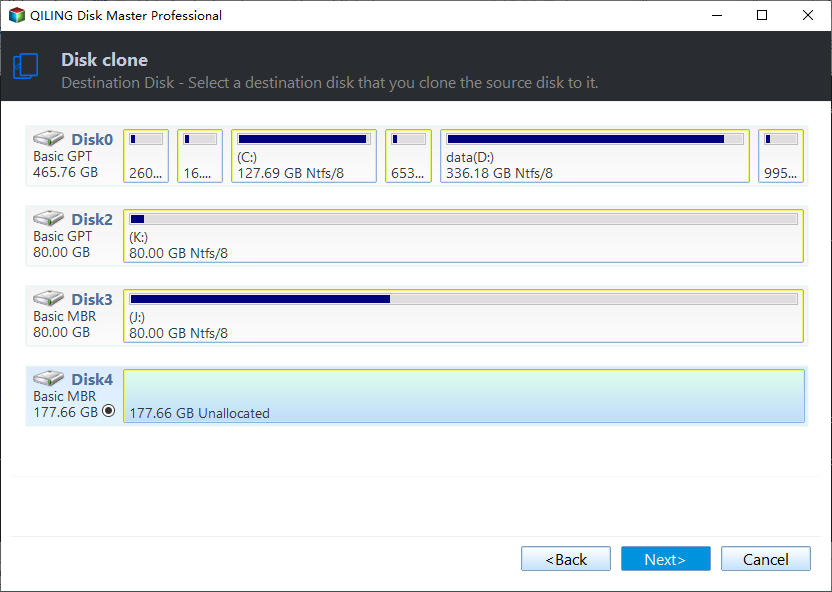
2. Select the destination disk where you want to clone/copy the old disk and click Next to continue.
The user is asked to confirm if the program wants to erase data on the destination disk, and they can click OK to proceed with the operation.
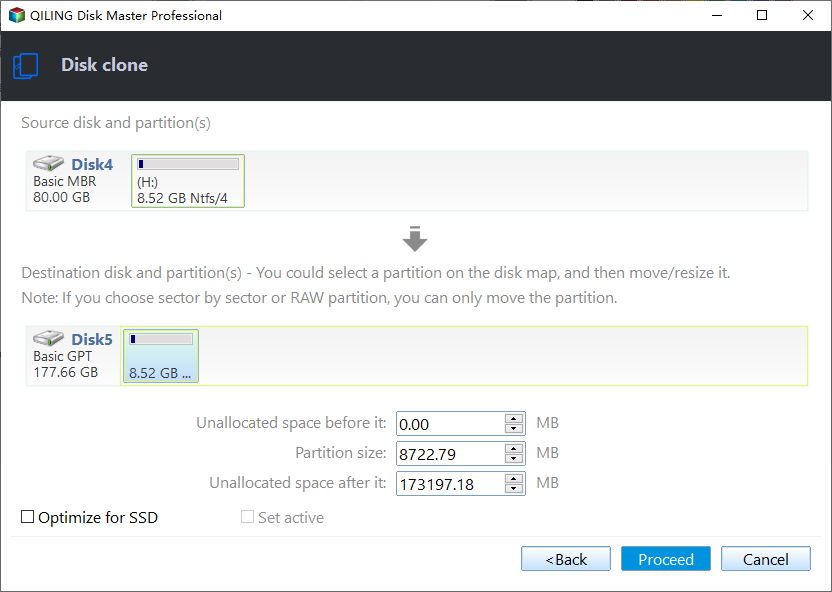
3. To modify the disk layout, select the "Check and edit the disk layout" option, which allows you to autofit the disk, copy the current layout as the source, or manually edit the disk layout.
Autofit the disk is recommended.
- Copy as the source option clones the layout of partitions on your source disk to the destination disk.
- Edit disk layout enables manual resizing or repositioning of partition layout on the target disk.
- If your destination disk is an SSD drive, be sure to select the "Check the option if the target is SSD" option.
To begin the disk cloning or copying process, click the "Proceed" button. This will initiate the process of creating an exact copy of the original disk, including all data, settings, and applications.
The post is helpful if it aids you in making your final decision, so don't forget to share it with your followers on social media platforms.
Samsung 990 Pro vs 980 Pro FAQs
1. How much power does a 990 Pro use compared to a 980 Pro?
The 990 Pro uses less power than the 980 Pro, consuming 5.0-5.8W for reading and writing, compared to the 980 Pro's 6.2W for reading and 5.7W for writing. Additionally, the 990 Pro has a slightly lower idle draw.
2. Is 980 Pro slower than 970 Evo?
The 980 Pro outperforms the 970 Evo in terms of performance and speed, being a newer and faster NVMe SSD.
3. Is the Samsung 980 Pro SSD worth it?
The Samsung 980 Pro SSD is a viable option that outperforms its predecessor, the 970 Evo, with faster read and write performance thanks to PCIe 4.0 technology, making it ideal for gaming, content creation, and data-intensive applications.
Related Articles
- Dash Cam Card Full Error: How to Fix 'Dash Cam Says SD Card Full'
- Fix A Device Which Does Not Exist Was Specified [100% Working Solutions]
This blog post will help you identify the reasons behind the 'a device which does not exist was specified' error and provide you with effective solutions to fix it. - Fixes for "An Error Occurred While PowerPoint Was Saving the File" in 2023
This article analyzes the reasons behind the error “An Error Occurred While PowerPoint Was Saving the File” and provides easy solutions to fix the issue, also introducing a professional tool to check for bad sectors and file system errors. - How to Fix 'An Error Occurred While Preparing the Installation' Error [macOS Upgrade Issue]
Fix the An error occurred while preparing the installation message and reinstall macOS while protecting important data. - Fixed: File System Check Exit Code Is 8 | Multiple Plans
The File System Check Exit Code Is 8 error can be caused by multiple reasons, but fortunately, there are several solutions available, including using First Aid, running the FSCK command, and possibly others. - File System Verify or Repair Failed. : (-69845) | How to Fix
If you're experiencing the error "file system verification or repair failed.: (-69845)". you're not alone. This error can be frustrating, but there are ways to fix it.
Products
Articles & Tutorials
- Data Recovery
- Data Backup
- File Recovery
- File Backup
- System Backup and Restore
- Disk and Partition Clone
- Technical articles
- Mobile articles
- Disk Master Help
- Windows Data Recovery Tutorials
- Windows Secure Delete Tutorials
- Windows Partition Management Tutorials
- Windows File Backup and Restore Tutorials
- Windows System Backup and Restore Tutorials
- Windows Disk Backup and Restore Tutorials
- Windows Clone Tutorials