Stardew Valley Saves Location: All You Want to Know
Stardew Valley is a game that seamlessly blends farm simulation elements with RPG mode, offering players a comforting and leisurely experience that's hard to find in real life. It provides a perfect escape from the pressures of the real world, allowing players to indulge in activities like fishing, farming, monster battling, mining, and socializing, all while enjoying a rich and engaging gaming experience.
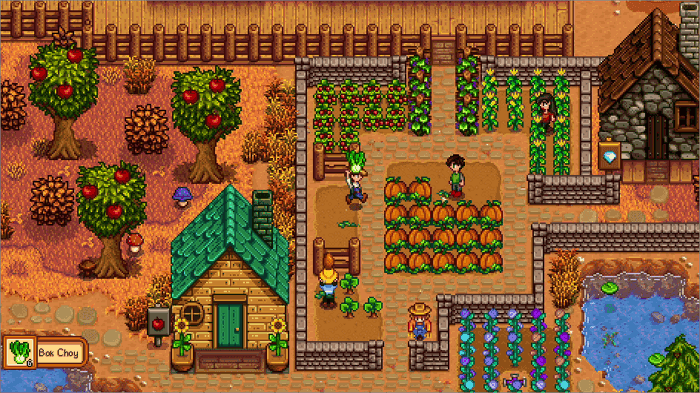
The game saves progress at the end of each day, resulting in lost progress if the player exits before that time.
To prevent data corruption of your character and quickly repair the saves, it's essential to know how to find Stardew Valley saves location. This article will guide you through the methods to locate your saves on various platforms, including Windows, Mac, Linux, iOS, and Android, to ensure you can easily access and repair your game data.
We offered more posts you can read here:
Where to Find Stardew Valley Saves Location
Since Stardew Valley supports multiple platforms, we introduced Stardew Valley Saves Location on Windows, Mac, Linux, iOS and Android. Please click the link below and navigate to the corresponding content to read according to the platform you use.
- Tip
- Stardew Valley saves are stored in XML format on your device, and are separate from the game file, so uninstalling and reinstalling the game won't affect your saved progress.
- Stardew Valley Saves Location on Windows PC
- Stardew Valley Saves Location on Mac
- Stardew Valley Saves Location on Linux
- Stardew Valley Saves Location on iOS
- Stardew Valley Saves Location on Andriod
Stardew Valley Saves Location on Windows PC
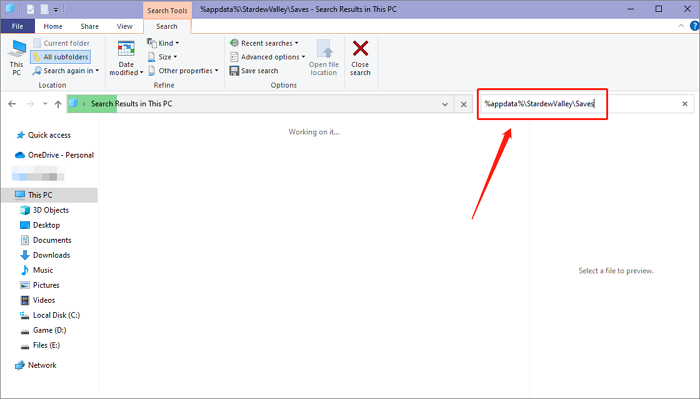
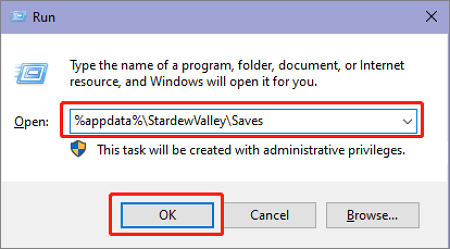
The Stardew Valley save file location on Windows is %appdata%\StardewValley\Saves.
You can open the saves folder in 2 ways.
Method 1. Open Windows File Explorer and search the address.
Method 2. To open a specific folder using the Run window, press the Win+R keys to open the Run dialog box. In the "Open" field, type the path to the folder you want to access, and press Enter to open it.
Stardew Valley Saves Location on Mac
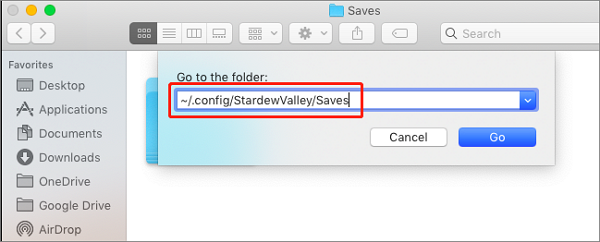
The Stardew Valley saves file location on Mac is /.config/StardewValley/Saves.
To access the saves folder, open Finder and navigate to the specified address in the search box, or press Command+Shift+G to quickly access it. This will allow you to view and manage your saved files.
Stardew Valley Saves Location on Linux
The Stardew Valley saves file on Linux is located at ~/.config/StardewValley/Saves.
Open the Files app, enter the address in the search box, and you can navigate to the saves folder.
Stardew Valley Saves Location on iOS
Here are the ways to find the Stardew Valley saves location on iPhone/iPad: The saves are stored in the iCloud, so you can check the iCloud storage on your device. You can also check the iCloud Drive app on your device, which may have a folder named "Stardew Valley" or "com.
For versions above iOS13:
Step 1. Open the Files app on your iPhone/iPad
Step 2. To access your iPhone or iPad files, select "Browse" in the lower-right corner and then click "On My iPhone/iPad".
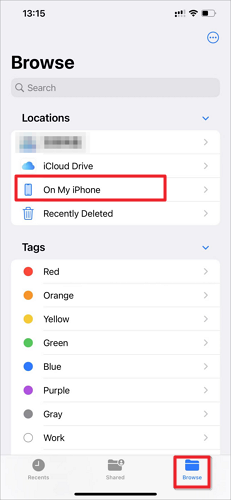
Step 3. To access your saves in Stardew Valley, simply choose the Stardew Valley folder, and you'll be able to view and manage your saved games.
For iOS12 and previous versions:
For iOS 12 and previous versions, you can't directly find the Stardew Valley save location on the device, but you can access it by connecting your iPhone/iPad to your computer.
Step 1. Attach your iPhone/iPad via USB and open Finder/iTunes
Step 2. To access the File Sharing menu in Stardew Valley, navigate to the left menu and select the "Hit File Sharing" option, which should then allow you to choose the game.
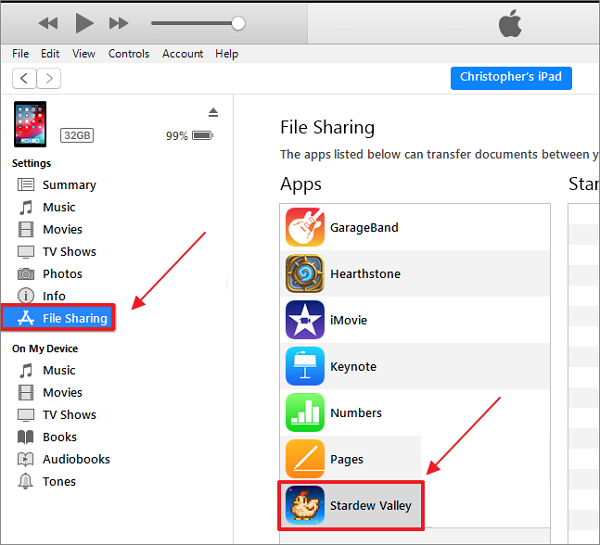
Step 3. Now you can see the saves files on your device
Stardew Valley Saves Location on Android
To find the Stardew Valley saves location on Android, go to Settings > Applications > Stardew Valley > Storage or Internal Storage, depending on your device, and look for the "Save" or "Data" folder. This folder contains your game saves.
Step 1. Open the File Explorer app on your Android device
Step 2. Choose the Stardew Valley folder
Step 3. Now you can see the saves files on your device
How to Backup Stardew Valley Saves
Whether it's to safeguard your game data or facilitate saves transfer between different devices, backing up Stardew Valley saves is a must. We recommend using Qiling Disk Master Pro as your backup helper.
The saving function in Stardew Valley is unique in that it updates data at the end of each game day. This can be inconvenient, especially if you want to manually back up your save file after each day's play, as it will have changed.
Qiling Disk Master Pro is a top-rated software for backing up PC game saves, providing automatic backups and updating game files through differential and incremental backup modes, minimizing data risks and player forgetfulness.
Conclusion
Whether you're using Windows, Mac, Linux, iOS, or Android, you can find the Stardew Valley saves location in this article. To repair your game progress or transfer saved files, it's essential to back up your saves, and Qiling Disk Master Pro can assist you with that.
FAQs
1. Can I transfer Stardew Valley saves?
You can transfer your Stardew Valley saves by backing up the saves file on one device, then pasting it into the folder on another device, whether it's a PC or mobile device. To do this, you'll need to connect the devices, find the original location of the saves file, and copy it to the new device. This allows you to transfer your game progress between different devices.
2. How many Stardew Valley save files can you have?
To avoid losing your saved game data, it's essential to regularly back up your saves for a game like Stardew Valley. Since you can only have one save file per game ID, creating an archive for the same game ID will overwrite the previous save. Therefore, it's crucial to create a backup of your saves to ensure you can restore your game data at any time. This will prevent you from losing your progress and allow you to pick up where you left off.
For a Stardew Valley save that no longer loads, read Stardew Valley Save Not Loading on Windows: Safe Recovery Steps.
Related Articles
- How to Fix Zsh: Command Not Found: Python [with Video]
- Tutorial on PowerShell Format Disk on Windows [Easiest Way]
- PC Turns On, but No Display or Power to Keyword [Fixed]
- Unable to Download Windows 11 ISO File? Why and How to Fix?
- How to Solve There Is No Partition Selected in Diskpart [Best Ways]
If you're unfamiliar with the workings of Diskpart, we recommend you utilize the Qiling Disk Master to operate on your disk. The tool works marvelously and will save you from typing the wrong commands on Diskpart. - [Fixed] The Object Invoked Has Disconnected from its Clients
The object invoked has disconnected from its client's message is a very common error message. Though it appears when a Java program is running on Windows, the exact cause can't be diagnosed in the first place.
Products
Articles & Tutorials
- Data Recovery
- Data Backup
- File Recovery
- File Backup
- System Backup and Restore
- Disk and Partition Clone
- Technical articles
- Mobile articles
- Disk Master Help
- Windows Data Recovery Tutorials
- Windows Secure Delete Tutorials
- Windows Partition Management Tutorials
- Windows File Backup and Restore Tutorials
- Windows System Backup and Restore Tutorials
- Windows Disk Backup and Restore Tutorials
- Windows Clone Tutorials