Call of Duty: Modern Warfare 2 File Location Guide
The highly anticipated Call of Duty: Modern Warfare 2 has finally been released worldwide, offering a familiar battle style and a wide range of game modes to players.
The game MW2 has a great upgrade and adjustment system for its weapons, a realistic gunfight effect, and new game modes that are creative. This has not only kept old COD fans happy but also made the game enjoyable for new players.
For new PC players to Call of Duty: Modern Warfare 2, understanding how to find the game's file location, change the install file location on Steam, and backup the game file is crucial to fully enjoying the game.
This article provides detailed guides to help address challenges related to the file location of Call of Duty: Modern Warfare 2. By continuing to read, one can gain a comprehensive understanding of the file location.
Maybe You also want to know:
Where to Find the Saves/Config Files Location of COD: MW 2
In the game MW 2, saves files and config files are crucial for its normal operation. Players need to know where to find them in order to modify the game progress or add mods. This information is essential for players who want to customize their gaming experience.
To find the Call of Duty: Modern Warfare 2 files location on Windows File Explorer, follow these steps: Open File Explorer, click on "This PC," then "Local Disk" (usually C:), and navigate to the "Program Files" or "Program Files (x86)" folder, depending on your system architecture. Look for the "Activision" or "Infinity Ward" folder, then search for the "Call of Duty: Modern Warfare 2" folder.
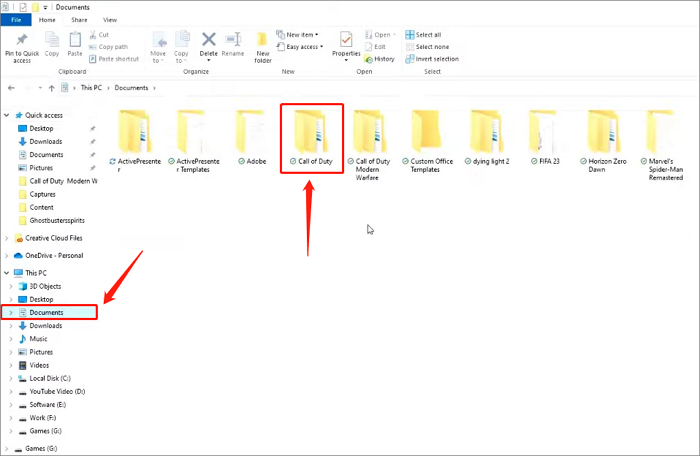
Step 1. Click "Document" on the Windows File Explorer and choose "Call of Duty"
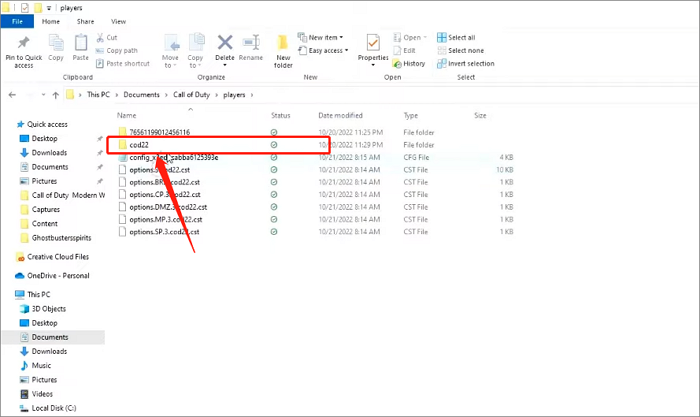
Step 2. Select "Player" and you can find config files here
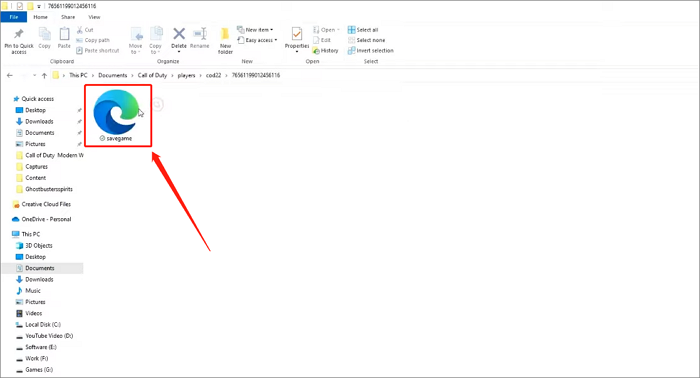
Step 3. Now hit the lower level file and here is COD: MW 2 saves file
- Tip
- To modify the COD: MW 2 files or add custom content, it's essential to make a file backup in advance to avoid potential issues with damaged files that cannot be restored. This precautionary step will ensure your game data remains intact, allowing you to experiment with customizations and content additions without worrying about losing your progress.
How to Change the Install File Location of COD: MW 2
To install Call of Duty: Modern Warfare 2 on Steam, you'll need at least 125 GB of free space, and disk space will continue to decrease as developers update the game. New players who didn't partition their disk before installing can move the files to a larger disk by changing the install location, ensuring the game updates and runs normally.
Fortunately, Steam provides a dedicated solution to change the install file location of COD: MW 2. By following the steps, you can easily relocate the install file with just a few clicks.
Step 1. To access Call of Duty: Modern Warfare 2 on Steam, open the Steam application, navigate to your LIBRARY, and find the game in the list of installed titles.
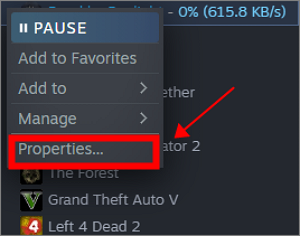
Step 2. Right-click it and select "Properties"
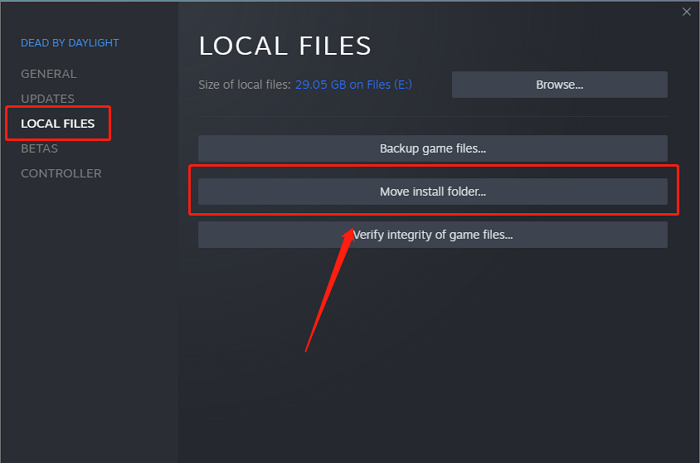
Step 3. Select "Local Files" and hit "Move install folder"
Step 4. Select the target location you want to change and click the "Move" button now.
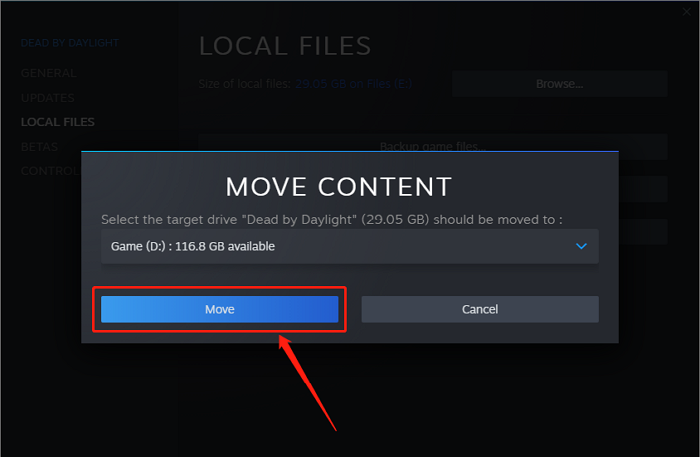
You can still play COD: MW 2 normally after moving the location of the COD: MW 2 file, as the game can still find and access it.
How to Backup COD: Modern Warfare 2 Install Files
To modify the Call of Duty: Modern Warfare 2 saves file or add mods, it's essential to back up all files in advance. This precautionary measure can help protect the security of the original data and allow for easy restoration of COD: MW 2 files at any time, avoiding confusion about game data.
Although Steam has a file backup function, we recommend using the professional backup software Qiling Disk Master Pro for more comprehensive backup.
Qiling Disk Master Pro is a top-notch backup software that allows for automatic file backup. It offers various backup modes, including full, incremental, and differential backup, and enables users to create a scheduled backup plan tailored to their needs. In addition to its primary function of game backup, Qiling Disk Master Pro can also be utilized in other aspects.
- Backup files, disk, system and app data
- Clone a hard drive
- Offer free 250 GB Cloud storage
- Create an iso image from a hard drive
Conclusion
To quickly master finding and changing the Call of Duty: Modern Warfare 2 file location, whether you're a seasoned player or new to the series, this article can help. Before making any changes to the COD: MW 2 file, it's recommended to use Qiling Disk Master Pro to back up your game file and avoid any potential data loss.
FAQs
1. How do I install Call of Duty Modern Warfare 2 from the disc?
To install Call of Duty Modern Warfare 2, insert the game disc into the console's disk drive. The game will install automatically on PlayStation, but Xbox will prompt you to install it.
2. How much storage is Modern Warfare 2?
Call of Duty: Modern Warfare 2 requires at least 72 GB of storage, but installing it from Steam requires a minimum of 125 GB of free space, as confirmed by Infinity Ward and the game's product page on Steam.
Related Articles
- iMac Won't Turn on | Why and How to Fix
- What is WindowServer on Mac and How to Fix WindowServer High CPU
- How to Fix Grayed Out Folders or Files on Mac
- How to Fix Microsoft Excel Has Stopped Working 2007/2010/2013/2016
- PS5 Can't Start Game or App, Everything You Want to Know in 2023
Fix PS5 cannot start game or app errors. Learn common causes and solutions for game data, updates, storage, and console settings. - PS5 No Sound? 8 Fixes Here! [Reasons Explained]
If your PS5 has no sound, as this article provides eight fixes to resolve the issue. Additionally, it explains the causes of why your PS5 becomes silent.
Products
Articles & Tutorials
- Data Recovery
- Data Backup
- File Recovery
- File Backup
- System Backup and Restore
- Disk and Partition Clone
- Technical articles
- Mobile articles
- Disk Master Help
- Windows Data Recovery Tutorials
- Windows Secure Delete Tutorials
- Windows Partition Management Tutorials
- Windows File Backup and Restore Tutorials
- Windows System Backup and Restore Tutorials
- Windows Disk Backup and Restore Tutorials
- Windows Clone Tutorials