What Is Mds_Stores High CPU Usage and How to Fix It?
You're likely experiencing issues with your Mac's Spotlight Search, which can be frustrating. This might be due to various reasons such as a cluttered search index, corrupted system files, or even a malfunctioning fan. If you're experiencing any of these symptoms, it's possible that your Mac's performance is being affected, leading to slower speeds and increased fan noise.
While Macs are known for their high quality, no product is perfect and users may encounter software issues. One common problem that can arise is the Mds_Stores error, which can be frustrating but is often fixable.
The occurrence of the software error Mds_Stores leads to a range of consequences, including a device freeze and extended CPU utilization.
Mds_Stores: What Is It?
Mds_Stores is a software component that can cause high CPU utilization, often due to its resource-intensive nature. It's a process that can be found on Windows systems, and its high CPU usage can be a concern for users who are not tech-savvy. The issue can be caused by various factors, including software bugs, configuration problems, or even malware. It's essential to investigate the root cause of the problem to resolve it effectively.
The Mds_Stores is an in-The MDS (Metadata Server) is a component of the Mac Spotlight Search that tracks and maintains data on the Mac, used by macOS Spotlight. Mds_Stores is responsible for compiling and maintaining the data collected by MDS to make Spotlight more efficient.
Mds_Stores helps you quickly find what you're looking for through Spotlight search results, making it easier to complete tasks by providing relevant recommendations when you type something into Spotlight.
How to Fix Mds_Stores High CPU Usage on Mac?
Mds_Stores can consume excessive CPU resources, causing the device to slow down. Understanding the reasons behind this issue is crucial, as is knowing the various ways to resolve it.
The high CPU usage of Mds_Stores is not absurd, as Spotlight uses them to track the metadata indexed on your device, making search more efficient for users.
Frequent changes to the system's contents can overwork the Mds_Stores, leading to increased CPU usage as the process struggles to keep track of the modifications.
The excessive CPU usage by Mds_Stores on your Mac is primarily due to two reasons. Firstly, the increasing amount of content or data on your device can cause this issue. Secondly, the constant changes made to the content on the Mac can also lead to high CPU usage by Mds_Stores.
An unusual CPU usage can be caused by a variety of factors, including malware or viruses, poorly optimized software, or even system bugs. If you notice high CPU usage, it's essential to address the issue promptly to prevent potential problems and ensure smooth system performance.
Windows high CPU usage can be a frustrating issue, causing your computer to slow down or even freeze. If you're experiencing this problem, there are several potential causes to investigate.
Methods to fix the Mds_Stores high CPU usage on Mac
There are multiple ways you can resolve the high CPU usage by Mds_Stores on the Mac. Check out some methods listed here.
Reboot Your Mac
Rebooting your Mac is a simple and effective solution to resolve the Mds_Stores error, which can be encountered via the Activity Monitor. This straightforward fix can resolve a wide range of Mac issues, making it a good initial step to take when encountering this error.
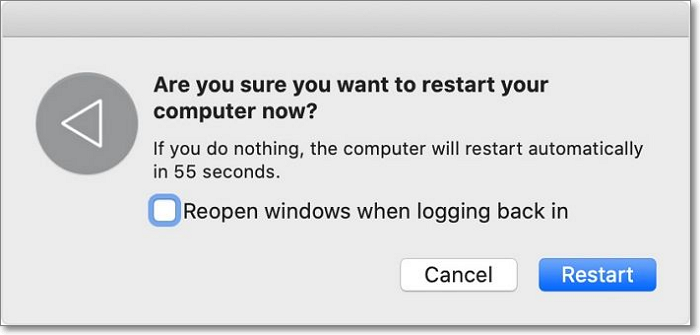
To resolve the high CPU usage issue, press the Control and Power button simultaneously, select Restart, and then check the Activity Monitor for a decrease in CPU consumption. If the problem persists, further troubleshooting may be necessary.
If not, you can follow the solutions mentioned below.
Disable Spotlight
To disable Spotlight, go to System Preferences > Spotlight, then toggle off the "Show Search Results" switch at the bottom of the window. This will disable Spotlight and may resolve the Mds_Stores error.
Step 1: To access the Terminal app, go to the Desktop, launch the Finder app, navigate to the Applications folder, and select Utilities.
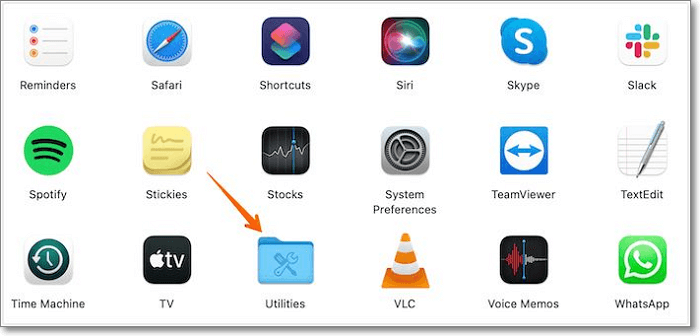
Step 2: Now, press the Terminal app. Please wait for it to open. Type the following command in the terminal windows, and press the Enter key. (Note: This response does not contain any actual command, as the original text did not provide one.
sudo mdutil -a -I off
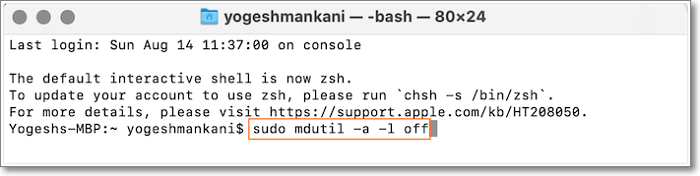
Step 3: 1. Press the Enter key to open the Activity monitor. 2. Click on the "System Report" button. 3.
Temporarily Stop and Restart Spotlight
To resolve the Mds_Stores error, stop Spotlight temporarily and then restart it immediately. This can be done by opening the Activity Monitor, finding the "mds" process, and quitting it. Then, immediately restart it. This should resolve the error.
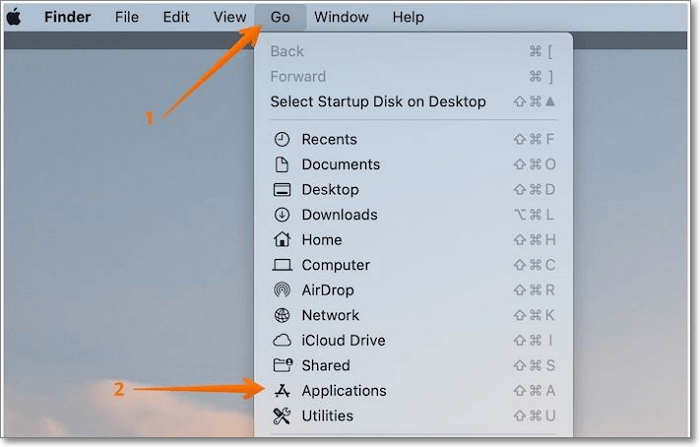
Step 1: To open the Utilities app, you can simply go to the Finder app, navigate to the Applications section, and launch the Utilities app from there.
Step 2: To enable the Windows Subsystem for Linux, click on the "Terminal" option, type "wsl --install" and press the Enter key.
sudo launchctl unload -w/System/Library/LaunchDaemons/com.apple.metadata.mds.plist
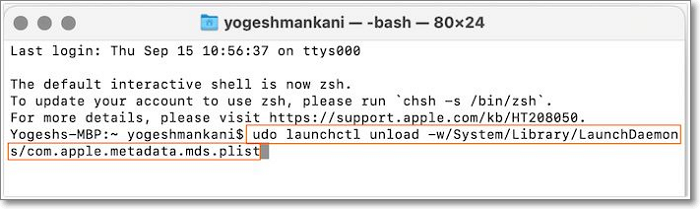
Step 3: Now enter the Admin password. Press the Enter key again, then restart the device, and finally restart Spotlight.
Step 4: To open the Utilities app, go to the Finder, click on the "Applications" folder, and then click on the Utilities app.
Step 5: Click the "Terminal" option, type the following command, and press the Enter key.
sudo launchctl -w/System/Library/LaunchDaemons/com.apple.metadata.mds.plis
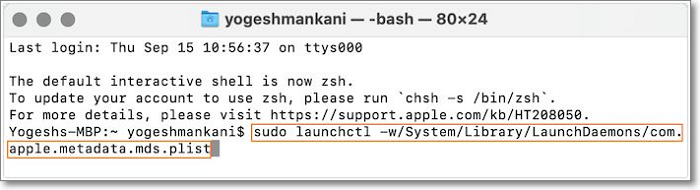
Step 5: Enter the Admin password, press Enter again, and restart the device. Then, check if the issue is resolved in Activity Monitor.
Final Verdict
The Mds_Stores error is a common software issue on Macs that causes high CPU usage, slowing down the system. To resolve this, you can try various solutions, but if none work, it's best to seek professional help.
FAQs About Mds_Stores
The Mds_Stores error is a frustrating software issue on Mac that can be resolved by gathering more information. Reading through the questions and answers below can provide a better understanding of the issue and its possible solutions.
1. How long does MDS & Spotlight take to finish indexing?
MDS & Spotlight can take around 15-45 minutes to finish indexing, but in some cases, it might take hours, depending on the amount of data being indexed.
2. How to stop mds_stores on Mac?
This is a background process often associated with Mac's Spotlight, which stands for MetaData Server. If you disable the Spotlight, it will stop the mds_stores.
Related Articles
- Fixed: CPU Isn't Supported | CPU Isn't Compatible with Windows 10/8.1/8
- How to Turn off The Firewall in Windows 10 [A Complete Guide]
- [Step-by-step Guide] How to Reset Only C Drive in Windows 10 Safely
- 3 Ways | How to Enable and Disable Offline Files in Windows 10
- How to See Saved Passwords in Opera GX
Fix CPU is not compatible with Windows 10, 8.1, or 8 error. Learn why the update fails and how to enable required CPU features safely. - How to See Wifi Password Windows 11
Forgot your WiFi password on Windows 11? Learn three simple methods to view your WiFi password using Control Panel, Windows Terminal, or Qiling Key Finder.
Products
Articles & Tutorials
- Data Recovery
- Data Backup
- File Recovery
- File Backup
- System Backup and Restore
- Disk and Partition Clone
- Technical articles
- Mobile articles
- Disk Master Help
- Windows Data Recovery Tutorials
- Windows Secure Delete Tutorials
- Windows Partition Management Tutorials
- Windows File Backup and Restore Tutorials
- Windows System Backup and Restore Tutorials
- Windows Disk Backup and Restore Tutorials
- Windows Clone Tutorials