6 Ways to Recover Deleted Snapchat Memories in 2023
PAGE CONTENT:
- 1. Recover Deleted Snapchat Memories from My Data Archive
- 2. Recover Deleted Snapchat Memories from the Cache
- 3. Recover Deleted Snapchat Memories from the Recently Deleted Folder
- 4. Recover Deleted Snapchat Memories from iCloud
- 5. Recover Deleted Snapchat Memories from Your PC/Computer
- 6. 5. Recover Deleted Snapchat Memories with Data Recovery Service
Snapchat users often complain about missing Memories, but there are solutions to recover deleted Snapchat Memories. The app, known for its fast and fun way to share moments with friends and family, allows users to express themselves, live in the moment, and learn about the world. If you've lost your Snapchat Memories, don't worry, as this post provides feasible solutions to retrieve them.

Why Did You Lose Snapchat Memories (Main Causes)
Snapchat chats and Memories can be lost due to various reasons, including account deletion, storage space, or device changes, making it essential to regularly back up your content.
- If you've accidentally deleted your Snapchat Memories, you can't directly cancel the operation to save them. However, you can try to recover them by going to the Memories section, tapping the three dots, and selecting "Recover Memories." If you've already deleted the Memories, you can try to recover them by going to the Snapchat settings, tapping "Account Actions," and selecting "Recover Memories.
- Snapchat is experiencing backup errors, but your missing Memories should return shortly.
- Snapchat removes your Memories with the current rule that mandates automatically deleting old Memories that haven't been viewed in a while, unless you manually save them.
To prevent Snapchat data loss, create a backup of your Memories to your cloud storage.
How to Recover Deleted Memories on Snapchat
If you're trying to recover deleted Snapchat Memories, this post offers six ways to retrieve deleted Snapchat photos, videos, and messages.
Method 1. Recover Deleted Snapchat Memories from My Data Archive
To restore Snapchat Memories, open My Data, and follow the steps provided. Many users have found this method effective in retrieving their Memories.
Step 1. Open Snapchat on your Chrome and log in to Snapchat.
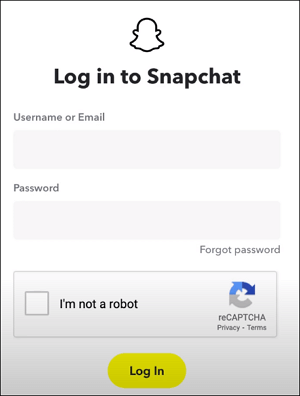
Step 2. Select "Manage My Account" and choose "My Data".
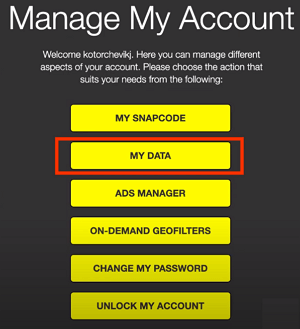
Step 3. Press "Submit Request" at the bottom of the page.
Step 4. The My Data page will display all the data available to be requested from Snapchat, and at the bottom, you can enter the email address where you'd like your data to be sent.
Step 5. Check your email and download the Mydata.zip file to your device.
Method 2. How to Recover Deleted Snapchat Memories from the Cache
Congratulations, Android users! You can recover deleted Snapchat Memories by saving temporary files, known as a cache, on your phone. Follow the steps to bring back lost Snapchat data.
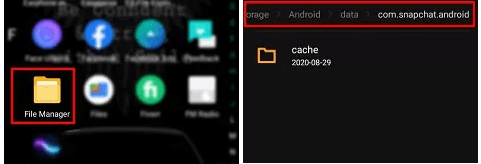
Step 1. To access the Snapchat data on an Android device, go to the "File Manager" app, then navigate to the "Android" folder, followed by "data" and finally "com. snapchat. android".
Step 2. After taking a screenshot using the "PrtScn" key, check the Cache folder to view the saved snaps. Move these files to any other location and change their extensions from ".cache" to ".
Method 3. Recover Deleted Snapchat Memories from the Recently Deleted Folder
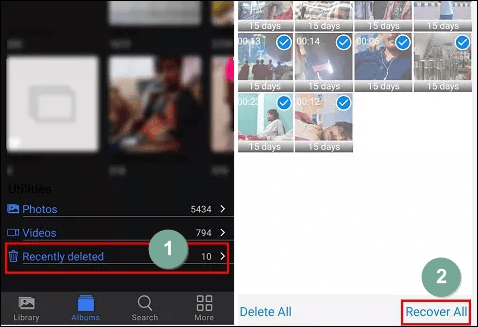
Whether you're an Android or iPhone user, you can try recovering lost Snapchat videos or photos by checking the Recently deleted folder. Follow these steps to restore your Snapchat data. (For example, Android users can try this method.)
Step 1. Go to "gallery > trash".
Step 2. Select the "Recently deleted" folder.
Step 3. Please check these files and select the wanted files, then tap "Recover All".
Method 4. Recover Deleted Snapchat Memories from iCloud
If you use Snapchat with an iPhone, you can recover deleted photos from iCloud by signing in with your iCloud account. This will allow you to access your deleted photos and restore them to your device.
Step 1. Go to iCloud.com, and log into your account.
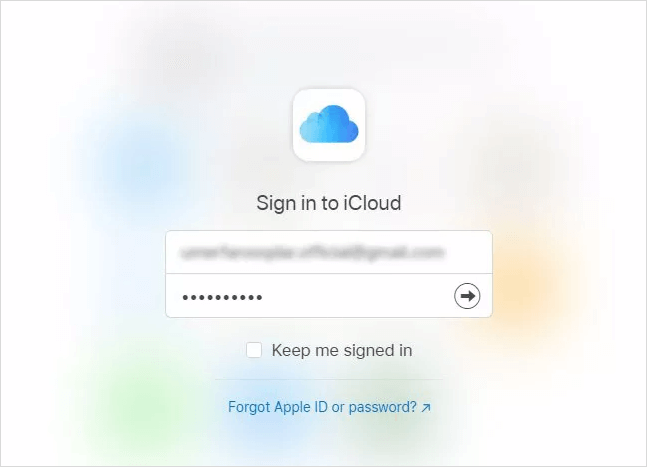
Step 2. To recover selected photos or videos, select them and click "Recover".
Method 5. Recover Deleted Snapchat Memories from Your PC/Computer
Snapchat has a desktop version, and if you lose data, you can try data recovery software like Deep Data Recovery, which can help you regain lost photos, videos, documents, and recordings.
- It can recover deleted files from various storage devices, including hard drives, SSDs, SD cards, USB flash drives, and memory cards.
- This software supports data recovery for Windows 11, 10, 8, and 7 laptops and computers.
- With this tool, photo, video, and file recovery are as easy as a piece of cake.
To recover Snapchat Memories from your computer, download this hard drive recovery software and follow the steps provided.
Step 1. Select the specific file location you want to scan, and then click the "Scan" button to proceed.

Step 2. To recover deleted files, select the "Deleted Files" and "LostFiles" folders in the left panel, and then apply the "Filter" feature or click the "Search files or folders" button to find the deleted files.

Step 3. To recover the files, click the "Recover" button and save the restored files in a location different from the original one.

Method 6. Try Data Recovery Service to Recover Deleted Snapchat Memories
If you still can't recover your lost Snapchat data, consider using data recovery services. Qiling has experienced experts who have successfully resolved thousands of similar cases, and they can provide the best data recovery service to retrieve your data.
Consult with Qiling data recovery experts for one-on-one manual recovery service. After a FREE diagnosis, we offer a range of services, including manual recovery, which can be tailored to meet your specific needs.
- To repair a corrupted RAID structure, unbootable Windows OS, and corrupted virtual disk file, you can try running a system file checker, checking the Event Viewer for errors, and booting in safe mode to isolate the issue. You can also try running a disk check on the affected drive, and if the issue persists, you may need to rebuild the RAID array or restore from a backup.
- Recover/repair lost partition and re-partitioned drive
- To resolve the issue of a RAW Bitlocker-encrypted drive, you can attempt to repair it by running the built-in Check Disk (chkdsk) utility in Windows. However, since the drive is encrypted with Bitlocker, you'll need to access the drive in a way that allows you to run the utility.
- Fix disks that become GPT-protected partitions
Conclusion
To recover deleted Snapchat data, try using third-party recovery software, checking the Snapchat cache, or looking in the device's recycle bin. Once you've recovered the data, be sure to save it to a safe place to avoid losing it again. If you found this solution helpful, consider sharing it with your friends on social media platforms like Twitter, Facebook, and Instagram.
Snapchat Memory Recovery FAQs
You can also follow these tips below for other frequently asked questions about Snapchat.
1. How do I unlock my Snapchat account?
To unlock your Snapchat account on your iPhone, follow these steps:
If your Snapchat is locked due to third-party app installation, uninstall the app or plugin from your iPhone and try to log in again, then visit the official site to unlock your account in a few hours.
2. How to recover deleted Snapchat photos on Android?
To recover deleted Snapchat photos from an Android device, follow these steps.
- Sign in to your Cloud account.
- Tap your recent backups - the one containing your Snapchat photos.
- Click restore to your Android devices.
3. Can you recover a deleted Snapchat memory?
You can recover deleted Snapchat Memories in six ways, with the most effective solution being to recover Snapchat from My Data.
4. Are deleted snaps saved anywhere?
Snapchat deletes a snap from its servers once all recipients have opened it, and if it remains unopened for 30 days, it is also deleted.
Related Articles
- How to Recover Permanently Deleted Excel File in Windows 10, Mac, iPhone, and Android
- [Fixed] Laptop Screen Black but Still Running of HP, Lenovo, Asus, Dell
- TXT File Recovery - Two Methods to Recover Lost Text Files
- Email Password Recovery: How to Recover Gmail Account and Password
- Top 6 Data Recovery Services in Boston, MA
Want to find data recovery services in Boston, Massachusetts that can help you recover photos, documents, and emails from computers or laptops? This guide will definitely solve your issues. - The Top 9 Data Recovery Services in Washington, DC (2024)
Do you need assistance finding data recovery services and recovering photographs, documents, and emails from computers or laptops in Washington, DC? Your problems will be resolved once you read this post.
Products
Articles & Tutorials
- Data Recovery
- Data Backup
- File Recovery
- File Backup
- System Backup and Restore
- Disk and Partition Clone
- Technical articles
- Mobile articles
- Disk Master Help
- Windows Data Recovery Tutorials
- Windows Secure Delete Tutorials
- Windows Partition Management Tutorials
- Windows File Backup and Restore Tutorials
- Windows System Backup and Restore Tutorials
- Windows Disk Backup and Restore Tutorials
- Windows Clone Tutorials