What Is SD Card Reader? [You Must Know This]
Key Takeaways:
This article provides an overview of SD card readers, covering what they are, how to use them, and the best SD card reader recommendations for 2024.
SD (Secure Digital) memory cards were created to expand storage capacity in digital devices. They are valued for their small size, fast data transmission, and hot swap feature, making them a popular choice among users.
To read the data on an SD card on other devices, you need to prepare an SD card reader. This is necessary because most computers and devices do not have a built-in SD card slot. An SD card reader is a small device that connects to a computer via USB, allowing you to transfer data from the SD card to the device with ease.
What Is SD Card Reader
An SD card reader is a device that connects to a computer via USB and allows reading and writing data from SD cards. It has a corresponding SD card slot and provides access to files on SD cards, enabling users to view, edit, and share their stored content.
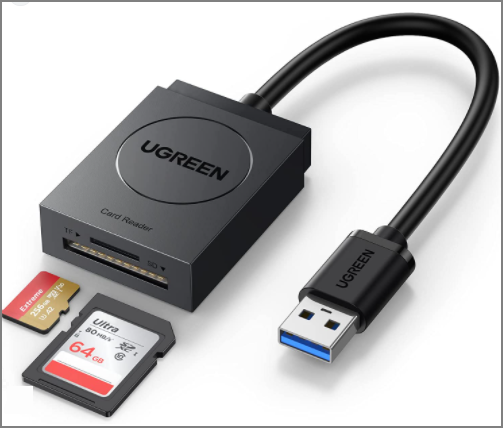
The SD card reader is surprisingly lightweight and compact, making it easy to transport. In fact, some models are even comparable in size to typical USB flash drives. This convenience is a welcome bonus for computers, as the card reader can read a variety of flash memory cards, much like a USB floppy drive.
How to Use SD Card Reader
SD card readers are now standard equipment on most computers, making it easy to transfer files. If you need to format or clone an SD card, it's essential to know how to connect it to your computer. Simply prepare an SD card reader and follow the steps to learn how to use it.
Step 1. Take the SD card out of the original device.
Step 2. Use a "push/push mechanism" to insert the SD card.

Step 3. Insert the card into the accessible USB drive on your computer.
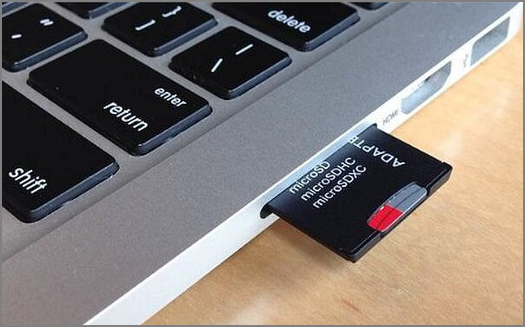
Step 4. When your computer recognizes the SD card, open the "files" folder to view data.
Step 5. To safely remove the external hard drive, select the Safely Remove Hardware icon in the bottom right corner of the screen.
A memory card linked via a card reader has a faster read and write speed than a card inserted into the device's slot, especially when using a PC without card slots, requiring an SD card reader.
2024 Best SD Card Reader Recommend
To choose a good SD card reader, consider factors such as the card reader's capacity, data transmission speed, memory card compatibility, and hardware interface. Six top-rated SD card readers that excel in these areas are available, offering a range of options for users.
- Anker SD Card Reader
- Beikell SD Card Reader
- Transcend SD Card Reader
- UGREEN SD Card Reader
- SmartQ SD Card Reader
- COCOCKA SD Card Reader
Each product has its own set of pros and cons. If you'd like to learn more about them and make a purchase, you can click the link to visit Amazon.
Conclusion
An SD card reader is a small and compact device that allows computers to access files on an SD card. It's a simple and easy-to-use tool that can be used by simply placing the SD card into the available slot, making it a necessary accessory for computers to read and interact with SD cards.
Choosing the right SD card reader can be overwhelming with so many options available. However, this article provides a selection of excellent card readers that cater to different needs, making it easier to make a decision.
Related Articles
- Complete Guide of SATA Cable[Definition, Types, Usage & Differences]
- How to Access Startup Security Utility Mac? [Latest Tips]
- What Is Bad Sector? [Bad Sector Explained in 2024]
- Ubisoft Game Save Folder (Everything You Need to Know)
- How to Choose QNAP External Drive Format [2024 Detailed Tutorial]
Choosing the best QNAP external drive format for your drive can be a daunting task, but understanding the facts can help. To make an informed decision, you can consider the guide provided in this article, which outlines the steps to format your drive. - QuickBooks Online Keeps Crashing [Troubleshoot with Comprehensive Guide]
Having trouble with QuickBooks Online crashing? This article has got you covered! It explains the reasons behind the crashes and provides solutions to fix the issue in just 5 minutes.
Products
Articles & Tutorials
- Data Recovery
- Data Backup
- File Recovery
- File Backup
- System Backup and Restore
- Disk and Partition Clone
- Technical articles
- Mobile articles
- Disk Master Help
- Windows Data Recovery Tutorials
- Windows Secure Delete Tutorials
- Windows Partition Management Tutorials
- Windows File Backup and Restore Tutorials
- Windows System Backup and Restore Tutorials
- Windows Disk Backup and Restore Tutorials
- Windows Clone Tutorials