What Is SD Card? How Is SD Card Used For? [Beginner's Guide]
Key Takeaway:
1. SD cards are small, portable memory cards used to store data in various devices, such as cameras, smartphones, and laptops. They come in different capacities and are used to expand storage capacity, transfer data, and provide a backup option for important files. SD cards are widely used in the digital world and have become an essential component in many electronic devices.
2. This article teaches you how to format SD cards for various devices, including cameras, laptops, phones, and switches.
The SD card, or Secure Digital card, is a widely used memory storage device that has become an essential component in many electronic devices, such as smartphones, cameras, and laptops. Despite its ubiquity, many people may not fully understand what an SD card is or how it works. This article aims to provide a detailed explanation of SD cards, covering their basic function, features, and uses, making it easy to understand even for those who may not be tech-savvy.
What Is SD Card?
Secure Digital (SD) cards are small flash memory cards that provide high-capacity memory for various portable devices, including smartphones, digital cameras, and music players. They are designed for use in portable devices such as car navigation systems, e-books, PDAs, and personal computers.
History:
The concept of the SD card has been around since the late 19th century, with early ideas and developments emerging over time. A brief timeline of its history can be condensed into key points, showcasing the evolution of this technology.
- In 1999, SanDisk, Panasonic, and Toshiba formed an alliance to develop the SD (Secure Digital) card, a new type of flash memory storage.
- In 2003, SanDisk Corporation introduced the miniSD, a smaller version of the standard SD memory card.
- 2004–2005: Micro cards, also known as T-Flash or TF, appeared during this period.
- 2006–2008: SDHC came with 32GB of storage in 2006.
- 2009-2022: The SDXC format was introduced, supporting cards up to 2TB, and various capacities were later introduced by corporations.
SD cards come in various capacities, ranging from a few megabytes to several terabytes. The capacity of an SD card depends on the specific model and manufacturer, with some cards offering larger storage space than others. However, most SD cards are designed to be compatible with a wide range of devices, and the capacity is usually indicated on the card itself or in the packaging.
Capacity:
SD cards come in various capacities, ranging from a few megabytes to several terabytes, with three main levels: standard capacity, high capacity, and extended capacity, each with different memory ranges.
- SD: 8MB - 2 GB
The available capacities of the storage device are 8MB, 16MB, 32MB, 64MB, 128MB, 256MB, 512MB, 1GB, and 2GB.
- SDHC: 2GB - 32GB
Its available capacities are 2GB, 4GB, 8GB, 16GB, and 32GB.
- SDXC: 32GB - 2TB
The device's available storage capacities are 32GB, 48GB, 64GB, 128GB, 256GB, 512GB, 1TB, and 2TB.
The speed of an SD card is measured in megabytes per second (MB/s) and is usually denoted by a number, such as Class 10 or U3. A faster SD card can read and write data more quickly, which is important for applications that require high-speed data transfer, such as video recording and photography. Some SD cards can reach speeds of up to 300 MB/s, while others may be slower, around 100 MB/s.
Speed:
There are different levels of SD cards depending on the data transfer speed, including Class 2, Class 4, Class 6, Class 10, and Class 30, with Class 30 being the fastest. Additionally, there are V6, V10, V30, and V60, which are more commonly used in high-end cameras and devices. The U3, V30, and V60 speeds are also used in some SD cards, with U3 being the minimum speed for 4K video recording.
- Speed Class
- UHS Speed Class
The SD Association has defined four Speed Classes for SD cards: Class 2, Class 4, Class 6, and Class 10. Each class represents a minimum write speed, with Class 10 being the fastest at 10 MB/s. The table below provides a quick reference for the speed of SD cards in each class: | Class | Minimum Write Speed | | --- | --- | | Class 2 | 2 MB/s | | Class 4 | 4 MB/s | | Class 6 | 6 MB/s | | Class 10 | 10 MB/s |
| Speed Class | Speed | Applied Range |
|---|---|---|
| Class 2 | 2MB/s | Digital camera shooting |
| Class 4 | 4MB/s | HDTV |
| Class 6 | 6MB/s | SLR Cameras |
| Class 10 | 10MB/s | HD TV |
| UHS-I | Write within 50MB/s, Read within 104MB/s | HD TV recording in real time |
| UHS-II | Write within 156MB/s, Read within 312MB/s | Future world |
With its defined capacity and speed, an SD card is widely used in various devices such as smartphones, tablets, cameras, and laptops for storing data, photos, videos, and applications. It's also used in gaming consoles, e-readers, and other portable devices for expanding storage and improving performance.
Now that we know what an SD card is, you can click the link to learn more about how SD cards work and what to do if your SD card isn't showing.
What Is SD Card Used For?
SD cards are widely used in our daily lives, providing additional storage capacity for devices such as cameras, smartphones, computers, and game consoles. However, their uses extend far beyond just storage - they also have specific applications in various fields, including:
- To transfer data: SD cards are used because they only need a card reader to connect to a computer, and no network support is required to access and read/write data.
- To back up data: Users often use SD cards as backup destinations because they're easy to carry and safer with no removable parts, and their capacity can be chosen according to the backup data size.
- To have external storage: SD cards are a convenient option for external storage due to their compact size, allowing for portability, and their immunity to network-based viruses.
- To extend the storage: Internal storage can be found in various devices, including mobile phones, cameras, and other electronic gadgets, serving as a built-in storage space for data and applications.
SD cards have a wide range of uses, but they are particularly helpful with various devices.
What Is SD Card on Android?
An SD card can be a helpful addition to an Android user's device, as it can be used as internal storage by inserting it into the card slot on the phone.
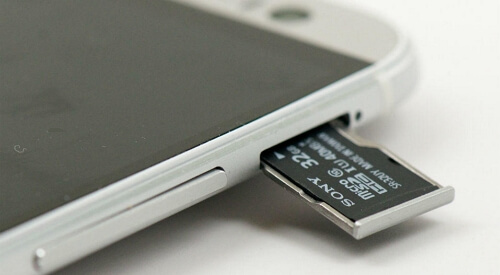
You can save documents, music, and other files on the SD card, freeing up phone storage space. The SD card can be easily transferred to a computer where the files can be accessed.
What Is SD Card on Nintendo 3DS?
The Switch's limited storage space can be a concern, especially when you consider the growing size of games. To alleviate this issue, using an SD card can be a convenient solution. These cards store your games and data on their chips, freeing up space on the console and keeping your information safe. This is particularly useful since the Switch's default storage is already partially allocated for the operating system, making it prone to filling up quickly. By using an SD card, you can expand your storage capacity and enjoy more games without worrying about running out of space.
What Is SD Card in Computer?
Users can also use SD cards on computers by inserting the card into a card reader, which is then plugged into the laptop's corresponding port, allowing for data reading and writing, providing a convenient storage solution for large files, thereby relieving storage pressure on the computer.
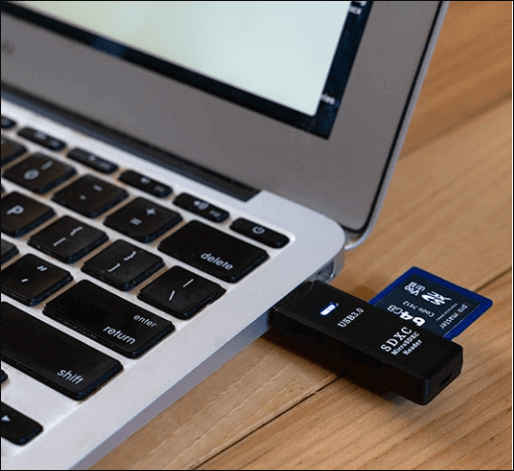
An SD card, also known as a Secure Digital card, is a small, portable memory storage device used to expand the storage capacity of various electronic devices, such as smartphones, tablets, cameras, and gaming consoles, allowing users to store and transfer files, photos, videos, and music.
You can click on this link to learn more about why formatting an SD card is necessary.
What Format Should You Use for Your SD Card?
To choose a suitable file system for your device, you'll need to consider the specific requirements of your device. Different devices require different file system formats, so it's essential to check the compatibility of your device with various file systems. A list is available to help you select the most suitable file system for your device.
- Android phones: FAT32, Ext3/4
- Most Cameras: FAT32
- Nintendo Switch: FAT32, exFAT
- Windows: NTFS, exFAT, FAT
- macOS: HFS, APFS, HFS+, exFAT, FAT32
After choosing a suitable file system for your device, it's time to learn how to format your SD card. You can find a detailed guide and a professional format tool in the next part.
Format SD Card via Qiling Partition Master
Qiling Partition Master Free is a professional and efficient Windows format tool that supports various Windows versions, including Windows 11/10/8, 8.1, and 7, and can help format an SD card with ease.
If you have downloaded this format tool, follow the steps in this link to format your SD card.

To format an SD card on Windows 11, you have four options in 2022. Firstly, you can use the built-in Disk Management tool, which allows you to format the SD card with various file systems, including FAT32, exFAT, and NTFS. Alternatively, you can use the Command Prompt or PowerShell to format the SD card with a specific file system.
In Windows 11, you can format an SD card using various methods to ensure successful formatting. To start, you can use the built-in Disk Management tool to format the SD card, which can be accessed by searching for "Disk Management" in the Start menu.
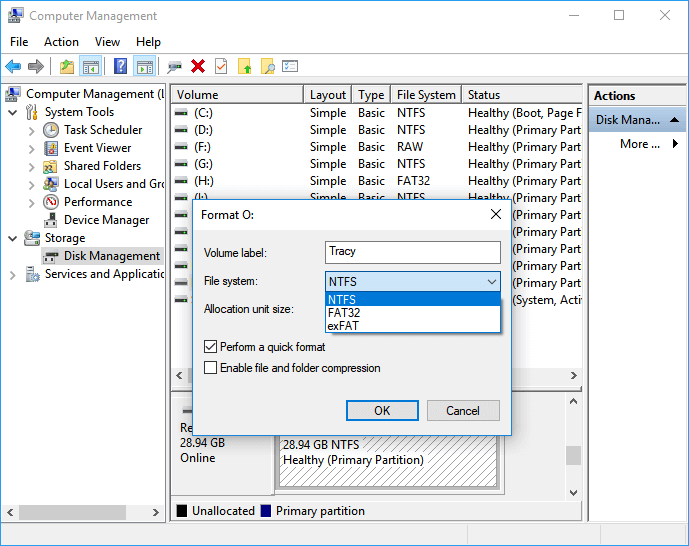
Qiling Partition Master can help with SD card problems by formatting your SD card to the ideal file format after the process is complete. This means you can use it to resolve any issues with your SD card.
What Can Qiling Partition Master Help?
The utility is a basic disk management tool in Windows, offering features such as disk management.
- Convert MBR to GPT
- Format SD card FAT32
- Formatting SD card Windows 7
- Format corrupted SD card
- Resize, move, delete, and create partitions
Now, download Qiling Partition Master to have a try. You will be at ease while managing your disks and other external hard drives with its help.
Conclusion
An SD card, or Secure Digital card, is a type of non-volatile memory card used to store data in a variety of devices, including cameras, smartphones, and computers. The article provides a detailed explanation of the SD card, covering its definition and uses, and is intended to help answer any remaining questions about this storage device.
FAQs About What Is SD Card
This part lists some common questions you may be interested in, and we hope it can help.
1. What does a card reader do?
Cloud storage can store photos, videos, and applications, as well as other documents, relieving storage pressure on devices like computers, cell phones, and game consoles.
2. What is the difference between SD and memory cards?
An SD card is a removable memory card used to store and access data in various electronic devices, such as cameras, smartphones, and computers.
3. Is an SD card the same as a SIM?
The SIM card and SD card are two distinct components that serve different purposes. The SIM card, provided by your phone provider, connects your phone to the network and provides your phone number, while the SD card, inserted into your phone, expands your storage capacity and stores your data, files, and apps.
Related Articles
- Mac Internet Recovery Mode, How to Start Up [Full Guideline]
- How to Reset NVRAM/PRAM on Your MacBook Pro/Air [2022 Fresh Guide]
- Install IDE Hard Drive
- How to Delete a User Profile From Windows 10 [Fixed]
- How to Delete Search Engines on Google Chrome on Windows, Mac, Android, and iPhone
To remove search engines from Chrome, go to the Chrome menu, click on “Settings,” then scroll down to the “Search engine” section, click on the three dots next to the search engine you want to delete, and select “Remove.” - Dish Hopper External Hard Drive Format: What Is the Best & How to Set [Ultimate Guide]
If your DVR isn't recognizing your hard drive, it might be due to the hard drive not being properly formatted for use with the DVR. This guide will help you choose the best format for your Dish Hopper external hard drive, ensuring it works seamlessly with your device.
Products
Articles & Tutorials
- Data Recovery
- Data Backup
- File Recovery
- File Backup
- System Backup and Restore
- Disk and Partition Clone
- Technical articles
- Mobile articles
- Disk Master Help
- Windows Data Recovery Tutorials
- Windows Secure Delete Tutorials
- Windows Partition Management Tutorials
- Windows File Backup and Restore Tutorials
- Windows System Backup and Restore Tutorials
- Windows Disk Backup and Restore Tutorials
- Windows Clone Tutorials