How Do SD Cards Work on Different Devices [Android/Camera/Switch/Laptop]
Key Takeaway:
1. SD cards are a type of non-volatile memory card that can be used to expand storage capacity on various devices, including Android smartphones, cameras, switches, and laptops. They work by storing data in a flash memory chip, which is a type of electronic memory that retains data even when power is turned off.
2. This article introduces a professional format tool for SD cards, designed to optimize the performance and efficiency of your storage devices.
The working principles of SD cards can be understood by diving into the details of how they function. SD cards, or Secure Digital cards, are a type of non-volatile memory card used to store data in various devices. They work by using a combination of flash memory, a controller, and a connector to store and retrieve data. The controller manages the flow of data between the card and the device, while the flash memory stores the actual data. When a device is connected to the SD card, the controller reads or writes data to the flash memory, allowing the device to access the stored information.
How Do SD Cards Store Data?
An SD card stores data on electronic components called NAND chips, which allow for safe and fast data storage. The chips have no moving parts, making the data safer, and data transfer is also much faster than CD or hard drive media.
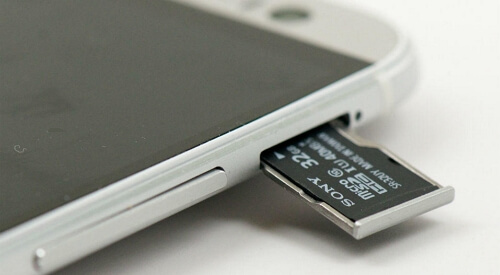
SD cards are less prone to wear and tear due to their NAND chips, allowing data to be written thousands of times, making them resilient and durable.
The working principle of SD cards remains the same across different devices, including cameras, smartphones, and laptops. An SD card stores data in a non-volatile memory, which means it retains the information even when the device is turned off. When a device is connected to an SD card, it can read and write data to the card using a controller chip that manages the communication between the device and the card.
How Do SD Cards Work on Different Devices?
SD cards, or Secure Digital cards, are small memory storage devices used in various electronic devices such as cell phones, cameras, and portable music players. They work by storing data in the form of digital information, which is then retrieved and used by the device. The data is stored on a small chip inside the SD card, and when the card is inserted into a device, it connects to the device's processor, allowing the data to be accessed and used. The SD card's chip contains a tiny computer that manages the data storage and retrieval, making it possible to store and access large amounts of digital information.
How Do SD Cards Work on Android Phones?
You can use an SD card on your Android phone for internal storage, keeping documents, music, and other files on it.
- Your phone has more storage available.
- Transferring data from an SD card to a computer is easier because you only need to remove the SD card and insert it into your computer to read it, after it has been properly uninstalled from your phone.
SD cards free up space on your phone by allowing you to store more data, such as photos and videos, on the card rather than on your phone's internal storage. This helps to declutter your phone's storage and keeps it running smoothly.
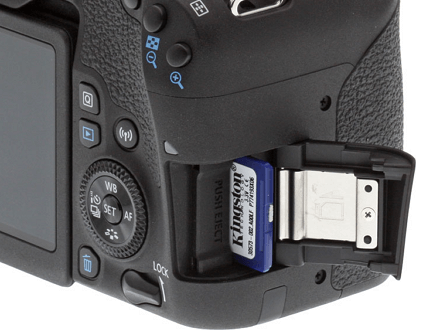
How Do SD Cards Work in Cameras?
You can use it to expand the storage of your camera and the reasons are as follows:
- The SD card can store photos on its electronic components.
- You can read and write data on the SD card.
- You can transfer photos from a camera to a PC by removing the SD card from your camera.
The device provides a bigger storage capacity, safeguarding your photos from potential loss or damage.
How Do SD Cards Work on Nintendo Switch?
The Nintendo Switch allows users to expand its storage space using an SD card, which is necessary for those who plan to buy many games, as the console comes with only 32 GB of storage, with some reserved for the OS, making it fill up quickly.
- SD cards, also known as memory cards, store data on their chips, but they don't have the capability to run games on their own. They are used to expand storage capacity for devices such as cameras, smartphones, and gaming consoles.
- External hard drives can provide additional storage capacity and protect your data from loss or damage. They can be connected to your computer via USB and used to back up important files and documents.
You can use an SD card on a laptop, but you'll need a card reader or a laptop with an SD card slot. Most laptops have a USB port, so you can use a USB SD card reader to access your SD card. Some laptops also have an SD card slot, so you can insert the card directly into the laptop. Either way, you can use your SD card on a laptop.
How Do SD Cards Work on Laptops?
Placing an SD card in a card reader and inserting it into your laptop's appropriate port can make your digital life easy and convenient. SD cards allow you to store and access a wide range of digital content, such as photos, videos, music, and documents, making them a versatile and essential tool for many users. By using an SD card, you can expand your device's storage capacity, freeing up space on your laptop and reducing clutter, and also enjoy faster data transfer speeds and improved performance.
- You can access the contents of the SD card via the computer by plugging it into a card reader or a USB adapter, and then transferring the data to your computer via a USB cable. This allows you to view, edit, and manage the files on the SD card as if they were on your computer.
- SD cards allow you to store or back up data and information from your computer to a portable device.
- When you need data, you can insert the SD card and read it immediately.
Besides, if you cannot see your SD card, click these links to help:
SD cards are very compatible, so they can be used on many devices, but only if you set the correct file system format for your SD card that is compatible with your device. The correct file system format for SD cards varies by device, but the most common formats include FAT32, exFAT, and NTFS.
- Android: FAT32, Ext3/4
- Camera: FAT32
- Nintendo Switch: FAT32, exFAT
- Laptop(Windows): NTFS, exFAT, FAT
To format an SD card correctly, you can use a professional formatting tool like Qiling Partition Master Free. This tool allows you to set the correct format for your SD card, ensuring it's ready for use with your device. With Qiling Partition Master Free, you can easily format your SD card and get it ready for storing data, photos, and videos.
Set the Proper Format for SD Cards via Qiling Partition Master
Qiling Partition Master is easy to use due to its clear interface, making it simple to format an SD card with the help of its prompts. It supports almost every Windows version, ensuring compatibility. If you're planning to format your SD card, this tool can be helpful.
Step 1. To format your SD card, locate it on your computer, right-click on the partition you want to format and select the "Format" option. This will erase all data on the card.
Step 2. Set a new partition label, file system (NTFS/FAT32/EXT2/EXT3/EXT4/exFAT), and cluster size to the selected partition, then click "Proceed".
Step 3. The process of formatting an SD card involves erasing all data on the card. This includes deleting any files, photos, videos, and other data stored on the card.
By the way, there are some links for you since you may also want to know how to format other devices:
The software has many other functions beyond just formatting an SD card. It can be used for disk management in Windows, and offers features such as partition resizing, creating and deleting partitions, and checking for disk errors. It also provides a user-friendly interface to manage disk partitions, making it a powerful tool for users who need to manipulate their disk partitions. Additionally, it can be used for disk cloning, which allows users to create an exact copy of their disk, including all partitions and data, onto another disk. This feature is particularly useful for users who need to upgrade their disk or replace an old one with a new one. Overall, Qiling Partition Master is a versatile and powerful tool that can help users manage their disk partitions and data with ease.
What Does Qiling Partition Master Do?
Qiling Partition Master is a reliable format tool, offering a range of features that make it a valuable asset for users. Its detailed features include a comprehensive set of tools for managing and maintaining partitions, making it a go-to solution for those who need to format their drives with confidence.
- Convert NTFS to FAT32
- Resize, create, delete, merge, and move partitions
- Convert FAT32 to NTFS or many other system formats
- Formatting a hard drive, SD card, USB, SSD, or external hard drive is a process of preparing it for use by deleting all existing data and reinitializing the file system. This process is necessary when you want to reuse a drive that previously contained data, or when you're setting up a new drive.
You can download an app to format your SD card for use with different devices.
Conclusion
SD cards, a form of flash memory, are used to store data on digital devices and retain their contents without power, making them ideal for devices like digital cameras, and can be formatted using tools like Qiling Partition Master.
FAQs About How Do SD Cards Work
We prepared three questions about how SD cards work, so if you need help, just continue to read.
1. What does an SD card actually do?
A Secure Digital Card, commonly referred to as an SD card, is a removable memory card used to store and transfer large amounts of data in various devices such as mobile electronics, cameras, and smart devices.
2. Do SD cards give you storage?
You can use an SD card to add more storage space to your device, and there are various capacities available to choose from based on your needs.
3. How does an SD card hold memory?
SD cards store data on electronic components called NAND chips, which allow users to save data and transfer it quickly. Since the chips have no moving parts, the stored data is more secure. This makes SD cards a reliable option for storing and transferring information.
Related Articles
- How to Restore System Image from External Hard Drive Windows 10
- How to Use HP USB Format Tool? [2022 Final Guide]
- Fix 'Windows Can't Find A System Image on This Computer' Error
- 5 Simple Ways to Zoom Out on Mac
- Forgot Microsoft Account Password? Here's What to Do
Forgot Microsoft account password? Recover it with 3 methods: use Qiling Key Finder, reset via verification email, or recover through the Microsoft account recovery form. Step-by-step guide. - I Forgot My Dropbox ID and Password | What Should I Do?
Dropbox allows you to store and share files online. Here is a complete guide to regaining control of your account quickly. Click here to find out more.
Products
Articles & Tutorials
- Data Recovery
- Data Backup
- File Recovery
- File Backup
- System Backup and Restore
- Disk and Partition Clone
- Technical articles
- Mobile articles
- Disk Master Help
- Windows Data Recovery Tutorials
- Windows Secure Delete Tutorials
- Windows Partition Management Tutorials
- Windows File Backup and Restore Tutorials
- Windows System Backup and Restore Tutorials
- Windows Disk Backup and Restore Tutorials
- Windows Clone Tutorials