What Is the Best SD Card Benchmark Tool? Your Answer Is Here
Key Takeaways of SD Card Benchmark Tool:
- An SD card benchmark tool tests the speed and efficiency of an SD card by running read-and-write tests and tracking parameters like transfer rates and access times.
- When choosing an SD card for a camera, smartphone, or other device, benchmarking tools can help identify the card's performance and compare it to similar cards. These tools can also diagnose issues with an SD card and provide solutions to fix any problems.
This article will focus on SD card benchmark tools, providing a comprehensive overview of their pros and cons to help you find the best tool for your needs.
You should keep the below-mentioned parameters in mind while choosing an SD card benchmark tool:
| 💰Price: | First, check if the tool is free or paid. If it's paid, determine whether it fits within your budget. |
| 🎉Features: | Check if the tool allows you to test the read and write speeds of your SD card. |
| 💽Supported SD Cards: | Check if your SD card is supported by the benchmarking tool, including SD, micro SD, SDXC, SDHC, etc. |
| 👨🏻💻Supported OS: | The SD card benchmark tool should be compatible with multiple operating systems, including Windows, Mac, and potentially others, to ensure broad usability and accessibility. |
| 📞Technical Support: | First-When using software, it's possible to encounter technical issues. To avoid frustration, check if the software offers technical support to help resolve any problems that may arise. |
Top 5 Best SD Card Benchmark Tools Recommend in 2024
If you're experiencing issues with your SD card, such as slow performance or errors, it's essential to use a trusted SD benchmark tool to assess its performance. We tested over 20 similar SD card testing utilities and used the results to pick the top performers. By running a benchmark test, you can determine if your SD card is functioning correctly and identify any potential issues.
| ⏱Tested Time: | 2 weeks |
| 🔢How Many SD Card Benchmark Tools We Tested: | 20 |
| 💵How Much We Spent on Testing These Tools: | $659.96 |
| 💻What Systems We Have Tested: | Windows 11/10/8.1/8/7/XP/Vista, and macOS 14.10-OS X 10.9 |
| 💽What SD Card We Have Tested: | SD (or SDSC), SDHC, SDXC, and SDUC, etc. |
Here are 5 best SD card benchmark tools that you can use to test your SD card performance with ease:
- #1. Qiling Disk Master 🏆🏅
- #2. H2testw
- #3. Blackmagic Disk Speed Test
- #4. CrystalDiskMark
- #5. ChipGenius
To help friends test and benchmark their SD card performance, consider sharing this list of best SD card benchmark tools online, which can be useful for various purposes.
#1. Qiling Disk Master - Easiest SD Card Benchmark Tool
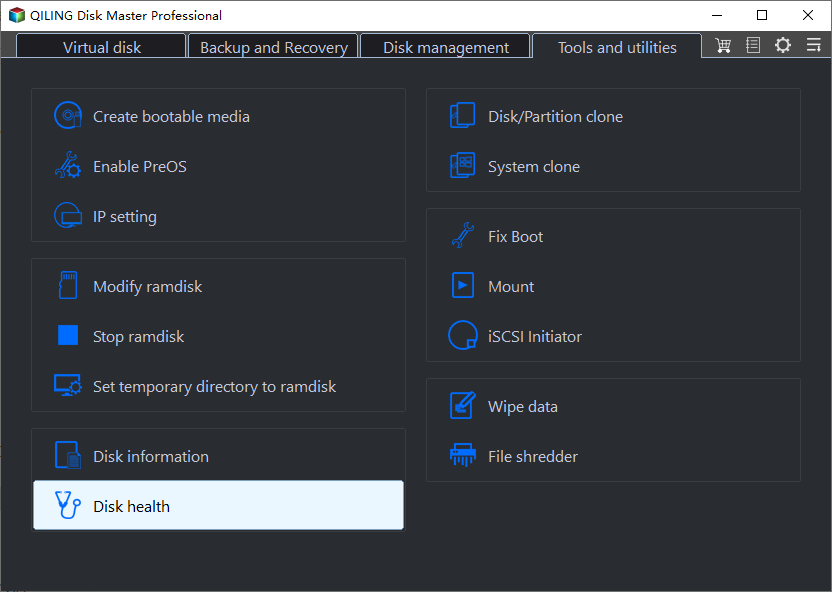
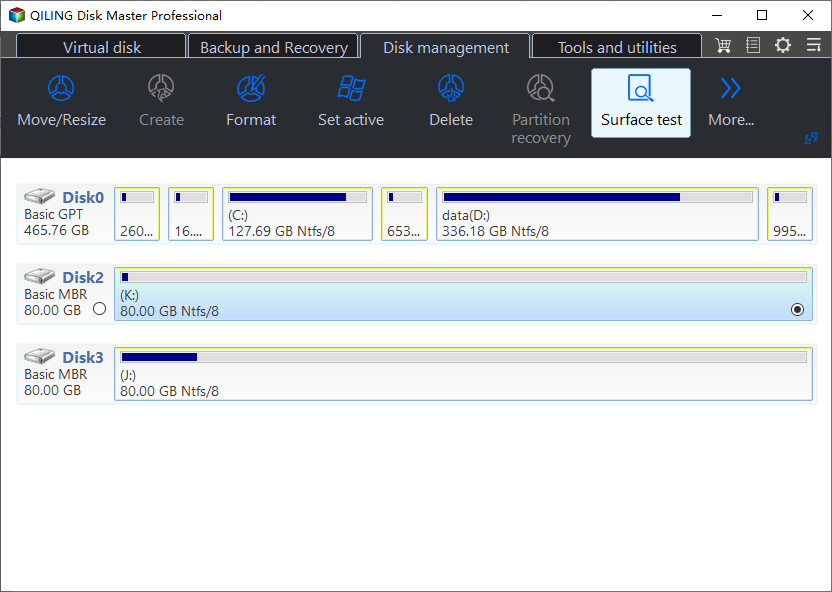
Qiling Disk Master is a top-tier partition manager that also serves as a benchmarking tool, allowing users to compare transfer rates of various storage media such as SD cards, USB drives, SSDs, and HDDs, using its DiskMark function.
Features & Benefits of Qiling Disk Master with Its Benchmark Tool:
Qiling Disk Master offers a range of features and benefits that make it an attractive option. With its ability to clone and backup disks, users can ensure their data is safe and easily recoverable in case of a disaster. The software also allows for disk partitioning and resizing, making it a versatile tool for managing disk space.
Benefits:
- 1️⃣Secure and effective
- 2️⃣Straightforward and useful
- 3️⃣Show in-depth details about the SD card's transfer rate
- 4️⃣Quick and dependable help with technical issues
Features:
- 1️⃣Test the speed of the SD card.
- 2️⃣Checks the speed of a Micro SD card.
- 3️⃣Temporary storage device
- 4️⃣Improve SSD's sluggish writing speeds
- 5️⃣Test the Read/Write Times of an SSD
Pros and Cons in Qiling Disk Master, with Editors' Review:
Qiling Disk Master is a tool that allows users to explore and analyze disk images. It provides a user-friendly interface for browsing and searching through the contents of a disk image, making it easier to find specific files or data.
Expert's Rating:
 Pros
Pros
- Straightforward interface and easy to use
- Display full results
- Highly-compatible
- Free to benchmark and test all types of SD cards
 Cons
Cons
- Paid Advanced version
Editors' Review
Jon L. Jacobi from PCWorld praises Partition Master Professional, saying it's done a great job and the merge function is very handy, having used it many times to create, delete, format, move, rename, and resize partitions.
Reason to Choose It
This software works with any version of Windows and features straightforward interfaces, making it easy to use for everyone.
Qiling SD Card Benchmark Tool Free Download:
Qiling Disk Master allows users to check their SD card speed by downloading the software and running it on their computer.
#SD Card Benchmark#Test SD Card Speed#Free#Qiling
For a step-by-step guide, refer to this link for help: SD Card Benchmark.
#2. H2testw
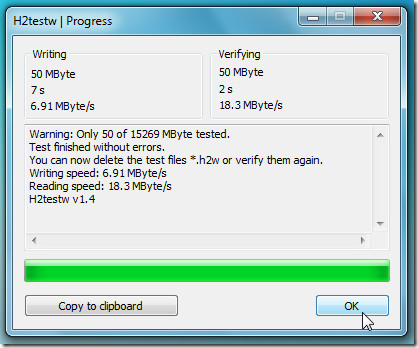
H2testw is a free software that tests and reports on the health of hard drives and USB flash drives, also detecting counterfeit SD cards and flash drives. Although it was developed in 2008, when SD cards were more prominent, it remains a reliable tool. However, scanning with H2testw can be time-consuming, taking days to complete, especially on modern, high-capacity drives that are frequently written to. Nevertheless, it remains a dependable option for assessing drive health.
Features & Benefits of H2testw:
Here is a list of features and benefits of H2testw that you might find interesting. Check the details
Benefits:
- 1️⃣Freeware
- 2️⃣ Light software
- 3️⃣Multilingual support
Features:
- 1️⃣Customizable settings
- 2️⃣Accurate tests
- 3️⃣Support old operating systems: Windows 2000, XP, Server 2003, Server 2008, Vista, 7, 8, and other outdated systems.
Pros and Cons in H2testw, with Editors' Review:
H2testw is a free, open-source software tool used to test the health and capacity of USB flash drives. It can be run from a CD or DVD, making it a useful tool for diagnosing issues with USB drives on a computer that may not be booting properly.
Expert's Rating:
Pros
- Scan deeply
- Reliable in checking the capacity
- Better for low-capacity S. D. card
Cons
- Time taking
- Old and outdated
- A thorough inspection can only be done once the target drive has been formatted.
Editors' Review
H2testw is a free, installation-free tool with a simple and easy-to-use interface, according to Softpedia.
Reason to Choose It
A tool for fixing system errors and verifying computer stability, it is a lightweight and efficient solution.
H2testw Free Download:
⬇️Download H2testw from SOFTPEDIA
#SD Card Benchmark#SD Card Performance Benchmark#Free
#3. Blackmagic Disk Speed Test
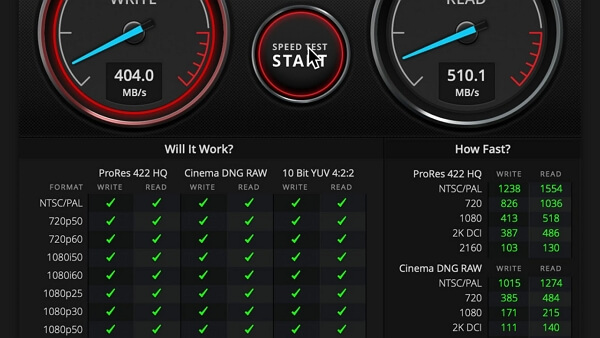
Standard disk performance can be tested and measured with Blackmagic Disk Speed Test, which checks the disk's read/write speed by filling all available space with sample data, ideal for testing hard drive performance for high-definition video.
Features & Benefits of Blackmagic Disk Speed Test Tool:
The Blackmagic Disk Speed Test is a tool that provides a detailed analysis of your computer's disk performance, offering features and benefits that help you understand and optimize your disk usage. With this tool, you can learn more about its capabilities and how it can help you improve your computer's speed and efficiency.
Benefits:
- 1️⃣Multiple test types
- 2️⃣It is for both Mac and Windows
- 3️⃣Intuitive interface
Features:
- 1️⃣Test the SD card using blocks of data.
- 2️⃣Display the result
- 3️⃣Benchmark OS drive, fusion drive, and SSDs
Pros and Cons in Blackmagic Disk Speed Test, with Editors' Review:
Blackmagic Disk Speed Test is a free tool that measures the read and write speeds of your storage devices, such as hard drives and solid-state drives. It provides detailed information about the performance of your storage devices, including the maximum read and write speeds, as well as the average and minimum speeds.
Expert's Rating:
Pros
- A quick scan
- Cater to video professionals
- Simple interface
Cons
- Configuration options are limited
- No data records to compare multiple speed tests
- It does not provide extensive performance information
Editors' Review
Blackmagic Disk Speed Test is a free app that easily installs and lets you know how fast your drives are, also reporting any speed changes over time.
Reason to Choose It
The test automatically detects and utilizes several CPU cores and GPUs to determine how quickly your computer can decode full-resolution Blackmagic RAW frames, providing reliable and realistic results.
Blackmagic Disk Speed Test Free Download:
⬇️Download Blackmagic Disk Speed Test from Apple Store for macOS
⬇️Download Blackmagic Disk Speed Test for PC
#SD Card Benchmark#Test SD Card Performance#Free
#4. CrystalDiskMark
CrystalDiskMark is a popular tool for testing the performance of hard drives and solid-state drives (SSDs), allowing users to evaluate their sequential and random read/write speeds. It also provides a simple user interface for users to plan and optimize their SSD performance if needed.
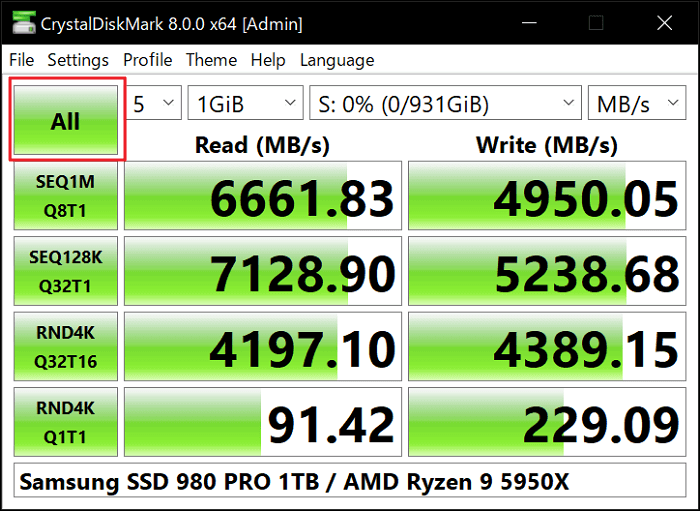
Features & Benefits of CystalDiskMark with Its Benchmark Tool:
CrystalDiskMark offers useful SD card benchmark features, including sequential and random speed tests, clear test results, and support for checking different storage devices.
Benefits:
- 1️⃣Free & open-source
- 2️⃣Easy to operate
- 3️⃣Fast in loading disk information
- 4️⃣Support to customize SD card benchmark
Features:
- 1️⃣Test file sizes range from 50MB to 32 GB.
- 2️⃣Multiple tests run
- 3️⃣Real time graphs
- 4️⃣Identify potential SD card issue
Pros and Cons in CystalDiskMark, with Editors' Review:
To learn more about CystalDiskMark, read the review information provided, which offers a detailed look at this benchmarking tool.
Expert's Rating:
Pros
- User-friendly
- Wide range of test options
- Reliable and accurate results
Cons
- Limited features
- Windows only
Editors' Review
CrystalDiskMark is an open-source disk drive benchmark tool for Microsoft Windows developed by Crystal Dew World. It works by reading and writing through the filesystem in a volume-dependent way, making it a useful tool for evaluating the performance of disk drives.
Reason to Choose It
CrystalDiskMark is a benchmarking tool that rapidly analyzes and reports data, making it comparable to other benchmarking tools. It tests a storage device's sequential read and write speeds, as well as its random read and write speeds.
CrystalDiskMark Free Download:
⬇️Click to Download CrystaDiskMark from DOWNLOAD.CNET
#Free SD Card Benchmark#Bencharmk SD Card Performance#Free Tool
#5. ChipGenius
ChipGenius scans the SD card for manufacturer and storage capacity, then compares the results with stored data, providing feedback on whether the card's specifications match its actual capacity, in this case, identifying a 64GB Class 10 SanDisk as an 8GB Class 6 Emtec.
The technology reduces testing time, but its effectiveness is limited due to vendors' ability to erase digital footprints, potentially missing fake cards.
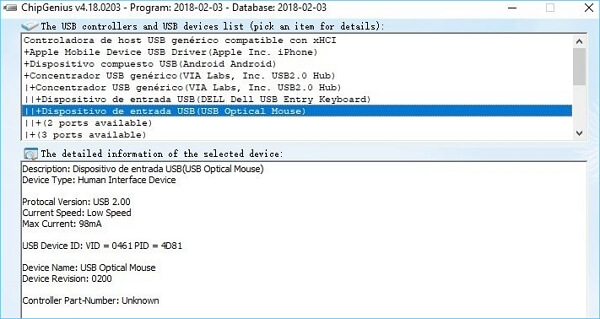
Features & Benefits of ChipGenius with Its Benchmark Tool:
ChipGenius helps identify USB and SD card controller information, device details, and storage specifications, making it useful when checking card authenticity or troubleshooting device issues.
Benefits:
- 1️⃣Time-saving
- 2️⃣Portable, doesn't require software installation
Features:
- 1️⃣S. M. A. R. T. status
- 2️⃣Portable version
Pros and Cons in Chip Genius, with Editors' Review:
People are interested in learning more about Chip Genius, and various opinions and thoughts are being shared about it. To get a better understanding of what people think, you can follow the conversation and discussions about Chip Genius to gain more insights and details.
Expert's Rating:
Pros
- No download is required
- Recognize and check nearly any USB device
Cons
- No option to export reports
- Requires a 32-bit and 64-bit setup
Editors' Review
ChipGenius is a software package that displays information about devices connected to a computer via a USB port.
Reason to Choose It
This tool is fantastic for analyzing and fixing USB drives and other storage media.
Chip Genius Free Download:
⬇️Click to Download Chip Genius from Softonic
#SD Card Performance Test#Benchmark SD Card Performance#Free
SD Card Benchmark Tool Overview
SD card benchmark tools are utilities that assess the performance and speed of an SD memory card, monitoring factors like transfer rates and access times through read-and-write tests.
Users should check the benchmark before buying an SD card to ensure optimal performance and loading times, and use SD card benchmark tools to compare data.
To determine the finest SD card, consider the following criteria: evaluate the current software's benefits to suit your needs, considering factors such as storage capacity, read and write speeds, compatibility with your device, and any additional features you require, such as waterproofing or durability.
| Benefits of SD Card Benchmark Tool | When to Use SD Card Benchmark Tool |
|---|---|
|
|
Users should check the benchmark of an SD card before buying it to ensure it meets their performance needs, and if issues arise, use an SD benchmark tool to assess the card's performance.
Conclusion
We've examined five SD card benchmark tools, highlighting their key characteristics, advantages, and disadvantages. These tools can help you choose the best one for your needs, allowing you to make an informed decision.
Qiling Disk Master is the best option for benchmark testing as it allows for quick, safe, and smooth testing without requiring SD card formatting or causing damage, unlike other software.
H2testw and Blackmagic Disk Speed Test are two separate tools used to benchmark the speed of SD cards and Mac hard drives, respectively. They serve as portable and user-friendly alternatives to traditional benchmarking software.
FAQs About SD Card Benchmark Tool
If you have more questions about SD card benchmark tools, you can refer to the following Q&A: What is an SD card benchmark tool? An SD card benchmark tool is a software program used to measure the performance of an SD card.
1. How can I test my SD card performance?
Step 1. Insert your micro S. D. card into your Computer
Step 2. Launch one of the SD Speed test tool from the list above, and click "Start."
Step 3. Choose the drive containing the SD card and press 'Start.'
Step 4. Repeat the procedure several times to ensure reliable results.
2. What is the best benchmark tool for SD cards on Mac?
The BlackMagic Disc Speed Test is a simple application that checks if your disk is ready for handling high-definition video.
3. How often should you benchmark your SD card?
If you only use your SD card to store pictures and music, it may not be benchmarked as often as it should be. To ensure your SD card is working at its best and to detect any potential issues early on, it's recommended to run a benchmark test on it at least once a year.
Related Articles
- Seagate Hard Drive Repair Tool Free [Fix Seagate Errors Quick & Easy]
- Yellow Screen of Death In Windows 10 [Detailed Info & Fixes]
- How to Extend C Drive in Windows 10 Without Formatting
- Solved: 6 Fixes for Samsung 990 Pro Slow Write Speed - 2024 New
- Will I Keep the Windows License After Format? I Need Answers
Do you want to know whether you kept the Windows license after you formatted your drive or computer? This page will solve your problem and give you a safe and secure way to finish formatting. - Windows 10 Drive Converted to RAW Format, How to Fix It
What should you do when your Windows 10 drive converted to RAW format? This short page focuses on this issue and guides you on this issue.
Products
Articles & Tutorials
- Data Recovery
- Data Backup
- File Recovery
- File Backup
- System Backup and Restore
- Disk and Partition Clone
- Technical articles
- Mobile articles
- Disk Master Help
- Windows Data Recovery Tutorials
- Windows Secure Delete Tutorials
- Windows Partition Management Tutorials
- Windows File Backup and Restore Tutorials
- Windows System Backup and Restore Tutorials
- Windows Disk Backup and Restore Tutorials
- Windows Clone Tutorials