Fixed: Change Block Size From 4K to 64K | 2024 Full Guide
The block size on a hard drive is a storage unit that can be adjusted, typically between 512 bytes and 64KB, with most PCs defaulting to 4K. While changing the block size is usually not necessary, it may be required in certain situations.
If you're looking for a solution to change the block size from 4K to 64K, this guide can help. Qiling offers four efficient solutions for this task. By continuing to read, you'll learn when and how to make this change.
How to Change Block Size From 4K to 64K - 4 Efficient Ways
You can change the block size of your hard drive from 4K to 64K using four different methods. Before deciding which one to use, refer to the table below to compare the available options and determine which is best for your needs.
| Solutions | Efficiency | Difficulty |
|---|---|---|
| 🏅Qiling Disk Master | 👍High - The best tool to change the block size is a utility that has several other disk-related tools, allowing users to manage their disk space and performance effectively. | ⭐ |
| 🥈Disk Management | Medium - Windows' built-in tool that does the job. | ⭐⭐ |
| 🥉File Explorer | Medium - Quick way to change the block size. | ⭐⭐ |
| 🥉CMD | Medium - For those who enjoy using the command prompt, changing Windows settings can be straightforward. With a simple series of commands, you can customize your Windows experience to suit your preferences. | ⭐⭐⭐ |
Obviously, using a third-The Qiling Disk Master is a reliable party tool that can change cluster size without requiring a format. This makes it a good choice for resizing, increasing the success rate and making it the easiest method. Other programs can also be used, and we will provide step-by-step instructions for all methods.
For other knowledge about allocation unit size, such as the best SSD cluster size, please check the following article:

What's The Best SSD Allocation Unit Size in Windows 11/10
On this page, we'll explore the best SSD allocation unit size for Windows 11/10 and provide a solution to change it.
Option 1: Change the block size from 4K to 64K via Qiling Disk Master
Qiling Disk Master is a one-stop shop for all your disk-related needs, offering features such as resizing hard disk clusters, and creating, deleting, and merging partitions with ease.
You can easily change the block size of your disk from 4K to 64K without any data loss, simply by clicking a few times. This process takes only a few seconds.
Other Features Of Qiling Disk Master:
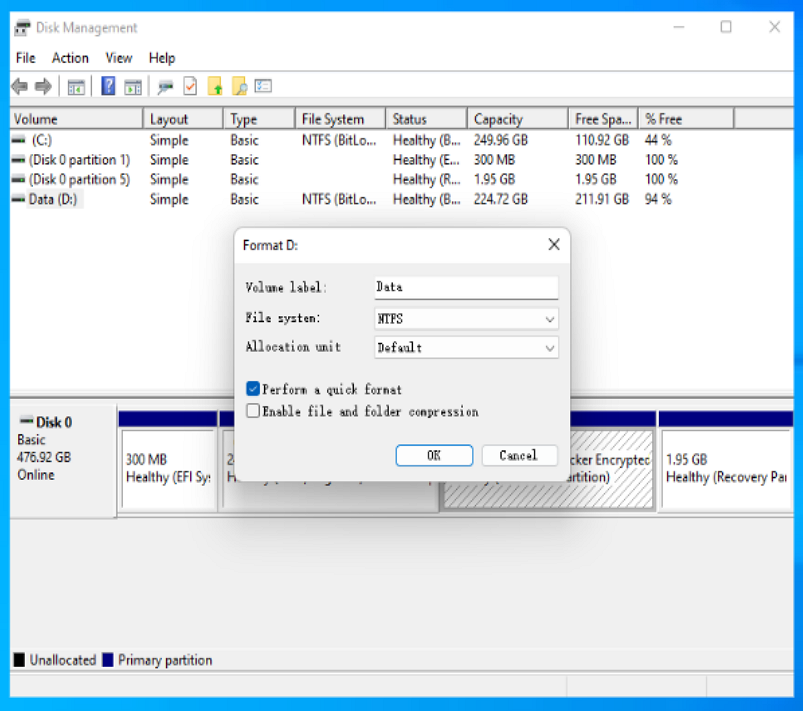
Option 2. Change cluster size from 4K to 64K with Disk Management
Disk Management is a Windows utility tool that allows users to perform various disk-related tasks, including changing file systems, creating partitions, formatting drives, and more, as well as modifying the block size.
Here's how:
Step 1. In the "Start" menu, type "Disk Management."
Step 2. Right-click on the drive whose cluster size you want to change.
Step 3. Select "Format."
Step 4. To allocate a unit size of 64K, click on the "Allocate unit size" drop-down menu and select "64K".
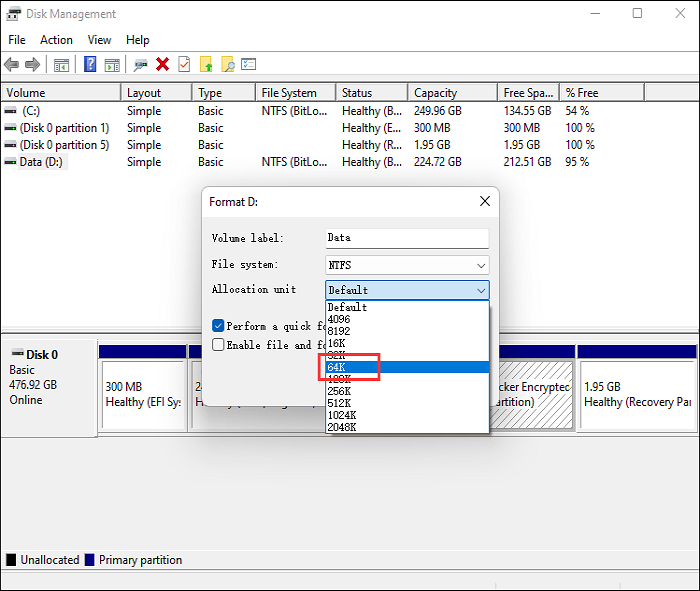
Step 5. Begin formatting your drive now.
Disk Management is a tool provided by Windows that allows users to manage disk partitions and formats, as well as perform other tasks such as creating, deleting, and resizing partitions.
Option 3: Change cluster size from 4K to 64K using File Explorer
You can change the cluster size of a hard drive using File Explorer.
Here's how:
Step 1. Open "This PC."
Step 2. Select the disk whose cluster size you'd like to change.
Step 3. Right-click the disk and select "Format."
Step 4. Select "64K" from the "Allocate unit size" drop-down menu.
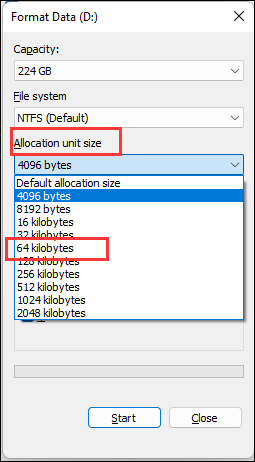
Step 5. To format the drive and change the cluster size, click on "Start".
Option 4. Change cluster size from 4K to 64K via CMD
The Command Prompt is Windows's command-line interpreter, allowing users to perform various commands and troubleshooting tasks.
To change the cluster size using the command prompt, you can use the `fsutil` command. The command to use is `fsutil file setquota < drive> < cluster>`, where `< drive>` is the letter of the drive you want to change and `< cluster>` is the new cluster size you want to set.
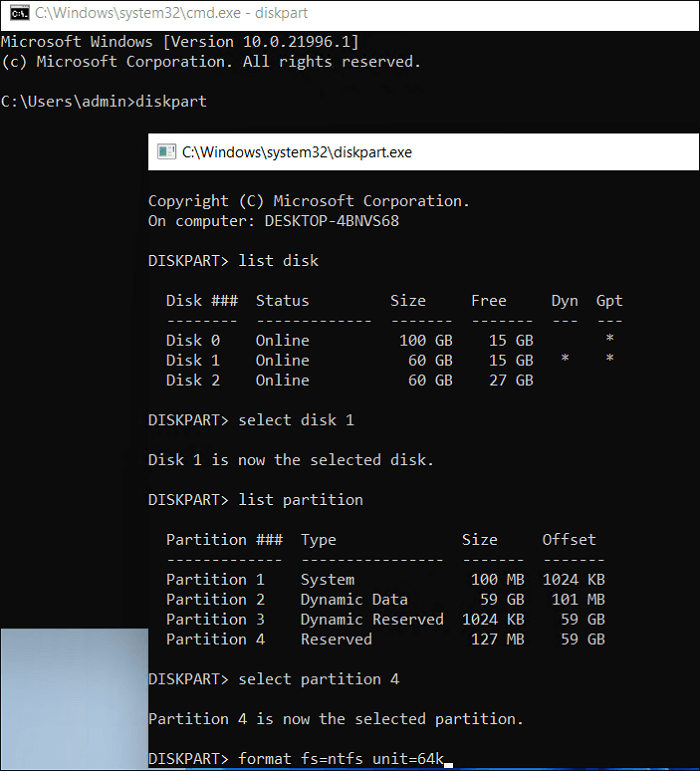
Step 1. To open a command prompt, click "Start" and type "command prompt" into the search bar.
Step 2. Select "Run as administrator."
Step 3. Now type the following commands by pressing the "Enter" key to change the cluster size successfully.
- diskpart
- list disk
- select disk x (To change the cluster size of a disk, you can use the `fsutil` command with the `fsutil fs setquota` option. For example, to change the cluster size of disk X to 16 KB, you would use the command `fsutil fs setquota X 16`. This will set the cluster size for the specified disk to 16 KB.
- list partition
- select partition m (m is the partition number for which you want to change the cluster size).
- format fs=ntfs quick unit=64k
What Is Block Size and Cluster Size
Block size and cluster size are two separate concepts in computing, particularly in file systems and storage management. Block size refers to the smallest unit of data that a file system can read or write, usually measured in bytes (e.
A block is a unit of storage where data can be written to or read by the drive, while a cluster is the amount of space allocated for a file, often taking up multiple blocks.
The main difference between block size and cluster size is that block size is a logical attribute of the file system, whereas cluster size is a physical characteristic of the storage device.
A smaller cluster size can improve performance for small files, but may waste disk space. On the other hand, a larger cluster size may slow down the performance of small files, while improving the efficiency of large files. Typically, a standard cluster size of 4096 bytes (or 4K) is used, striking a balance between these competing factors.
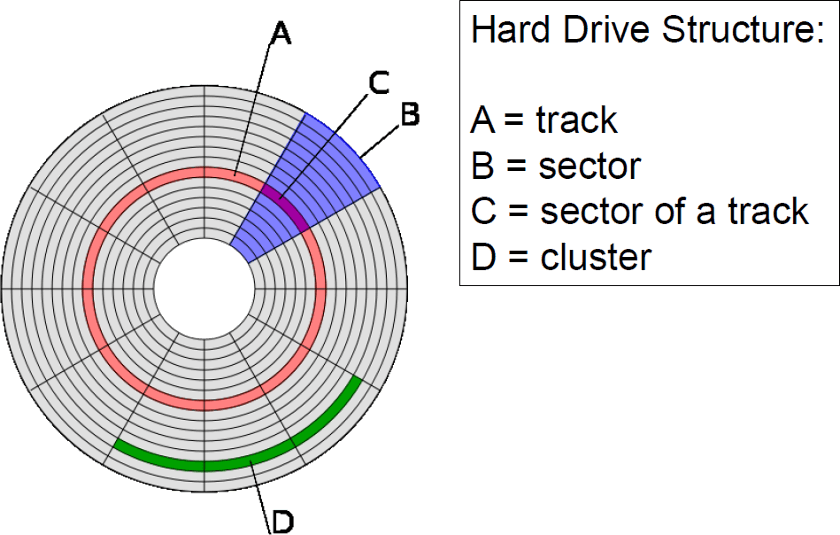
For most workloads, using a cluster size and block size that strikes a good balance between performance and efficiency is ideal. If you need to optimize these settings, a guide is available to help you find the most efficient solution. You can also share this information with others if you find it useful.
Why Change Block Size From 4K to 64K
A 64K block is a unit of storage that is 64 kilobytes, often used in file systems to store large files, being a multiple of the standard 4K block size.
Larger clusters allow more data to be stored per cluster, reducing the time the hard drive head must physically go through from cluster to cluster, and a 64K block size prevents HDD fragmentation.
Here are a few reasons why you may want to consider changing the block size of your drive from 4K to 64K:
- To improve performance for large files: If you have a lot of large files on your storage device, changing the cluster size to 64K can improve performance. This is because large files are typically stored in a contiguous block of space, and a 64K cluster size allows for more efficient storage of these files, resulting in improved performance.
- To save disk space: If you have a lot of small files on your storage device, changing the cluster size to 64K can save disk space.
- To improve compatibility with certain applications: If an application requires a specific cluster size, you should adjust the disk cluster size to meet that requirement, as some applications, like databases, may necessitate a cluster size of 64K.
Conclusion
Now that you know why changing the block size of your disk to 64K from 4K is a good idea, let's look at how to do it. We recommend using Qiling Disk Master, a user-friendly tool that can change the block size in just a few seconds, making it our go-to method. This makes it easy to upgrade your disk's performance with minimal fuss.
Qiling Disk Master offers several disk-related tools and is extremely easy to use, making it a complete no-brainer.
FAQs About Change Block Size From 4K to 64K
Do you have any other questions about changing the block size from 4K to 64K? Here, we answer everything about it.
1. Does block size matter a lot?
An HDD's performance can be affected by block size, with smaller block sizes being beneficial for small files and larger block sizes being better for larger files, as it reduces stress on the drive when searching for them.
2. What is the size of a Windows 4K block?
The actual size of the 4K block is 4,096 bytes.
3. How to check the disk block size in Windows?
Here's how to check the block size:
- In the "Start" menu, type "System Information."
- Expand "Components," followed by "Storage."
- On the right-side window, locate "Bytes/Sector."
- The number displayed in "Bytes/Sector" is the block size of your hard disk.
4. How to change cluster size without formatting?
To change the cluster size without formatting, use the Qiling Disk Master. This tool allows you to modify the cluster size effortlessly without losing any data or requiring a format.
Here's how to use this program to change the cluster size without formatting:
- Right-To change the disk partition, click on the disk whose partition you want to modify and select the "Advanced" option.
- Expand the "New Size" drop-down menu and select "64K."
- Click OK," and in the following window, click "Apply."
Related Articles
- How to Fix Windows 10 Boot Loop | 100% Working Solutions
- What is Dynamic Foreign Disk, How to Import Foreign Disk Without Data Loss
- Can't Safely Eject External Hard Drive on Windows 10, How to Solve It?
If you encountered the 'Problem Ejecting a USB Mass Storage Device' problem and can't safely eject an external hard drive on Windows 10, you can try the solid ways in this post to fix this issue. - Can't Shrink the 3 TB USB Drive, How to Fix?
If you have encountered the 'Can't shrink the 3 TB USB drive' problem, this post may be able to help as it contains an effective method of shrinking a 3 TB USB drive. - 3 Ways to Convert Dynamic Disk to Basic Without Data Loss (Free/Paid)
You can convert a dynamic disk to a basic disk using Magic Partition Manager software under Windows XP/Vista/7/8 and Windows Server 2003/2008/2012, or use a free tool, without losing any data. - How to Convert NTFS to FAT32 Without Losing Data
This page introduces you how to convert NTFS to FAT32 with 4 NTFS to FAT32 converters. For a straightforward and efficient tool, try Qiling Partition Master Free to easily change NTFS to FAT32 with ease.
Products
Articles & Tutorials
- Data Recovery
- Data Backup
- File Recovery
- File Backup
- System Backup and Restore
- Disk and Partition Clone
- Technical articles
- Mobile articles
- Disk Master Help
- Windows Data Recovery Tutorials
- Windows Secure Delete Tutorials
- Windows Partition Management Tutorials
- Windows File Backup and Restore Tutorials
- Windows System Backup and Restore Tutorials
- Windows Disk Backup and Restore Tutorials
- Windows Clone Tutorials