Best Portable Partition Resizer Tools for Windows
With partition resizer portable, you can download the tool and move it to your USB drive, allowing you to resize partitions on any computer's hard drive faster and more conveniently. For beginners, the best partition resizer is the one that is user-friendly, safe, and efficient, making it easy to resize partitions without losing data.
Top 3 Best Partition Resizer Portable
To help you choose the best portable partition resizer, we've tested and analyzed multiple software and selected four top options. If you're still undecided, check out the details below to find the most suitable portable partition resize tool for yourself.
| 🛠️Tools | 🖥️Compatibility |
🧩Difficulty |
🏅Rating |
|
Windows 11/10/8.1/8/7/7 SP1/Vista/XP and ALL Windows Servers |
Very Easy |
★★★★☆ |
|
|
Windows 11/10/8.1/8/7/Vista/XP/2000 |
Easy |
★★★★☆ |
|
|
Windows 11/10/8/7/Vista/XP and Windows Server |
Complicated |
★★★☆☆ |
1. Qiling Disk Master Portable
🏅Rating: 4.7 out of 5
🖥️Compatibility: Windows 11/10/8.1/8/7/7 SP1/Vista/XP and ALL Windows Servers
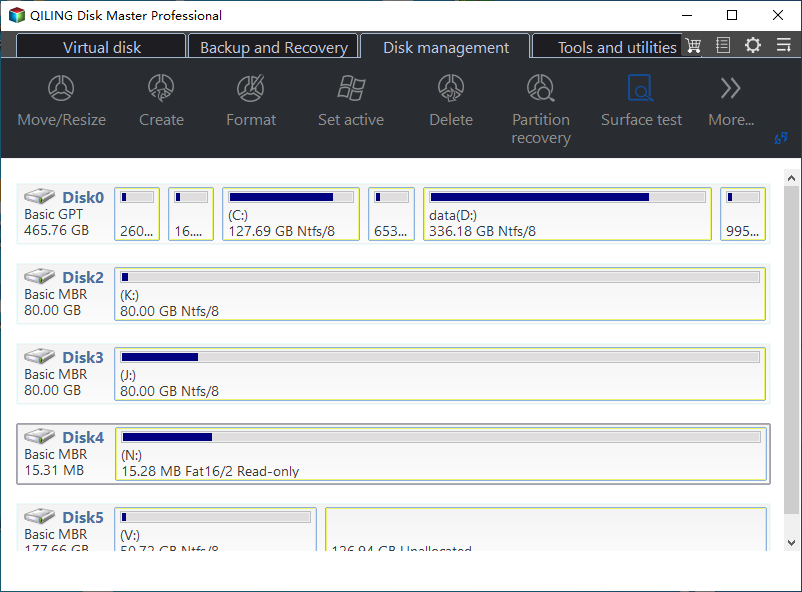
Qiling Disk Master Portable is a professional disk and partition manager that offers comprehensive control over your computer. With its clear UI design and various functions, it allows both beginners and advanced users to resize and move partitions, as well as clone, delete, extend, shrink, create, format, and split partitions.
To use the portable edition, download the portable ZIP file from the official site, unzip it to an external device such as a USB drive, and it's ready to use.
📌Key Features:
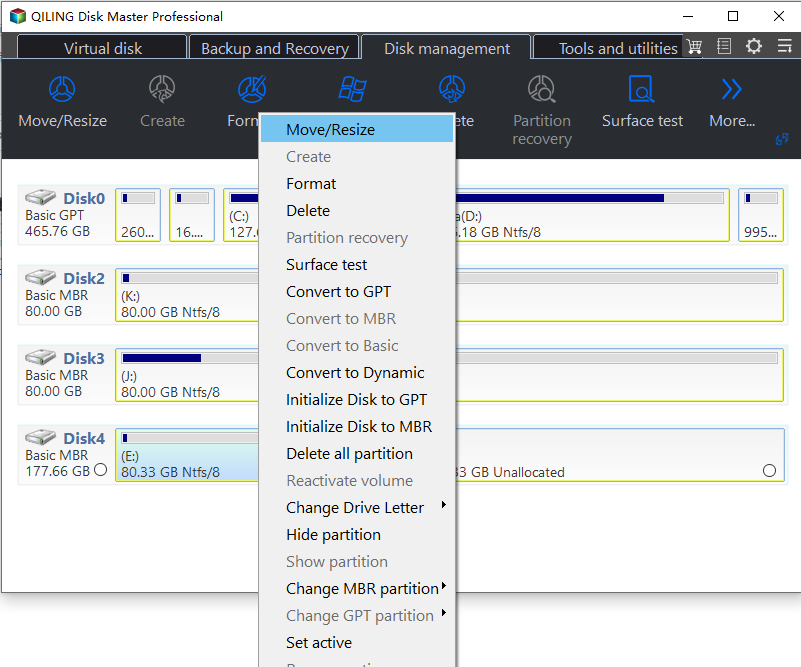
- All-A disk partition manager allows users to manipulate disk partitions, enabling features such as resizing, moving, deleting, formatting, creating, cloning, and converting disk partitions. This utility provides a comprehensive set of tools for managing disk space, making it easier to optimize storage capacity and ensure efficient use of available resources.
- Ability to create bootable media based on WinPE.
- You can download and burn an ISO file to a USB drive or CD disc, allowing you to access the contents of the file. This process typically involves using a software tool, such as Rufus or ISO to USB, to create a bootable USB drive or a CD disc from the ISO file.
- The tool offers a range of additional practical features, including boot repair, password reset, write protection, space analyzer, and more.
Expert's Rating:
 Pros
Pros
- User-friendly UI.
- Comprehensive functionality and multiple extra features.
- Step-by-step guide on the interface.
- 24x7 professional support service.
 Cons
Cons
- Some additional features require a network connection.
- Limited free features.
📝Review from Lifewire:
The program's user interface is intuitive and easy to navigate, making it simple to understand and accomplish tasks related to computer partitions. The options are not overly complex and are clearly labeled.
✒️️Personal Views:
Qiling Disk Master Portable is ideal for beginners who are new to technical operations. It offers easy-to-follow features for managing disks and partitions, checking bad sectors and corrupted system files, and repairing them. Additionally, it provides practical features that are updated regularly, allowing users to resolve common issues using just one tool.
You can check the following article if you are interested in this tool.
Qiling Disk Master Portable | Full Guide
It could be time-To avoid the hassle of searching for and downloading a reliable partition manager tool, I recommend using Qiling Disk Master Portable, a straightforward tool that allows you to manage your disks and partitions easily, making it a suitable alternative to Partition Manager.
2. IM-Magic Partition Resizer
🏅Rating: 4.1 out of 5
🖥️Compatibility: Windows 11/10/8.1/8/7/Vista/XP/2000
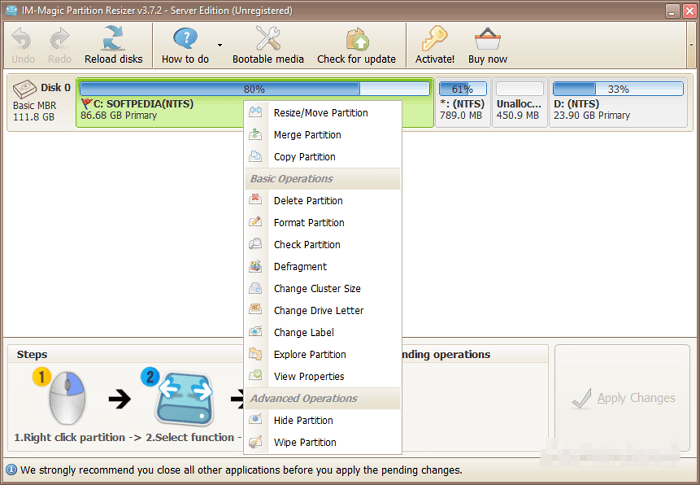
IM-Magic Partition Resizer is a tool that offers basic features for managing disk partitions, allowing users to resize partitions with just a few clicks and achieving 100% successful resizing. Its portable version makes it usable on any computer, making it a reliable and efficient partition resizer.
📌Key Features:
- The software offers comprehensive basic functions, including extend, clone, format, resize & move partitions, migrate OS, and more.
- It can completely wipe disks/partitions without the possibility of recovery.
- Ability to convert basic disk to dynamic without losing data.
- Supports hardware figured RAID volumes at all levels.
Expert's Rating:
Pros
- Easy access to all the options.
- Various features for disk/partition management.
- Preview before applying changes.
Cons
- Unable to create a new drive from unallocated space.
- Paid-The advanced functions of this technology include a 1-second extending technology, cancel-at-well technology, rollback protection, and bootable media, which provide enhanced capabilities and reliability.
📝Review from Softpedia:
IM-Magic Partition Resizer Pro is a reliable app that can quickly resolve partition resizing issues without causing much pain. It's a trusted solution for those in need of partition resizing assistance.
✒️️Personal Views:
IM-Magic Partition Resizer is a portable partition resizer that can perform basic partitioning tasks without causing trouble, making it suitable for most users. However, it may struggle with advanced tasks.
3. DiskGenius Portable
🏅Rating: 3.7 out of 5
🖥️Compatibility: Windows 11/10/8/7/Vista/XP and Windows Server
DiskGenius is a versatile tool that offers both data recovery and disk/partition management capabilities. Its portable version allows users to manage disk partitions, recover lost partitions, and retrieve deleted files on any Windows computer, providing a convenient solution for users with both needs.

📌Key Features:
- You can resize or shrink a partition without losing data by using a partition manager software. This software allows you to extend or shrink a partition, or even divide it into two parts, without affecting the data on the partition.
- Create and format partitions with multiple file system formats such as NTFS, exFAT, FAT32, Ext2, Ext3, Ext4, etc.
- To build a virtual environment for testing or running applications, you can create a virtual environment using a tool like VirtualBox, VMware, or Docker. This allows you to run a virtual machine with a different operating system or configuration than your host machine, which can be useful for testing or running applications that require a specific environment.
- To prepare for data recovery, scan disks and partitions for various errors and preview files beforehand. This step helps identify potential issues and allows you to assess the recoverability of your data before proceeding with the recovery process.
Expert's Rating:
Pros
- It supports a variety of file systems.
- Works as both a data recovery utility and disk manager.
Cons
- Very complicated interface.
- Incomplete interface prompts.
- Some functions require learning curves.
📝Review from Pandora Recovery:
DiskGenius is a considerable option, but it may have a steep learning curve and a technical user interface that can be off-putting at first. However, once you get used to it, it can be a powerful tool.
✒️️Personal Views:
DiskGenius is a safe and reliable partition resize tool that's also great at recovering data. It can quickly and efficiently retrieve files, but its complex UI and operations might make it difficult for beginners to use.
Conclusion
This article helps you choose and download a portable partition manager by comparing multiple aspects of 3 well-known tools, ultimately recommending Qiling Disk Master Portable as the most suitable option for both beginners and advanced users.
This tool has a user-friendly interface and reliable features that allow for easy management of disks and partitions, with additional functions being added to provide full control over the device.
If this article provides helped you decide which partition resizer is suitable for you, don't forget to share it on your social media to help more users find the right tool for their needs.
FAQs on Partition Resizer Portable
1. Can I resize the C drive without losing data?
You can resize the C drive without losing data using Qiling Disk Master's Resize/Move feature, which allows you to adjust the storage space of partitions.
2. Can Qiling Disk Master fix bad sectors?
Qiling Disk Master Professional can run a surface test on various storage devices, identify bad sectors, and repair them.
3. What program is used to resize partitions?
There are various programs available to resize partitions on a hard drive, such as Qiling Disk Master, which offers a user-friendly interface and comprehensive functions.
Related Articles
- Change Windows Password Using Command Prompt - 2 Ways
- More Windows Guides: How Long Does a Windows Update Take? 🔥
- How to Fix Windows 11 Black Screen with Cursor| 100% Works
- 9 Best Tips to Troubleshoot Windows 7 Is Running Slow
- Newest Partition Magic Server Software Review and Download in 2026
If you're having trouble changing your Windows password, you can try using the Command Prompt to do so. However, if you're looking for a more straightforward alternative, there are other options available. - [Fixed] There Is No exFAT Format Option in Windows 11/10/8.1/8/7
If you're having trouble formatting a hard drive to exFAT in Windows, you can try using the built-in format option in Windows, or use a third-party formatting tool. To do this, go to the drive properties, then click on the 'Format' button and select the exFAT file system.
Products
Articles & Tutorials
- Data Recovery
- Data Backup
- File Recovery
- File Backup
- System Backup and Restore
- Disk and Partition Clone
- Technical articles
- Mobile articles
- Disk Master Help
- Windows Data Recovery Tutorials
- Windows Secure Delete Tutorials
- Windows Partition Management Tutorials
- Windows File Backup and Restore Tutorials
- Windows System Backup and Restore Tutorials
- Windows Disk Backup and Restore Tutorials
- Windows Clone Tutorials