How to Fix SSD Health at 99% [Full Guide in 2024]
SSD health status is crucial as it determines the lifespan and performance of the device. Users often wonder if a 99% or 98% SSD health percentage is normal. Fortunately, a health percentage in this range is generally acceptable, and Qiling can provide a detailed analysis and guidance on detecting and maintaining SSD health.
Overview of SSD Health at 99%: Is It Normal?
It's a common issue where SSD health ratios drop to 99% or 98% after a period of use, with many users reporting their SSDs becoming 99% healthy over time, often without any noticeable issues or problems.
99% SSD health is generally considered normal. The remaining 1% is likely due to various factors such as wear leveling, garbage collection, and other internal processes that occur on the drive. These processes help maintain the drive's performance and longevity. However, it's worth noting that the actual SSD health can vary depending on the specific drive model, usage patterns, and other factors.
Is It Normal For My SSD Health at 99%
The health of a solid-state drive (SSD) at 99% can be considered normal, but it depends on the specific situation. If the SSD is relatively new and has been used for a short period, a 99% health score is likely normal.
- For a new SSD: If an SSD is new and its health is at 99% or lower, it's not normal and may be a sign of a manufacturing defect.
- For a used SSD: 99% SSD health is considered normal, as it indicates that the storage cells are still within their warranty endurance period. This is because the cells wear out with each write operation, and can only withstand a limited number of overwrites before failing.
If your SSD's health is steadily dropping, it's time to take notice, but if it's still at 99%, 98%, or 96% after a few months, it's still an excellent SSD. To test the health of your SSD, read on to find the best way to do so.
How to Check SSD Health Correctly
If a new SSD shows a health of 99%, it's possible that the testing tool used is incorrect. For a more accurate assessment, consider using a professional and reliable SSD health checker like Qiling Disk Master Free, which offers a comprehensive Disk Health function that checks temperature, performance, boot time, usage, and SMART status, providing a quick and accurate test report.
This simple SSD health checker is easy to use, whether you're familiar with computer operation or not. It helps you check the health of your SSD in a straightforward way.
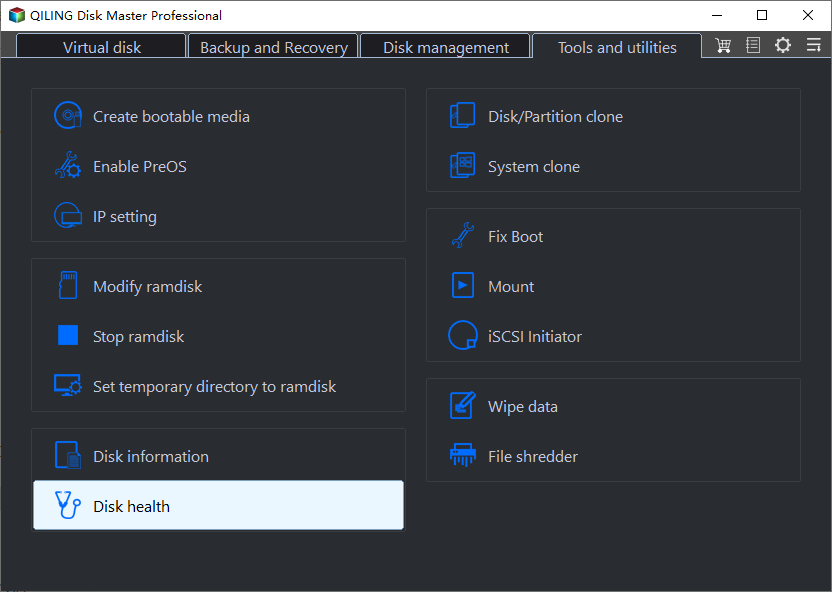
Step 1. Launch Qiling Disk Master and click the blue arrow to activate the "Disk Health" feature under the "Tools" section.
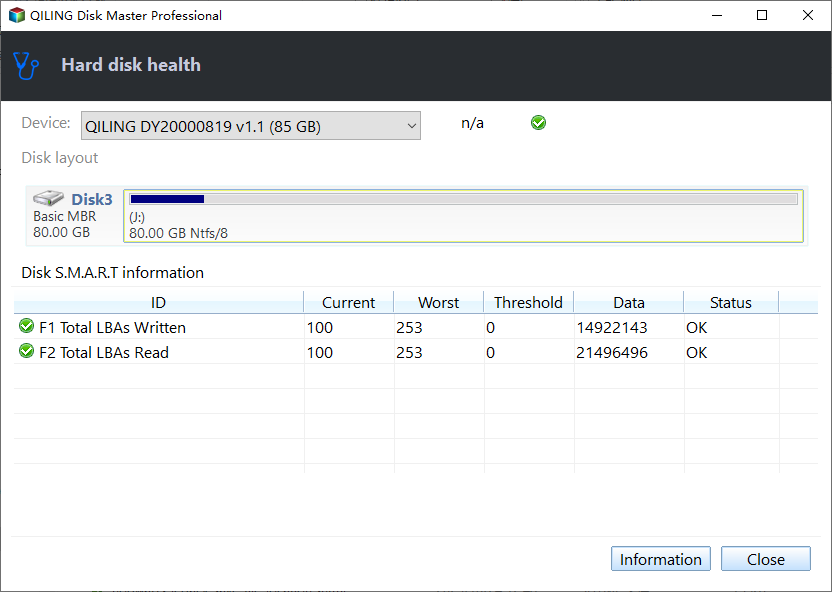
Step 2. Select the target disk and click the "Refresh" button to view its health condition.
Qiling Disk Master is a comprehensive and powerful tool that offers more than just checking SSD health. It also features DiskMark, one of the best SSD benchmark tools, which allows users to test and evaluate the performance of their SSDs.
- Check hard drive health
- Improve SSD read and write speed
- Fix SSD slow errors
- Format SSD with no harm to it
- Check the hard drive temperature
If you like this tool, download it and try it out! It can help you manage your SSD and HDD better, giving your computer the best performance. If it's helpful, you can share it with others who might need it by clicking the link below.
If your SSD's health is down, it could be due to various reasons such as physical damage, overheating, firmware issues, or even a faulty controller. To identify the root cause, you may need to check for any signs of physical damage, ensure proper airflow and cooling, update the firmware, or run a diagnostic test on the controller.
Why Is My SSD Health Down to 99%
It's normal for SSD health to be stable at high percentages, but if it continues to drop or drops rapidly, it could indicate an SSD error, potentially causing a poor health ratio.
- Presence of bad sectors
- Driver failure
- SSD wear and tear
- Manufacturing defects
- SSD overheating
- Poor Ventilation
- Power adapter error
If the health of your SSD has not declined very badly, you can take some ways to repair it. In the next section, I will suggest ways to keep your SSD healthy.
You May Also Like: SSD Temperature Range
Bonus Tip: What to Do If My SSD Health at 99%
SSD health decline can be caused by various factors, and the solution depends on the specific reason. For instance, if high temperature is the culprit, using a cooler can help. In other cases, updating the firmware, fixing bad sectors, or taking other corrective measures may be necessary to restore optimal performance.
If the performance of your SSD is slow, you can use the Qiling Disk Master tool to improve it. This tool offers 4K alignment, which can help enhance the SSD's performance.
Step 1. Go to "Toolkit" and choose "4K Alignment".
Step 2. Select the disk you want to align and click the "Start" button.
Conclusion
SSDs have excellent performance, and a 99% health rating is normal, as they wear out over time due to reads and writes, with the device reporting overall health through various attributes.
If you're concerned about the health of your SSD, this guide provides a detailed step-by-step process to check SSD health, and Qiling Disk Master can also improve SSD performance after running a test. Download it now to try it out!
FAQs About SSD Health at 99%
99% SSD health is generally considered to be in good condition, but it's not necessarily a guarantee that the drive will last indefinitely. Some users have reported issues with SSDs at this health level, such as slow performance or sudden failures. However, the likelihood of these issues occurring is still relatively low.
1. Is 98% SSD health good?
98-99% health is considered normal for Solid-State Drives (SSDs), especially for new ones, after being used for almost a year.
2. Why is SSD health decreasing?
The lifespan of an SSD depends on its construction and usage, but it typically takes several years to wear out, with external factors like damage and high temperatures also affecting its health.
3. Should I worry about my SSD at 88% health?
The health ratio of an SSD is based on the amount of data written (TBW) since it was first used, and a 300TB SSD with 88% health has only written 36TB of data, leaving 264TB unused, so there's no need to worry about its health.
Related Articles
- How to Fix PS3 Can't Read NTFS USB Drive
- Use Diskpart to Create Primary Partition or Volume on Windows [For Beginners]
- Best Free System Clone Software for Windows 10 Recommend
- Your Easiest Guide for Running USB Flash Drive Speed Test Online
- How to Check Samsung SSD Warranty Serial Number
Checking the warranty serial number is a vital step in estimating your disk's lifespan and health status. This post will cover solid ways to check the Samsung SSD warranty serial number. - How to Disable Write Protection From USB Drive, Help
This page will provide a complete guide on how to disable write protection from a USB drive. Reading this article will help you recover the write-protected USB drives.
Products
Articles & Tutorials
- Data Recovery
- Data Backup
- File Recovery
- File Backup
- System Backup and Restore
- Disk and Partition Clone
- Technical articles
- Mobile articles
- Disk Master Help
- Windows Data Recovery Tutorials
- Windows Secure Delete Tutorials
- Windows Partition Management Tutorials
- Windows File Backup and Restore Tutorials
- Windows System Backup and Restore Tutorials
- Windows Disk Backup and Restore Tutorials
- Windows Clone Tutorials